
Introduction
This manual provides detailed instructions for the safe and effective use of your Panasonic ER-SB60-S803 Premium Beard Trimmer and ER-GN300K503 Wet & Dry Nose/Ear Trimmer. Please read all instructions carefully before use and retain this manual for future reference.
Safety Information
To reduce the risk of injury, electric shock, fire, or damage to the product, always observe the following safety precautions:
- Do not immerse the charging adapter in water.
- Keep the appliance out of reach of children.
- Do not use the appliance if the blades are damaged, as this may cause injury.
- Always unplug the appliance before cleaning the charging adapter.
- This appliance is designed for personal use only.
- Do not modify or repair the appliance yourself. Contact an authorized service center.
Package Contents
Verify that all items are present in the package:
- Panasonic ER-SB60-S803 Beard Trimmer
- Comb Attachment (1-10mm)
- Detail Trimming Attachment
- Charging Adapter
- Cleaning Brush
- Lubricating Oil
- Panasonic ER-GN300K503 Nose & Ear Trimmer
- Protective Cap for Nose & Ear Trimmer
- Cleaning Brush for Nose & Ear Trimmer

Image: The Panasonic ER-SB60-S803 Beard Trimmer, its retail packaging, a comb attachment, and a detail trimming attachment are shown. The trimmer is silver and black with a digital display.
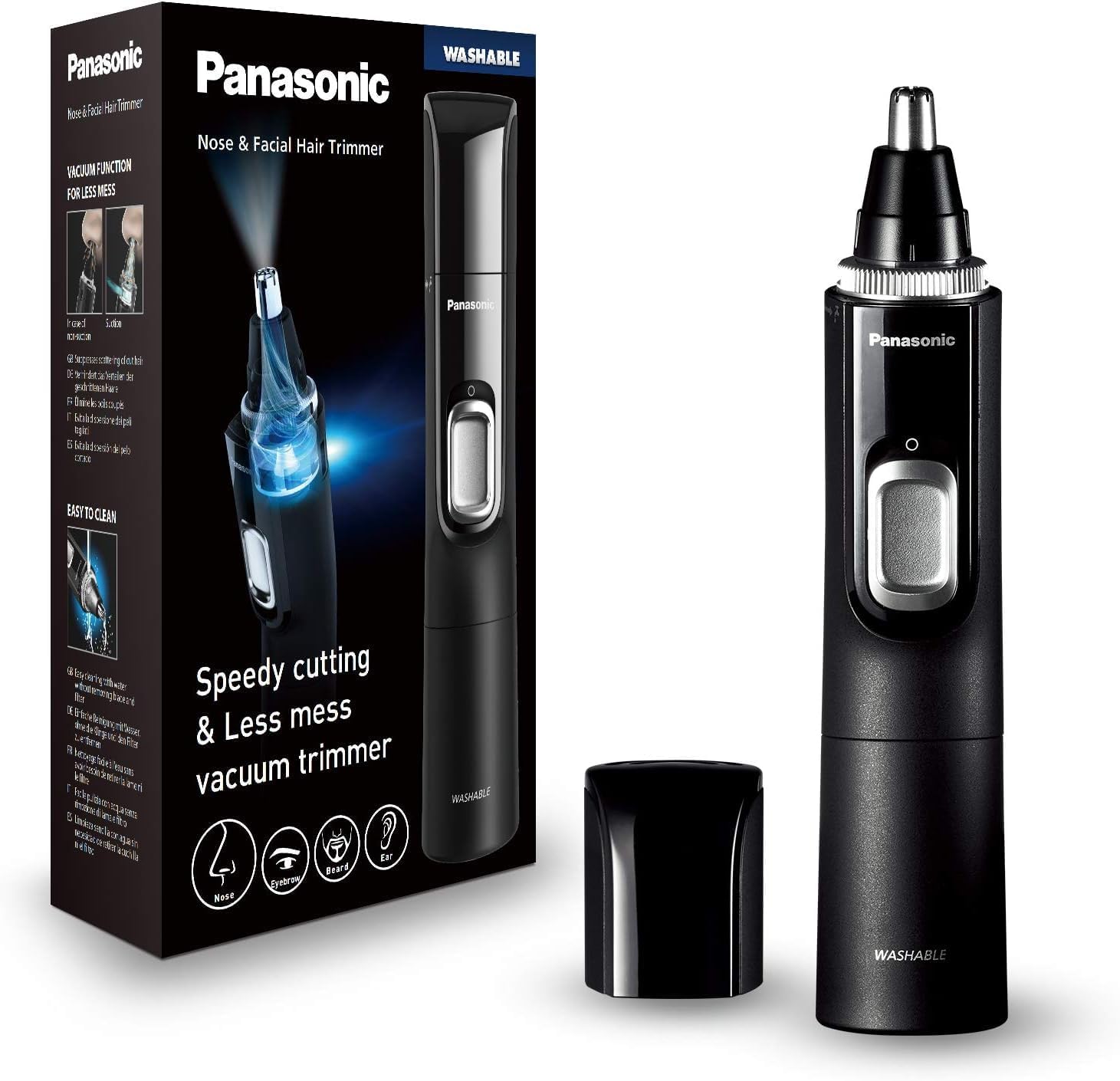
Image: The Panasonic ER-GN300K503 Nose & Facial Hair Trimmer, its retail packaging, and a protective cap are displayed. The trimmer is black with a silver power button.
Product Overview
ER-SB60-S803 Beard Trimmer
- Precision Blades: Professional-grade blades for efficient cutting.
- Length Adjustment Dial: Allows selection of 20 different cutting lengths.
- Power Button: Turns the trimmer on/off.
- Charge Indicator: Displays battery status.
- Washable Design: For easy cleaning under running water.
ER-GN300K503 Nose & Ear Trimmer
- Rotary Blade System: Designed for safe and effective hair removal.
- Power Button: Activates the trimmer.
- Protective Cap: Covers the blade when not in use.
- Wet & Dry Operation: Can be used in the shower.

Image: A side view of the Panasonic ER-SB60-S803 Beard Trimmer with dimensions indicated: 179 mm in height, 48 mm in width, and 45 mm in depth.

Image: The Panasonic ER-GN300K503 Nose & Facial Hair Trimmer is shown alongside its protective cap and a small cleaning brush.

Image: A close-up view of the Panasonic ER-GN300K503 nose trimmer's rotary blade system, highlighting the dual-edge stainless steel blades.
Setup
ER-SB60-S803 Beard Trimmer
- Charging: Before first use, fully charge the trimmer for approximately 1 hour. Connect the charging adapter to the trimmer and plug it into an electrical outlet. The charge indicator will illuminate.
- Attaching Comb: To trim your beard, attach the desired comb attachment (1-10mm or detail trimming) by sliding it onto the trimmer head until it clicks into place.
ER-GN300K503 Nose & Ear Trimmer
- Battery Installation: Twist the bottom part of the trimmer counter-clockwise to open the battery compartment. Insert one AA alkaline battery, ensuring correct polarity (+/-). Close the compartment by twisting clockwise until secure.
Operating
ER-SB60-S803 Beard Trimmer
- Select Length: Rotate the length adjustment dial to your desired cutting length. The available settings provide 20 different lengths.
- Power On: Press the power button to turn on the trimmer.
- Trimming: Hold the trimmer with the blades facing your skin. Move the trimmer against the direction of hair growth for an even trim. For detailing, use the detail trimming attachment without the comb.
- Power Off: Press the power button again to turn off the trimmer.
ER-GN300K503 Nose & Ear Trimmer
- Power On: Press the power button to activate the trimmer.
- Nose Hair Trimming: Gently insert the trimmer tip into your nostril, ensuring it does not go too deep. Move the trimmer in a circular motion to cut unwanted hair.
- Ear Hair Trimming: Carefully insert the trimmer tip into your ear canal, avoiding deep insertion. Move gently to trim visible hair.
- Eyebrow Trimming: Use the trimmer to carefully shape and trim stray eyebrow hairs.
- Power Off: Press the power button again to turn off the trimmer.
Maintenance
Cleaning
- After Each Use: Turn off the trimmer and remove any attachments.
- Rinsing: Both trimmers are washable. Rinse the blade unit and the main body under running water to remove hair clippings. For the ER-SB60-S803, ensure the charging port cover is securely closed before rinsing.
- Drying: Shake off excess water and allow the trimmers to air dry completely before storing.
- Brush Cleaning: Use the provided cleaning brush to remove stubborn hair from the blades and internal components.
Lubrication (ER-SB60-S803 only)
After every few uses, or if the trimmer's performance decreases, apply 2-3 drops of the provided lubricating oil to the blades. Run the trimmer for a few seconds to distribute the oil evenly.
Storage
Store the trimmers in a cool, dry place, away from direct sunlight and high humidity. Ensure the protective cap is on the ER-GN300K503 when stored.
Troubleshooting
- Trimmer does not turn on:
- ER-SB60-S803: Ensure the battery is charged.
- ER-GN300K503: Check if the AA battery is inserted correctly and has sufficient power. Replace if necessary.
- Poor cutting performance:
- Clean the blades thoroughly to remove any trapped hair or debris.
- For ER-SB60-S803, apply lubricating oil to the blades.
- Ensure the comb attachment is correctly seated (ER-SB60-S803).
- Blades may be dull. Contact customer support for replacement options.
- Trimmer gets hot during use: This can be normal during extended operation. If it becomes excessively hot, turn it off and allow it to cool down. Ensure blades are clean and lubricated (ER-SB60-S803).
Specifications
ER-SB60-S803 Beard Trimmer
- Power Source: Rechargeable (cordless/corded use)
- Operating Time: Approximately 60 minutes (fully charged)
- Charging Time: Approximately 1 hour
- Cutting Length Settings: 20
- Dimensions: 179 mm (H) x 48 mm (W) x 45 mm (D)
- Washable: Yes
ER-GN300K503 Nose & Ear Trimmer
- Power Source: 1 x AA Battery
- Operation: Wet & Dry
- Blade Type: Dual-edge stainless steel rotary blade
- Washable: Yes
Warranty and Support
Panasonic products are manufactured to high-quality standards. For warranty information, please refer to the warranty card included with your product or visit the official Panasonic website for your region. For technical support or service, please contact Panasonic customer service.