
Introduction
This manual provides essential instructions for the installation, operation, and maintenance of your LEDVANCE Smart+ WiFi LED Lamp Classic B E14. This smart lamp offers adjustable color and white light, controllable via a dedicated app or voice commands, enhancing your lighting experience.

Image: Front view of the LEDVANCE Smart+ WiFi LED Lamp Classic B E14.
Safety Information
- Ensure power is off before installation or removal.
- Do not disassemble or modify the lamp.
- Suitable for dry locations only.
- Avoid direct exposure to water or high humidity.
- Keep out of reach of children.
Setup
Follow these steps to set up your LEDVANCE Smart+ WiFi LED Lamp:
- Physical Installation:
Ensure the power supply to the light fixture is switched off. Carefully screw the LEDVANCE Smart+ WiFi LED Lamp into an E14 base socket. Do not overtighten.

Image: LEDVANCE Smart+ WiFi LED Lamp with its packaging, illustrating the product and its E14 base.
- Download the LEDVANCE Smart+ App:
Download the official LEDVANCE Smart+ App from your smartphone's app store (available for iOS and Android). Search for "LEDVANCE Smart+".
- Power On and Pairing Mode:
Switch on the power to the light fixture. The lamp should blink, indicating it is in pairing mode. If it does not blink, switch it off and on four times consecutively (on-off-on-off-on-off-on-off) with a 1-2 second interval between each switch.
- Connect to Wi-Fi:
Open the LEDVANCE Smart+ App, create an account or log in. Follow the in-app instructions to add your new device. Ensure your smartphone is connected to a 2.4 GHz Wi-Fi network during the pairing process. The lamp will connect directly to your home Wi-Fi network (no additional hub required).
Operating Instructions
Once successfully paired, you can control your LEDVANCE Smart+ WiFi LED Lamp using the app or voice commands.
- App Control:
Within the LEDVANCE Smart+ App, you can:
- Adjust brightness levels.
- Change light color (RGB) and color temperature (warm white to cool white).
- Set schedules and timers for automatic on/off.
- Create custom scenes for different moods or activities.
- Group multiple LEDVANCE Smart+ devices for synchronized control.
- Voice Control:
The lamp is compatible with voice assistants like Amazon Alexa and Google Assistant. To enable voice control:
- Link your LEDVANCE Smart+ account to your Amazon Alexa or Google Home app.
- Discover new devices within the voice assistant app.
- Use commands such as:
- "Alexa, turn on the living room light."
- "Hey Google, set the bedroom light to blue."
- "Alexa, dim the kitchen light to 50%."
Maintenance
The LEDVANCE Smart+ WiFi LED Lamp requires minimal maintenance.
- Cleaning: Disconnect power before cleaning. Use a soft, dry cloth to wipe the lamp. Do not use liquid cleaners or abrasive materials.
- Storage: If storing the lamp for an extended period, keep it in a cool, dry place away from direct sunlight.
Troubleshooting
If you encounter issues with your LEDVANCE Smart+ WiFi LED Lamp, refer to the following common solutions:
- Lamp not responding/offline:
- Ensure the lamp is powered on.
- Check your Wi-Fi router and internet connection.
- Verify the lamp is within range of your Wi-Fi router.
- Restart the lamp by switching it off and on at the wall switch.
- If the issue persists, try re-pairing the lamp by following the "Setup" instructions.
- Cannot connect to Wi-Fi:
- Ensure your Wi-Fi network is 2.4 GHz. 5 GHz networks are not supported.
- Check your Wi-Fi password for accuracy.
- Move the lamp closer to your Wi-Fi router during the pairing process.
- Temporarily disable VPN or firewall settings on your router if they interfere with device discovery.
- Voice control not working:
- Confirm your LEDVANCE Smart+ account is correctly linked in your Alexa or Google Home app.
- Ensure the lamp is online and responsive in the LEDVANCE Smart+ App.
- Try rediscovering devices in your voice assistant app.
Specifications
Key technical specifications for the LEDVANCE Smart+ WiFi LED Lamp Classic B E14:
| Feature | Specification |
|---|---|
| Model | Classic B E14 |
| Base Type | E14 |
| Power Consumption | 4.9 W |
| Luminous Flux | 470 lm |
| Equivalent Incandescent Power | 40 W |
| Color Temperature | Tunable White & RGB (Color Light) |
| Lifespan | Up to 20,000 hours |
| Connectivity | Wi-Fi (2.4 GHz) |
| Voice Control Compatibility | Amazon Alexa, Google Assistant |
| Energy Efficiency Class | F |

Image: Detailed product data sheet providing comprehensive technical specifications.
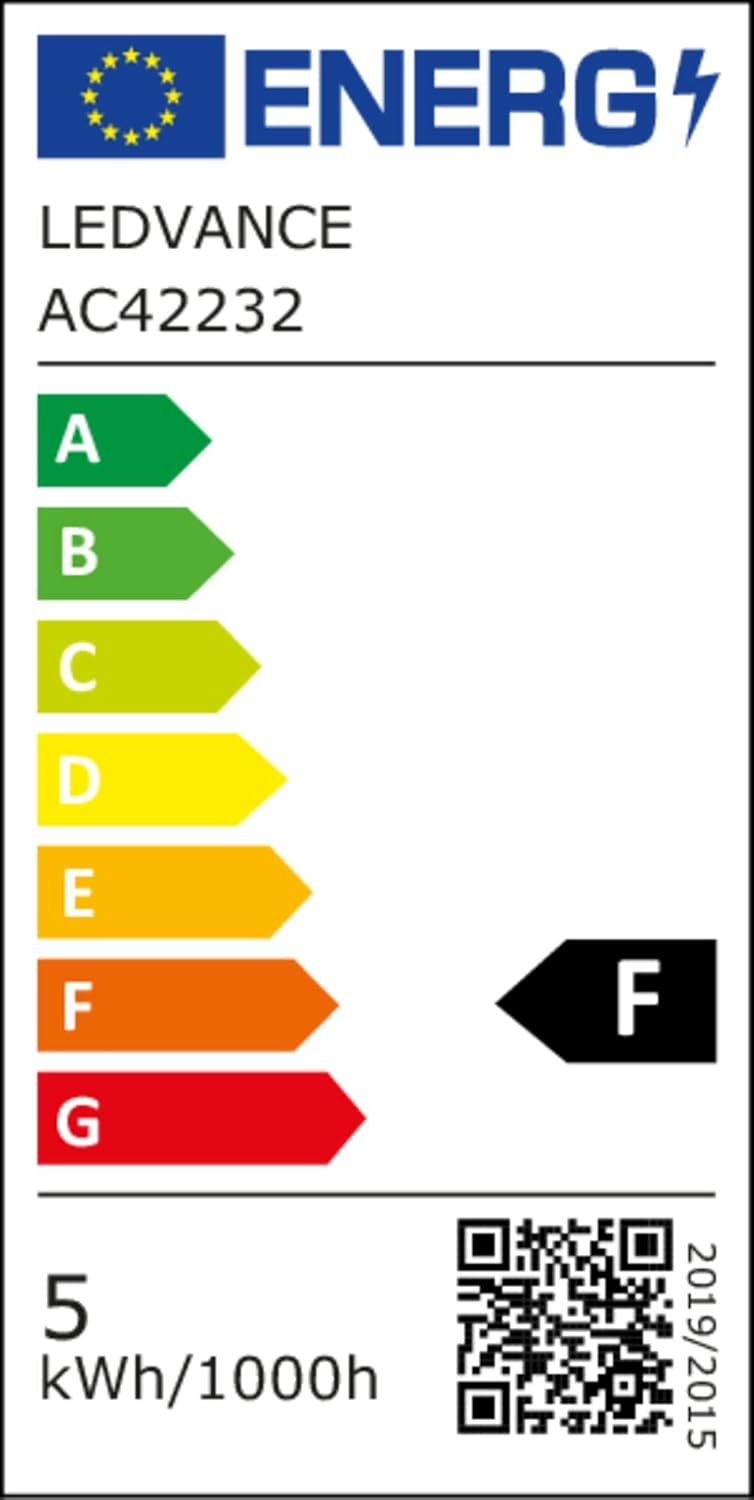
Image: EU Energy Label for the LEDVANCE Smart+ WiFi LED Lamp, showing an energy efficiency class of F. More details can be found at eprel.ec.europa.eu/qr/1218020.
Warranty and Support
LEDVANCE products are designed for quality and durability. For warranty information, please refer to the documentation included with your purchase or visit the official LEDVANCE website.
For technical support or further assistance, please contact LEDVANCE customer service through their official website or the contact information provided in your product packaging.


