
DownyPaws DPWFP6
DownyPaws Wireless Cat Water Fountain User Manual
Model: DPWFP6
Introduction
Thank you for choosing the DownyPaws Wireless Cat Water Fountain. This automatic pet water dispenser is designed to provide fresh, clean water to your pets with ultimate convenience and safety. Its wireless, battery-operated design allows for flexible placement, encouraging your pets to drink more water without the hassle of cords.
Important Safety Information
- Read all instructions carefully before operating the fountain.
- This appliance is for indoor household use only.
- Do not immerse the battery compartment or the main control unit in water. Only the water reservoir and upper tray are washable.
- Ensure the USB Type-C charging cable is properly connected to a power source and the battery unit during charging.
- Keep out of reach of children and pets when not in use or during maintenance.
- Use only original or certified replacement parts and filters.
- If the fountain is damaged, discontinue use immediately and contact customer support.
Package Contents
Please check the package to ensure all items are present and in good condition:
- 1 x DownyPaws Cat Water Fountain (Main Unit)
- 1 x Filter
- 1 x Filter Sponge
- 1 x USB Type-C Cable
- 1 x Water Pump (integrated with the main control unit)
- 2 x Lithium Ion Batteries (pre-installed in the battery compartment)
Product Overview

Image: Fully assembled DownyPaws Wireless Cat Water Fountain, showing the water flowing from the spout into the basin.
The DownyPaws Wireless Cat Water Fountain consists of several key components designed for ease of use and maintenance:
- Water Reservoir: The main basin that holds up to 2.5 liters (84 oz) of water.
- Upper Tray/Basin: Where the water collects for your pet to drink.
- Main Control Unit: Contains the pump, battery compartment, and control panel with mode indicators.
- Spout: Delivers the simulated faucet stream.
- Filter Slot: Located beneath the upper tray, holds the multi-layer filter.
- Motion Sensor: Detects pet presence for motion-activated mode.
Setup and First Use
- Unpack Components: Carefully remove all parts from the packaging.
- Rinse Components: Thoroughly rinse the water reservoir, upper tray, and filter slot with clean water. Do NOT rinse the main control unit or battery compartment.
- Install Filter: Place the filter and filter sponge into their designated slots beneath the upper tray. Ensure they are seated correctly.
- Assemble Fountain: Place the upper tray onto the water reservoir. Ensure the main control unit is securely attached to the upper tray.
- Fill with Water: Fill the water reservoir with fresh, clean water up to the "Max" line (2.5L).
- Initial Charge: Before first use, it is recommended to fully charge the fountain. Connect the USB Type-C cable to the charging port on the detachable battery compartment and plug it into a suitable USB power adapter (not included). A full charge takes approximately 4.5 hours.

Image: The detachable battery compartment connected to a USB-C cable for charging, with a cat drinking from the fountain in the background.
- Power On: Once charged, press the power button on the main control unit to turn on the fountain.
Operating Modes
The DownyPaws fountain offers two operating modes to suit your pet's needs and conserve battery life:

Image: A black and white cat approaching the fountain, with an overlay showing the 5ft/1.5m and 120-degree motion detection range.
1. Motion-Activated Mode
- In this mode, the water flow activates when your pet approaches within 5 feet (1.5 meters) and within a 120-degree detection angle.
- This mode conserves battery life and encourages pets to drink by simulating a fresh faucet stream when they are near.
- To select this mode, press the mode button on the control panel until the motion sensor indicator light is on.
2. Timed Mode
- In this mode, the fountain will dispense water for 20 seconds every 15 minutes, regardless of pet presence.
- This ensures a consistent supply of fresh water throughout the day.
- To select this mode, press the mode button on the control panel until the timer indicator light is on.
You can switch between modes by pressing the button on the control panel.
Battery and Charging
The DownyPaws fountain is equipped with a built-in 4,000mAh rechargeable battery, providing up to 30 days of operation on a single charge (based on internal testing in motion-activated mode with one cat).
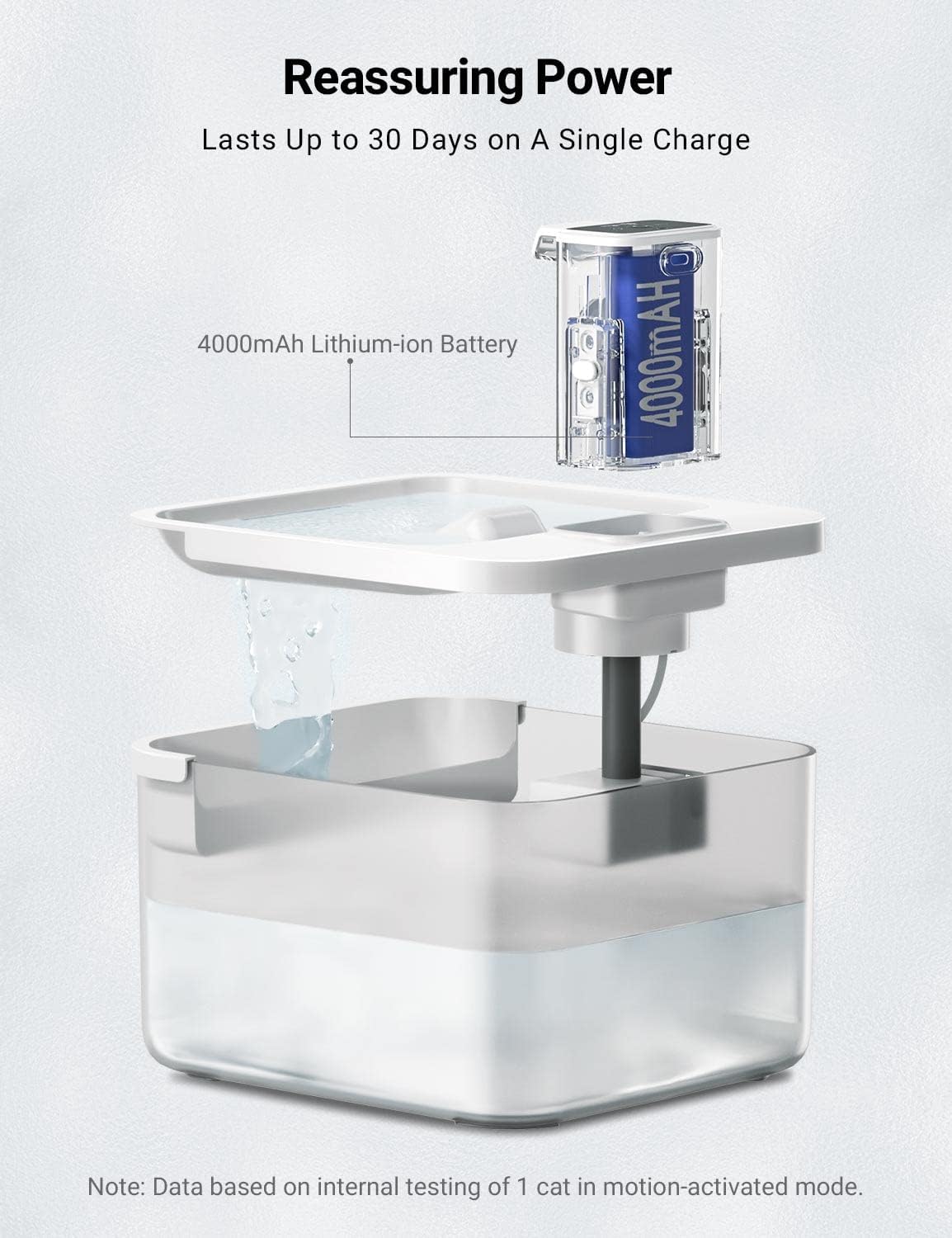
Image: An exploded view diagram illustrating the 4000mAh lithium-ion battery and its integration into the fountain's design.
Charging Instructions:
- The battery section is detachable for convenient charging. Gently pull the main control unit upwards to detach it from the upper tray.
- Connect the provided USB Type-C cable to the charging port on the detachable battery compartment.
- Plug the other end of the USB cable into a standard USB power adapter (e.g., phone charger, computer USB port).
- The battery indicator light on the control panel will show charging status. It will typically turn solid when fully charged.
- A full charge takes approximately 4.5 hours.
- The fountain has a 160ml water storage on top, allowing for uninterrupted hydration even during short-term charging of the detached battery unit.
Filtration System
The DownyPaws fountain utilizes a comprehensive 5-level filtration system to ensure your pet always has access to fresh and healthy water:
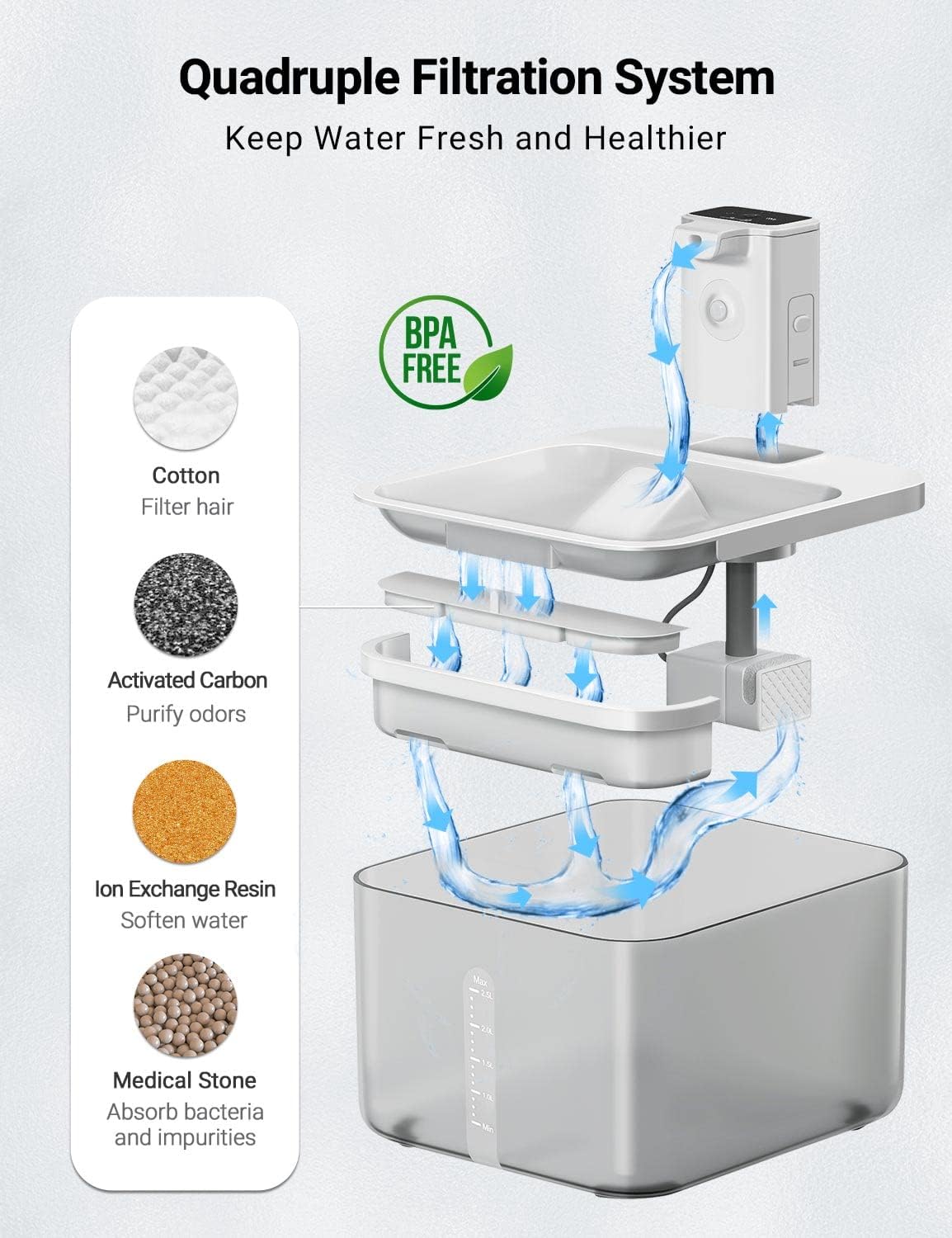
Image: A diagram illustrating the multi-stage filtration process, showing water passing through cotton, activated carbon, ion exchange resin, medical stone, and a high-density sponge.
- Non-woven Fabric: Filters out hair and larger impurities.
- Activated Carbon: Removes bad taste and odors from the water.
- Ion Exchange Resin: Softens tap water by reducing mineral content.
- Medical Stone: Absorbs bacteria and other impurities, and may release beneficial trace elements.
- High-Density Sponge: Located at the pump intake, helps remove fine particles and protects the pump.
For optimal performance and water quality, replace the filter regularly. Search for "B0BHDT4Z9Z" to purchase genuine DownyPaws replacement filters.
Maintenance and Cleaning
Regular cleaning is essential to maintain the fountain's hygiene and prolong its lifespan. The BPA-free design and detachable parts make cleaning easy.

Image: The DownyPaws fountain disassembled into its main components (water reservoir, upper tray, main control unit) being rinsed under running water, demonstrating ease of cleaning.
Cleaning Steps:
- Power Off: Turn off the fountain and disconnect any charging cables.
- Disassemble: Carefully detach the main control unit from the upper tray, then remove the upper tray from the water reservoir.
- Remove Filter: Take out the filter and filter sponge. Discard the old filter if it's time for replacement.
- Clean Components:
- Rinse the water reservoir, upper tray, and filter slot thoroughly with warm water and a mild, pet-safe detergent. Use a soft brush to clean any residue.
- For the spout and the main control unit (where the pump is located), rinse only. Do NOT immerse the battery compartment or the entire main control unit in water. Use a damp cloth to wipe the exterior.
- Clean the pump impeller if necessary. Refer to the pump's specific cleaning instructions if provided separately.
- Rinse Thoroughly: Rinse all washable parts thoroughly to remove any soap residue.
- Reassemble: Reassemble the fountain by placing a new or cleaned filter and sponge, then reattaching the upper tray and main control unit.
- Refill: Fill the reservoir with fresh water.
Frequency: It is recommended to clean the fountain at least once a week, and replace the filter every 2-4 weeks, depending on water quality and pet usage.
Troubleshooting
| Problem | Possible Cause | Solution |
|---|---|---|
| Fountain not dispensing water. |
|
|
| Water flow is weak or inconsistent. |
|
|
| Fountain is noisy. |
|
|
| Battery life is shorter than expected. |
|
|
Specifications
| Model Number | DPWFP6 |
| Dimensions (L x W x H) | 8.1 x 7.3 x 7.1 inches (20.6 x 18.5 x 18 cm) |
| Item Weight | 2.25 pounds (1.02 kg) |
| Water Capacity | 84 oz / 2.5 Liters |
| Material | Acrylonitrile Butadiene Styrene (ABS), BPA-free |
| Battery Type | Lithium Ion (4000mAh) |
| Charging Time | Approx. 4.5 hours |
| Noise Level | < 30dB |
| Manufacturer | DownyPaws |
| Included Components | Fountain unit, Filter, Filter Sponge, USB Type-C Cable, Water Pump |

Image: Technical drawing showing the dimensions of the DownyPaws Wireless Cat Water Fountain: 8.1 inches length, 7.3 inches width, and 7.1 inches height.
Warranty and Support
The DownyPaws Wireless Cat Water Fountain comes with a 1-year manufacturer's warranty from the date of purchase.
This warranty covers defects in materials and workmanship under normal use. It does not cover damage caused by misuse, neglect, accidents, unauthorized repairs, or normal wear and tear.
For warranty claims, technical support, or any questions regarding your product, please contact DownyPaws customer service through the retailer's platform or visit the official DownyPaws brand store for contact information.
Online Resources:
- Official User Manual (PDF): Download PDF Manual
- DownyPaws Brand Store: Visit Store
Related documentsDPWFP6


Ask a question about this manual
Ask about setup, troubleshooting, compatibility, parts, safety, or missing instructions. Manuals+ will review the question and use this page’s manual context to help answer it.