
1. Product Overview
This manual provides detailed instructions for the ZWNAV 12.1 inch Android Auto Replacement Touch Screen Head Unit, compatible with Infiniti QX60 and JX35 models manufactured between 2014 and 2019. This system integrates GPS navigation, multimedia playback, and smartphone connectivity features like Android Auto and Apple CarPlay.

Image 1.1: The ZWNAV 12.1 inch car radio installed in an Infiniti QX60 JX35, illustrating the visual transformation from the original car radio to the new Android head unit.
2. Setup and Installation
2.1. Package Contents
Verify that all components are present in the package before beginning installation:
- GPS Navigation Unit
- Power Cable
- GPS Antenna
- USB Adapter (x2)
- RCA Cable
- Video Input Cable
- Power Cord
- Wi-Fi Antenna
- Camera Cable
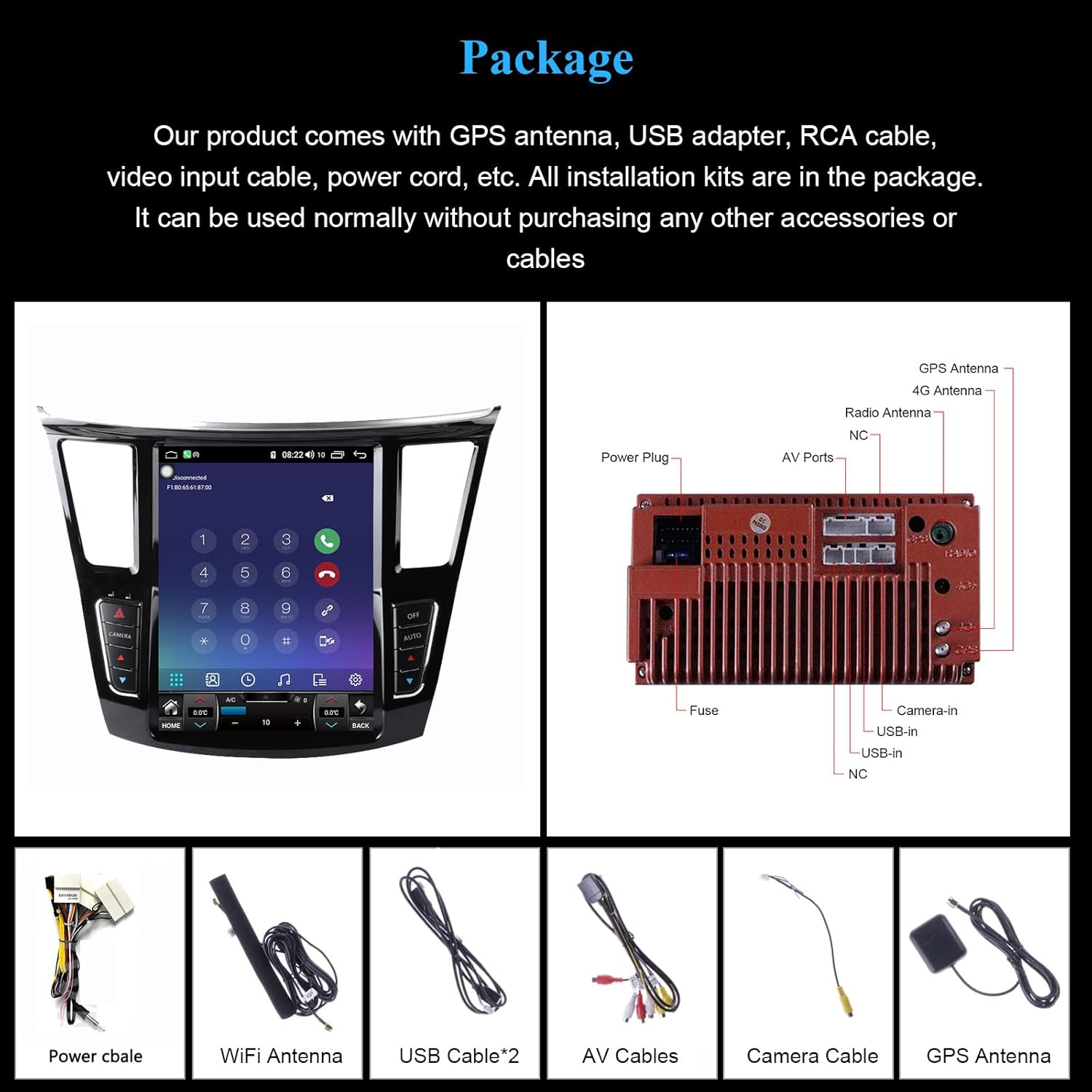
Image 2.1: Overview of the ZWNAV car radio unit and its complete set of included installation accessories.
2.2. Compatibility
This head unit is designed for Infiniti QX60 and JX35 models from 2014 to 2019. It supports the original car's 360-degree camera system.
2.3. Installation Overview
Installation typically involves removing the factory radio and integrating the new head unit using the provided wiring harness and accessories. Professional installation is recommended. Ensure all cables are securely connected to prevent signal loss or malfunction.
Video 2.1: An instructional video demonstrating the features and potentially the installation process of the ZWNAV Android car radio stereo for Infiniti QX60 JX35 (2014-2019).
3. Operating Instructions
3.1. Navigation System
The unit features a built-in GPS positioning system. It supports both online and offline navigation applications such as Google Maps, iGO, Sygic, and Waze. Ensure the GPS antenna is properly installed for optimal signal reception.

Image 3.1: The integrated GPS navigation system provides accurate positioning and supports various mapping applications for seamless travel guidance.
3.2. Digital Sound Processor (DSP)
Equipped with a built-in DSP and TDA7851 power amplifier chip, the unit offers multi-band adjustment, speaker balance settings, and sound field control. This allows for a customized audio experience, including super subwoofer support, to enhance your in-car sound.

Image 3.2: The DSP feature allows for precise audio adjustments, including 27 EQ settings, to optimize sound quality and create a personalized listening environment.
3.3. Wireless CarPlay and Android Auto
The unit supports wireless Apple CarPlay and Android Auto. Connect your smartphone via Bluetooth to access navigation, music, messages, and other compatible apps directly on the head unit's screen.

Image 3.3: Wireless CarPlay and Android Auto integration provides seamless smartphone connectivity for enhanced in-car functionality.
3.4. Steering Wheel Controls
The system is compatible with your vehicle's original steering wheel controls, allowing you to manage audio, calls, and other functions without taking your hands off the wheel.

Image 3.4: Maintain control of essential functions directly from your steering wheel for convenience and safety.
3.5. Radio RDS
The built-in radio supports RDS (Radio Data System), providing additional information such as station name, program type, and traffic announcements where available.

Image 3.5: The Radio RDS function enhances your radio listening experience by displaying broadcast information.
3.6. 4G LTE Connectivity
For enhanced online functionality, the unit supports 4G LTE connectivity. Insert a compatible SIM card to access internet services directly from the head unit.

Image 3.6: Enjoy fast internet access with 4G LTE support, enabling online navigation, streaming, and more.
3.7. Bluetooth
Utilize Bluetooth for hands-free calling and audio streaming from your mobile device. Pair your phone through the unit's settings menu.

Image 3.7: Bluetooth connectivity allows for safe hands-free communication and wireless audio playback.
3.8. Split Screen Functionality
The split-screen feature allows you to run two applications simultaneously on the 12.1-inch display, such as navigation and music playback.

Image 3.8: Utilize the split-screen feature to multitask efficiently, viewing navigation and entertainment simultaneously.
3.9. App Download
As an Android-based system, you can download and install various applications from the Google Play Store, expanding the unit's capabilities.

Image 3.9: Access a wide range of applications through the app download feature, customizing your in-car experience.
3.10. Wi-Fi Connectivity
Connect to Wi-Fi networks to access online features, download updates, and stream content. The unit supports standard Wi-Fi protocols.

Image 3.10: Integrated Wi-Fi allows for internet access, enabling online services and software updates.
3.11. USB Ports
Multiple USB ports are provided for connecting external devices such as USB drives for media playback, or for charging smartphones.

Image 3.11: USB ports provide versatile connectivity for media playback and device charging.
3.12. Music and Video Playback
The unit supports various audio and video formats, allowing you to enjoy your media library directly on the 12.1-inch QLED Full HD touch screen.

Image 3.12: Enjoy a wide range of music and video content directly on the high-resolution display.
3.13. Mirror Link
The Mirror Link function allows you to mirror your smartphone's screen onto the head unit's display, providing access to your phone's interface and applications.

Image 3.13: Mirror Link enables you to display your smartphone's content directly on the car radio screen.
3.14. Reversing Camera Support
The unit supports connection to a reversing camera, providing a clear view of the area behind your vehicle when in reverse gear. This enhances safety during parking and maneuvering.

Image 3.14: Reversing camera support provides a visual aid for safer parking and backing up.
4. Maintenance
To ensure optimal performance and longevity of your ZWNAV car radio, follow these maintenance guidelines:
- Screen Cleaning: Use a soft, lint-free cloth to gently wipe the touch screen. For stubborn smudges, slightly dampen the cloth with water or a screen-safe cleaner. Avoid harsh chemicals or abrasive materials.
- Software Updates: Periodically check for available software updates through the unit's settings menu or the manufacturer's website. Keeping the software updated ensures access to the latest features and performance improvements.
- Cable Connections: Ensure all cables, especially power and antenna connections, remain secure. Loose connections can lead to intermittent issues or signal loss.
- Environmental Conditions: Avoid exposing the unit to extreme temperatures, direct sunlight for prolonged periods, or excessive moisture.
5. Troubleshooting
If you encounter issues with your ZWNAV car radio, refer to the following common problems and solutions:
| Problem | Possible Cause | Solution |
|---|---|---|
| Unit does not power on | Loose power connection, blown fuse, vehicle battery issue | Check power cable connections. Inspect vehicle's fuse box for blown fuses. Verify vehicle battery health. |
| No sound output | Volume too low, mute activated, incorrect audio settings, loose speaker wires | Increase volume. Check if mute is active. Verify audio output settings. Inspect speaker wire connections. |
| GPS signal loss or inaccuracy | GPS antenna obstruction, faulty antenna, software issue | Ensure GPS antenna has a clear view of the sky. Check antenna connection. Restart the unit. |
| Touch screen unresponsive | Software glitch, screen calibration issue | Restart the unit. Perform a factory reset if the issue persists (note: this will erase data). |
| Bluetooth connection issues | Device not paired, Bluetooth off, interference | Ensure Bluetooth is enabled on both devices. Re-pair the device. Move away from sources of interference. |
If these steps do not resolve the issue, please contact ZWNAV customer support for further assistance.
6. Product Specifications
The ZWNAV 12.1 inch Car Radio offers the following technical specifications:
- Screen Size: 12.1 inches
- Display Type: IPS
- Resolution: 1920 x 1080
- Operating System: Android
- Memory Storage Capacity: 128 GB (6GB RAM variant)
- Touch Screen Type: Capacitive
- Connectivity Technology: Bluetooth, Wi-Fi, 4G LTE
- Supported Satellite Navigation System: GPS
- Map Type: North America (pre-installed or compatible)
- Audio Output Mode: Stereo
- Special Features: Built-in DSP, Wireless CarPlay, Android Auto, Steering Wheel Control compatibility, Split Screen, Mirror Link, Reversing Camera support
- Human-Interface Input: Microphone, Touchscreen
- Mounting Type: Dashboard Mount
- Compatible Flash Memory Type: microSD
- Compatible Devices: Smartphone
- Vehicle Service Type: Car (Infiniti QX60 JX35 2014-2019)
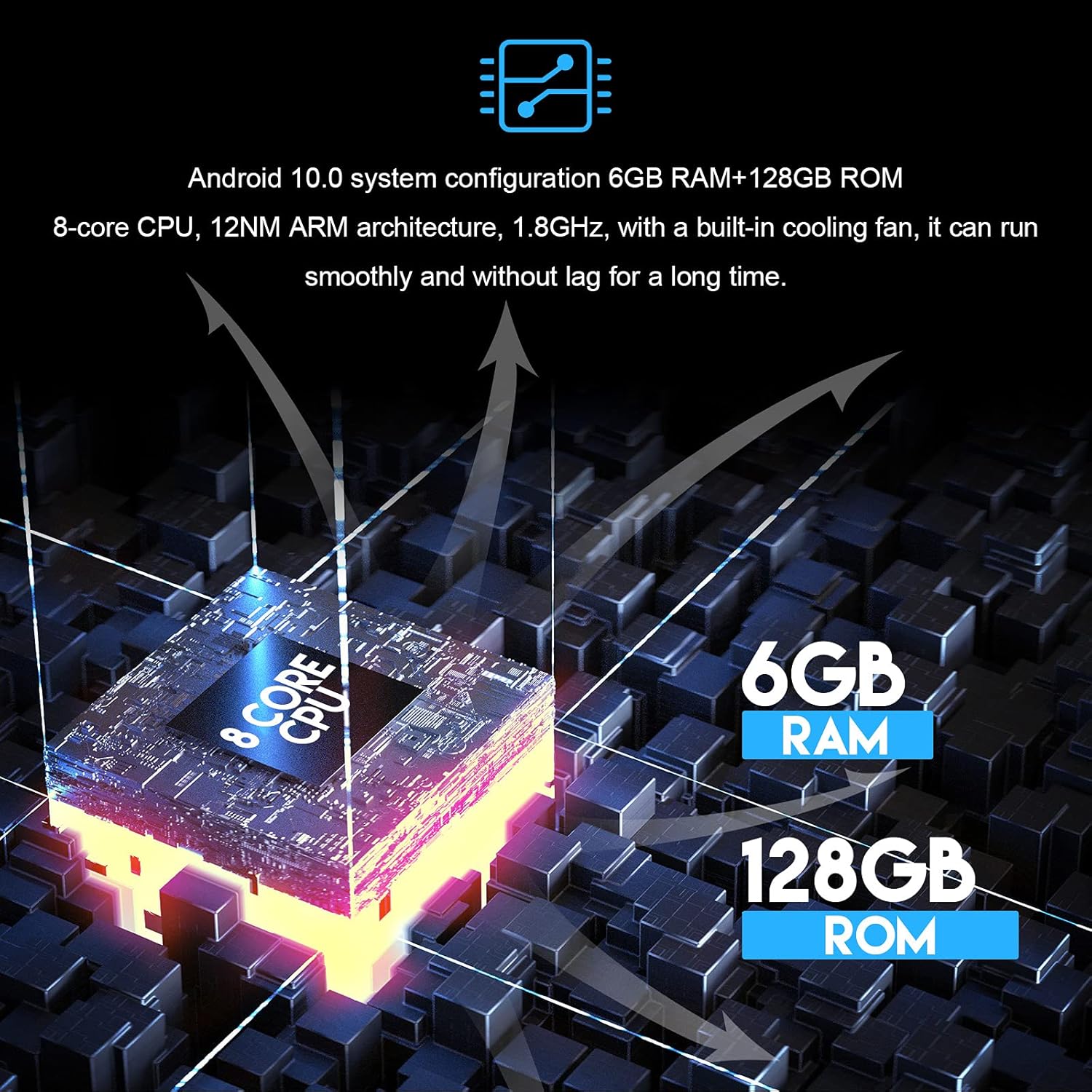
Image 6.1: Internal architecture of the ZWNAV car radio, showcasing its Android 10.0 system, 8-core CPU, 6GB RAM, and 128GB ROM for smooth operation.
7. Warranty and Support
This ZWNAV car radio comes with a one-year warranty from the manufacturer. Additionally, lifetime after-sales service is provided.
For any questions, technical support, or warranty claims, please contact ZWNAV customer service:
- Email: ZWNNUSGPS@outlook.com
- Amazon: Contact the seller directly through your Amazon order history.
