
1. Introduction
This user manual provides comprehensive instructions for the safe and effective operation of the VIHELM DT-9875H Industrial Handheld Thermal Imager. This device is designed for industrial applications, offering precise temperature measurement within a range of -20℃ to 800℃. Please read this manual thoroughly before using the thermal imager to ensure proper functionality and to prevent damage or injury.
2. Safety Information
Always observe the following safety precautions to avoid potential hazards and ensure the longevity of your device:
- Do not expose the device to extreme temperatures, humidity, or corrosive environments.
- Avoid direct exposure of the lens to strong light sources, such as the sun or high-power lasers, as this may damage the infrared sensor.
- Handle the device with care to prevent drops or impacts.
- Only use the specified charger and battery type.
- Do not attempt to disassemble or modify the device. Refer all servicing to qualified personnel.
- Be aware of the laser pointer (if equipped) and avoid direct eye exposure.
3. Product Overview
The VIHELM DT-9875H is a robust handheld thermal imager designed for professional use. It features a high-resolution display, intuitive controls, and advanced imaging capabilities.
3.1 Device Components
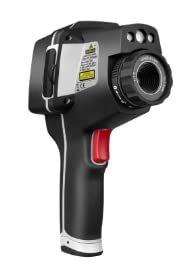
Figure 3.1: Side view of the DT-9875H Thermal Imager, showing the ergonomic grip and main lens.
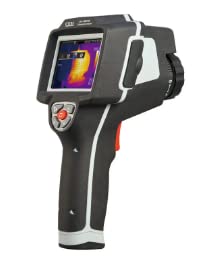
Figure 3.2: View of the DT-9875H Thermal Imager displaying a thermal image on its screen.
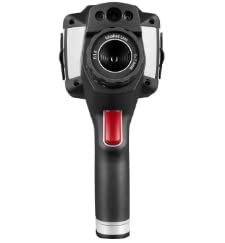
Figure 3.3: Front view of the DT-9875H Thermal Imager, highlighting the infrared lens and auxiliary sensors.
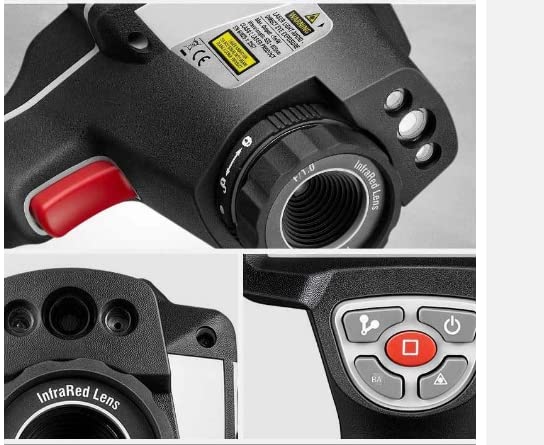
Figure 3.4: Detailed view of the infrared lens with focus ring and the primary control buttons on the device.
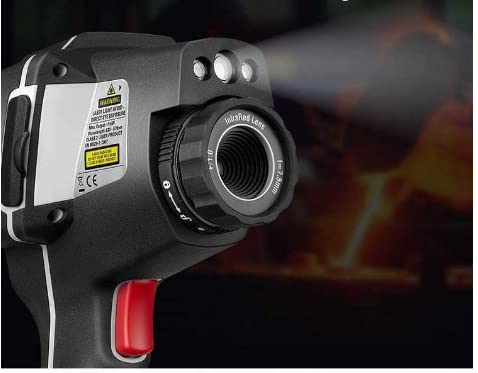
Figure 3.5: The DT-9875H Thermal Imager demonstrating its integrated laser pointer for target identification.
3.2 Controls and Interface
- Power Button: Located on the top right, used to turn the device on/off.
- Trigger Button: Red button on the grip for capturing images or initiating measurements.
- Navigation Buttons: Up, Down, Left, Right buttons around a central 'OK' button for menu navigation.
- Menu Button: Accesses the main menu for settings and modes.
- Focus Ring: Located around the infrared lens for manual focus adjustment.
- Display Screen: High-definition color TFT capacitive touch panel for viewing thermal images and navigating menus.
4. Setup
4.1 Charging the Battery
- Locate the charging port on the device.
- Connect the provided power adapter to the charging port.
- Plug the adapter into a suitable power outlet. The charging indicator will illuminate.
- Allow the battery to charge fully before first use. A full charge typically takes approximately four hours.
4.2 Initial Power On
- Press and hold the Power Button until the display screen illuminates.
- The device will perform a self-test and then display the live thermal image.
- Upon first use, you may be prompted to set the date, time, and language. Follow the on-screen instructions.
5. Operating Instructions
5.1 Basic Measurement
- Point the thermal imager at the target object.
- Adjust the focus ring until the image on the screen is clear.
- The screen will display the temperature distribution. The highest and lowest temperatures within the view will be indicated.
- Press the Trigger Button to capture a thermal image.
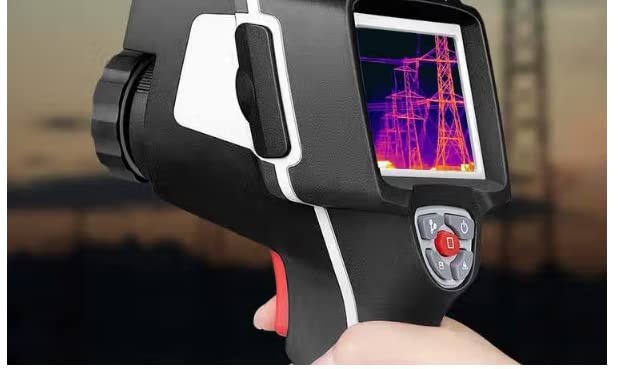
Figure 5.1: The DT-9875H in use, displaying a thermal image on its screen.
5.2 Menu Navigation and Settings
Press the Menu button to access various settings and modes. Use the navigation buttons to scroll and the 'OK' button to select.

Figure 5.2: Example of the DT-9875H menu interface, showing options like Measure, Image, Camera, and settings.
- Palette: Select from various color palettes (e.g., Iron Red, Rainbow, Gray White) to visualize temperature differences.
- Image Adjustment: Options for manual/automatic histogram.
- Emissivity: Adjust the emissivity setting based on the material being measured for accurate readings.
- Isothermal Analysis: Detect specific temperature ranges.
- Storage: Access stored images and videos.
- System Settings: Configure language, date, time, auto-shutdown, and other device parameters.
5.3 Data Storage and Transfer
The device supports storage on an SD card (up to 32GB). Captured images are stored in JPEG format with temperature data, and videos in MPEG-4 format.
- To transfer data, connect the device to a computer using a USB-mini cable.
- The device will appear as a removable storage device, allowing you to copy files.
6. Maintenance
6.1 Cleaning
- Use a soft, dry cloth to clean the device's exterior.
- For the lens, use a specialized lens cleaning cloth and solution to avoid scratches.
- Do not use abrasive cleaners or solvents.
6.2 Battery Care
- Charge the battery regularly, even if the device is not in use, to maintain battery health.
- Store the device in a cool, dry place when not in use for extended periods.
7. Troubleshooting
| Problem | Possible Cause | Solution |
|---|---|---|
| Device does not power on. | Low or depleted battery. | Charge the battery fully. |
| Image is blurry. | Incorrect focus. | Adjust the focus ring on the lens. |
| Inaccurate temperature readings. | Incorrect emissivity setting; distance too far. | Adjust emissivity for the target material. Ensure proper measurement distance. |
| Cannot save images/videos. | SD card full or not inserted correctly. | Check SD card insertion. Delete old files or replace with a new SD card. |
8. Specifications
The following table details the technical specifications of the VIHELM DT-9875H Industrial Handheld Thermal Imager:
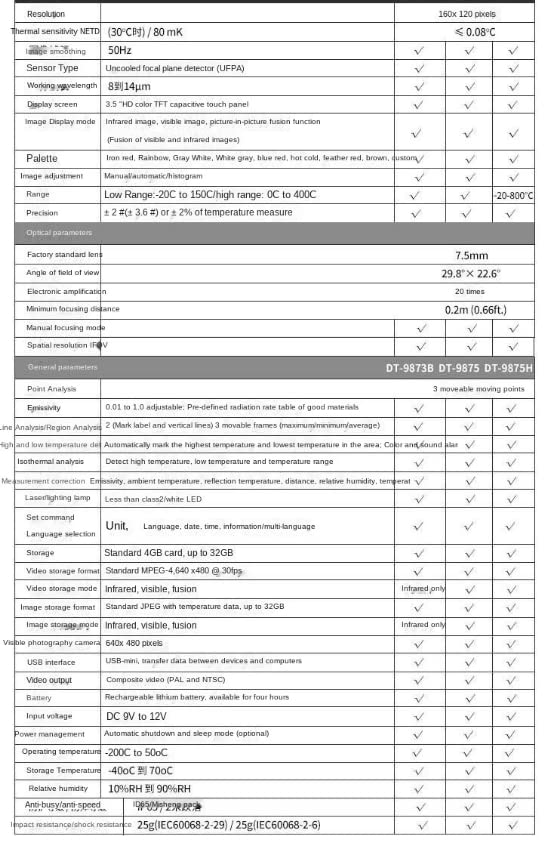
Figure 8.1: Comprehensive technical specifications for the DT-9875H, DT-9875, and DT-9873B models.
| Feature | Specification (DT-9875H) |
|---|---|
| Thermal Resolution | 160 x 120 pixels |
| Temperature Range | -20℃ to 800℃ |
| Accuracy | ±2℃ or ±2% of temperature measure |
| Display Screen | 3.5" HD color TFT capacitive touch panel |
| Image Display Mode | Infrared image, visible image, picture-in-picture fusion function |
| Palette Options | Iron red, Rainbow, Gray White, White gray, Blue red, Hot cold, Feather red, Brown, Custom |
| Storage Medium | Standard 4GB card, up to 32GB |
| Image Storage Format | Standard JPEG with temperature data |
| Video Storage Format | Standard MPEG-4, 640 x 480 @ 30fps |
| Battery Type | Rechargeable lithium battery, approximately four hours operation |
| Operating Temperature | -20℃ to 50℃ |
| Relative Humidity | 10% RH to 90% RH (non-condensing) |
| Dimensions | Approximately 6 x 5 x 3 inches |
| Weight | Approximately 2.2 Pounds |
9. Warranty and Support
For warranty information, technical support, or service inquiries, please contact VIHELM customer support through their official website or the retailer from whom the product was purchased. Please have your model number (DT-9875H) and purchase date available when contacting support.
What's in the Box:
- DT-9875H Thermal Imager x 1
- User Manual (this document)
- Charging Cable
- Power Adapter
- SD Card (pre-installed or included separately)