
TOTAL TACSD30186
TOTAL Multi-bit Screwdriver User Manual
Model: TACSD30186
Brand: TOTAL
Introduction
The TOTAL Multi-bit Screwdriver is a versatile and comprehensive tool designed for a wide range of DIY, repair, and maintenance tasks. This set provides a complete selection of bits and sockets, ensuring you have the right tool for various screws and nuts. Its ergonomic T-shaped handle and integrated ratchet function enhance efficiency and reduce user fatigue during prolonged use.
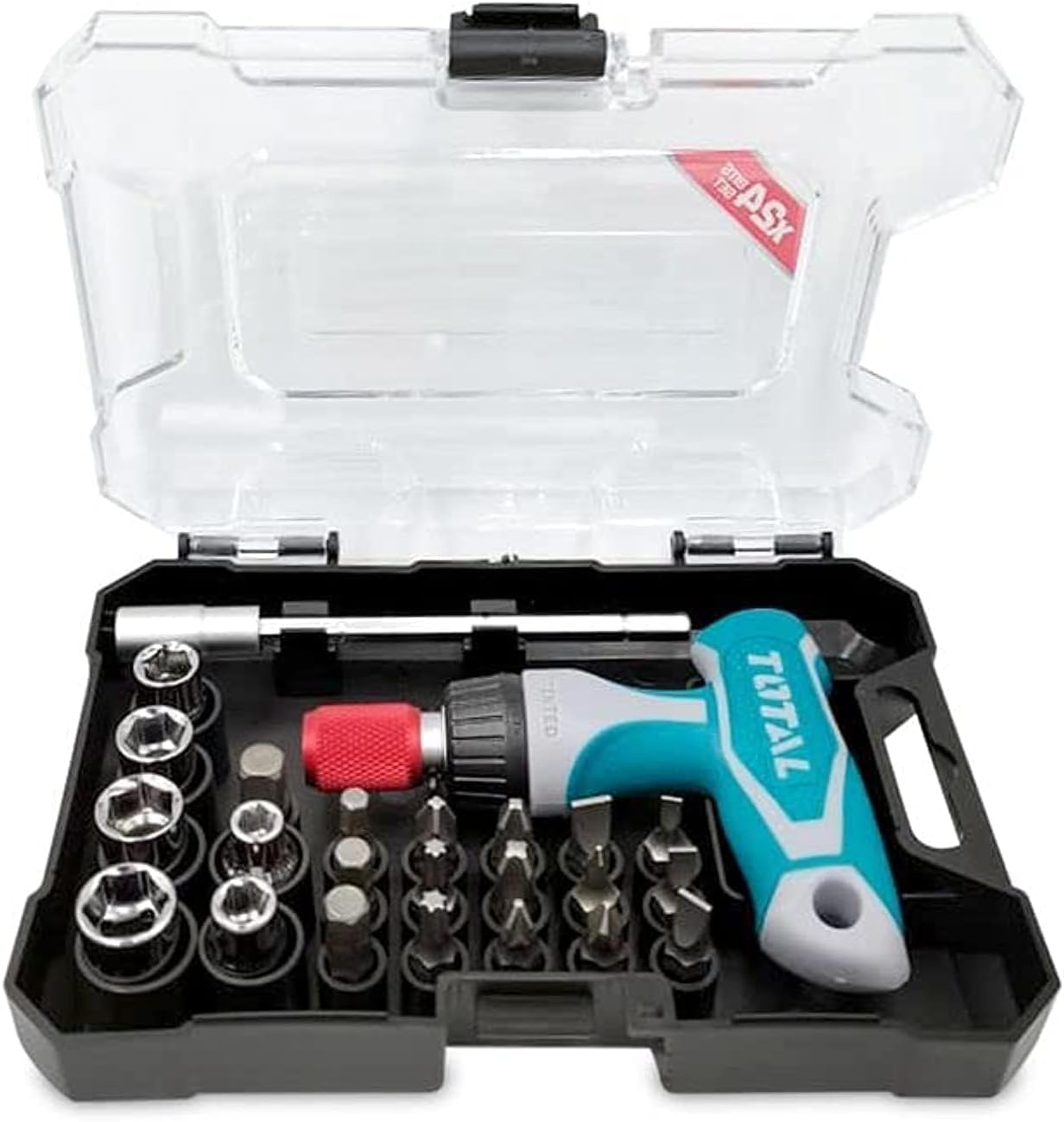
Figure 1: The TOTAL Multi-bit Screwdriver set, neatly organized in its transparent storage case.
Package Contents
Verify that all the following components are included in your package:
- 1 x T-shaped Ratchet Handle
- 4 x Flat Bits (SL3, SL4, SL5, SL6)
- 4 x Phillips Bits (PH0, PH1, PH2, PH3)
- 2 x Pozidrive Bits (PZ1, PZ2)
- 2 x Torx Bits (T15, T29)
- 3 x Hex Bits (H4, H5, H6)
- 1 x 100mm Magnetic Extension Bar
- 1 x 25mm Adapter
- 6 x 1/4" Hex Sockets (5mm, 6mm, 7mm, 8mm, 9mm, 10mm)
- 1 x Storage Case

Figure 2: All components of the screwdriver set displayed outside the case.
Setup and Assembly
Selecting the Right Bit/Socket:
Identify the type and size of the screw or nut you need to work with. Choose the corresponding bit (Flat, Phillips, Pozidrive, Torx, Hex) or hex socket from the provided set.

Figure 3: A selection of screwdriver bits.
Inserting a Bit/Socket:
The T-shaped handle features a magnetic bit holder. Simply insert the chosen bit directly into the magnetic holder at the end of the handle. For sockets, first insert the 25mm adapter into the handle, then attach the desired hex socket to the adapter. Alternatively, for deeper reach, insert the 100mm magnetic extension bar into the handle, then attach a bit or the 25mm adapter with a socket.
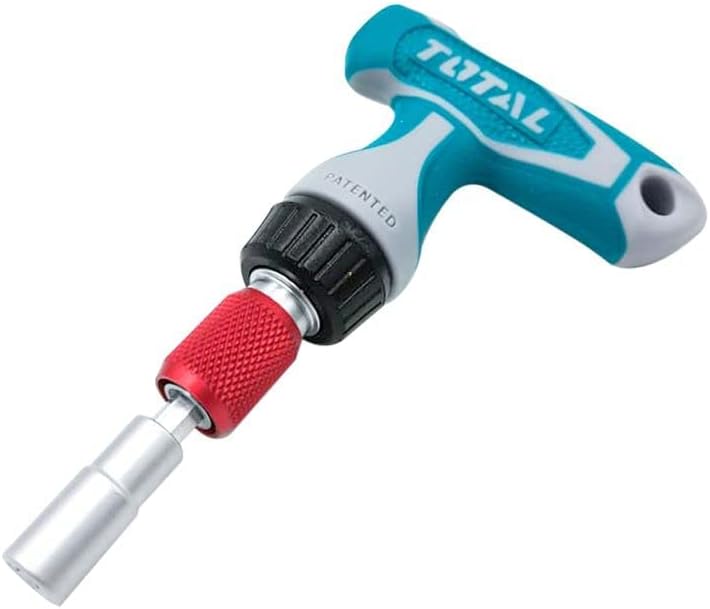
Figure 4: T-handle with extension and socket attached.
Operating Instructions
Using the Ratchet Function:
The T-handle features a three-position ratchet mechanism. Locate the selector ring near the bit holder. Rotate this ring to select one of the following modes:
- Clockwise (Right Arrow): For tightening screws. The handle will turn the bit clockwise and freewheel counter-clockwise.
- Counter-clockwise (Left Arrow): For loosening screws. The handle will turn the bit counter-clockwise and freewheel clockwise.
- Locked (Middle Position): For fixed operation, allowing the screwdriver to function as a traditional non-ratcheting screwdriver.

Figure 5: Ratchet mechanism selector.
Applying Force:
Hold the T-handle firmly. Apply downward pressure to keep the bit engaged with the screw head, then rotate the handle in the desired direction. The T-shape provides excellent leverage and comfort, reducing strain on your hands.
Maintenance
- Cleaning: After each use, wipe down the handle, bits, and sockets with a clean, dry cloth to remove any dirt, dust, or debris. For stubborn grime, a slightly damp cloth can be used, followed by immediate drying.
- Storage: Always store the screwdriver set in its original case. This protects the components from loss, damage, and corrosion. Store in a dry environment away from direct sunlight and extreme temperatures.
- Inspection: Periodically inspect bits and sockets for wear or damage. Replace any worn or damaged components to ensure optimal performance and safety.
Troubleshooting
| Problem | Possible Cause | Solution |
|---|---|---|
| Bit slips from screw head | Incorrect bit size/type; Insufficient downward pressure; Worn bit. | Ensure correct bit for screw head; Apply firm downward pressure; Replace worn bit. |
| Ratchet mechanism not engaging | Selector ring in locked position; Debris in mechanism. | Rotate selector ring to clockwise or counter-clockwise position; Clean mechanism carefully. |
| Bits/sockets not holding firmly in handle | Magnetic holder weakened; Debris in holder. | Clean the magnetic holder; If magnetism is permanently lost, contact support. |
Specifications
- Model Name: TACSD30186
- Brand: TOTAL
- Head Style: Hex
- Material: Chrome Vanadium (CR-V)
- Color: Metallic Silver / Blue
- Item Weight: 11 ounces (0.31 Kilograms)
- Product Dimensions: 8.27 x 12.2 x 2.36 inches
- Included Bits: SL3, SL4, SL5, SL6, PH0, PH1, PH2, PH3, PZ1, PZ2, T15, T29, H4, H5, H6 (15 total)
- Included Sockets: 5mm, 6mm, 7mm, 8mm, 9mm, 10mm (6 total)
- Extension Bar: 100mm Magnetic
- Adapter: 25mm
Warranty and Support
For warranty information or technical support regarding your TOTAL Multi-bit Screwdriver, please refer to the product packaging or contact TOTAL customer service directly. Keep your purchase receipt as proof of purchase.
For further assistance, you may visit the official TOTAL Tools website or contact their support channels. Always provide your product model number (TACSD30186) when seeking support.
Related documentsTACSD30186


Ask a question about this manual
Ask about setup, troubleshooting, compatibility, parts, safety, or missing instructions. Manuals+ will review the question and use this page’s manual context to help answer it.