
Introduction
The TOPDON TB6000Pro is a versatile 2-in-1 smart car battery charger and battery tester designed for both domestic battery maintenance and professional use. It offers quick charging, advanced battery testing with pre- and post-reports, and intelligent management via a mobile application. This device is compatible with a wide range of 6V and 12V batteries, including lead-acid (flooded, gel, AGM, maintenance-free, WET, CAL, EFB), 12V lithium-ion, and LiFePO4 batteries.
What's in the Box
- Battery Charger
- Battery Alligator Clip
- Ring Connectors
- User Guide

Image: Components included in the TB6000Pro package.
Specifications
| Feature | Detail |
|---|---|
| Product Dimensions | 9.21 x 4.69 x 4.45 inches (9"D x 4"W x 4"H) |
| Item Weight | 2.14 pounds |
| Item Model Number | TB6000Pro |
| Output Voltage | 12 Volts |
| Color | Black |
| Ingress Protection (IP) Rating | IP65 (Water and Dust Resistant) |
| Battery Compatibility | 6V & 12V Lead-Acid (Flooded, Gel, AGM, Maintenance-Free, WET, CAL, EFB), 12V Lithium-Ion, LiFePO4 |
| Charging Current | 1-6 Amps (Adjustable) |
| Battery Testing Compatibility | 100-2000CCA Regular Flooded, AGM Flat/Spiral, EFB, GEL batteries |
Setup
Before using the TB6000Pro, ensure the product is in good condition and all components are present. Connect the appropriate battery clamps or ring connectors to the TB6000Pro unit. Ensure a secure connection to the battery terminals, observing correct polarity (red to positive, black to negative). The device can be powered via a standard electrical outlet.

Image: The TB6000Pro unit with its included battery connection accessories.
Operating Instructions
Quick Charging Mode
For immediate charging without app control, press the button on the charger to initiate the quick charging process. The device will automatically detect the battery type and begin charging.
App Intelligent Management (Bluetooth Control)
The TB6000Pro can be controlled and monitored via a mobile application connected via Bluetooth. This allows for advanced settings and real-time data monitoring.
- Bluetooth Connection: Connect your smartphone to the TB6000Pro via Bluetooth through the dedicated app.
- Timed Charging: Set specific times for the charger to operate, which can help manage electricity costs.
- Adjustable Current and Voltage: Fine-tune charging parameters (voltage 6-16V, current 1-6A) with 0.1 accuracy for specific battery requirements.
- Real-time Monitoring: Monitor power consumption and charged power in real-time through the app.
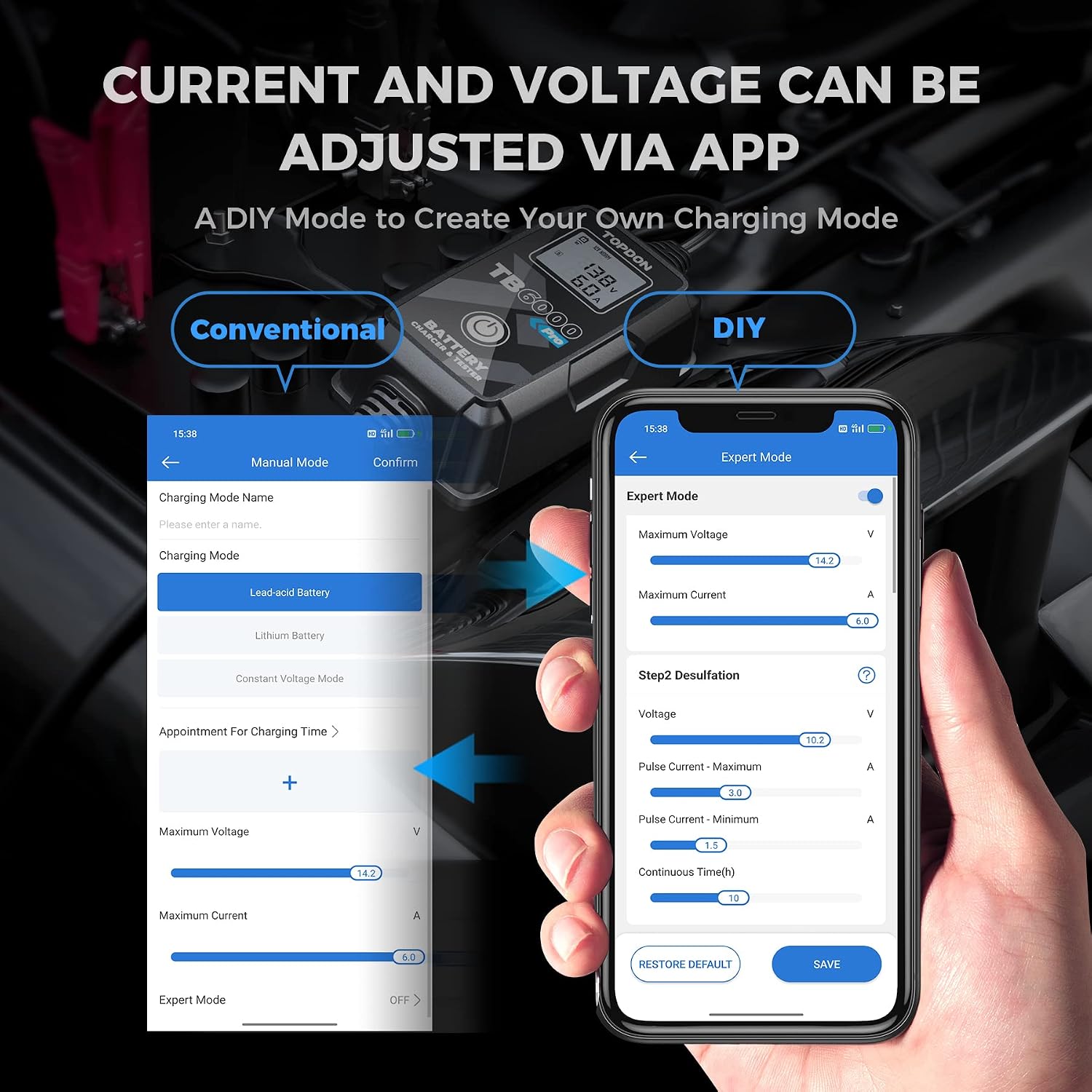
Image: The mobile application interface demonstrating adjustable current and voltage settings for precise charging control.
9-Step Charging Process
TOPDON's patented 9-step charging process optimizes, maintains, and integrates the charging for lead-acid batteries, extending battery life and repairing sulfation.

Image: Visual representation of how the 9-step charging process contributes to longer battery life.
Battery Testing Functions
The TB6000Pro functions as a comprehensive battery tester, providing detailed analysis and reports.
- Pre- and Post-Report: Generate reports showing data comparison (CCA, Internal Resistance, Voltage, State of Health) before and after charging to demonstrate battery improvement. These reports can be saved.
- Battery Test: Measures State of Health (SOH), State of Charge (SOC), and performs Resistance Test.
- Charging Test: Includes Ripple Analysis, Load Voltage, and No-Load Voltage measurements.
- Cranking Test: Evaluates Cranking Analysis, Cranking Voltage, and Cranking Time.

Image: Overview of the intelligent detection functions available for battery, charging, and cranking tests.
Video: Demonstrates the features and operation of the TB6000Pro Battery Charger and Tester, including app connectivity and testing capabilities.
Repair Modes
- Desulfation: The 9-step charging process includes desulfation to help repair and optimize the life of lead-acid batteries.
- Supply Mode: For batteries with internal voltage too low to charge, Supply Mode can raise the battery's voltage to normal levels, enabling subsequent charging.

Image: Illustrates the effectiveness of the TB6000Pro's trickle charge and repair mode compared to conventional chargers.
Maintenance
To ensure the longevity and optimal performance of your TB6000Pro, follow these maintenance guidelines:
- Keep the device clean and free from dust and debris.
- Store in a dry environment when not in use.
- The rugged ABS housing and IP65 rating provide protection against water and dust, allowing use in various environments. However, avoid submerging the device in water.
- Regularly inspect cables and connectors for any signs of wear or damage.
Troubleshooting
The TB6000Pro is equipped with smart safety features to prevent common issues. If you encounter problems, consider the following:
- No Power/Display: Ensure the charger is properly plugged into a live power outlet. Check the power cable for damage.
- Charging Error (e.g., "Error 4"): This may indicate a severely discharged or damaged battery. Try using the SUPPLY MODE to raise the battery voltage if applicable. Ensure the battery type selected in the app (if used) matches the connected battery.
- No Bluetooth Connection: Ensure Bluetooth is enabled on your smartphone and the TB6000Pro is within range. Restart both the app and the charger if necessary.
- Slow Charging: Verify the selected charging current in the app. Ensure the battery is not excessively large for the charger's capacity (6A max).
- Safety Features Triggered: The device protects against reverse polarity, sparks, short circuits, overheating, and overvoltages. If the charger stops unexpectedly, check for these conditions and correct them before resuming.

Image: Highlights the robust safety features and rigorous testing of the TB6000Pro.
Safety Information
Always prioritize safety when operating the TB6000Pro. The device incorporates multiple safety mechanisms:
- Reverse Polarity Protection: Prevents damage if battery clamps are connected incorrectly.
- Spark-Proof Technology: Ensures no sparks occur during connection or disconnection.
- Short Circuit Protection: Automatically shuts off in case of a short circuit.
- Overheating Protection: Monitors internal temperature and reduces output or shuts down if overheating occurs.
- Overvoltage Protection: Safeguards against excessive voltage input.
- IP65 Rated Protection: Provides water and dust resistance for safe operation in various conditions.

Image: ETL Certification confirms the TB6000Pro meets national safety standards.
Warranty and Support
For detailed warranty information or technical support, please refer to the official TOPDON website or contact TOPDON customer service directly. A comprehensive user manual in PDF format is also available for download at this link.


