
WORKPRO W125092A
WORKPRO 20V Cordless Brushless Impact Wrench W125092A User Manual
Model: W125092A
1. Introduction
Thank you for choosing the WORKPRO 20V Cordless Brushless Impact Wrench. This manual provides essential information for the safe operation, maintenance, and troubleshooting of your tool. Please read it thoroughly before use and retain it for future reference.
2. General Safety Information
Always follow basic safety precautions to reduce the risk of fire, electric shock, and personal injury when using power tools.
- Work Area Safety: Keep your work area clean and well-lit. Cluttered or dark areas invite accidents. Do not operate power tools in explosive atmospheres, such as in the presence of flammable liquids, gases, or dust.
- Electrical Safety: Avoid body contact with earthed or grounded surfaces. Do not expose power tools to rain or wet conditions.
- Personal Safety: Always wear eye protection. Use hearing protection when operating noisy tools. Dress properly; avoid loose clothing or jewelry. Secure long hair.
- Tool Use and Care: Do not force the power tool. Use the correct tool for your application. Disconnect the battery pack from the power tool before making any adjustments, changing accessories, or storing power tools.
- Battery Tool Use and Care: Recharge only with the charger specified by the manufacturer. Use power tools only with specifically designated battery packs.
3. Package Contents
The WORKPRO 20V Cordless Brushless Impact Wrench kit includes the following items:
- 1x WORKPRO Cordless Brushless Impact Wrench
- 1x 20V 2.0Ah Lithium-ion Battery Pack
- 1x Fast Charger
- 1x Belt Clip
- 1x User Manual (this document)
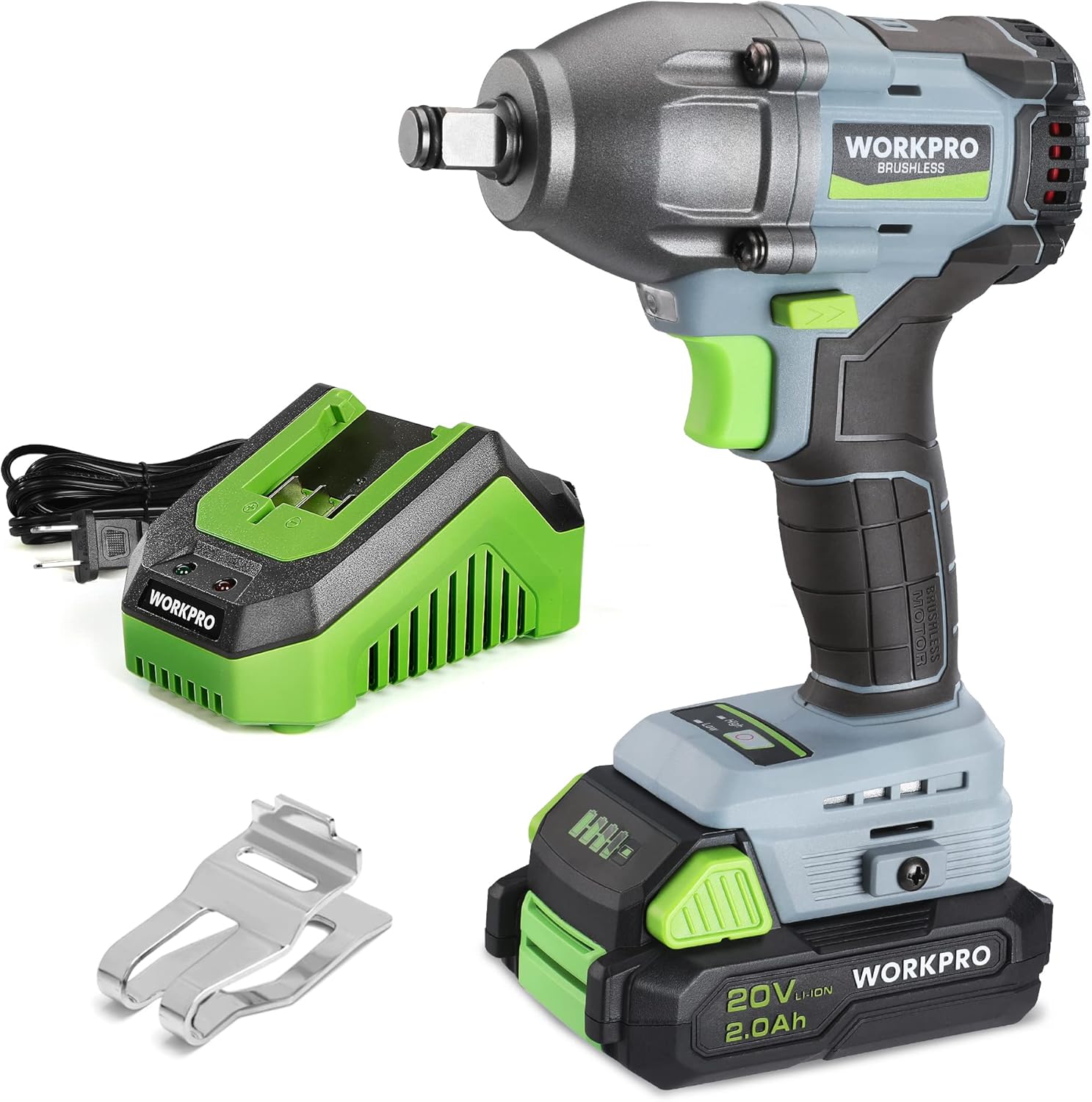
Image 3.1: Contents of the WORKPRO Impact Wrench kit.
4. Product Overview
Familiarize yourself with the components of your WORKPRO Impact Wrench:
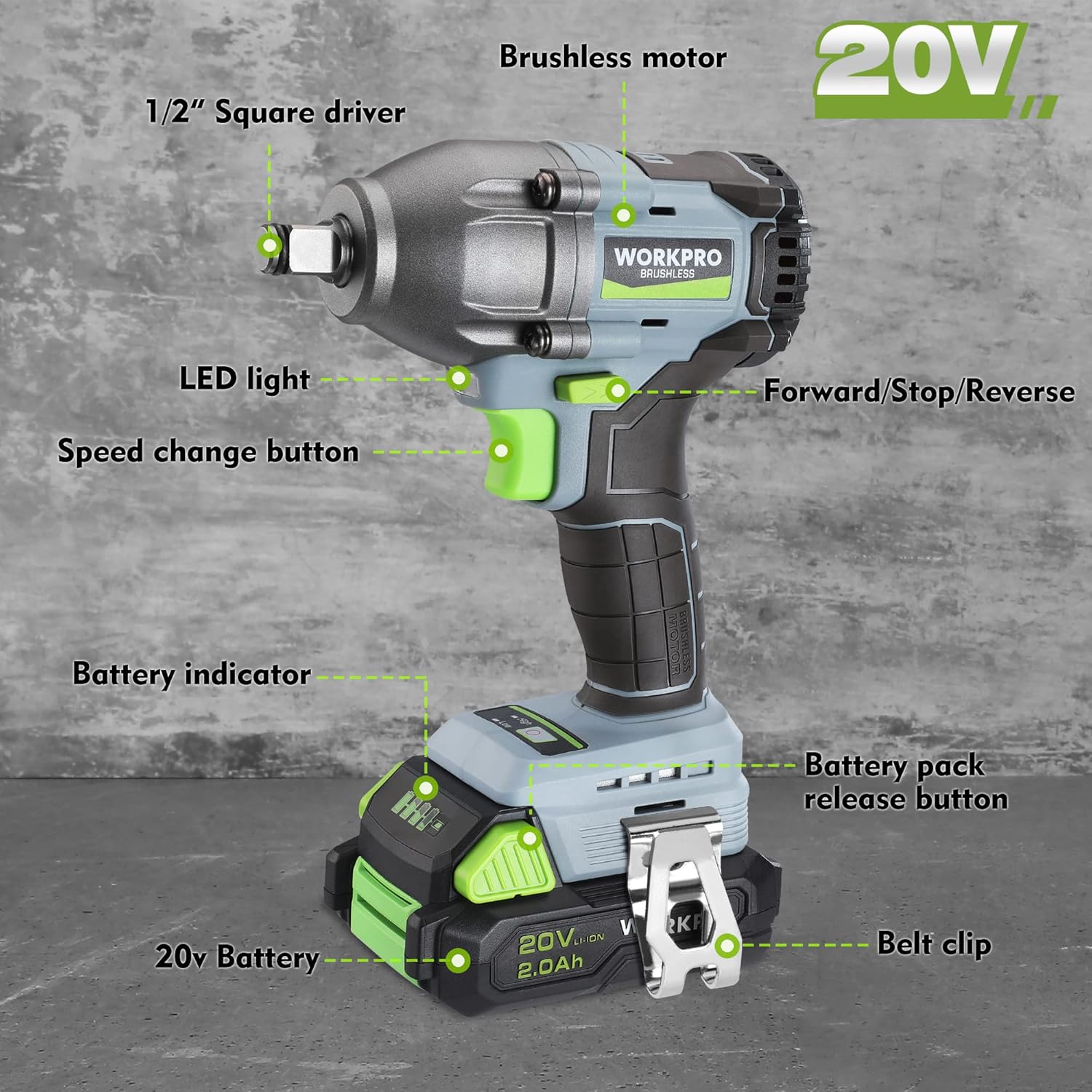
Image 4.1: Key components of the Impact Wrench, including the 1/2" square driver, LED light, speed change button, forward/stop/reverse switch, brushless motor, battery indicator, battery pack release button, 20V battery, and belt clip.
- 1/2" Square Driver: For attaching sockets.
- LED Light: Illuminates the work area.
- Speed Change Button: Toggles between high and low-speed settings.
- Forward/Stop/Reverse Switch: Controls the direction of rotation and locks the trigger.
- Brushless Motor: Provides efficient power and extended tool life.
- Battery Indicator: Displays the remaining battery charge.
- Battery Pack Release Button: For detaching the battery.
- 20V Battery: Rechargeable lithium-ion power source.
- Belt Clip: For convenient carrying.
4.2. Brushless Motor Technology
This impact wrench is equipped with a brushless motor, which offers several advantages over traditional brushed motors. Brushless motors generate less heat and noise, deliver more power, and have a longer service life. They operate without carbon brushes, reducing wear and tear and eliminating sparks during operation.

Image 4.2: Illustration of the brushless motor technology.
5. Setup
5.1. Charging the Battery
Before first use, fully charge the 20V 2.0Ah lithium-ion battery pack.
- Connect the fast charger to a standard power outlet.
- Slide the battery pack onto the charger until it clicks into place.
- The charger indicator light will show the charging status. A full charge typically takes approximately 1 hour.
- Once fully charged, remove the battery pack from the charger.

Image 5.1: Battery pack connected to the fast charger.
5.2. Installing and Removing the Battery Pack
- To Install: Align the battery pack with the base of the impact wrench and slide it in until it clicks securely into place.
- To Remove: Press the battery pack release button and slide the battery pack out from the tool.
5.3. Attaching Sockets
Ensure the tool is off and the forward/reverse switch is in the center (locked) position before attaching or removing sockets.
- Push the desired 1/2" square drive socket firmly onto the square driver until it locks into place.
- To remove, pull the socket off the square driver.
6. Operation
6.1. Power On/Off and Speed Control
- To Turn On: Squeeze the trigger switch. The tool speed increases as you increase pressure on the trigger.
- To Turn Off: Release the trigger switch.
- Variable Speed: The trigger provides variable speed control.
6.2. Forward/Reverse Rotation
The forward/reverse switch controls the direction of rotation and acts as a lock-off button.
- Forward (Tightening): Push the switch to the left.
- Reverse (Loosening): Push the switch to the right.
- Lock-Off: Place the switch in the center position to prevent accidental starting.
6.3. Speed Settings
The impact wrench features two speed settings for different applications.
- Low Speed: 0-2600 Impacts Per Minute (IPM), 295 ft-lbs torque. Ideal for delicate tasks or when less power is required.
- High Speed: 0-3200 IPM, 370 ft-lbs torque. For heavy-duty applications requiring maximum power.
Press the speed change button to toggle between High and Low settings. An indicator light will show the selected speed.

Image 6.1: Speed setting indicator on the tool.
6.4. LED Work Light
The built-in LED light automatically illuminates your work area when the trigger is pressed, improving visibility in dimly lit conditions.
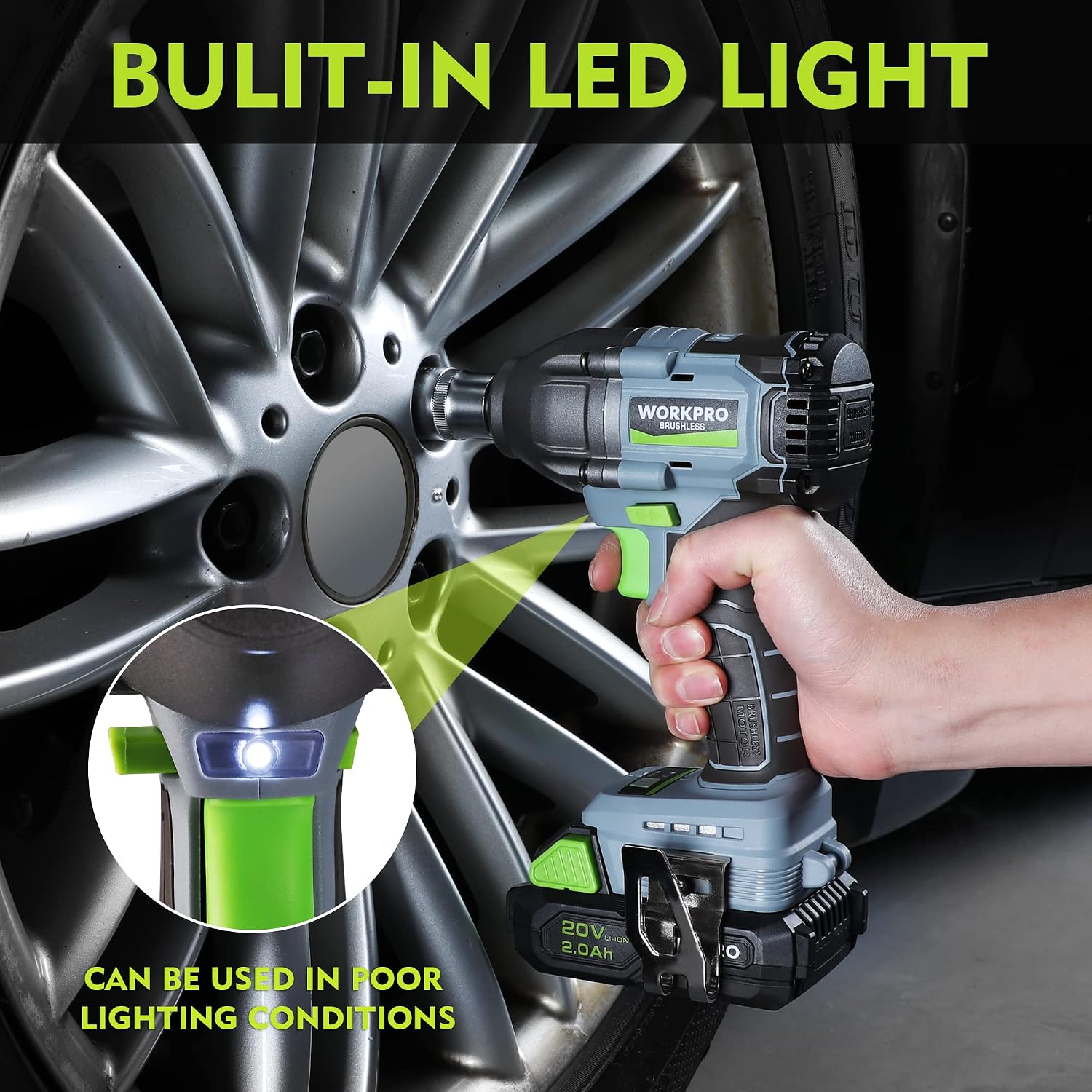
Image 6.2: LED work light in operation.
6.5. Usage Recommendations
- For automotive repairs, such as changing car tires, ensure the vehicle is properly supported and secured.
- When tightening lug nuts, use the impact wrench to snug them, then finish with a calibrated torque wrench to achieve the manufacturer's specified torque. This prevents over-tightening and potential damage.
- The tool is suitable for major construction projects, heavy equipment maintenance, and product assembly.

Image 6.3: Impact wrench in use for automotive tasks.
6.6. Ergonomics and Handling
The WORKPRO impact wrench is designed with a lightweight and ergonomic grip to reduce user fatigue during extended use. Its balanced design provides comfortable handling and improved control.

Image 6.4: Demonstrating the ergonomic grip and lightweight design.
7. Maintenance
Regular maintenance ensures optimal performance and extends the life of your tool.
- Cleaning: Keep the tool's ventilation openings clear and free of debris. Use a clean, dry cloth to wipe down the housing. Do not use water or chemical cleaners.
- Battery Care: Store batteries in a cool, dry place away from direct sunlight. Do not store batteries in a discharged state for extended periods.
- Storage: When not in use, store the impact wrench and its accessories in a secure, dry location out of reach of children.
8. Troubleshooting
If you encounter issues with your WORKPRO Impact Wrench, refer to the following common problems and solutions:
| Problem | Possible Cause | Solution |
|---|---|---|
| Tool does not start. | Battery not charged or improperly installed. Forward/reverse switch in lock-off position. | Ensure battery is fully charged and correctly inserted. Move forward/reverse switch out of the center position. |
| Reduced power or torque. | Low battery charge. Incorrect speed setting. | Recharge the battery. Select the high-speed setting for maximum torque. |
| Battery not charging. | Charger not plugged in. Faulty battery or charger. | Check power connection. Contact customer support if the issue persists after trying a different outlet. |
If the problem persists after attempting these solutions, please contact WORKPRO customer support.
9. Specifications
| Feature | Specification |
|---|---|
| Model Number | W125092A |
| Voltage | 20V |
| Motor Type | Brushless |
| Drive Size | 1/2 inch Square |
| Max Torque | 370 ft-lbs (500 N.m) |
| High Speed IPM | 0-3200 IPM |
| Low Speed IPM | 0-2600 IPM |
| Battery Capacity | 2.0Ah Lithium-ion |
| Charging Time | Approx. 1 hour |
| Item Weight | 4.71 pounds |
| LED Work Light | Yes |
10. Warranty and Support
WORKPRO products are manufactured to high-quality standards and are guaranteed against manufacturing defects. For specific warranty details, including duration and coverage, please refer to the warranty card included with your purchase or visit the official WORKPRO website.
For technical assistance, replacement parts, or any questions regarding your product, please contact WORKPRO customer support:
- Website: www.workprotools.com (Example link, actual link may vary)
- Email: support@workprotools.com (Example email, actual email may vary)
- Phone: Refer to your product packaging or website for regional contact numbers.
Related documentsW125092A

Ask a question about this manual
Ask about setup, troubleshooting, compatibility, parts, safety, or missing instructions. Manuals+ will review the question and use this page’s manual context to help answer it.