
EJEAS V7
EJEAS V7 Bluetooth 5.1 Motorcycle Intercom System User Manual
Model: V7
Brand: EJEAS
1. Introduction
The EJEAS V7 is a Bluetooth 5.1 motorcycle intercom system designed for clear and reliable communication among riders. This device supports real-time intercom for up to 2 riders and connection for up to 7 riders, offering a maximum range of 800 meters (600-700m in environments with interference). It features advanced DSP noise reduction technology, an IP65 waterproof rating, and a long-lasting 850 mAh battery. The V7 is suitable for various activities including motorcycling, ATV riding, and snowmobiling.
2. Product Features
- 7-Rider Connection & 2-Rider Real-time Intercom: Supports up to 7 rider connections with real-time intercom for 2 riders, up to 800m range.
- Bluetooth 5.1 Communication System: Faster speed and more stable connection for pairing with other Bluetooth devices (hands-free kits, navigation, mobile phones).
- DSP Noise Reduction: Advanced technology reduces background noise, effectively eliminating over 90% of ambient noise, maintaining voice quality even at 120 km/h.
- High Capacity Battery & IP65 Waterproof: 850 mAh battery provides up to 16 hours talk time and 160 hours standby. IP65 waterproof rating ensures usability in various conditions, including rain. Features an upgraded Type-C charging port.
- EUC Remote Control Support: Compatible with EUC remote controls for real-time intercom, phone reception, music control, FM, volume control, and voice assistant.
- APP SafeRiding Support: Software updates available via the official SafeRiding APP.
3. Package Contents
Please check the box for the following items:
- EJEAS V7 Intercom Unit(s)
- Headphone & Microphone Set(s)
- Helmet Clip(s)
- Velcro Pads
- Type-C Charging Cable(s)
- User Manual
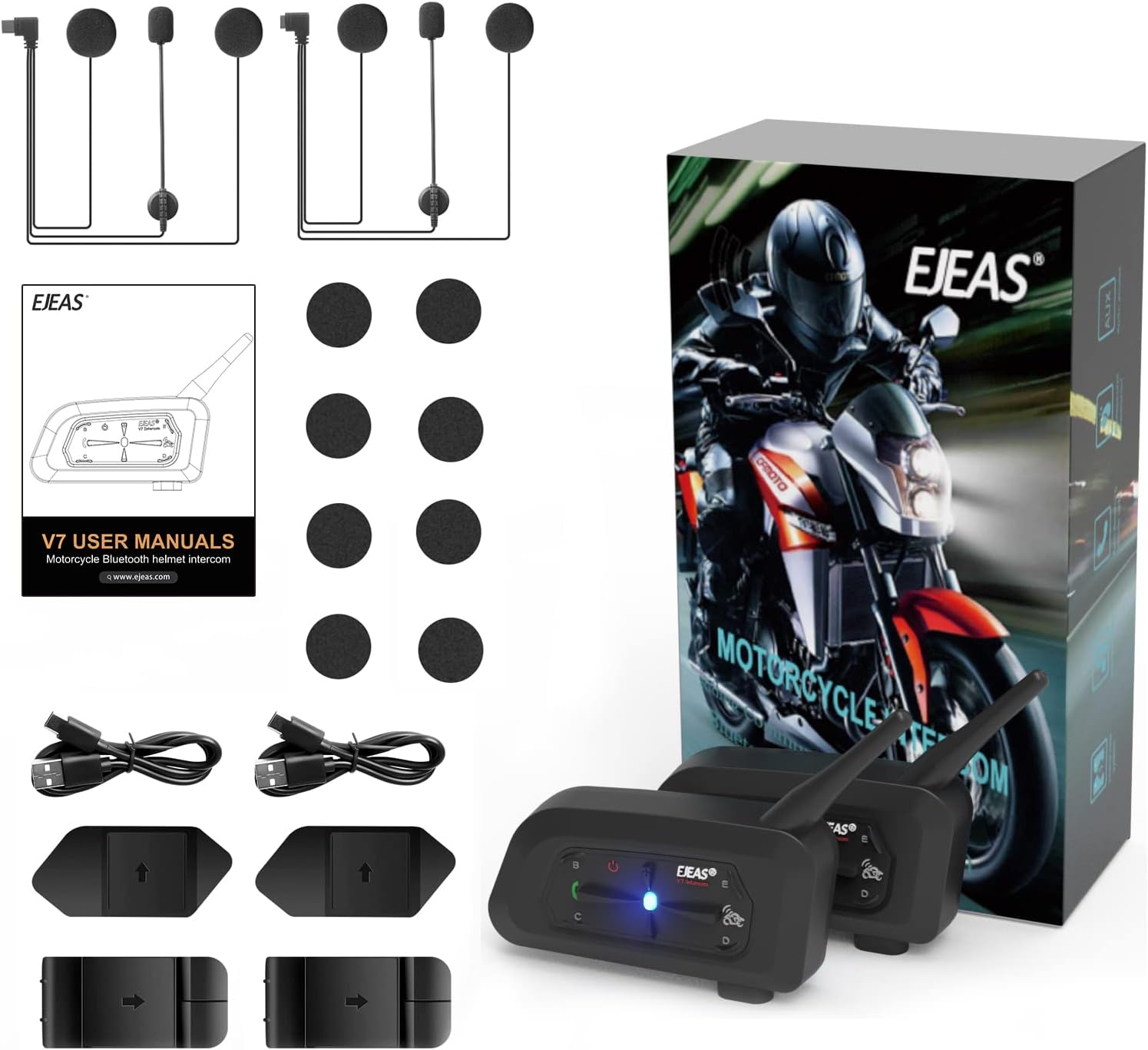
Figure 1: EJEAS V7 Package Contents
4. Product Overview and Controls

Figure 2: EJEAS V7 Intercom Unit Diagram and Controls
Button Functions:
- Power On/Off (Button A): Press and hold to power on or off.
- Volume Up (Button E): Increases volume.
- Volume Down (Button C): Decreases volume.
- Phone Button (Button B): Answers/ends calls, initiates voice assistant.
- Intercom Button (Button D): Initiates/ends intercom communication.
- Type-C Charging Port: For charging the device.
- Indicated Light: Shows device status (power, pairing, charging).
5. Setup and Installation
5.1 Installing the Intercom Unit
The EJEAS V7 can be installed on most helmet types using the provided clip or adhesive mount.
- Choose Mounting Method: Decide between the clip mount or the adhesive mount based on your helmet type and preference.
- Attach Mount:
- Clip Mount: Slide the clip between the helmet shell and the inner padding on the left side of the helmet. Ensure it is securely fastened.
- Adhesive Mount: Clean the desired area on the left side of your helmet. Peel off the protective film from the adhesive pad and firmly press the mount onto the helmet for at least 30 seconds. Allow sufficient time for the adhesive to cure before use.
- Secure Intercom Unit: Slide the EJEAS V7 unit onto the installed mount until it clicks into place.

Figure 3: Helmet Clip Installation Steps
5.2 Connecting Headphones and Microphone
- Connect Headphone/Microphone Cable: Plug the headphone/microphone cable into the Type-C port on the EJEAS V7 unit.
- Install Speakers: Attach the speakers inside the helmet, aligning them with your ears. Use the provided velcro pads to secure them.
- Position Microphone: Position the microphone in front of your mouth, ensuring it is close enough for clear voice pickup but not obstructing your vision.
6. Operating Instructions
6.1 Power On/Off
- Power On: Press and hold Button A for approximately 3 seconds until the indicator light flashes blue.
- Power Off: Press and hold Button A for approximately 3 seconds until the indicator light turns off.
6.2 Bluetooth Pairing with Mobile Device
- Ensure the EJEAS V7 is powered off.
- Press and hold Button A for approximately 5-7 seconds until the indicator light flashes red and blue alternately, indicating pairing mode.
- On your mobile phone, enable Bluetooth and search for "EJEAS V7".
- Select "EJEAS V7" from the list of available devices to connect. Once connected, the indicator light will flash blue slowly.


Figure 4: Bluetooth 5.1 Pairing
6.3 Intercom Pairing (2 Riders)
- Ensure both EJEAS V7 units are powered off.
- On both units, press and hold Button D for approximately 5-7 seconds until the indicator lights flash red and blue alternately.
- The units will automatically search and pair with each other. Once connected, the indicator lights will flash blue slowly, and you will hear a confirmation tone.
- To initiate intercom communication, briefly press Button D on either unit. To end, briefly press Button D again.

Figure 5: 2-Rider Intercom Communication
6.4 Group Intercom (Up to 7 Riders)
The EJEAS V7 supports connection for up to 7 riders, with real-time intercom for 2 riders at a time. For detailed group pairing instructions, refer to the full user manual or the SafeRiding APP.

Figure 6: 7-Rider Group Connection
6.5 Music Playback
- After pairing with your mobile phone, open your music player.
- Play/Pause: Briefly press Button B.
- Next Track: Briefly press Button E.
- Previous Track: Briefly press Button C.
6.6 Phone Calls
- Answer Call: Briefly press Button B when a call comes in.
- End Call: Briefly press Button B during a call.
- Reject Call: Press and hold Button B for 2 seconds when a call comes in.
- Voice Assistant: Double-press Button B to activate your phone's voice assistant (e.g., Siri, Google Assistant).
6.7 Volume Control
- Increase Volume: Briefly press Button E.
- Decrease Volume: Briefly press Button C.
6.8 DSP Noise Reduction
The EJEAS V7 features advanced DSP (Digital Signal Processing) noise reduction technology. This system automatically recognizes and reduces ambient noise from both incoming and outgoing audio signals, ensuring clear communication even at high speeds or in noisy environments.

Figure 7: CVC Noise Reduction
6.9 EUC Remote Control and SafeRiding APP
The EJEAS V7 supports connection with EUC remote controls for convenient operation while riding. Additionally, the official SafeRiding APP allows for software updates and potentially advanced settings management. Refer to the EUC remote control manual or the SafeRiding APP for specific instructions.
7. Maintenance
7.1 Cleaning
Wipe the intercom unit with a soft, damp cloth. Do not use harsh chemicals or abrasive cleaners, as these can damage the device.
7.2 Battery Care
- Charging: Charge the device fully before first use. Use the provided Type-C charging cable. A full charge takes approximately 2 hours.
- Storage: If storing the device for an extended period, charge it to about 50% every three months to prolong battery life. Store in a cool, dry place.
7.3 Water Resistance (IP65)
The EJEAS V7 is rated IP65 waterproof, meaning it is protected against dust ingress and low-pressure water jets from any direction. It can withstand rain and splashes but should not be submerged in water.

Figure 8: IP65 Waterproof Feature
8. Troubleshooting
| Problem | Possible Cause | Solution |
|---|---|---|
| Device does not power on. | Low battery; device frozen. | Charge the device fully. Perform a hard reset by pressing and holding the power button for 10 seconds. |
| Cannot pair with phone/another intercom. | Device not in pairing mode; too far apart; interference. | Ensure device is in pairing mode (flashing red/blue). Bring devices closer. Turn off other Bluetooth devices. Reset both devices and try again. |
| No sound or low volume. | Volume too low; speakers not connected properly; faulty speakers. | Increase volume using Button E. Check speaker connections. Test with another set of headphones if possible. |
| Intercom range is shorter than expected. | Environmental interference; obstacles. | Range can be affected by terrain, buildings, and other radio signals. Try to maintain line of sight. |
9. Specifications
| Feature | Specification |
|---|---|
| Model Name | EJEAS V7 |
| Bluetooth Version | 5.1 |
| Intercom Range | Up to 800m (600-700m in interference environments) |
| Max Riders for Connection | 7 |
| Real-time Intercom Riders | 2 |
| Battery Capacity | 850 mAh |
| Talk Time | Up to 16 hours |
| Standby Time | Up to 160 hours |
| Charging Time | Approx. 2 hours |
| Charging Port | Type-C |
| Water Resistance | IP65 |
| Noise Control | Active Noise Cancellation (DSP) |
| Impedance | 50 Ohms |
| Frequency Range | 20 Hz - 20,000 Hz |
| Compatible Devices | Motorcycles, mobile phones, car audio systems |
10. Warranty and Support
EJEAS products are designed for reliability and performance. For warranty information and customer support, please refer to the warranty card included in your product packaging or visit the official EJEAS website. If you encounter any issues not covered in this manual, please contact EJEAS customer service for assistance.
Online Resources:
- Official EJEAS Website: www.ejeas.com
- SafeRiding APP: Check your device's app store for the latest version.
Related documentsV7


Ask a question about this manual
Ask about setup, troubleshooting, compatibility, parts, safety, or missing instructions. Manuals+ will review the question and use this page’s manual context to help answer it.