
Pipishell PHM-1342
Pipishell Full Motion TV Monitor Wall Mount Bracket
User Manual
1. Introduction
Thank you for choosing the Pipishell Full Motion TV Monitor Wall Mount. This manual provides important information regarding the installation, operation, and maintenance of your wall mount. Please read this manual thoroughly before installation to ensure safe and correct usage. Keep this manual for future reference.
2. Product Features
- TV Mount Compatibility: Fits most 13-42 inch TVs and monitors weighing up to 44 lbs, with VESA mounting patterns up to 200x200mm. Compatible with brands like SAMSUNG, SONY, LG, VIZIO, TCL, ELEMENT, SCEPTRE, HISENSE.
- Full Motion for Optimal Viewing: Offers tilt (+9°/-11°), swivel (up to 90° left/right), and 360° rotation for landscape and portrait orientation. Extends 14.59 inches and retracts to 2.7 inches.
- Robust Design: Constructed from high-grade alloy steel with strong articulating arms and flexible joints, ensuring optimal support and durability.
- Space-saving: Retracts to a mere 2.9 inches from the wall, freeing up shelf and floor space. Ideal for corner installations.
- Easy Installation: Designed for quick and straightforward setup with detailed instructions and all necessary hardware included.
3. Package Contents
Please verify that all components are present and undamaged before beginning installation. If any parts are missing or damaged, please contact customer support.
- Wall Plate Assembly
- TV Brackets (2)
- Mounting Hardware Kit (various screws, anchors, washers, spacers)
- Bubble Level
- Instruction Manual (this document)
4. Safety Information
- Do not attempt installation if you do not understand these instructions or have any doubts about the safety of the installation.
- Ensure the wall structure can safely support the combined weight of the mount and the TV.
- Always use a stud finder to locate wood studs for secure mounting. For concrete or brick walls, use appropriate anchors (not always included, verify kit contents).
- Do not overtighten screws; this may cause damage and reduce the mount's stability.
- Keep children and pets away during installation.
- This product is intended for indoor use only.
5. Setup and Installation
Before you begin, ensure you have the necessary tools (e.g., drill, screwdriver, tape measure, pencil, stud finder).
5.1. Pre-Installation Checks
Check Wall Types: This mount is suitable for single wood studs and concrete/brick walls. Do NOT install into drywall alone.
Check VESA Compatibility: Locate the 4 mounting holes on the back of your TV. Measure the horizontal and vertical distance between them. This mount supports VESA patterns from 75x75mm to 200x200mm.
Check Cables Outlet: Ensure the mount will not block any cable outlets or ports on your TV.
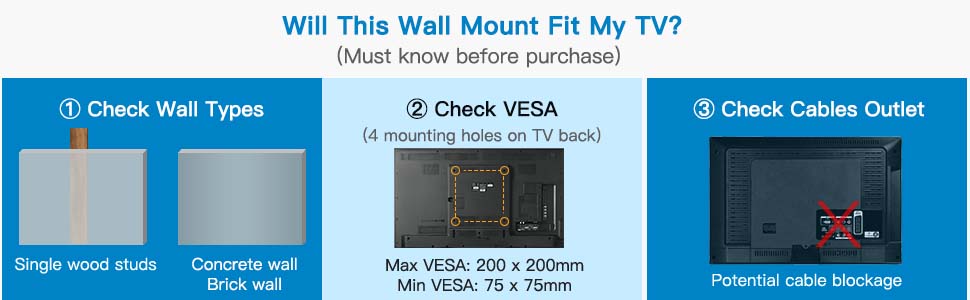
Image: Pre-installation checks including wall type, VESA pattern, and cable outlet assessment.
5.2. Installation Steps
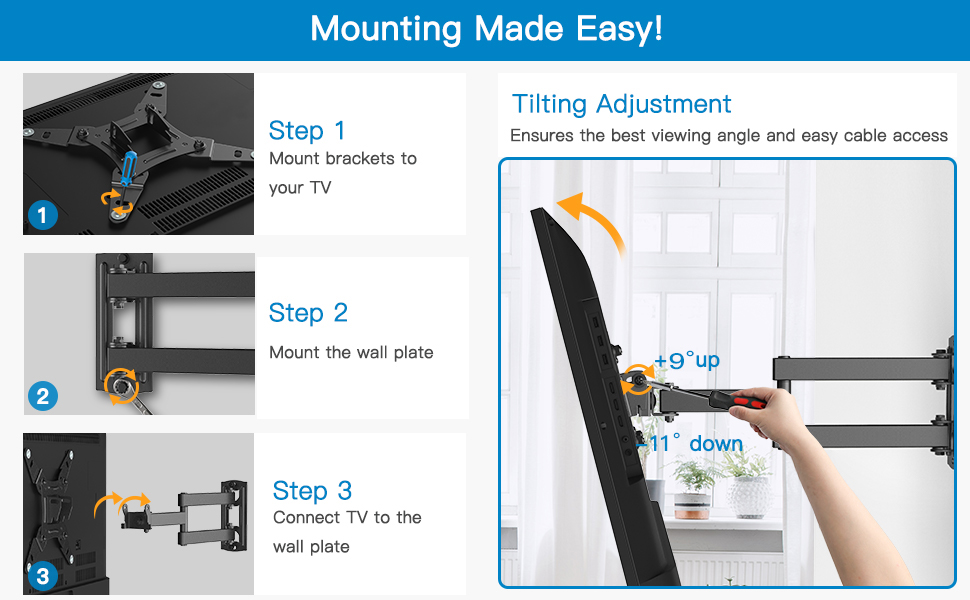
Image: Visual guide for the three main installation steps and tilting adjustment.
- Step 1: Mount Brackets to your TV. Carefully place your TV face down on a soft, clean surface. Attach the two TV brackets to the back of your TV using the appropriate screws, washers, and spacers from the hardware kit. Ensure the brackets are centered and securely fastened.
- Step 2: Mount the Wall Plate. Locate the desired mounting position on your wall. Use a stud finder to find a wood stud or mark drill points for concrete/brick anchors. Drill pilot holes and securely fasten the wall plate assembly to the wall using the provided lag bolts and washers. Use the bubble level to ensure the wall plate is perfectly horizontal.
- Step 3: Connect TV to the Wall Plate. With assistance, carefully lift the TV (with brackets attached) and hook the TV brackets onto the wall plate. Ensure the TV is securely seated on the mount. Tighten any safety screws or locking mechanisms to prevent accidental dislodgement.
6. Operating Instructions
Once installed, your Pipishell Full Motion TV Monitor Wall Mount offers various adjustments for optimal viewing.
6.1. Tilting Adjustment
The mount allows for a tilt range of +9° (up) to -11° (down). Loosen the tilt adjustment knobs or bolts on the TV brackets, adjust the screen to your desired angle to reduce glare, and then re-tighten the knobs/bolts to secure the position.
6.2. Swivel Adjustment
The articulating arm allows the TV to swivel up to 90° left or right. Gently push or pull the TV to the desired viewing angle. The maximum swivel angle may vary depending on your TV's size and its distance from the wall.
6.3. Extension and Retraction
The mount can extend up to 14.59 inches from the wall and retract back to 2.7 inches. To extend, gently pull the TV forward. To retract, push the TV back towards the wall until it reaches the desired position.
6.4. Rotation Adjustment
The mount supports 360° rotation, allowing you to switch between landscape and portrait orientation. Loosen the rotation mechanism (if applicable), rotate the TV, and then re-tighten to secure.
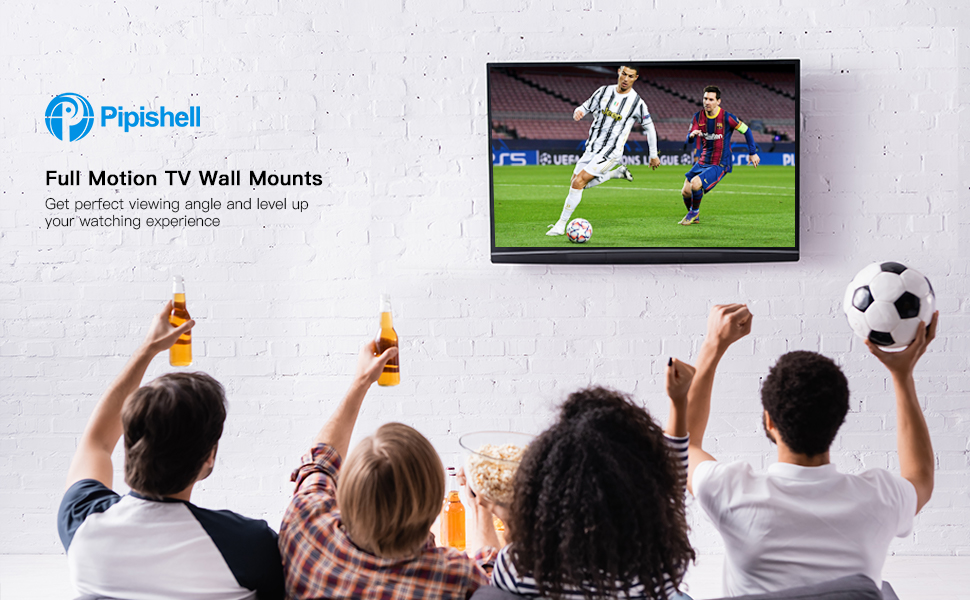
Image: The Pipishell Full Motion TV Wall Mount in use, providing a perfect viewing angle for entertainment.

Image: Versatile application of the TV mount in various settings like bedrooms, living rooms, dining halls, and meeting rooms.
7. Maintenance
To ensure the longevity and safe operation of your TV wall mount, follow these simple maintenance guidelines:
- Cleaning: Wipe the mount with a soft, dry cloth to remove dust. Do not use abrasive cleaners or solvents.
- Periodic Checks: Periodically check all screws and connections to ensure they remain tight and secure. Re-tighten if necessary.
- Lubrication: If the articulating arms become stiff, a small amount of silicone-based lubricant can be applied to the moving joints.
8. Troubleshooting
If you encounter any issues with your Pipishell TV wall mount, please refer to the following common problems and solutions:
- Mount is not level: Ensure the wall plate was installed level. If not, adjust the wall plate or use the fine-tuning leveling feature (if available on your specific model) on the TV brackets.
- Difficulty moving the TV: Check if any cables are snagged or if the tilt/swivel mechanisms are overtightened. Loosen slightly if needed. Ensure the TV weight is within the specified limit.
- TV appears unstable: Immediately remove the TV from the mount. Re-check all installation steps, especially the wall plate attachment and TV bracket security. Ensure the wall structure is adequate.
- Missing parts: Refer to the package contents list. Contact Pipishell customer support for replacement parts.
9. Specifications
| Feature | Specification |
|---|---|
| Brand | Pipishell |
| Model | PHM-1342 |
| Mounting Type | Wall Mount |
| Movement Type | Articulating, Full Motion |
| Material | Alloy Steel |
| Compatible TV Sizes | 13 - 42 Inches |
| Maximum Weight Capacity | 44 lbs (20 kg) |
| VESA Compatibility | 75x75mm, 100x100mm, 200x100mm, 200x200mm |
| Tilt Angle | +9° / -11° |
| Swivel Angle | Up to 90° left/right (screen size dependent) |
| Rotation | 360° |
| Extension from Wall | 2.7 inches (retracted) to 14.59 inches (extended) |
10. Warranty and Support
For warranty information and customer support, please refer to the product packaging or visit the official Pipishell website. You can also contact their customer service team directly for assistance with installation, troubleshooting, or product inquiries.
Website: Pipishell Official Store
Related documentsPHM-1342


Ask a question about this manual
Ask about setup, troubleshooting, compatibility, parts, safety, or missing instructions. Manuals+ will review the question and use this page’s manual context to help answer it.