
Weiser 9GED92700-001
Weiser SmartCode Electronic Touchpad Deadbolt User Manual
Model: 9GED92700-001
Satin Nickel Touchpad Traditional Lock
Introduction
The Weiser SmartCode Electronic Touchpad Deadbolt offers enhanced security and convenience for your home. This electronic deadbolt features a sleek design, keyless entry via a touchpad, and SmartKey re-key technology. This manual provides detailed instructions for installation, operation, maintenance, and troubleshooting to ensure optimal performance and security.
Product Features
The SmartCode Electronic Touchpad Deadbolt is equipped with several features designed for security and ease of use:
- Traditional Electronic Door Lock: Features a fast and quiet motorized deadbolt with one-touch motorized locking. It is ANSI Grade 2 certified and supports up to 50 user codes, including 1 master code.
- Touchpad Operation: Provides keyless entry by simply entering a personalized access code. The touchpad includes bright LED illumination for easy code access, tactile feedback, and fingerprint resistance to protect the privacy of access codes.
- SmartKey Security: Allows you to re-key your lock in seconds, maintaining key control and protecting against lost, stolen, or unauthorized keys without removing the lock from your door.
- Auto-Lock Functionality: Lock your door with a single touch, eliminating the need for additional turning or twisting.
- Low Light Code Entry: The keypad remains lit for 30 seconds after inactivity, ensuring visibility in low-light conditions.

Figure 1: Front and interior view of the Weiser SmartCode Electronic Touchpad Deadbolt.

Figure 2: Versatile application of the SmartCode deadbolt for various entry points.

Figure 3: Demonstration of the auto-lock feature for convenient and secure exit.

Figure 4: The lock supports up to 50 user access codes and one master code.

Figure 5: The backlit keypad ensures easy code entry even in low light conditions.

Figure 6: Keyless entry provides secure and convenient access.

Figure 7: SmartKey Security protects against advanced break-in techniques and allows for easy re-keying.
What's in the Box
Upon opening your Weiser SmartCode Electronic Touchpad Deadbolt package, you should find the following components:
- Electronic Deadbolt (Interior/Exterior Assemblies)
- Adjustable Latch
- Strike Plate
- Collar
- Mounting Plate
- Installation Hardware (screws, bolts)
- 2 Weiser Keys
- SmartKey Tool
- Installation Manual
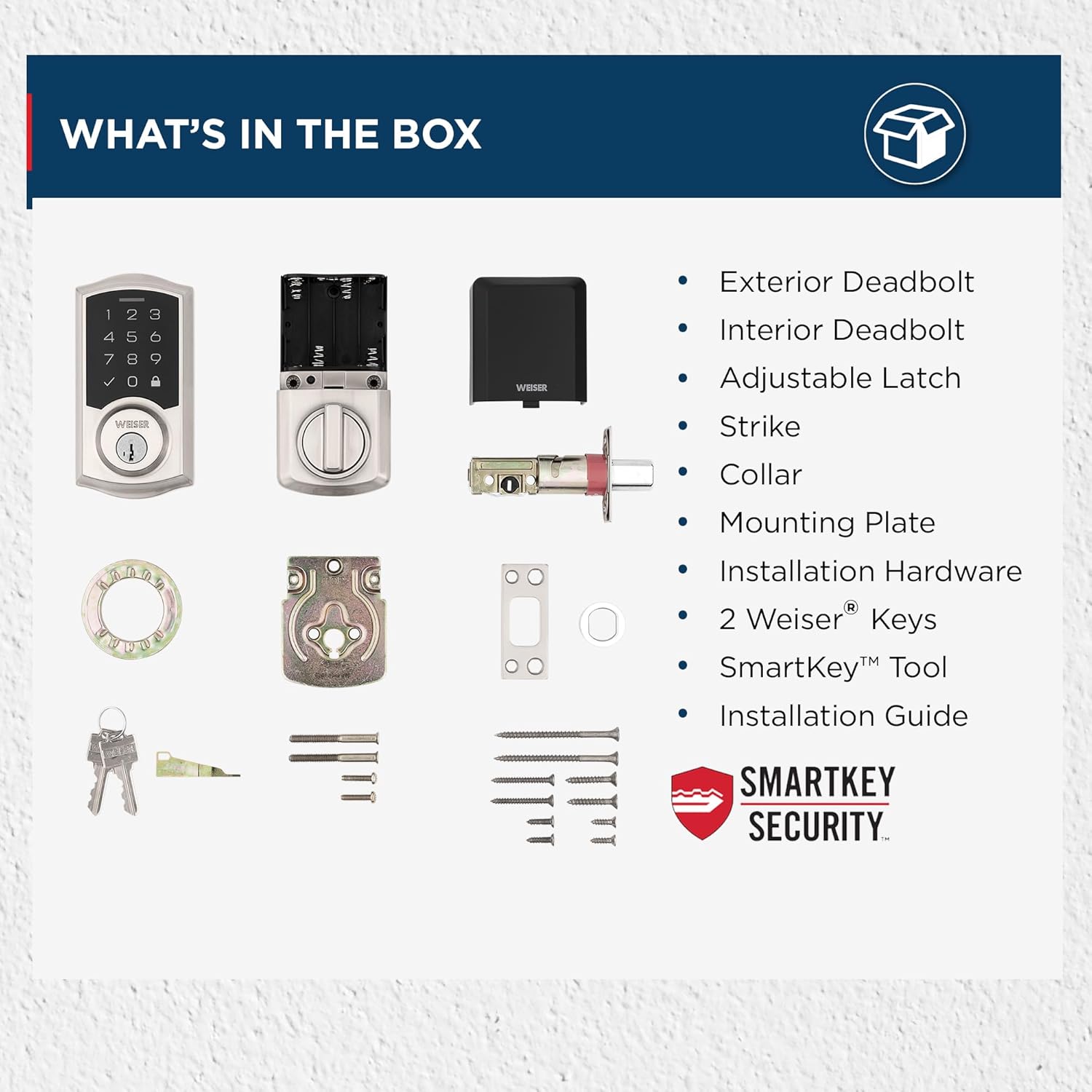
Figure 8: Contents of the SmartCode Deadbolt package.
Setup and Installation
The Weiser SmartCode Electronic Touchpad Deadbolt is designed for straightforward installation. It is compatible with standard doors measuring 1-3/8" to 1-3/4" thick and features an adjustable backset (2-3/8" or 2-3/4").
For detailed, step-by-step interactive 3D instructions with voice and video guidance, it is highly recommended to use the free BILT app. This application provides a seamless setup experience. Refer to the included Installation Manual for traditional written instructions.

Figure 9: Product dimensions and adjustable latch backset details.
Operating Instructions
Operating your SmartCode deadbolt is simple and intuitive:
- Unlocking from Outside: Enter your personalized 4-8 digit user code on the touchpad. The deadbolt will retract, allowing entry.
- Locking from Outside: Press the Lock button (padlock icon) on the touchpad. The deadbolt will extend to secure the door.
- Unlocking/Locking from Inside: Use the turn button on the interior assembly to manually lock or unlock the deadbolt.
- Adding/Deleting User Codes: Refer to the detailed instructions in the Installation Manual for programming new user codes or deleting existing ones using the master code.
- SmartKey Re-keying: To re-key the lock to a new key, follow the specific instructions provided with the SmartKey tool and in the Installation Manual.
Maintenance
To ensure the longevity and optimal performance of your SmartCode deadbolt, follow these maintenance guidelines:
- Battery Replacement: The deadbolt operates on 4 AA batteries. Replace batteries when the low battery indicator illuminates or when the lock's operation becomes sluggish. To replace, slide off the interior cover to access the battery compartment.
- Cleaning: Clean the touchpad and exterior surfaces with a soft, damp cloth. Avoid abrasive cleaners or solvents that could damage the finish or electronic components.
- Lubrication: Periodically lubricate the deadbolt latch and cylinder with a silicone-based lubricant to ensure smooth operation. Do not use oil-based lubricants.
Troubleshooting
If you encounter issues with your SmartCode deadbolt, try the following troubleshooting steps:
- Lock Mechanism Lagging: If the lock mechanism lags or requires multiple code entries, first ensure the batteries are fresh and properly installed. Check for any obstructions in the door frame or strike plate that might impede the deadbolt's movement. Re-calibration of the lock might be necessary; refer to the Installation Manual for specific steps.
- Keypad Unresponsive: Check battery levels. If the keypad does not light up or respond, replace the batteries. Ensure the keypad is clean and free from debris.
- Code Not Working: Verify that you are entering the correct user code. Ensure the master code has not been changed. If multiple codes are not working, try re-programming a known working code or performing a factory reset (refer to manual).
- Deadbolt Not Extending/Retracting Fully: Check for proper alignment of the strike plate and the deadbolt. The door frame might need adjustment. Ensure the door is fully closed when attempting to lock.
For persistent issues, consult the comprehensive troubleshooting section in your Installation Manual or contact Weiser customer support.
Specifications
| Attribute | Detail |
|---|---|
| Brand | Weiser |
| Model Name | SmartCode |
| Model Number | 9GED92700-001 |
| Lock Type | Deadbolt, Electronic |
| Material | Metal |
| Color | Satin Nickel |
| Style | Traditional |
| Dimensions (L x W x H) | 2.81 x 1 x 5.38 inches |
| Item Weight | 1 pounds (454 Grams) |
| Power Source | 4 AA Batteries (not included) |
| User Codes | Up to 50 user codes + 1 Master code |
| ANSI Grade | Grade 2 |
| Door Thickness Compatibility | 1-3/8" to 1-3/4" |
| Backset | Adjustable (2-3/8" or 2-3/4") |
| Special Features | Anti-Bump, Auto-Lock, Back-Lit Keypad, One-Touch Lock, Weather Resistant |
Warranty and Support
The Weiser SmartCode Electronic Touchpad Deadbolt comes with a One-Year Electronic Warranty. For specific terms and conditions, please refer to the warranty information included in your product packaging or visit the official Weiser website.
For further assistance, technical support, or to purchase replacement parts, please contact Weiser customer service. Contact information can typically be found in your Installation Manual or on the Weiser website.
Related documents9GED92700-001


Ask a question about this manual
Ask about setup, troubleshooting, compatibility, parts, safety, or missing instructions. Manuals+ will review the question and use this page’s manual context to help answer it.