
Product Overview
The Weiser SmartCode Electronic Touchpad Deadbolt offers enhanced security and convenience for your home. This modern deadbolt features a touchpad for keyless entry, allowing access via personalized codes. It incorporates SmartKey re-key technology for easy re-keying and operates on 4 AA batteries. The sleek matte black finish complements contemporary home aesthetics.

Front and back view of the Weiser SmartCode Electronic Touchpad Deadbolt in Matte Black.
What's Included
Verify that all components are present before beginning installation:
- Exterior Deadbolt Assembly
- Interior Deadbolt Assembly
- Adjustable Latch
- Strike Plate
- Collar
- Mounting Plate
- Installation Hardware (screws)
- 2 Weiser Keys
- SmartKey Tool
- Installation Guide (this manual)

All components included in the product packaging for the SmartCode Deadbolt.
Setup and Installation
The Weiser SmartCode Deadbolt is designed for straightforward installation. It is compatible with standard doors measuring 1-3/8" to 1-3/4" thick and features an adjustable backset (2-3/8" or 2-3/4"). For detailed, step-by-step interactive 3D instructions with voice and video guidance, it is recommended to use the free BILT app.
Ensure proper alignment and secure fastening of all components during installation to guarantee optimal performance and security.

The SmartCode Deadbolt is suitable for various entry points including main entry doors, side doors, shed doors, and garage doors.
Operating Instructions
Keyless Entry
Gain entry by simply entering your personalized access code on the touchpad. The touchpad features bright LED illumination for easy code access, tactile feedback, and fingerprint resistance to protect the privacy of your access codes. The keypad remains lit for 30 seconds after inactivity.

The keyless entry feature provides secure and convenient access to your home.
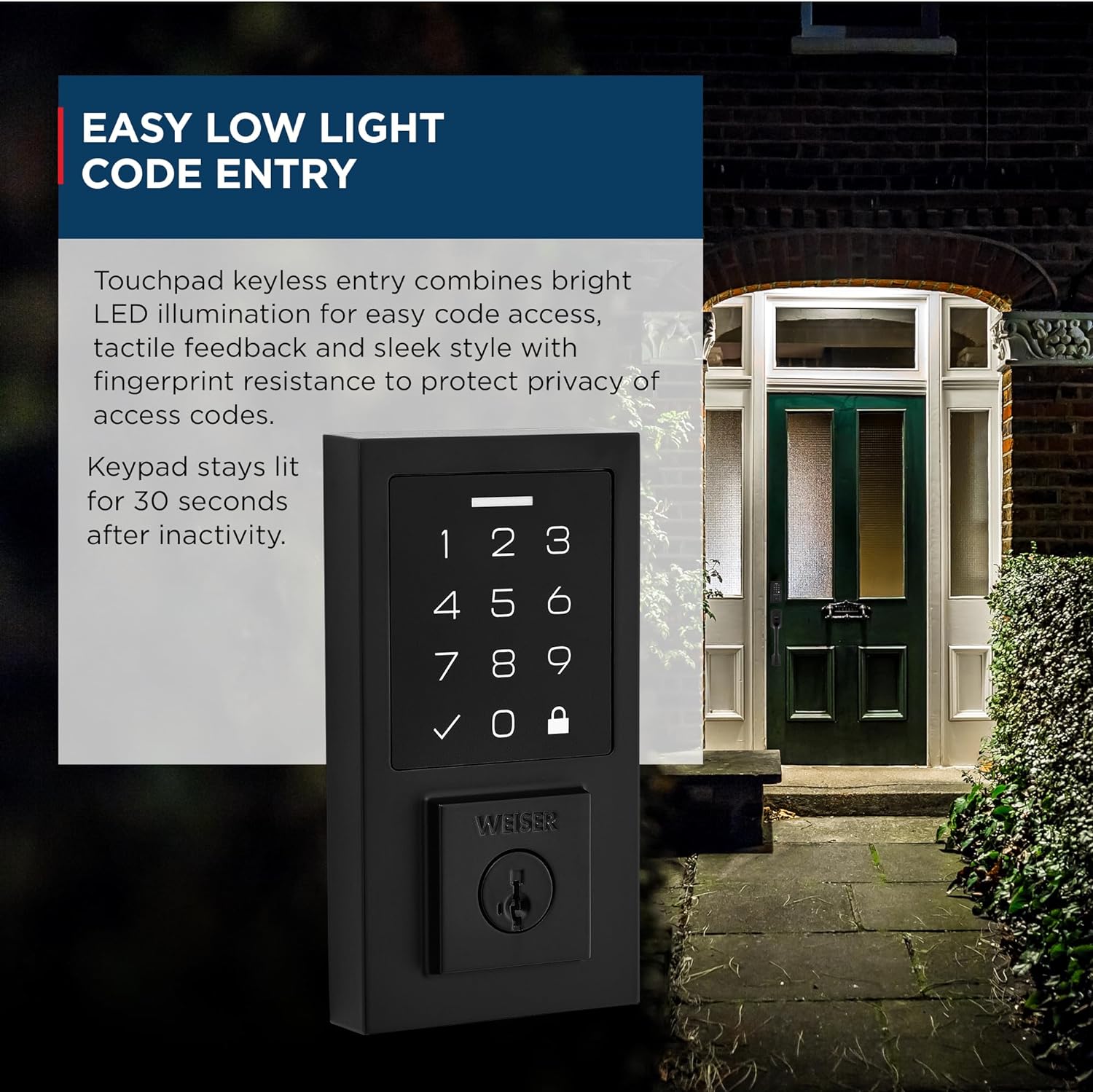
The touchpad's bright LED illumination ensures easy code entry even in low light conditions.
Setting User Codes
The SmartCode Deadbolt supports up to 50 unique user access codes, in addition to one master code. This allows for personalized access for family members, guests, or service providers.

The lock supports 50 user access codes and 1 master code for flexible access management.
Auto-Lock Feature
The motorized deadbolt provides fast and quiet operation with a one-touch motorized locking function. The auto-lock feature can be configured to automatically lock the door after a set period, providing added security without requiring manual action.

The auto-lock feature secures your door with a single touch, eliminating the need for additional turning or twisting.
Maintenance
SmartKey Security Re-keying
The SmartKey Security feature allows you to re-key your lock in seconds. This technology protects against advanced break-in techniques and enables you to maintain key control, making lost, stolen, or unauthorized keys obsolete without removing the lock from your door.

SmartKey Security protects against kick-in, bump, pick, drill, and saw attacks, and allows for quick re-keying.
Battery Replacement
The SmartCode Deadbolt operates on 4 AA batteries. When the battery level is low, the lock will provide an indicator. Replace all four batteries simultaneously with new, high-quality alkaline batteries to ensure optimal performance.
Troubleshooting
If you encounter issues with your Weiser SmartCode Electronic Touchpad Deadbolt, consider the following common solutions:
- Code Not Working: Ensure you are entering the correct code. Verify that the lock is not in a programming mode. Try re-entering the code slowly and deliberately.
- Lock Mechanism Lagging/Not Responding: Check the battery level and replace batteries if necessary. Ensure the door frame and strike plate are properly aligned and not obstructing the deadbolt. Lubricate the latch and deadbolt mechanism if there is friction.
- Keypad Not Lighting Up: This typically indicates low battery power. Replace the batteries.
- Motorized Deadbolt Not Extending/Retracting: Check for any obstructions in the door frame or strike plate. Ensure the batteries are fresh and correctly installed.
If problems persist after attempting these steps, refer to the comprehensive installation guide or contact Weiser customer support.
Specifications
| Brand | Weiser |
| Model Name | SmartCode |
| Model Number | 9GED92700-004 |
| Lock Type | Deadbolt, Electronic |
| Material | Metal |
| Color | Black (Matte Black Finish) |
| Style | Contemporary |
| Item Dimensions (L x W x H) | 2.75 x 1 x 5.19 inches |
| Item Weight | 1 pounds (454 Grams) |
| Power Source | 4 AA Batteries (not included) |
| Door Compatibility | 1-3/8" to 1-3/4" thick doors, adjustable backset (2-3/8" or 2-3/4") |
| User Codes | 50 User Codes, 1 Master Code |
| Security Rating | ANSI Grade 2 |

Detailed dimensions of the Weiser SmartCode Touchpad Deadbolt components.
Warranty and Support
Weiser products are backed by a comprehensive warranty. For specific warranty details regarding your SmartCode Electronic Touchpad Deadbolt, please refer to the warranty card included in your product packaging or visit the official Weiser website.
For technical assistance, troubleshooting, or to inquire about replacement parts, please contact Weiser Customer Support:
- Website: www.weiserlock.com
- Phone: Refer to your regional Weiser support contact information.
When contacting support, please have your product model number (9GED92700-004) and purchase information readily available.


