
ZEAPON AA-E1
ZEAPON Micro 3 Slider Motor Instruction Manual
Model: AA-E1
Introduction
This manual provides detailed instructions for the setup, operation, and maintenance of your ZEAPON Micro 3 Slider Motor. Please read this manual thoroughly before use to ensure proper functionality and to maximize the performance of your device. The Micro 3 Slider Motor is designed to enhance the capabilities of ZEAPON Micro 3 M500, M700, and M1000 camera sliders.
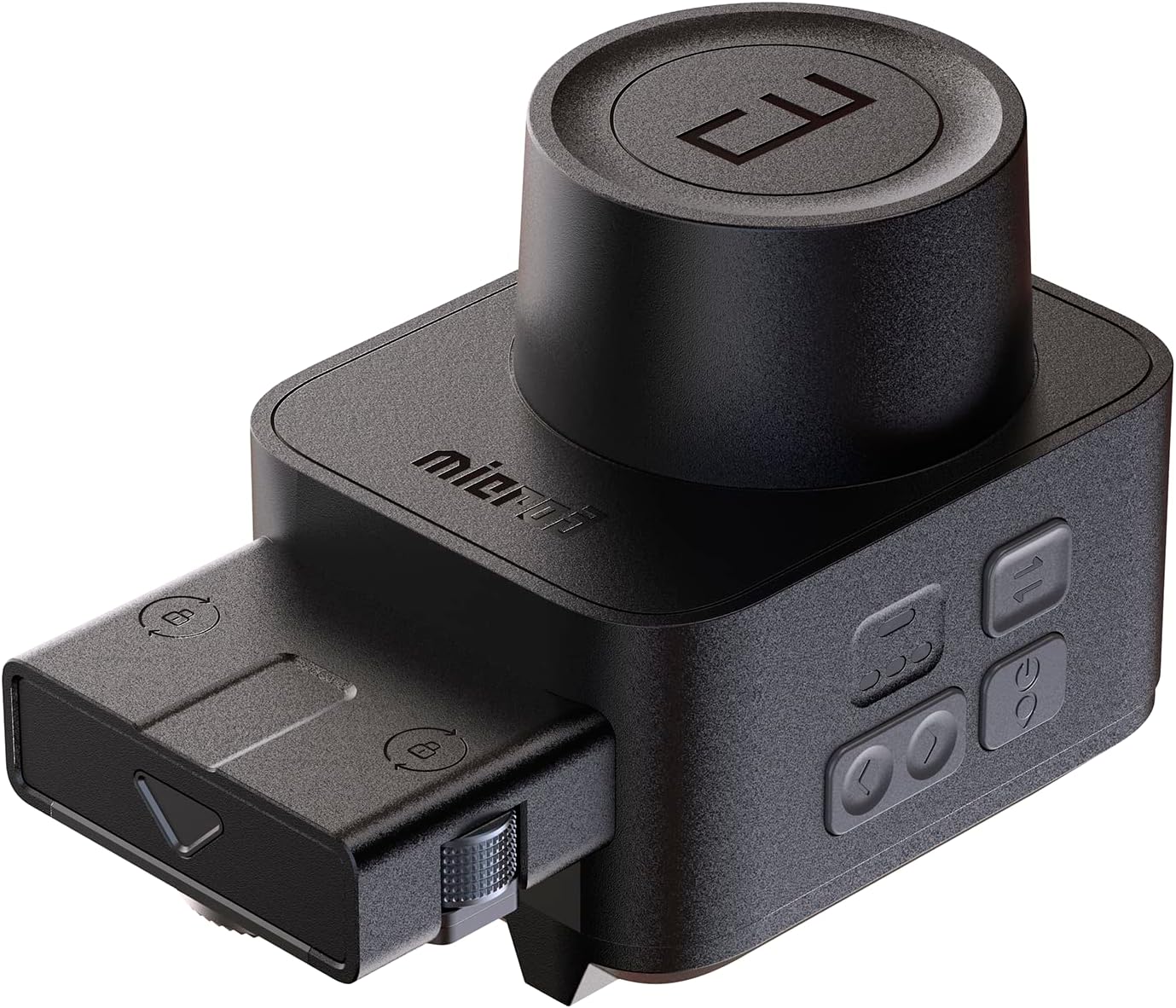
Front view of the ZEAPON Micro 3 Slider Motor, showcasing its compact design and control knob.
Key Features
- Hellaflush Design, 4 KG Payload: The Micro 3 utilizes a 45-degree angled track design, distributing weight vertically and horizontally. This results in a stable platform with a 4 kg payload limit in any direction, and a horizontal load capacity of up to 12 kg.
- Vacuum Adjustable Damping: Incorporates "Vacuum Adjustable Damping" technology for smooth and consistent camera movements. The vacuum structure and special damping grease provide solid damping smoothness and allow stepless adjustment of movement resistance between levels 1 and 5.
- Fast Switching Without Replacement of Belt: Features a non-carrying design where the slider rail and motor are independent, driven by a high-strength stainless steel Arri gear. The motor can be easily integrated and removed using quick-release screws, allowing effortless switching between manual and motorized slider operation.
- Triple Support System: A new triple support system shifts tripod rod stress points from the slider's center to support components at both ends. Standard 1/4" and 3/8" screw ports are included. This design enhances stability on flat surfaces and allows for creative mounting options, such as upside-down or car mounting.

Overview of the ZEAPON Micro 3 Double Distance Slider system, highlighting its key features.
Package Contents
Verify that all items are present in the package:
- Micro3 slider motor ×1
Setup Instructions
1. Attaching the Motor to the Slider
- Ensure the Micro 3 slider is clean and free of debris.
- Align the Micro 3 Slider Motor with the designated attachment points on your ZEAPON Micro 3 M500, M700, or M1000 camera slider.
- Secure the motor using the quick-release screws. Ensure it is firmly attached to prevent movement during operation.

The Micro 3 Slider Motor securely attached to a compatible camera slider.
2. Camera Mounting
- Mount your camera onto the slider's camera plate using the appropriate 1/4" or 3/8" screw.
- Ensure the camera is balanced on the slider for optimal performance.

Detail of the camera mounting plate with interchangeable 1/4" and 3/8" screws.
3. Powering the Motor
Connect the motor to a 5V 2A power source using a USB cable. This can be a wall adapter or a power bank.

The slider motor connected to a 5V 2A wall adapter for power.

The slider motor connected to a portable power bank for mobile use.
Operating Instructions
1. Power On/Off
Press and hold the power button on the motor to turn it on or off. Indicator lights will confirm the power status.

Side view of the motor showing the power button and status indicators.
2. Adjusting Damping
The "Vacuum Adjustable Damping" feature allows you to control the resistance of the slider movement. Rotate the damping adjustment knob to select a level between 1 and 5, where 1 is the lowest resistance and 5 is the highest.

Diagram showing the internal mechanism of the vacuum adjustable damping system.
3. Switching Between Manual and Motorized Modes
The motor can be quickly detached or attached to switch between manual and motorized operation. Use the quick-release screws for this transition.

Illustration of the quick-release mechanism for detaching or attaching the motor.
4. App Control and Features Overview
The ZEAPON Micro 3 Slider Motor can be controlled remotely via a dedicated mobile application. This allows for precise control over movement, speed, and advanced features like time-lapse photography without the need for physical cables. The video below demonstrates various operational aspects and features of the Micro 3 Slider system.
This video demonstrates the various features and operational aspects of the ZEAPON Micro 3 Camera Slider, including setup, damping adjustment, quick switching, and app control. It showcases the product's versatility for different shooting scenarios, such as macro photography and car mounting.
Maintenance
To ensure the longevity and optimal performance of your ZEAPON Micro 3 Slider Motor, follow these maintenance guidelines:
- Cleaning: Regularly wipe the motor and slider tracks with a soft, dry cloth to remove dust and debris. Avoid using harsh chemicals or abrasive materials.
- Storage: Store the motor in a dry, cool place, away from direct sunlight and extreme temperatures.
- Inspection: Periodically check all screws and connections to ensure they are secure.
Troubleshooting
If you encounter issues with your ZEAPON Micro 3 Slider Motor, refer to the following common problems and solutions:
- Motor Not Responding:
- Ensure the motor is properly powered and the power indicator lights are on.
- Check the USB cable connection.
- Verify that the motor is securely attached to the slider.
- Unsmooth Movement:
- Check the damping adjustment knob. Adjust it to a higher level if the movement is too loose.
- Clean the slider tracks to remove any obstructions.
- Ensure the camera is balanced on the slider.
- App Connection Issues:
- Ensure Bluetooth is enabled on your mobile device.
- Restart the motor and the mobile application.
- Check for app updates.
For further assistance, please contact ZEAPON customer support.
Specifications
| Feature | Detail |
|---|---|
| Brand | ZEAPON |
| Model Number | AA-E1 |
| Compatible Devices | Camera |
| Item Weight | 2.75 pounds |
| Package Dimensions | 17.72 x 6.22 x 5.2 inches |
| Color | Black |
| UPC | 796784457870 |
| First Available | September 19, 2022 |
Warranty and Support
For warranty information, technical support, or further inquiries, please visit the official ZEAPON store or contact their customer service directly.
Official ZEAPON Store: ZEAPON Store on Amazon
Related documentsAA-E1


Ask a question about this manual
Ask about setup, troubleshooting, compatibility, parts, safety, or missing instructions. Manuals+ will review the question and use this page’s manual context to help answer it.