1. Introduction
The Hantek DSO2D15 is a cost-effective digital storage oscilloscope designed for a wide range of applications including communications, aerospace, embedded systems, computers, research, and education. This device features a 150MHz bandwidth, 1GSa/s real-time sampling rate, and an 8M memory depth. It also integrates a 1-channel 25MHz waveform generator, a 3-digit digital voltage meter, and a 6-digit hardware frequency indicator.
This manual provides essential information for the proper setup, operation, and maintenance of your Hantek DSO2D15 oscilloscope, ensuring optimal performance and longevity.
2. Product Overview
2.1 Key Features
- 2 channels with independent control knobs.
- 150MHz analog channel bandwidth.
- Sampling rate up to 1 GSa/s.
- 8M memory depth.
- Vertical range: 2mV/div ~ 10V/div.
- Built-in 1-channel 25MHz waveform generator supporting arbitrary waveform output.
- Vertical resolution: 8-bit.
- Supports 14 trigger modes including Edge, Pulse, Video, Slope, Overtime, Window, Pattern, Interval, Under Amp, UART, LIN, CAN, SPI, IIC.
- BUS decode and protocol analysis for RS232/UART, I2C, SPI, CAN, LIN.
- Ability to save multiple data formats: settings, waveforms, reference waveforms, CSV, pictures.
- Integrated 3-digit digital voltage meter and 6-digit hardware frequency indicator.
- 32 types of auto measurements with statistics (max, min, standard deviation, etc.).
- Two sets of digital voltmeters.
- Support for threshold testing and free measurements within the screen.
- Abundant SCPI remote command control.
- USB Host/Device connectivity.
- 7-inch TFT LCD screen with 800x480 pixels and 16 million display colors.
2.2 What's in the Box
Upon unpacking, please verify that all items listed below are present and in good condition:
- 1 x Hantek DSO2D15 Digital Storage Oscilloscope
- 2 x PP-150B 150MHz Oscilloscope Probes
- 1 x USB Cable
- 2 x Clip Lines
- 1 x Power Cable (US type)

Image: The Hantek DSO2D15 Digital Storage Oscilloscope shown with its standard accessories, including probes, USB cable, clip lines, and power cable.
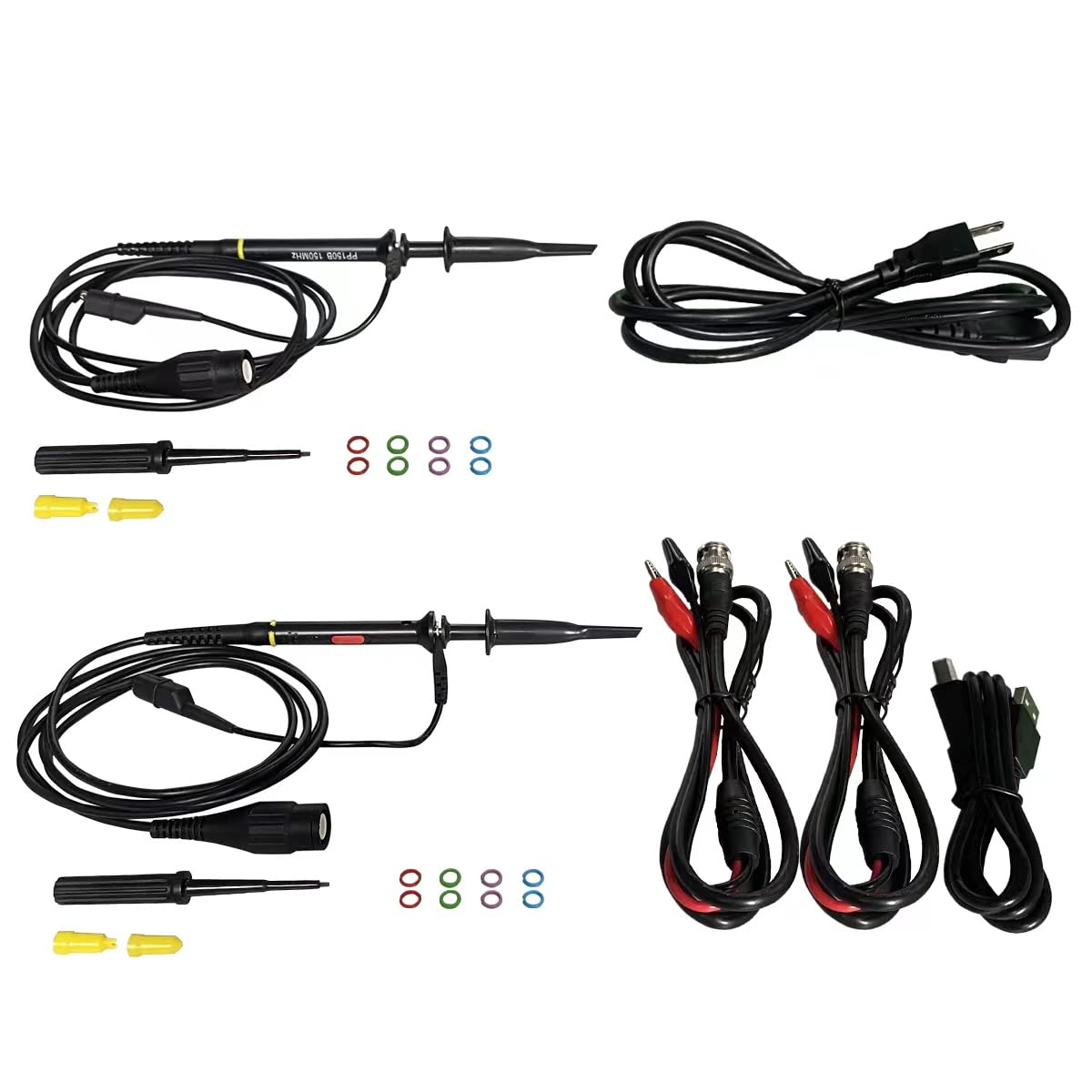
Image: A closer view of the accessories included with the Hantek DSO2D15, featuring two oscilloscope probes, a USB cable, and two sets of clip lines.
3. Setup
3.1 Power Connection
- Ensure the oscilloscope is placed on a stable, flat surface with adequate ventilation.
- Connect the provided power cable to the power input port on the rear of the oscilloscope.
- Plug the other end of the power cable into a suitable AC power outlet (100-240V, 50/60Hz).
- Press the power button on the front panel to turn on the device.
3.2 Probe Connection
- Connect the BNC connector of the oscilloscope probe to the CH1 or CH2 input port on the front panel.
- Ensure the probe is securely twisted into place.
- Attach the ground clip of the probe to the circuit's ground point.
- Adjust the probe's attenuation setting (e.g., 1X, 10X) to match the setting on the oscilloscope's input channel menu.
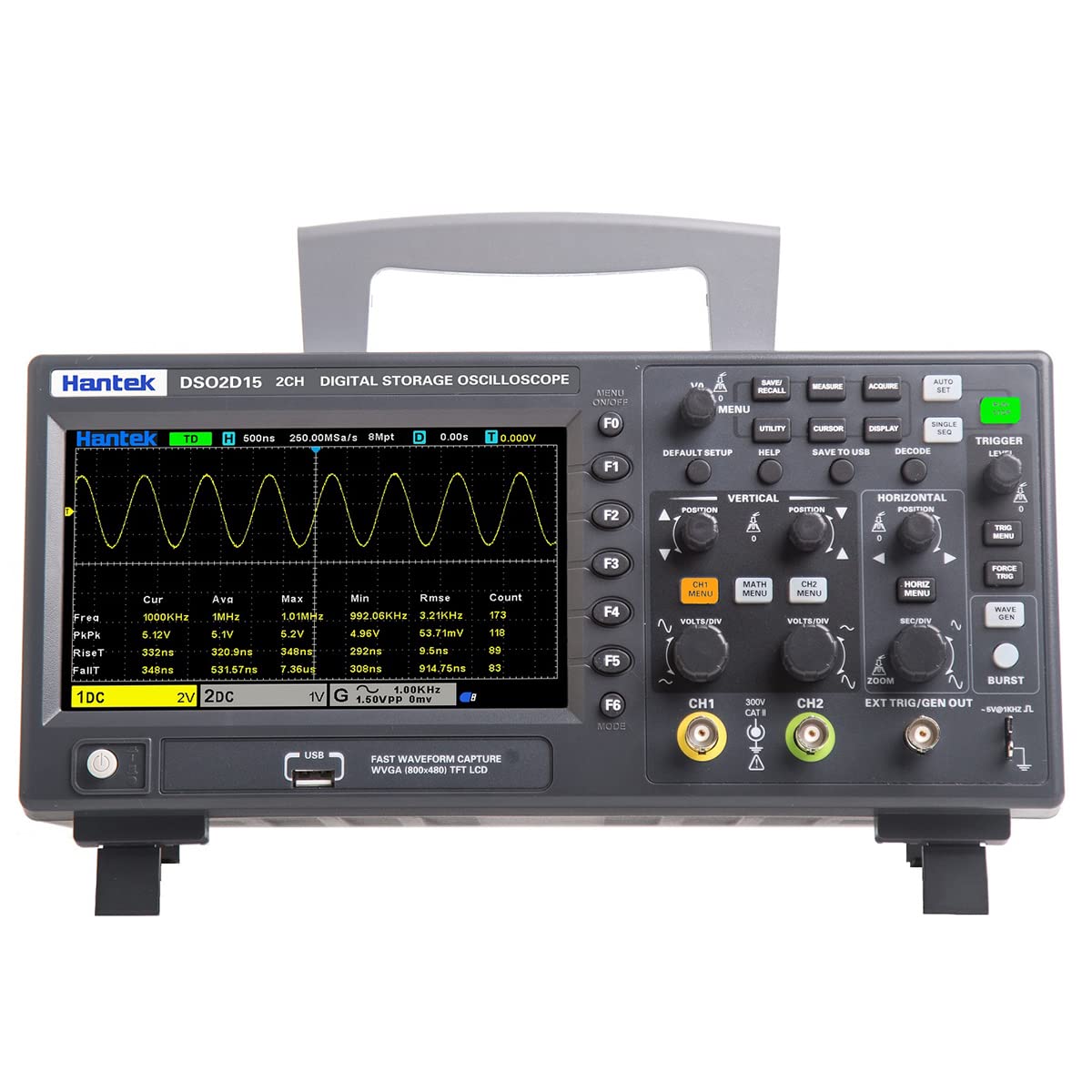
Image: Front view of the Hantek DSO2D15 oscilloscope, showing the display, control knobs, function buttons, and input channels (CH1, CH2, EXT TRIG/GEN OUT).
3.3 Software and Firmware Updates
For optimal performance and to resolve potential issues, it is recommended to regularly check for and install the latest software and firmware updates. PC software is compatible with Windows 7/8/10 (32-bit and 64-bit). macOS is not supported.
Please visit the official Hantek website for the most current downloads: www.hantek.com
4. Operating Instructions
4.1 Basic Waveform Display
- After connecting the probe to your circuit, press the AUTO SET button for automatic waveform optimization.
- Use the VERTICAL knobs (VOLTS/DIV) for CH1 and CH2 to adjust the vertical scale (voltage per division).
- Use the HORIZONTAL knob (SEC/DIV) to adjust the horizontal scale (time per division).
- Adjust the POSITION knobs to move the waveform vertically or horizontally on the screen.

Image: The Hantek DSO2D15 oscilloscope screen showing a clear, stable waveform, demonstrating its display capabilities.
4.2 Trigger System
The trigger system stabilizes repetitive waveforms and captures single-shot events. Use the TRIGGER LEVEL knob to set the voltage level at which the oscilloscope triggers. Various trigger modes (Edge, Pulse, Video, etc.) can be selected via the TRIGGER MENU button.
4.3 Waveform Generator (AWG)
The built-in 25MHz arbitrary waveform generator can be accessed via the WAVE GEN button. This allows you to output various standard and arbitrary waveforms for testing circuits.
4.4 Measurements and Analysis
- Press the MEASURE button to access automatic measurement functions. The DSO2D15 supports 32 types of auto measurements with real-time statistics.
- Use the CURSOR button to enable manual cursors for precise voltage and time measurements.
- The DECODE button allows for serial bus protocol analysis (RS232/UART, I2C, SPI, CAN, LIN).
4.5 Saving Data
The oscilloscope allows saving various data formats to a USB drive connected to the front USB Host port. Press the SAVE TO USB button to save settings, waveforms, reference waveforms, CSV data, or screenshots (pictures).
5. Maintenance
5.1 General Cleaning
To maintain the oscilloscope's appearance and functionality, regularly clean the exterior with a soft, damp cloth. Avoid using abrasive cleaners or solvents that could damage the casing or screen. Ensure the device is powered off and unplugged before cleaning.
5.2 Safety Precautions
WARNING: Hazardous voltage inside. Do not remove the cover unless by specified personnel. This device operates with high internal voltages that can cause severe injury or death. Only qualified service personnel should attempt internal repairs or maintenance.

Image: Rear view of the Hantek DSO2D15 oscilloscope, clearly showing the power input, USB port, and a prominent warning label regarding hazardous internal voltage.
5.3 Storage
When not in use, store the oscilloscope in a dry, dust-free environment, away from direct sunlight and extreme temperatures. Use the original packaging or a suitable carrying case for protection during transport.
6. Troubleshooting
6.1 Common Issues and Solutions
- Frozen Screen Issue: If the screen freezes, try restarting the device. Ensure you have the latest firmware installed from the Hantek website, as this can often resolve software-related stability issues.
- Intermittent Channel 2 Problem: This can sometimes be resolved by updating the firmware. Also, check the probe connection for Channel 2 to ensure it is secure and the probe itself is not faulty. Try swapping probes between channels to isolate the issue.
- No Waveform Display:
- Verify the probe is correctly connected to both the oscilloscope and the circuit under test.
- Check the probe's attenuation setting and ensure it matches the oscilloscope's channel setting.
- Adjust the VOLTS/DIV and SEC/DIV settings to ensure the waveform is within the display range.
- Press the AUTO SET button.
- Ensure the trigger level is appropriately set and the trigger mode is suitable for the signal.
- PC Software Connectivity Issues: Ensure you are using a Windows 7/8/10 (32-bit or 64-bit) operating system. Download and install the latest PC software and USB drivers from the Hantek website.
6.2 Further Assistance
If you encounter persistent issues not covered here, please refer to the comprehensive user manual available on the Hantek website or contact Hantek customer support.
7. Specifications
| Parameter | Value |
|---|---|
| Model Number | DSO2D15 |
| Channels | 2 |
| Bandwidth | 150 MHz |
| Sampling Rate | 1 GSa/s |
| Memory Depth | 8M |
| Vertical Range | 2mV/div ~ 10V/div |
| Vertical Resolution | 8-bit |
| Waveform Generator | 1-channel, 25MHz |
| Display | 7-inch TFT LCD, 800x480 pixels, 16M colors |
| Trigger Modes | Edge, Pulse, Video, Slope, Overtime, Window, Pattern, Interval, Under Amp, UART, LIN, CAN, SPI, IIC |
| BUS Decode | RS232/UART, I2C, SPI, CAN, LIN |
| Digital Voltage Meter | 3-digit |
| Hardware Frequency Indicator | 6-digit |
| Product Dimensions | 12.5 x 4.3 x 5.9 inches |
| Product Weight | 6.05 Pounds |
8. Warranty Information
Specific warranty terms and conditions for the Hantek DSO2D15 Digital Storage Oscilloscope are typically provided by the manufacturer or the authorized seller at the time of purchase. Please refer to the documentation included with your product or contact your point of purchase for detailed warranty information, including coverage period and claim procedures.
For general warranty inquiries, you may also visit the official Hantek website.
9. Support
For technical support, software downloads, firmware updates, and additional resources, please visit the official Hantek website:
You can also find product information and potentially contact the seller through the Hantek Store on Amazon: Hantek Amazon Store


