
1. Introduction
Thank you for choosing the Sofucor 60 Inch Ceiling Fan, Model 6004 WD. This manual provides essential information for the safe installation, operation, and maintenance of your new ceiling fan. Please read these instructions thoroughly before beginning installation or use, and retain this manual for future reference.
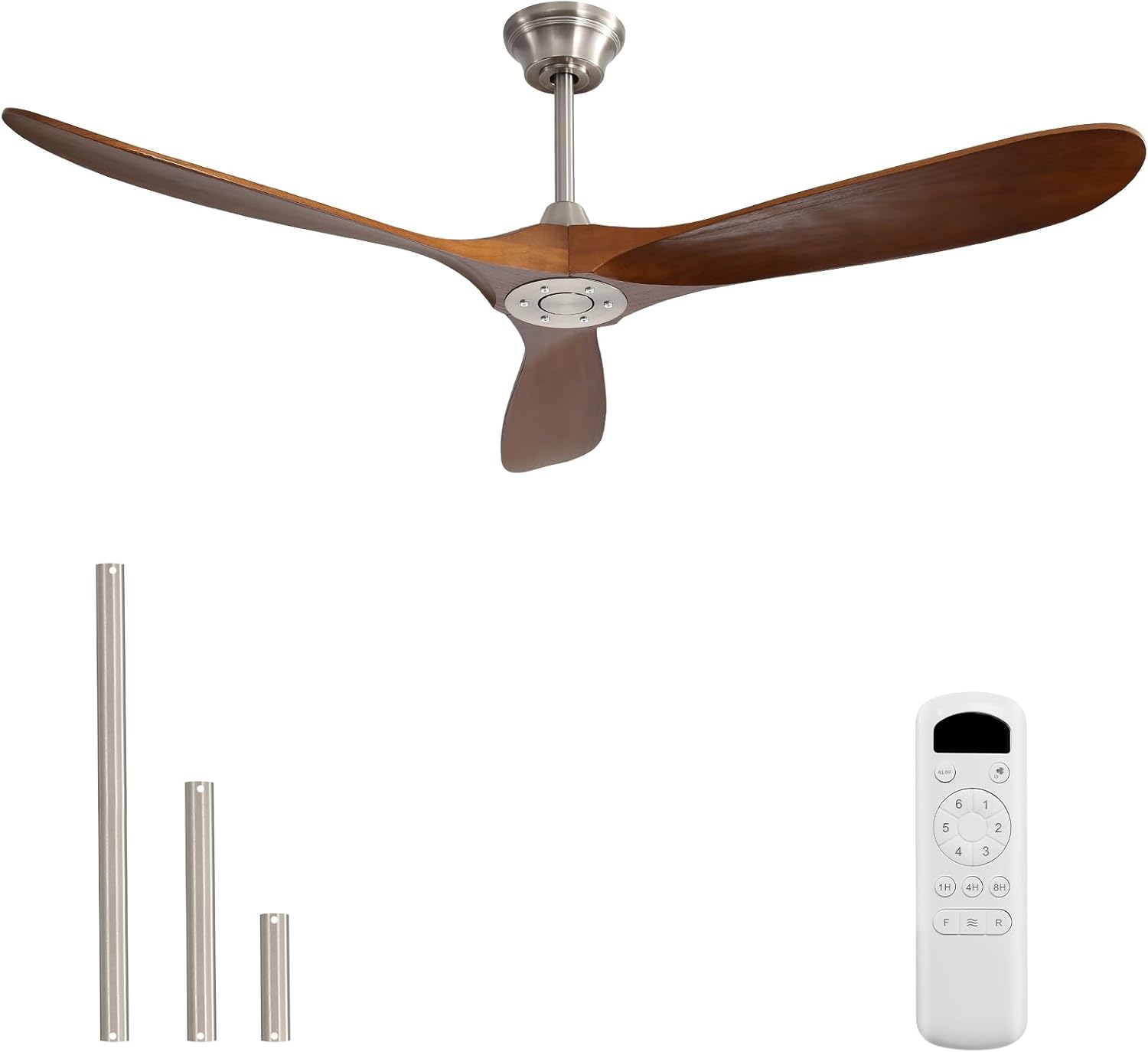
Image 1.1: Sofucor 60 Inch Ceiling Fan, remote control, and various downrod lengths.
2. Safety Information
To reduce the risk of electric shock, fire, or personal injury, always follow these basic safety precautions:
- Read all instructions carefully before installing the fan.
- Ensure the installation site is structurally sound and capable of supporting the fan's weight (approximately 15.67 lbs).
- All wiring must be in accordance with national and local electrical codes. If you are unfamiliar with wiring, consult a qualified electrician.
- Turn off power at the circuit breaker or fuse box before beginning installation to prevent electrical shock.
- Do not operate the fan with damaged blades or any visible defects.
- Maintain a minimum clearance of 7 feet from the floor to the bottom of the fan blades.
- Ensure the fan is securely mounted to a ceiling joist or an outlet box marked 'Acceptable for Fan Support'.
3. Package Contents
Carefully unpack your ceiling fan and verify that all components are present and undamaged. If any parts are missing or damaged, contact customer support immediately.
- Fan Motor Housing (Brushed Nickel body)
- Solid Wood Blades (Walnut, 3 blades)
- Downrods (5 inch, 10 inch, 24 inch)
- Canopy and Mounting Bracket
- Remote Control and Receiver
- Hardware Pack (screws, washers, wire nuts)
- Instruction Manual
Image 3.1: All components included in the Sofucor 60 Inch Ceiling Fan package.
4. Setup and Installation
4.1 Before Installation
Before you begin, ensure the power is disconnected at the main circuit breaker. Gather the necessary tools, which typically include a screwdriver, wire strippers, and a ladder.
4.2 Mounting Options
Your Sofucor ceiling fan can be installed on both flat and sloped ceilings (up to 15 degrees). Select the appropriate downrod length for your ceiling height and room type.

Image 4.1: Product dimensions and suitable ceiling types for installation.
4.3 Component Overview
Familiarize yourself with the main components of the fan for easier assembly.
- Thicken Downrods: Available in 5, 10, and 24 inches for flexible installation heights.
- Sturdier Structure: Designed for longer life and stability.
- Energy Saving Silicon Steel DC Motor: Provides efficient and quiet operation.
- 3 Solid Wood Blades: Crafted from natural solid wood for durability and aesthetic appeal.
- Control Remote Receiver & Enhanced Steel Hanger: For convenient operation and secure mounting.

Image 4.2: Key components and their features.
4.4 General Installation Steps
- Mounting Bracket Installation: Secure the mounting bracket to the ceiling joist or an approved outlet box.
- Downrod Assembly: Attach the chosen downrod to the fan motor housing.
- Wiring: Connect the fan's electrical wires to the household wiring according to the provided wiring diagram. Ensure all connections are secure.
- Hanging the Fan: Carefully lift the fan assembly and hang it on the mounting bracket.
- Blade Attachment: Securely attach the solid wood blades to the fan motor housing.
- Canopy Installation: Slide the canopy up to the ceiling and secure it to cover the wiring.
Note: For detailed visual instructions, refer to any installation videos provided by Sofucor or consult a professional electrician if you are unsure about any steps.
5. Operating Instructions
Your Sofucor ceiling fan is controlled by a convenient remote control, offering various settings for optimal comfort.
5.1 Remote Control Functions
The remote control allows you to manage all fan functions. Ensure batteries are correctly installed.
- On/Off Button: Powers the fan on or off.
- Speed Settings (1-6): Adjusts the fan speed from gentle (1) to strong (6).
- Timer Button (1H/2H/4H/8H): Sets the fan to turn off automatically after 1, 2, 4, or 8 hours.
- Reverse Function (F/R): Changes the direction of blade rotation for summer or winter mode.

Image 5.1: Remote control features for silent operation and various settings.
5.2 Speed Settings
Choose from 6 distinct speed settings to suit your comfort needs:
- Levels 1-2: Comfortable wind, ideal for sleeping or reading.
- Levels 3-4: Natural wind, suitable for entertainment or social gatherings.
- Levels 5-6: Strong wind, perfect for sports or fitness activities.

Image 5.2: Description of the 6-speed settings.
5.3 Reversible DC Motor
The reversible DC motor allows for year-round comfort by changing the direction of airflow:
- Summer Mode (Downward Airflow): Blades rotate counter-clockwise, pushing cool air down to create a refreshing breeze.
- Winter Mode (Upward Airflow): Blades rotate clockwise, drawing cool air up and redistributing warm air trapped at the ceiling, helping to warm the room.

Image 5.3: Reversible airflow for seasonal comfort.
5.4 Timer Function
Utilize the timer function to automatically turn off the fan after a set period, promoting energy saving and undisturbed rest.

Image 5.4: Timer settings for convenient operation.
5.5 Quiet Operation
The Sofucor fan is designed for quiet operation, with a noise level as low as 30dB, ensuring a peaceful environment.

Image 5.5: The fan's quiet operation ensures a comfortable sleeping environment.
6. Maintenance
Regular maintenance helps ensure the longevity and optimal performance of your ceiling fan.
- Cleaning: Use a soft, damp cloth to clean the fan blades and motor housing. Do not use abrasive cleaners or solvents.
- Blade Inspection: Periodically check the blades for any cracks or damage. Replace damaged blades immediately.
- Tighten Screws: Ensure all screws on the motor housing and blade attachments are tight. Loose screws can cause wobbling or noise.
- No Lubrication Needed: The DC motor is permanently lubricated and does not require additional oiling.
7. Troubleshooting
If you encounter issues with your fan, refer to the table below for common problems and solutions.
| Problem | Possible Cause | Solution |
|---|---|---|
| Fan does not start | No power to the fan; Loose wire connections; Remote control not paired or batteries dead. | Check circuit breaker/fuse; Verify all wire connections are secure; Replace remote batteries or re-pair remote with receiver. |
| Fan wobbles | Loose blade screws; Unbalanced blades; Loose mounting bracket. | Tighten all blade screws; Use a balancing kit (not included) to balance blades; Ensure mounting bracket is securely fastened. |
| Remote control not working | Dead batteries; Remote not paired with receiver; Obstruction between remote and receiver. | Replace batteries; Follow pairing instructions in the full manual (if applicable); Ensure clear line of sight to receiver. |
| Fan is noisy | Loose screws; Blades hitting an obstruction; Motor issues. | Check and tighten all screws; Ensure no obstructions are near the blades; If noise persists, contact customer support. |
8. Specifications
Key technical details for your Sofucor 60 Inch Ceiling Fan:
| Feature | Detail |
|---|---|
| Model Name | 6004 WD |
| Size | 60 Inch |
| Color | Walnut blades + Brushed Nickel body |
| Number of Blades | 3 |
| Motor Type | Reversible DC Motor |
| Power Source | DC Powered |
| Voltage | 120 Volts |
| Wattage | 35 watts |
| Control Method | Remote Control |
| Number of Power Levels | 6 |
| Noise Level | 30 dB |
| Indoor/Outdoor Usage | Indoor, Outdoor (covered spaces, not exposed to rain) |
| Item Weight | 15.67 pounds |
| Certifications | ETL/FCC Certified |
9. Warranty and Support
Sofucor is committed to providing quality products and excellent customer service.
9.1 Warranty Information
- Motor Warranty: Lifetime warranty on the DC motor. If the motor does not work, it can be replaced free of charge for life.
- Parts Warranty: 2-year protection for other parts, including fan blades, remote controls, and receivers. These parts can be replaced within 2 years.

Image 9.1: Sofucor warranty and support commitment.
9.2 Customer Support
For technical assistance, installation questions, or warranty claims, please contact our 24/7 customer service team. Detailed contact information can be found on the Sofucor official website or your purchase documentation.
We are always here to assist you and ensure your satisfaction.


