
1. Introduction
Thank you for choosing the STARSCOPE G3 10x42 Monocular Telescope Smartphone Pro Bundle. This manual provides essential information for the proper setup, operation, and maintenance of your monocular. Please read it carefully before use to ensure optimal performance and longevity of your device.
What's in the Box:
- 1 STARSCOPE G3 Monocular Telescope
- 1 G3 Phone Mount
- 1 Rear Lens Cap
- 1 Front Lens Cap
- 1 Extendable Tripod
- 1 Carry Bag
- 1 Lanyard
- 1 Cleaning Cloth
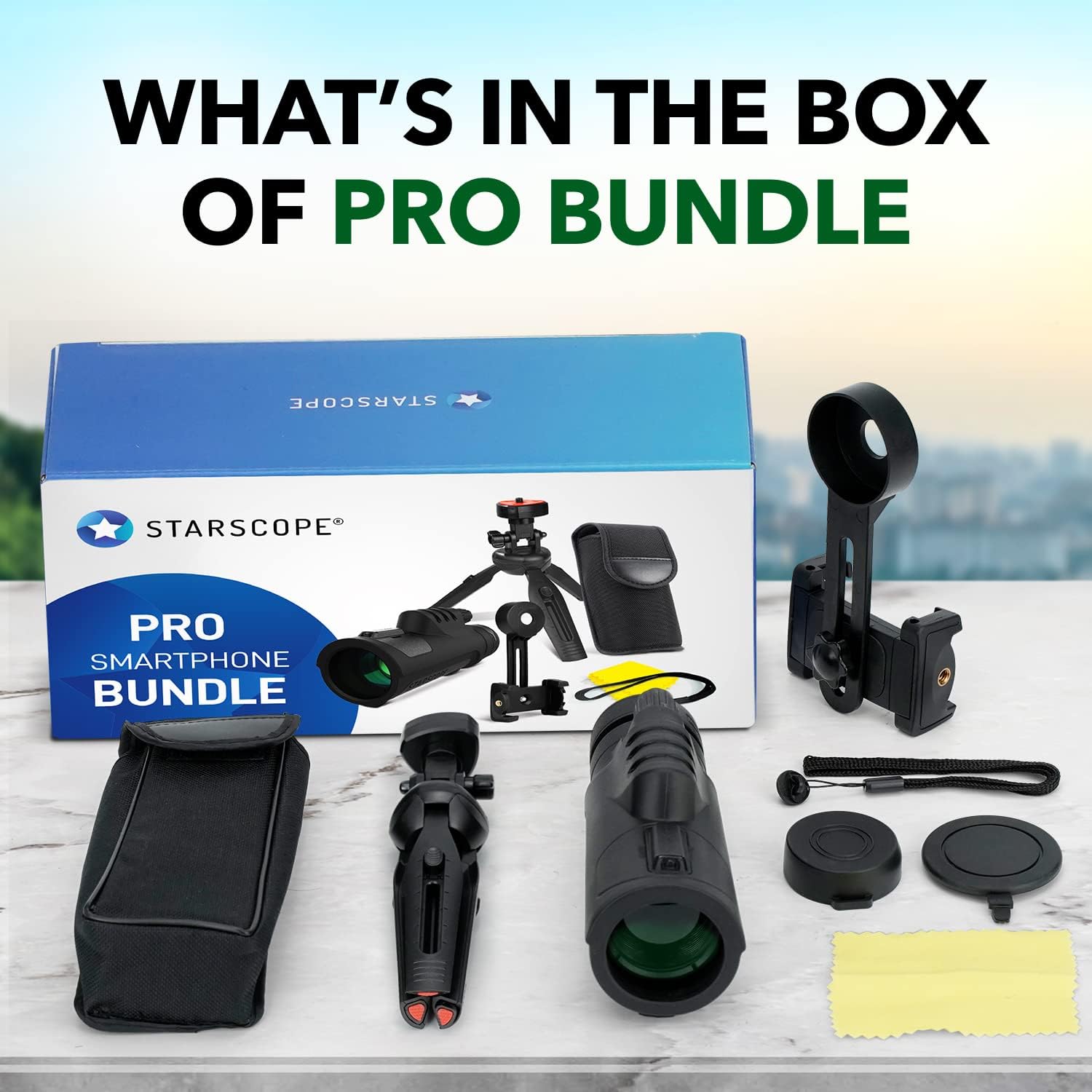
Image: All components included in the STARSCOPE G3 Pro Bundle.
2. Safety Information
- WARNING: Do not look directly at the sun through the monocular. This can cause severe and permanent eye damage.
- Keep the monocular and accessories out of reach of small children to prevent choking hazards.
- Handle the monocular with care to avoid dropping or impact, which can damage optical components.
- Store the monocular in its protective case when not in use to prevent dust and scratches.
3. Components Overview
Familiarize yourself with the different parts of your STARSCOPE G3 monocular and its accessories.

Image: Labeled diagram of the monocular components.
- Objective Lens: The large lens at the front of the monocular that gathers light.
- Ocular Lens (Eyepiece): The lens you look through.
- Focus Knob: Used to adjust the focus for a clear image.
- Tripod Mount: Threaded hole for attaching the monocular to a tripod.
- Lens Caps: Protective covers for the objective and ocular lenses.
- Phone Mount: Adapter to attach a smartphone to the monocular.
- Tripod: Provides stable support for viewing and photography.
4. Setup Instructions
4.1 Attaching the Lanyard
Thread the lanyard through the designated loop on the monocular body. Secure it firmly to prevent accidental drops.
4.2 Using the Tripod
- Unfold the legs of the extendable tripod.
- Adjust the height of the tripod legs as needed. The tripod offers two height options.
- Screw the monocular onto the tripod mount. Ensure it is securely fastened.
- Use the twisting knob on the tripod head to adjust the direction of the monocular.

Image: Attaching the monocular to the tripod.

Image: Detailed view of the tripod's adjustable features.
4.3 Attaching the Smartphone Adapter
- Open the phone mount and securely place your smartphone into the clamps.
- Align the aperture of the phone mount with your smartphone's primary camera lens. Adjust the position until the camera view is centered and free of black edges. If a black screen appears, try aligning with a different lens on your phone.
- Attach the phone mount assembly to the ocular lens of the monocular. Ensure a snug fit.
- Adjust the phone mount and monocular until the image from the monocular is centered on your phone's screen.

Image: Smartphone adapter dimensions and features.
Setup Video Guide:
Video: Instructions on how to set up and mount your phone properly with the monocular.
5. Operating Instructions
5.1 Basic Viewing
- Remove both front and rear lens caps.
- Hold the monocular with one hand and look through the ocular lens.
- Rotate the focus knob until the image appears clear and sharp.

Image: Adjusting the focus knob for clarity.
5.2 Adjusting the Eyecup
The eyecup can be adjusted for comfortable viewing, whether you wear eyeglasses or not.
- Without Eyeglasses: Extend the eyecup by twisting it counter-clockwise until it is fully open.
- With Eyeglasses: Retract the eyecup by twisting it clockwise until it is fully closed. This allows your eyeglasses to be closer to the ocular lens for a full field of view.

Image: Adjustable eyecup for comfortable viewing.
5.3 Using with a Smartphone for Photography/Videography
Once the smartphone adapter is attached and aligned (as per Section 4.3):
- Open your smartphone's camera application.
- Adjust the focus of the monocular using the focus knob until the image on your phone screen is clear.
- Use your phone's digital zoom function to fill the screen with the monocular's view, if desired.
- Capture photos or videos using your phone's camera controls.

Image: Capturing images with the monocular and smartphone.
6. Maintenance
6.1 Cleaning the Lenses
To maintain optical clarity, clean the lenses carefully:
- Use the included cleaning cloth or a soft, lint-free cloth.
- Gently wipe the lens surfaces to remove dust and smudges.
- For stubborn dirt, a small amount of lens cleaning fluid designed for optics can be applied to the cloth, not directly to the lens.
- Avoid using abrasive materials or harsh chemicals, as these can damage the lens coatings.
6.2 Storage
When not in use, store your monocular in a cool, dry place, preferably in its carry bag with lens caps on. Avoid extreme temperatures and high humidity.
6.3 Water Resistance
The STARSCOPE G3 monocular features an IP64 water-resistant design, built to perform in tough, wet environments. While it can withstand splashes and light rain, it is not designed for submersion in water.

Image: Monocular demonstrating IP64 water resistance.
7. Troubleshooting
- Blurry Image:
Ensure the focus knob is properly adjusted. If using with a smartphone, verify the phone's camera is focused and the adapter is correctly aligned with the phone's lens. - Dark or Incomplete Image on Smartphone:
Re-align the smartphone adapter's aperture precisely with your phone's primary camera lens. Adjust the phone's digital zoom to remove any black circular edges. - Monocular Not Stable on Tripod:
Check that the monocular is securely screwed onto the tripod mount. Ensure the tripod legs are fully extended and stable on a flat surface. - Dust or Smudges on Lens:
Clean the lenses gently using the provided cleaning cloth as described in the Maintenance section.
8. Specifications
| Feature | Detail |
|---|---|
| Brand | STARSCOPE |
| Model Name | G3 |
| Zoom Ratio | 10x |
| Objective Lens Diameter | 42 Millimeters |
| Optical Tube Length | 12 Inches |
| Eye Piece Lens Description | FMC (Fully Multi-Coated) |
| Prism Type | BAK4 |
| Focus Type | Fixed Focus |
| Field Of View | 1000 Yards |
| Exit Pupil Diameter | 4.2 Millimeters |
| Product Dimensions | 6.5"D x 2.3"W x 3"H |
| Item Weight | 453 Grams |
| Compatible Devices | Smartphone |
| Water Resistance | IP64 |
9. Warranty Information
The STARSCOPE G3 Monocular Telescope Smartphone Pro Bundle comes with a 1-year warranty from the date of purchase. This warranty covers manufacturing defects and workmanship under normal use. It does not cover damage caused by misuse, accident, unauthorized modification, or improper storage. Please retain your proof of purchase for warranty claims.
10. Customer Support
For any questions, technical assistance, or warranty claims, please contact STARSCOPE customer support. Refer to the product packaging or the retailer's website for the most current contact information.