
1. Overview
The ECONTROLLY RC-913R is a replacement infrared remote control designed for specific Integra AV Receiver models. It is pre-programmed and ready to use without additional setup, offering a straightforward solution for controlling your audio-video receiver.
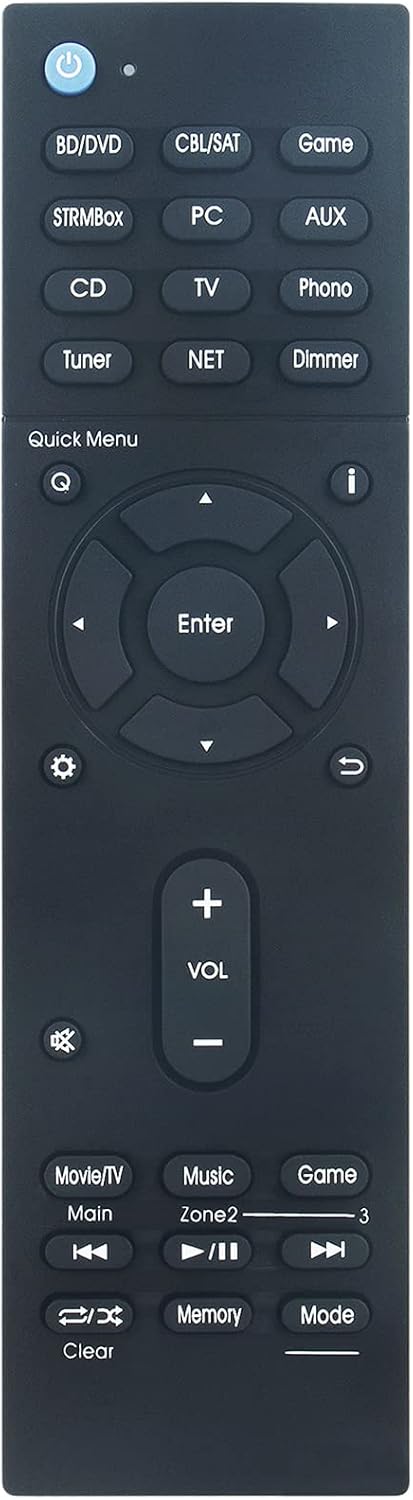
Figure 1: Front view of the RC-913R Remote Control.
2. Compatible Models
This remote control is specifically designed to work with the following Integra AV Receiver models:
- DRX-5
- DRX-5.2
- DRX-4
- DRX-3.2
- DRX-R1.1
- DRC-R1.1
3. Setup
3.1 Battery Installation
The RC-913R remote control requires two (2) AAA ALKALINE batteries for operation. Please follow these steps for battery installation:
- Locate the battery compartment on the back of the remote control.
- Slide the battery compartment cover downwards or in the direction indicated by an arrow to open it.
- Insert two new AAA ALKALINE batteries, ensuring the positive (+) and negative (-) terminals align correctly with the markings inside the compartment.
- Close the battery compartment cover by sliding it back into place until it clicks securely.
Important: Do not use rechargeable batteries. Only use AAA ALKALINE batteries for optimal performance and to prevent potential damage.

Figure 2: Angled view of the RC-913R, showing the general form factor.
4. Operating Instructions
The RC-913R is an infrared remote control, meaning it operates by sending infrared light signals to your Integra AV Receiver. Ensure there is a clear line of sight between the remote control and the receiver's infrared sensor for proper operation. No programming is required; simply insert batteries and begin use.
4.1 Basic Functions
The remote control features dedicated buttons for various functions of your Integra AV Receiver. Below are some common button functionalities:
- Power Button (⏻): Turns the receiver on or off.
- Input Selectors (e.g., BD/DVD, CBL/SAT, Game, STRMBox, PC, AUX, CD, TV, Tuner, NET, Phono): Selects the desired audio/video input source.
- Volume Up/Down (VOL + / -): Adjusts the master volume level.
- Mute (🔇): Mutes or unmutes the audio output.
- Navigation Buttons (Up, Down, Left, Right, Enter): Used to navigate menus and confirm selections on your receiver's display.
- Quick Menu (Q): Accesses quick settings or context-sensitive menus.
- Return (↩): Goes back to the previous menu or screen.
- Dimmer: Adjusts the brightness of the receiver's display.
- Playback Controls (Play/Pause, Skip Forward, Skip Backward): Controls media playback for compatible sources.
- Zone 2: Controls functions for a secondary audio zone, if supported by your receiver.

Figure 3: Button layout of the RC-913R Remote Control.
5. Maintenance
Proper care and maintenance will extend the life of your remote control:
- Cleaning: Wipe the remote control regularly with a soft, dry cloth. For stubborn dirt, slightly dampen the cloth with water; do not use harsh chemicals or abrasive cleaners.
- Battery Care: If the remote control will not be used for an extended period, remove the batteries to prevent leakage, which can damage the device.
- Storage: Store the remote control in a cool, dry place away from direct sunlight, extreme temperatures, and high humidity.
- Avoid Drops: Protect the remote from physical shocks and drops, as this can damage internal components.
6. Troubleshooting
If you experience issues with your RC-913R remote control, consider the following troubleshooting steps:
- Remote Not Responding: Ensure the batteries are inserted correctly with the correct polarity (+/-). Replace old batteries with new AAA ALKALINE batteries.
- No Line of Sight: Make sure there are no obstructions between the remote control and the infrared sensor on your Integra AV Receiver. Point the remote directly at the receiver.
- Weak Signal: If the remote only works at close range, the batteries may be low. Replace them.
- Receiver Issues: Confirm that your Integra AV Receiver is powered on and functioning correctly. Try operating the receiver using its front panel controls.
- Compatibility: Double-check that your receiver model is listed under the compatible models in Section 2.
7. Specifications
| Feature | Specification |
|---|---|
| Model | RC-913R |
| Compatibility | Integra AV Receiver models: DRX-5, DRX-5.2, DRX-4, DRX-3.2, DRX-R1.1, DRC-R1.1 |
| Technology | Infrared (IR) |
| Programming Required | No (Pre-programmed) |
| Power Source | 2 x AAA ALKALINE Batteries (not included) |
| Product Dimensions | 7.09 x 1.97 x 0.59 inches (18 x 5 x 1.5 cm) |
| Item Weight | 2.79 ounces (79 grams) |
| Color | Black |
| Max Number of Supported Devices | 1 |
8. Warranty and Support
For any questions, concerns, or support regarding your ECONTROLLY RC-913R remote control, please contact the manufacturer or seller directly through your purchase platform. Please refer to your purchase documentation for specific warranty information, as it may vary.