Safety Information
Always assemble the table according to the provided instructions. Do not overload the table; the maximum weight recommendation is 80 lbs. Ensure the table is placed in a stable location to prevent tipping. Be cautious of pinch points during assembly.
An anti-tip kit is included for wall-mount safety. It is recommended to use this kit to enhance stability, especially in households with children or pets.
Product Features
- Space-Saving Design: With dimensions of 5.9"D x 70.9"W x 31.5"H, this slim console table is designed to fit into narrow spaces such as behind a sofa, in an entryway, or along a hallway, maximizing functional space.
- Integrated Charging Station: Features 2 built-in plug outlets, 2 USB ports, and a 59" power cord. The top panel can be rotated to position the power strip on the side or in the middle, offering flexibility for charging mobile phones, laptops, desk lamps, or tablets.
- Enhanced Stability: Constructed with a sturdy metal frame and P2 particleboard engineered wood. It includes 4 upgraded adjustable feet for stability on uneven floors and an anti-tip kit for wall-mount security.
- Versatile Functionality: Can be used as a console table, sofa table, entry table, or nightstand. Its rustic and elegant design complements various rooms including living rooms, bedrooms, dining rooms, studies, foyers, offices, and hallways.

Image: Integrated charging station with two AC outlets and two USB ports, designed for convenient device charging.
Setup and Assembly
The HOOBRO Narrow Console Table is designed for straightforward assembly. Numbered accessories, detailed instructions, and necessary assembly tools are included to facilitate the process.
- Included Components: Assembly Guide, Installation Tool.
- Tools Recommended For Assembly: Allen Key, Screw Driver.
- Recommended Number of People for Assembly: 1.
Follow the step-by-step instructions provided in the assembly guide to ensure correct and secure construction. Pay close attention to the orientation of parts, especially when attaching the metal frame components.
Video: Official HOOBRO demonstration of the console table's design and how it fits behind a couch, highlighting its slim profile and functionality.

Image: Key features of the console table, including the wooden top, anti-tip mechanism, robust metal frame, and adjustable feet for stability.
Operating Instructions
Using the Charging Station:
- Connect the table's power cord (59" long) to a wall outlet.
- To access the power outlets and USB ports, ensure the top panel is correctly positioned. The power strip can be rotated to face the side or the middle of the table as preferred.
- Plug in your devices (mobile phones, laptops, desk lamps, tablets) into the 2 AC outlets (120V/12A) or the 2 USB ports (5V/2A).
- Always ensure devices are properly connected and the power cord is not strained or pinched.
Adjusting Table Height:
The table features adjustable feet. Rotate the feet at the bottom of the legs to fine-tune the table's height and ensure stability on uneven surfaces.

Image: A smartphone connected to the charging station, demonstrating the ease of access to power outlets and USB ports.
Maintenance
To maintain the appearance and longevity of your HOOBRO console table, follow these simple care instructions:
- Cleaning: Wipe the table surfaces with a dry cloth. Avoid using harsh chemicals or abrasive cleaners that may damage the finish.
- Spills: Promptly clean any spills to prevent staining, especially on the engineered wood top.
- Stability Check: Periodically check all screws and connections to ensure they remain tight. Re-tighten if necessary.
- Weight Limit: Do not exceed the maximum weight recommendation of 80 lbs to prevent damage to the table structure.
Troubleshooting
If you encounter any issues with your HOOBRO Narrow Console Table, consider the following common solutions:
- Wobbling: Ensure all screws are securely tightened. Adjust the leveling feet at the bottom of each leg to compensate for uneven flooring.
- Charging Station Not Working: Verify that the table's main power cord is securely plugged into a functional wall outlet. Check if the devices are correctly inserted into the AC outlets or USB ports.
- Assembly Difficulties: Refer back to the detailed assembly guide. Ensure all parts are correctly identified and oriented as per the diagrams. Do not force components together.
For persistent issues, please contact HOOBRO customer support.
Specifications
| Feature | Detail |
|---|---|
| Brand | HOOBRO |
| Model Number | BF185UXG01G1 |
| Product Dimensions | 5.9"D x 70.9"W x 31.5"H (15cm D x 180cm W x 80cm H) |
| Item Weight | 17 Pounds |
| Maximum Weight Recommendation | 80 Pounds |
| Frame Material | Metal |
| Top Material Type | Engineered Wood (P2 particleboard) |
| Color | Rustic Brown + Black |
| Power Outlets | 2 AC Outlets (120V/12A) |
| USB Ports | 2 USB Ports (5V/2A) |
| Power Cord Length | 59 inches |
| Product Care Instructions | Wipe with Dry Cloth |
| Indoor/Outdoor Usage | Indoor |
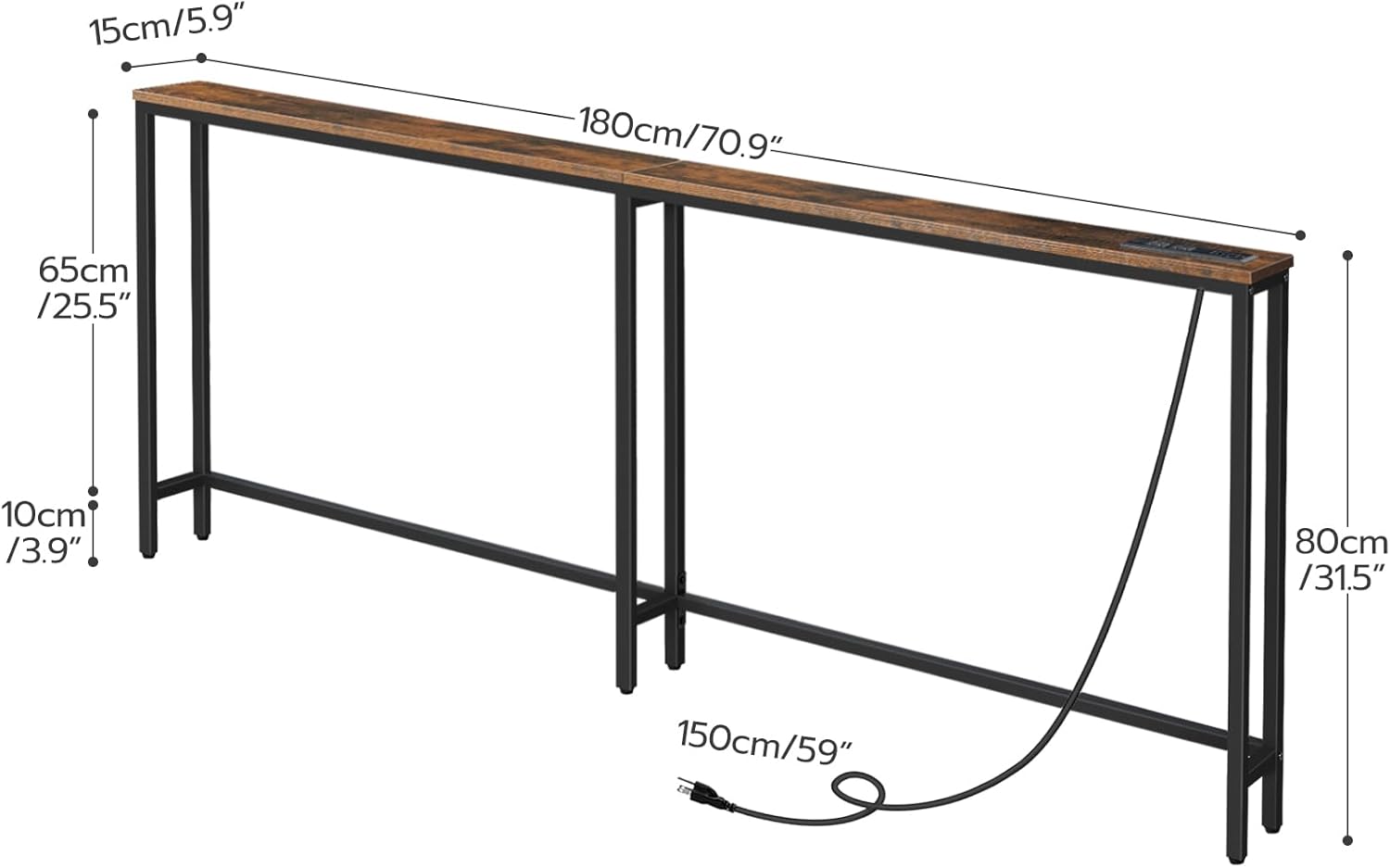
Image: Detailed dimensions of the console table, including depth, width, height, and power cord length.
Warranty and Support
For warranty information, product support, or to inquire about replacement parts, please contact HOOBRO customer service through their official website or the retailer where the product was purchased.
Please retain your proof of purchase for any warranty claims.


