
1. Introduction
Thank you for choosing the Saulcy C2 Dog Training Collar. This manual provides detailed instructions for the safe and effective use of your new training system. Please read this manual thoroughly before operation to ensure proper usage and to maximize the training benefits for your dog.
The Saulcy C2 Dog Training Collar is designed to assist in training dogs weighing 15-120 lbs, offering three adjustable training modes: Beep, Vibration (0-99 levels), and Static Shock (0-99 levels). Its IPX7 waterproof receiver and 1000ft remote range make it suitable for various training environments.

Image: A woman hugging a pug, surrounded by icons representing common dog behavioral issues such as biting, chewing, barking, digging, and jumping. This illustrates the types of behaviors the Saulcy C2 Dog Training Collar aims to help correct.
2. Product Overview
2.1 Package Contents
- Remote Transmitter
- Receiver Collar
- Adjustable Nylon Strap
- USB Charging Cable
- Test Light Tool
- Contact Points (Short and Long)
- Silicone Caps for Contact Points
- User Manual
2.2 Key Features
- 3 Training Modes: Beep, Vibration (0-99 levels), and Static Shock (0-99 levels) for customized training.
- IPX7 Waterproof Receiver: Allows the receiver to be submerged in water up to 3.2 feet for 30 minutes, suitable for training in wet conditions.
- 1000ft Remote Range: Provides ample distance for effective outdoor training.
- Security Keypad Lock: Prevents accidental activation of static shock.
- Adjustable Collar: Fits dogs with neck girths from 8 to 27 inches, suitable for dogs weighing 15-120 lbs.
- Rechargeable Batteries: Long-lasting battery life for both remote (up to 90 days standby) and receiver (up to 30 days standby).
2.3 Component Diagram
Refer to the diagram below for an identification of the remote transmitter and receiver collar components.

Image: Detailed diagram illustrating the remote transmitter with LCD screen, buttons (Beep, Vibration, Shock, Power/Channel, Up/Down), security keypad lock, and USB charging port. The receiver collar is shown with contact points, USB charging port, On/Off button, and adjustable collar strap. Silicone caps are also depicted.
3. Safety Information
- Not for Aggressive Dogs: Do not use this product on aggressive dogs. If your dog is aggressive, consult a professional dog trainer.
- Age and Weight: This collar is suitable for dogs over 6 months old and weighing between 15-120 lbs.
- Collar Fit: Ensure the collar fits snugly but not too tightly. Two fingers should fit comfortably between the collar and your dog's neck.
- Wear Time: Do not leave the collar on your dog for more than 12 hours per day. Prolonged wear can cause skin irritation.
- Skin Checks: Regularly check your dog's neck for signs of irritation, redness, or sores. If irritation occurs, discontinue use and consult a veterinarian.
- Static Shock: Use static shock mode only as a last resort and at the lowest effective level. Always start with Beep or Vibration modes.
- Supervision: Always supervise your dog during training sessions.
- Avoid Damage: Do not attempt to disassemble or repair the device yourself. This will void the warranty.
4. Setup Guide
4.1 Charging the Devices
- Connect the USB charging cable to the charging ports on both the remote transmitter and the receiver collar.
- Plug the USB cable into a standard USB power adapter (not included) or a computer USB port.
- The battery indicator on the remote and receiver will show charging status. A full charge typically takes 2-3 hours.
- Once fully charged, the battery indicator will show full. Disconnect the devices from the charger.
Note: The remote can standby for up to 90 days, and the receiver for up to 30 days on a full charge.
4.2 Pairing the Remote and Receiver
The remote and receiver are typically pre-paired from the factory. If they are not paired or you need to re-pair them:
- Ensure both devices are fully charged and turned off.
- Turn on the remote transmitter by pressing any button.
- Press and hold the On/Off button on the receiver collar until the indicator light flashes rapidly.
- Within 10 seconds, press the Beep or Vibration button on the remote. The receiver's indicator light will flash slowly, indicating successful pairing.
- If pairing fails, repeat the steps.
4.3 Fitting the Receiver Collar
Proper fit is crucial for effectiveness and your dog's comfort.

Image: An illustration demonstrating the adjustable nature of the collar, suitable for dogs from 15 lbs to 120 lbs, with a neck girth of 8-27 inches. It also shows how to cut off excess strap and burn the end to prevent fraying.
- Place the receiver collar around your dog's neck, ensuring the contact points are positioned underneath, making direct contact with the skin.
- Adjust the strap so it is snug but not tight. You should be able to fit two fingers comfortably between the collar and your dog's neck.
- If your dog has long fur, you may need to trim the fur around the contact points to ensure proper skin contact.
- Select the appropriate length of contact points (short or long) based on your dog's fur length.
- If the collar strap is too long, you can trim the excess and use a lighter to carefully singe the cut edge to prevent fraying.
5. Operating Instructions
5.1 Turning On/Off
- Remote: Press any button to turn on. The LCD screen will illuminate. The remote will automatically enter standby mode after a period of inactivity.
- Receiver: Press and hold the On/Off button on the receiver until the indicator light illuminates. To turn off, press and hold the On/Off button until the light extinguishes.
5.2 Selecting Training Modes and Levels
The remote offers Beep, Vibration, and Static Shock modes, each with adjustable intensity levels for Vibration and Static Shock.

Image: The remote control displaying its LCD screen and three main buttons for Beep, Vibration, and Shock modes. Icons for each mode are shown alongside a dog, emphasizing the three distinct training options.
- Beep Mode: Press the Beep Button (speaker icon) to deliver an audible tone to the receiver. This mode has no adjustable levels.
- Vibration Mode: Press the Vibration Button (wavy lines icon) to deliver a vibration. Use the Up/Down buttons on the side of the remote to adjust the vibration intensity from 00 to 99.
- Static Shock Mode: Press the Shock Button (lightning bolt icon) to deliver a static correction. Use the Up/Down buttons on the side of the remote to adjust the shock intensity from 00 to 99.
Recommendation: Always start with the lowest effective level for Vibration and Static Shock.
5.3 Security Keypad Lock
The remote features a security keypad lock to prevent accidental static shock activation.
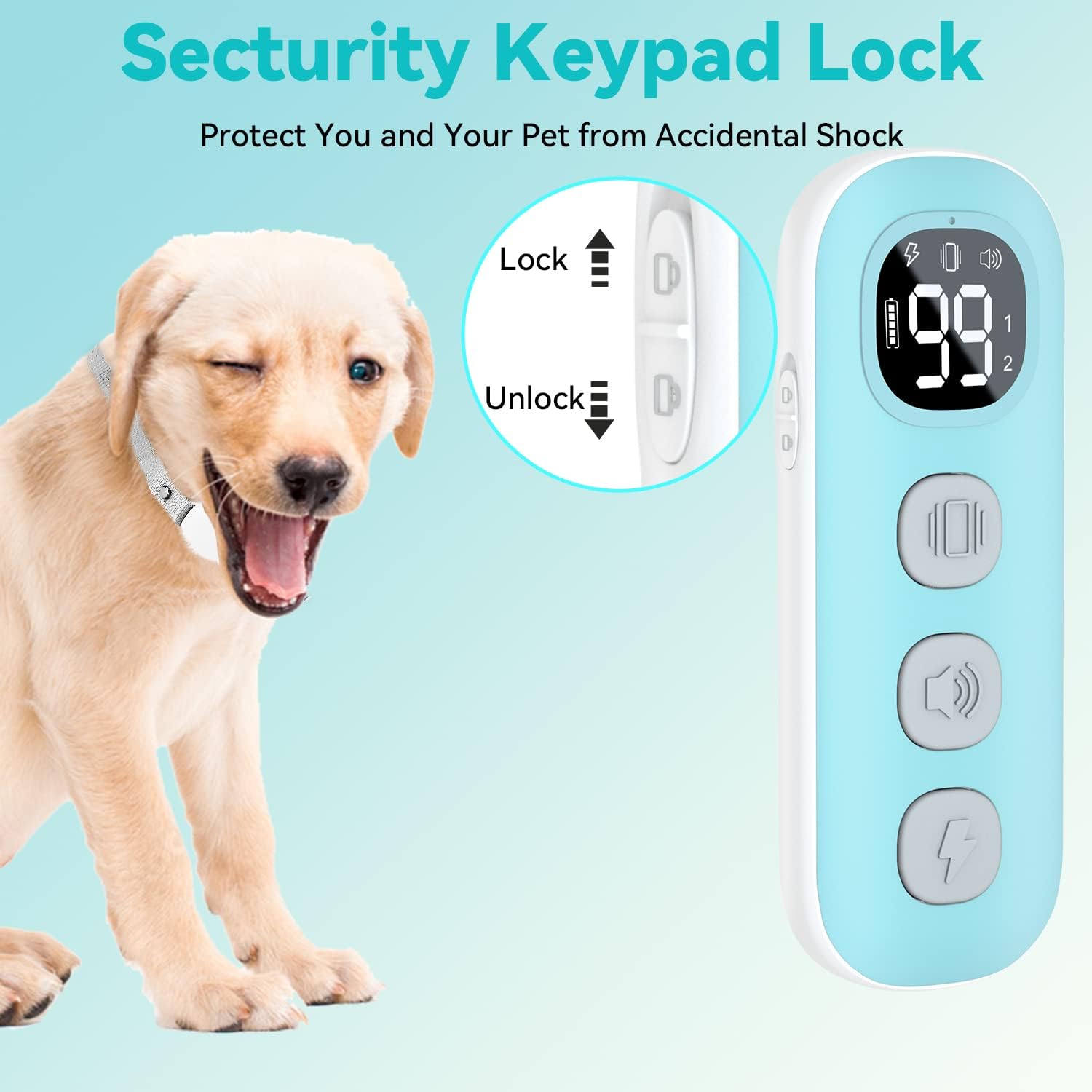
Image: A close-up of the remote control highlighting the security keypad lock switch on the side. The switch can be moved up to "Lock" or down to "Unlock" the static shock function, preventing unintended activation.
- Slide the lock switch on the side of the remote upwards to the "Lock" position to disable the static shock button.
- Slide the lock switch downwards to the "Unlock" position to enable the static shock button.
5.4 Training Tips
- Consistency is Key: Use the collar consistently for specific behaviors you want to correct.
- Positive Reinforcement: Always pair corrections with positive reinforcement when your dog performs the desired behavior.
- Short Sessions: Keep training sessions short and positive (10-15 minutes).
- Start with Beep/Vibration: Begin training with the Beep or Vibration modes before introducing static shock.
- Observe Reactions: Pay close attention to your dog's reaction to each stimulation level. The goal is to get their attention, not to cause distress.
6. Maintenance
- Cleaning: Regularly clean the receiver collar and contact points with a damp cloth. Ensure the devices are dry before charging.
- Battery Care: Charge the devices fully before long periods of storage. Recharge every 3-4 months to maintain battery health.
- Strap Inspection: Periodically inspect the collar strap for wear and tear. Replace if damaged.
- Storage: Store the collar and remote in a cool, dry place away from direct sunlight and extreme temperatures.
7. Troubleshooting
| Problem | Possible Cause | Solution |
|---|---|---|
| Collar not working / No response | Low battery; Not paired; Receiver off; Out of range. | Charge both devices; Re-pair remote and receiver; Turn on receiver; Move closer to your dog. |
| Static shock not working | Security keypad locked; Poor contact with skin; Level set to 00; Contact points too short. | Unlock keypad; Adjust collar fit; Increase shock level; Use longer contact points; Trim fur. |
| Remote LCD screen blank | Low battery; Remote in standby mode. | Charge remote; Press any button to wake up. |
| Dog shows no reaction to stimulation | Level too low; Poor contact with skin; Dog has adapted. | Increase stimulation level gradually; Adjust collar fit; Ensure contact points touch skin; Re-evaluate training approach. |
| Skin irritation on dog's neck | Collar worn too long; Collar too tight; Allergic reaction. | Remove collar immediately; Clean dog's neck; Consult veterinarian; Ensure proper fit and wear time (max 12 hours/day). |
8. Specifications
| Feature | Detail |
|---|---|
| Model | C2 |
| Training Modes | Beep, Vibration (0-99 levels), Static Shock (0-99 levels) |
| Waterproof Rating | IPX7 (Receiver) |
| Remote Range | Up to 1000 feet (300 meters) |
| Dog Weight Range | 15-120 lbs |
| Collar Neck Girth | 8-27 inches |
| Receiver Battery Life (Standby) | Up to 30 days |
| Remote Battery Life (Standby) | Up to 90 days |
| Charging Time | Approximately 2-3 hours |
| Material | Nylon, Plastic |
| Item Weight | 8.4 ounces (total package) |
9. Warranty and Support
Saulcy products are designed for durability and performance. For warranty information, technical support, or any questions regarding your Saulcy C2 Dog Training Collar, please contact our customer service team.
You can typically find contact information on the product packaging, the official Saulcy website, or through your purchase platform.
Please retain your proof of purchase for warranty claims.

