Important Safety Instructions
Read all instructions carefully before using this appliance. Keep this manual for future reference.
- Ensure the appliance is placed on a stable, level surface.
- Do not immerse the appliance, cord, or plug in water or any other liquid.
- Unplug from the power outlet when not in use and before cleaning.
- Keep out of reach of children.
- Do not operate with a damaged cord or plug.
- Only use the appliance for its intended household use.
Product Overview
The Goldair 10L Evaporative Cooler is designed to provide efficient cooling through the natural process of water evaporation. It features multiple speed settings, a timer function, and convenient remote control operation.
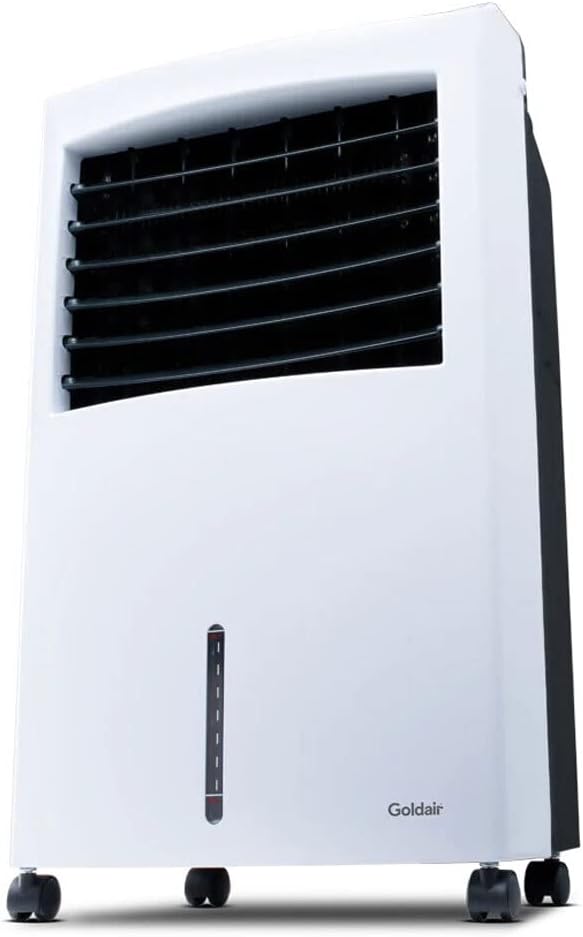
Image: Front view of the Goldair 10L Evaporative Cooler, showing its white and black casing, front grille, water level indicator, and castor wheels.

Image: Close-up of the top control panel, displaying buttons and indicator lights for Sleep, Natural, Normal modes, High, Mid, Low speeds, Timer, Cool, Swing, and Power (ON/OFF).

Image: The white remote control for the evaporative cooler, featuring buttons for ON/OFF, Timer, Speed, Mode, Cool, and Swing functions.
Setup
- Unpacking: Carefully remove the evaporative cooler from its packaging. Retain all packaging materials for future storage or transport.
- Placement: Place the unit on a firm, level surface. Ensure there is adequate space around the unit for proper airflow. Avoid placing it directly against walls or furniture.
- Filling the Water Tank:
- Locate the water tank at the bottom of the unit.
- Pull out the water tank gently.
- Fill the tank with clean, cool water. Do not exceed the "MAX" fill line. For enhanced cooling, ice packs or ice cubes can be added to the water tank.
- Carefully push the water tank back into its position until it clicks securely.
- Power Connection: Plug the power cord into a standard electrical outlet. Ensure the voltage matches the requirements specified on the product label.
Operating Instructions
The Goldair Evaporative Cooler can be operated using the control panel on the unit or the provided remote control.
Control Panel Functions:
- ON/OFF Button: Press to turn the unit on or off.
- SPEED Button: Cycles through Low, Mid, and High fan speeds.
- MODE Button: Selects between Normal, Natural, and Sleep modes.
- TIMER Button: Sets the operating timer for up to 7.5 hours. Each press adds 0.5 hours.
- COOL Button: Activates or deactivates the evaporative cooling function.
- SWING Button: Activates or deactivates the oscillation function for wider air distribution.
Remote Control:
The remote control duplicates all functions available on the main control panel, allowing for convenient operation from a distance.
Operating Modes:
- Normal Mode: Provides constant airflow at the selected speed.
- Natural Mode: Simulates natural breeze by varying fan speed intermittently.
- Sleep Mode: Reduces fan speed and light indicators for quiet operation during sleep.
Maintenance
Regular maintenance ensures optimal performance and extends the lifespan of your evaporative cooler.
- Cleaning the Exterior:
- Before cleaning, always unplug the unit from the power outlet.
- Wipe the exterior surfaces with a soft, damp cloth. Do not use abrasive cleaners or solvents.
- Cleaning the Water Tank:
- Empty any remaining water from the tank.
- Clean the tank with a mild detergent and water. Rinse thoroughly to remove any residue.
- Allow the tank to air dry completely before reinserting.
- Cleaning the Cooling Pad:
- The cooling pad should be cleaned periodically, especially if water quality is poor.
- Refer to the diagram in the manual (if available) for instructions on how to access and remove the cooling pad.
- Rinse the cooling pad under running water to remove dust and mineral deposits. Do not use harsh chemicals.
- Ensure the pad is dry before reinstallation.
- Storage: If storing the unit for an extended period, ensure the water tank and cooling pad are clean and dry. Store in a cool, dry place away from direct sunlight.
Troubleshooting
| Problem | Possible Cause | Solution |
|---|---|---|
| Unit does not turn on | No power supply; Power button not pressed. | Check power cord connection; Press the ON/OFF button. |
| Weak airflow | Fan speed too low; Air filter/cooling pad clogged. | Increase fan speed; Clean or replace air filter/cooling pad. |
| No cooling effect | Water tank empty; COOL function not activated. | Fill water tank; Press the COOL button. |
| Unusual noise | Unit not on a level surface; Obstruction in fan. | Place on a level surface; Check for and remove any obstructions. |
If the problem persists after attempting these solutions, please contact Goldair customer support.
Specifications
- Brand: Goldair
- Model: 10L Evaporative Cooler
- ASIN: B0BFDRTLWK
- Water Tank Capacity: 10 Liters
- Speeds: 3 (Low, Mid, High)
- Timer: 7.5 Hours
- Control: Manual buttons, Remote Control
- Special Features: Timer, Auto Shut Off, Sleep Mode, Oscillation (Swing)
- Material: Plastic
- Mounting Type: Freestanding
- Colour: White/Black
- Included Components: 1 x Goldair Evaporative Cooler, 10 Liter
Warranty and Support
This Goldair Evaporative Cooler comes with a 1 Year Warranty from the date of purchase.
For warranty claims, technical support, or any inquiries regarding your product, please contact Goldair customer service. Keep your proof of purchase for warranty validation.
Contact Information: Please refer to the Goldair official website or the packaging for the most up-to-date contact details.

Image: Goldair's "The Gold Standard" logo, indicating rigorous testing and quality assurance.