
coioc U89
coioc Bluetooth Sport Headphones User Manual
Model: U89
1. Introduction
Thank you for choosing coioc Bluetooth Sport Headphones, Model U89. These headphones are designed to provide a high-quality audio experience with advanced features such as Bluetooth 5.3 connectivity, HiFi stereo sound, long battery life, and IPX7 waterproofing, making them ideal for sports and active lifestyles. This manual will guide you through the setup, operation, and maintenance of your new headphones.
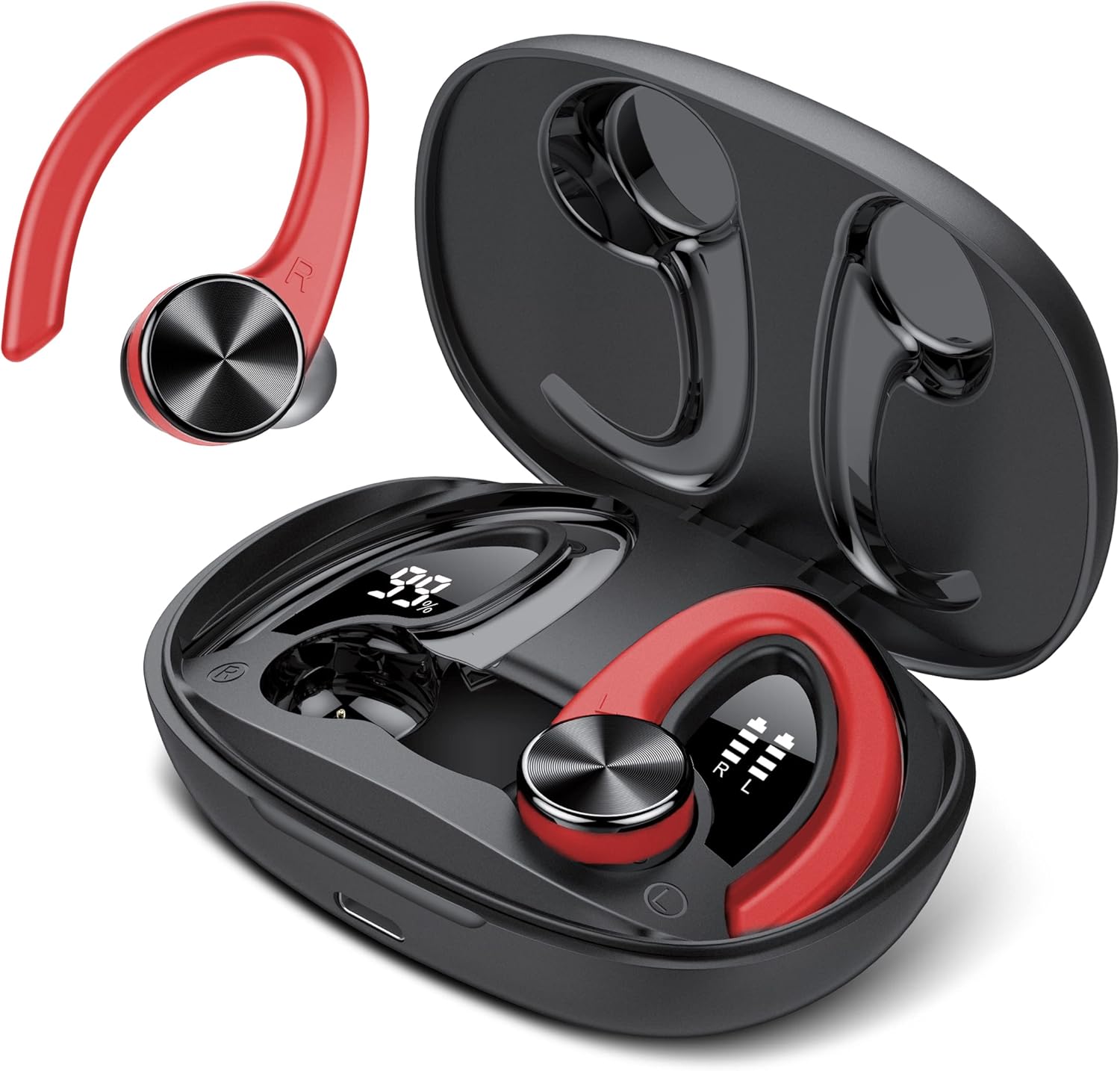
Image: The coioc U89 Bluetooth Sport Headphones, featuring a red and black design, shown alongside their open charging case. The earbuds have ear hooks for a secure fit during physical activity.
2. Package Contents
Please check the package for the following items:
- coioc U89 Bluetooth Sport Headphones (Left and Right)
- Charging Case
- USB-C Charging Cable
- Ear Tips (Multiple Sizes: S, M, L)
- User Manual

Image: A visual representation of the package contents, including the headphones, charging case, USB-C cable, and ear tips.
3. Setup
3.1. Charging the Headphones and Case
Before first use, fully charge the headphones and the charging case. Connect the provided USB-C cable to the charging port on the case and a power source. The LED display on the charging case will show the battery percentage of the case and individual battery levels for each earbud.
- A single charge provides up to 6 hours of playtime for the earbuds.
- The charging case provides multiple recharges, extending total playtime up to 45 hours.

Image: Illustration showing the 45-hour ultra-long playtime, with 6 hours from earbuds and additional charges from the case, highlighting Type-C fast charging.

Image: The charging case with its dual LED digital display, showing the charging case capacity (99%) and the individual earbud power levels (R and L).
3.2. Pairing with Your Device
The coioc U89 headphones feature one-step pairing for convenience.
- Open the charging case and take out both earbuds. They will automatically enter pairing mode.
- On your device (smartphone, tablet, laptop), enable Bluetooth.
- Search for "U89" in the list of available Bluetooth devices and select it to connect.
- Once connected, you will hear a confirmation tone, and the headphones will be ready for use.
The headphones are compatible with almost all Bluetooth-enabled devices, including iPhone, Samsung, Android, and iOS devices.

Image: A smartphone screen showing Bluetooth settings with "U89" available for connection, illustrating the one-step pairing process.

Image: Icons representing iOS, Android, tablet, and laptop, indicating the wide compatibility of the headphones with various devices.
3.3. Wearing the Headphones
For optimal sound quality and comfort, ensure a proper fit.
- Choose the correct size of ear tips (S, M, L) that provide a snug seal in your ear canal.
- Place the earbud into your ear.
- Position the ear hook over your ear to secure the headphone in place. Adjust for comfort.
The bionic 3D ergonomic design ensures a stable and comfortable fit, especially during sports activities.

Image: A woman wearing the coioc U89 headphones during a workout, demonstrating the comfortable and unshakable fit.

Image: A step-by-step guide showing how to choose the right ear tip size, place the earbud, and adjust the ear hook for a secure and comfortable fit.
4. Operating Instructions
The coioc U89 headphones feature smart touch controls on each earbud for easy operation.

Image: A detailed diagram illustrating the various touch controls on the earbud, including playback, volume, track skipping, call management, and voice assistant activation.
4.1. Music Playback
- Play/Pause: Double-tap either the Left (L) or Right (R) earbud.
- Volume Up: Single-tap the Right (R) earbud.
- Volume Down: Single-tap the Left (L) earbud.
- Next Track: Long press the Right (R) earbud for 2 seconds.
- Previous Track: Long press the Left (L) earbud for 2 seconds.
4.2. Call Management
- Answer/End Call: Double-tap either the Left (L) or Right (R) earbud.
- Reject Call: Long press either the Left (L) or Right (R) earbud for 2 seconds.
4.3. Voice Assistant
- Activate Voice Assistant: Triple-tap either the Left (L) or Right (R) earbud.
5. Maintenance and Care
5.1. Cleaning
Regular cleaning helps maintain optimal performance and hygiene.
- Wipe the earbuds and charging case with a soft, dry, lint-free cloth.
- Remove ear tips and clean them with mild soap and water. Ensure they are completely dry before reattaching.
- Do not use abrasive cleaners, alcohol, or chemical solvents.
5.2. Water Resistance (IPX7)
The coioc U89 headphones are rated IPX7 waterproof, meaning they can withstand immersion in water up to 1 meter for 30 minutes. This makes them suitable for workouts and protection against sweat and rain.
- Do not intentionally submerge the charging case in water, as it is not waterproof.
- Ensure the earbuds are dry before placing them back into the charging case to prevent damage.

Image: An earbud with water splashing around it, visually representing its IPX7 waterproof rating.
5.3. Storage
When not in use, store the headphones in their charging case to protect them from dust and damage.
6. Troubleshooting
If you encounter any issues with your coioc U89 headphones, please refer to the following common solutions:
| Problem | Solution |
|---|---|
| Headphones not pairing |
|
| No sound from one earbud |
|
| Charging issues |
|
| Poor sound quality |
|
7. Specifications
| Feature | Detail |
|---|---|
| Brand | coioc |
| Model Number | U89 |
| Connectivity Technology | Wireless (Bluetooth 5.3) |
| Bluetooth Version | 5.3 |
| Form Factor | Over-Ear (with ear hooks) |
| Waterproof Rating | IPX7 |
| Earbud Playtime | Up to 6 hours |
| Total Playtime (with case) | Up to 45 hours |
| Charging Case Battery | 500 mAh |
| Charging Port | USB-C |
| Product Dimensions | 8.8 x 6.1 x 3.2 cm; 132 Grams |
| Material | Plastic |
| Compatible Devices | iPhone, Samsung, Android, iOS |
8. Warranty and Support
coioc products are designed and manufactured to the highest quality standards. For any warranty claims or technical support, please contact coioc customer service through the retailer where you purchased the product or visit the official coioc brand store online. Please retain your proof of purchase for warranty purposes.
For more information, visit the coioc Brand Store.
Related documentsU89


Ask a question about this manual
Ask about setup, troubleshooting, compatibility, parts, safety, or missing instructions. Manuals+ will review the question and use this page’s manual context to help answer it.