
1. Introduction and Overview
Thank you for choosing the Vekkia 14 LED Book Light. This manual provides essential information for the safe and efficient use of your new book light. Designed for comfortable reading, this light features adjustable brightness and color temperature, a flexible neck, and a convenient clip-on design. Its rechargeable battery ensures long-lasting illumination for various activities, including reading, knitting, and crafting.
2. Package Contents
Please verify that all items are present in your package:
- Vekkia 14 LED Book Reading Light (x1)
- Type-C USB Charging Cable (x1)
- USB Wall Charger (x1)
- Travel Case (x1)
- User Manual (x1)

Image: The Vekkia 14 LED Book Light package, showing the book light, USB-C charging cable, wall charger, and a protective travel case.
3. Setup and Initial Use
3.1 Charging the Book Light
Before first use, fully charge your Vekkia Book Light. Connect the provided Type-C USB cable to the charging port on the light's base and plug the other end into the USB wall charger. A charging indicator light will typically show the charging status and turn off or change color when fully charged. The light can be used while charging.
3.2 Attaching the Book Light
The Vekkia Book Light features a sturdy clip with anti-slippery pads to securely attach it to books, e-readers, or other surfaces without causing damage. The clip opens approximately 2.1 inches wide, allowing for attachment to various objects.

Image: The Vekkia 14 LED Book Light securely clipped onto a book, demonstrating its compact and flexible design.

Image: A detailed view of the power button located on the base of the Vekkia book light.
4. Operating Instructions
4.1 Power On/Off and Brightness Adjustment
Locate the power button on the base of the light. A single short press will turn the light on and cycle through its 9 brightness modes. Continue pressing to find your preferred brightness level. The light will turn off after cycling through all modes.

Image: A detailed view of the power button located on the base of the Vekkia book light.
4.2 Color Temperature Selection
The Vekkia 14 LED Book Light offers three color temperature modes: warm (3000K), white (6500K), and mixed (4200K). To switch between these modes, press and hold the power button for 2 seconds. This allows you to select the ideal lighting for eye comfort and preference.

Image: Visual guide to the 9 available light settings, combining three color temperatures with three brightness levels.
4.3 Adjusting the Lighting Heads
The book light features a 180-degree foldable patented whale tail design with extendable lighting heads. This allows you to adjust the light direction and spread to cover both pages of a book evenly, providing an unobstructed reading vision and soft illumination across all pages.
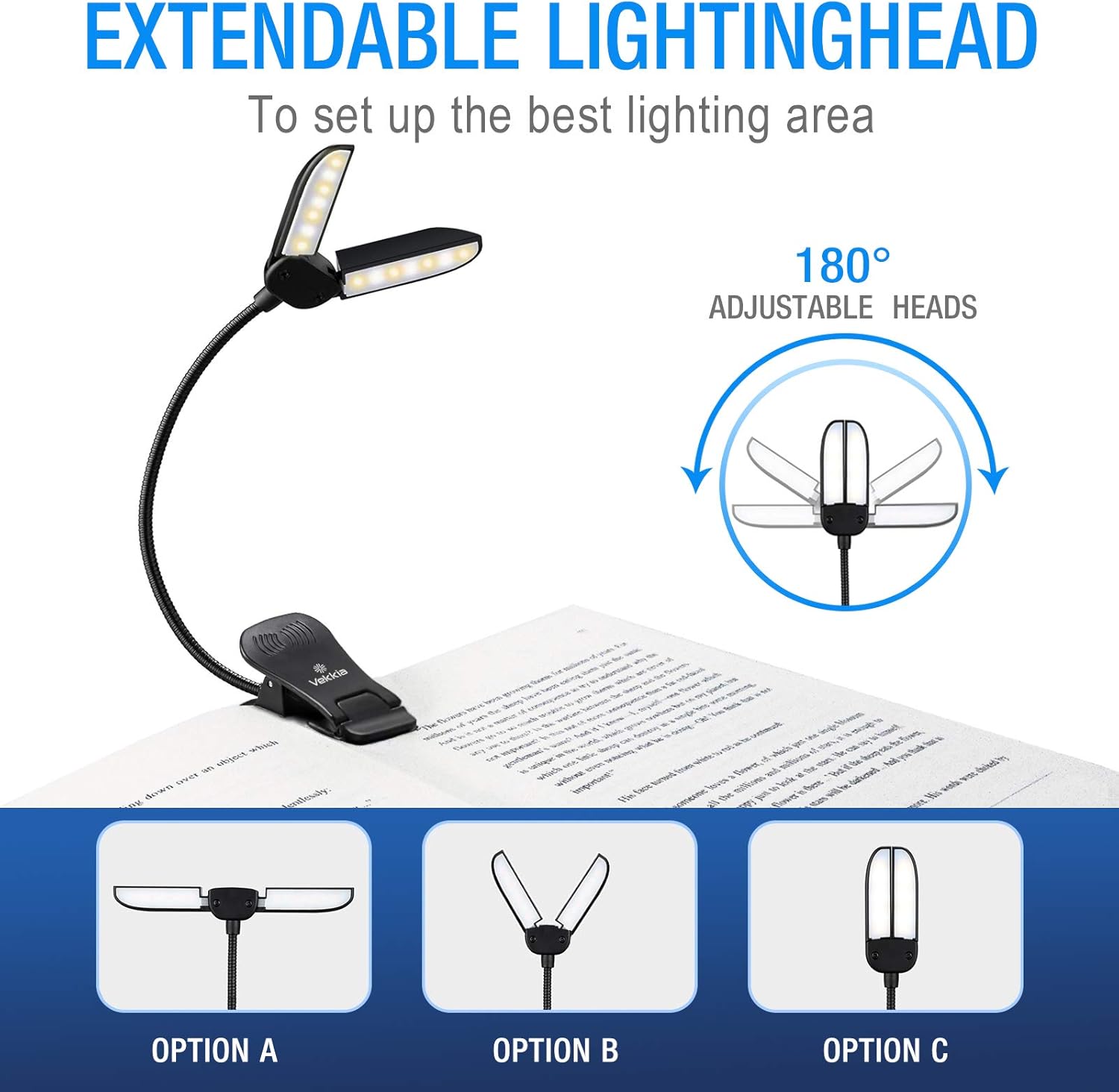
Image: Illustration of the flexible and adjustable lighting heads, demonstrating how they can be positioned for optimal light coverage.

Image: A comparison highlighting the Vekkia book light's ability to cover both pages of a book, unlike traditional single-point lights.
5. Charging and Battery Life
The Vekkia 14 LED Book Light is equipped with a powerful rechargeable battery, eliminating the need for disposable batteries. A full charge provides up to 70 hours of wireless reading time on the lowest brightness setting. The upgraded LED bulbs are designed to last for 100,000 hours without replacement.
5.1 Charging Process
- Connect the Type-C USB cable to the charging port on the light's base.
- Plug the USB end of the cable into the provided wall charger or any compatible USB power source.
- The charging indicator light will illuminate to show that the device is charging.
- Once fully charged, the indicator light will change or turn off.
6. Maintenance and Care
- Keep the book light clean by wiping it with a soft, dry cloth. Avoid using abrasive cleaners or solvents.
- Store the light in its travel case when not in use to protect it from dust and damage.
- Avoid exposing the device to extreme temperatures or direct sunlight for prolonged periods.
- Do not attempt to disassemble or repair the unit yourself. Contact customer support if issues arise.
7. Troubleshooting
| Problem | Possible Cause | Solution |
|---|---|---|
| Light does not turn on. | Battery is depleted. | Charge the book light fully. |
| Light flickers or is dim. | Low battery or faulty connection. | Recharge the device. Ensure the charging cable is securely connected. |
| Light does not hold a charge. | Battery degradation or faulty charging component. | Ensure you are using the provided charger and cable. If the issue persists, contact customer support. |
| Clip does not hold securely. | Surface is too thick or slippery. | Ensure the surface is within the 2.1-inch clip capacity. Adjust the position to maximize grip. |
8. Product Specifications
- Model Number: 14LED-Cable
- Light Source Type: LED (14 LEDs total)
- Color Temperatures: Warm (3000K), Mixed (4200K), White (6500K)
- Brightness Levels: 9 (3 color modes x 3 brightness levels)
- Power Source: Rechargeable Battery
- Charging Port: Type-C USB
- Battery Life: Up to 70 hours (low brightness setting)
- LED Lifespan: 100,000 hours
- Dimensions: 6.3"D x 4.37"W x 2.17"H
- Item Weight: 7 Ounces
- Material: Plastic
- Mounting Type: Clip
- Control Method: Touch/Push Button
9. Official Product Videos
Watch these official videos for visual demonstrations of the Vekkia 14 LED Book Light's features and usage:
9.1 Vekkia Book Light Overview
Video: An honest review demonstrating the Vekkia Book Light's features, including its clip, flexibility, and various light settings. This video provides a comprehensive look at the product's functionality.
9.2 LED Book Reading Clip On Lamp Demo
Video: A demonstration of the LED Book Reading Clip On Lamp, showcasing its ease of use, clip mechanism, and different light modes for optimal reading comfort.
9.3 Vekkia Book Light Features Showcase
Video: A quick overview of the Vekkia Book Light, highlighting its portability, adjustable brightness, and suitability for various reading environments.
10. Warranty and Support
The Vekkia 14 LED Book Light comes with a 1-year manufacturer warranty. For any questions, concerns, or warranty claims, please contact Vekkia customer support through their official website or the retailer where the product was purchased. Please retain your purchase receipt for warranty validation.