
Introduction
The Picun PG-06 Wireless Gaming Headset offers a versatile audio experience for gamers and multimedia enthusiasts. Designed for multi-platform compatibility, it provides seamless connectivity across various devices through 2.4Ghz wireless, Bluetooth 5.2, and a 3.5mm wired connection. Experience immersive 3D stereo surround sound with 40mm dynamic EQ speaker units, and communicate clearly with its retractable noise-cancelling microphone. The headset features soft dual-layer memory foam for extended comfort during long gaming sessions.

Image: The Picun PG-06 Wireless Gaming Headset, showcasing its sleek black design with red accents, along with the included USB-A dongle and 3.5mm AUX cable.
Video: An official overview of the Picun PG-06 Wireless Gaming Headset, highlighting its features and design.
What's in the Box
Your Picun PG-06 Wireless Gaming Headset package includes the following components:
- Wireless gaming headset
- 2.4Ghz USB dongle
- USB-C charging cable
- 3.5mm AUX cable
- User Manual (this document)
Setup
Charging the Headset
Before initial use, fully charge your headset. The headset provides approximately 30 hours of playtime on a full charge, with a quick charge time of 1-2 hours.
- Locate the USB-C charging port on the headset.
- Connect the provided USB-C charging cable to the headset.
- Plug the USB-A end of the cable into a compatible USB power source (e.g., computer USB port, USB wall adapter).
- The indicator light will show charging status and turn off when fully charged.
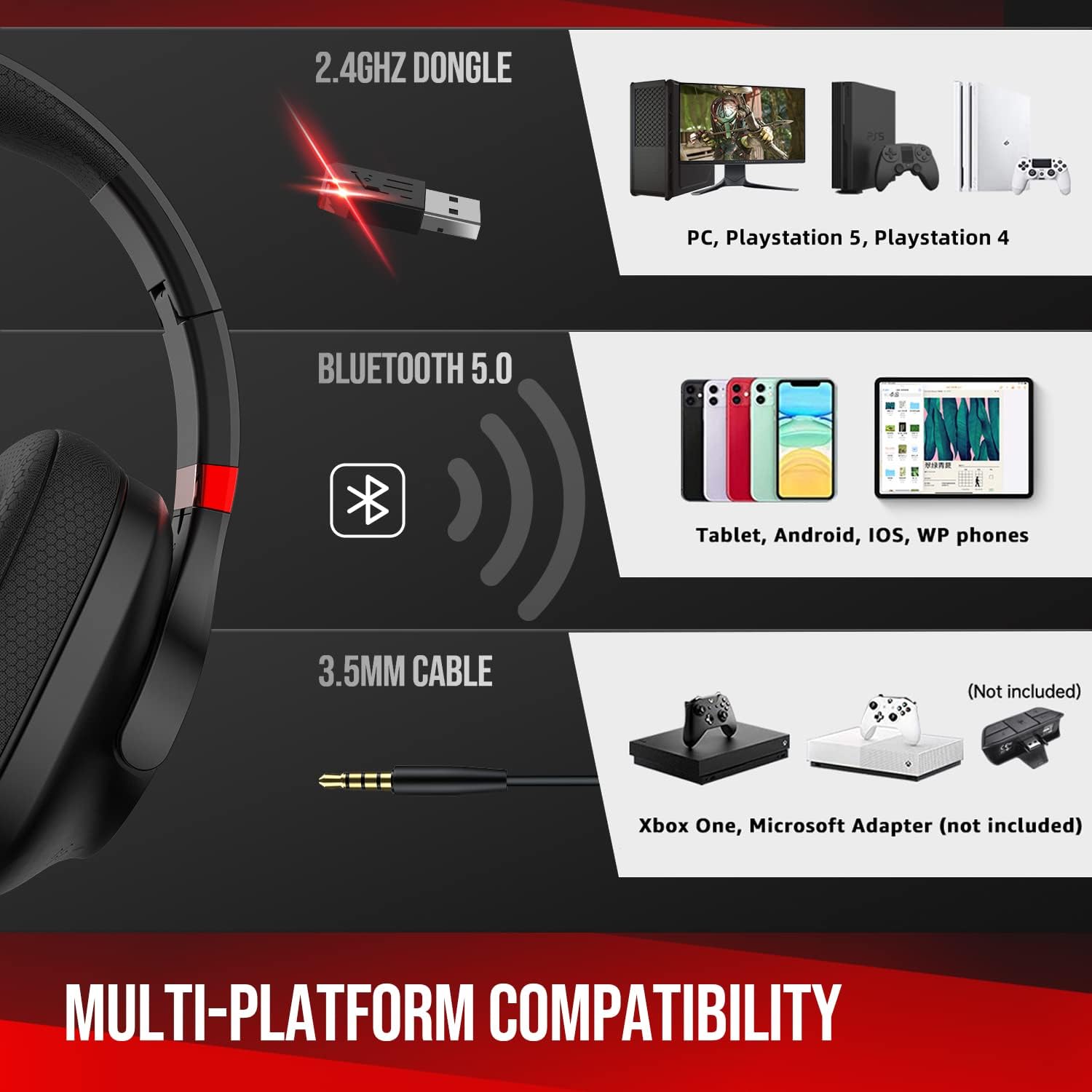
Image: Close-up of the headset showing the USB-C charging port and a charging cable connected, indicating 30+ hours of battery life.
Connecting to Devices
The Picun PG-06 offers multiple connectivity options:
1. 2.4Ghz Wireless Connection (via USB Dongle)
This mode provides lossless transmission for PC, PS5, and PS4.
- Plug the 2.4Ghz USB dongle into an available USB-A port on your PC, PS5, or PS4.
- Power on the headset by pressing and holding the Power On/Off button.
- The headset should automatically connect to the dongle. A blue indicator light on the headset will confirm connection.

Image: A diagram illustrating the multi-platform compatibility, including the 2.4Ghz dongle for PC/PlayStation, Bluetooth for mobile/tablet, and 3.5mm AUX for other devices.
2. Bluetooth 5.2 Connection
Connect wirelessly to your cell phone, tablet, or other Bluetooth-enabled devices.
- Ensure the headset is powered on.
- Press and hold the Mute/Mode switch button for 3 seconds to enter Bluetooth pairing mode. The indicator light will flash.
- On your device, go to Bluetooth settings and select "Picun PG-06" from the list of available devices.
- Once paired, the indicator light on the headset will become solid blue.
3. 3.5mm AUX Cable Connection
Use the included 3.5mm AUX cable for a wired connection, especially useful when the battery is low or for devices without wireless capabilities (e.g., Xbox One, Nintendo Switch).
- Plug one end of the 3.5mm AUX cable into the headset's 3.5mm jack.
- Plug the other end into the 3.5mm audio jack of your device.
- The headset will automatically switch to wired mode.
Operating the Headset
Headset Controls
The headset features intuitive controls located on the earcups:
- Power On/Off Button: Press and hold to power on or off.
- Volume Wheel: Scroll up or down to adjust the audio volume.
- Mute/Mode Switch Button:
- Press once to mute/unmute the microphone.
- Press and hold for 3 seconds to switch between 2.4Ghz wireless and Bluetooth modes (when not in AUX mode).

Image: A detailed view of the headset's controls, indicating the power button, volume wheel, and mute/mode switch button.
Retractable Noise-Cancelling Microphone
The advanced noise-cancelling microphone reduces background noise for clear communication. It is retractable for convenience.
- To use the microphone, gently pull it out from the left earcup.
- Adjust the flexible microphone arm to position it optimally for your voice.
- To store, simply push the microphone back into the earcup until it is fully retracted.

Image: An illustration demonstrating the retractable noise-cancelling microphone extending and retracting from the headset.
Comfort and Audio Experience
The PG-06 headset is designed for comfort and superior sound quality:
- Soft Dual-Layer Memory Foam: The earcups and headband feature soft memory foam that conforms to your head, providing a comfortable and secure fit for extended use.
- 40mm Dynamic EQ Speaker Units: These units deliver rich, thumping bass and crisp treble, creating a 3D stereo surround sound experience that allows you to hear every detail in your games and media.
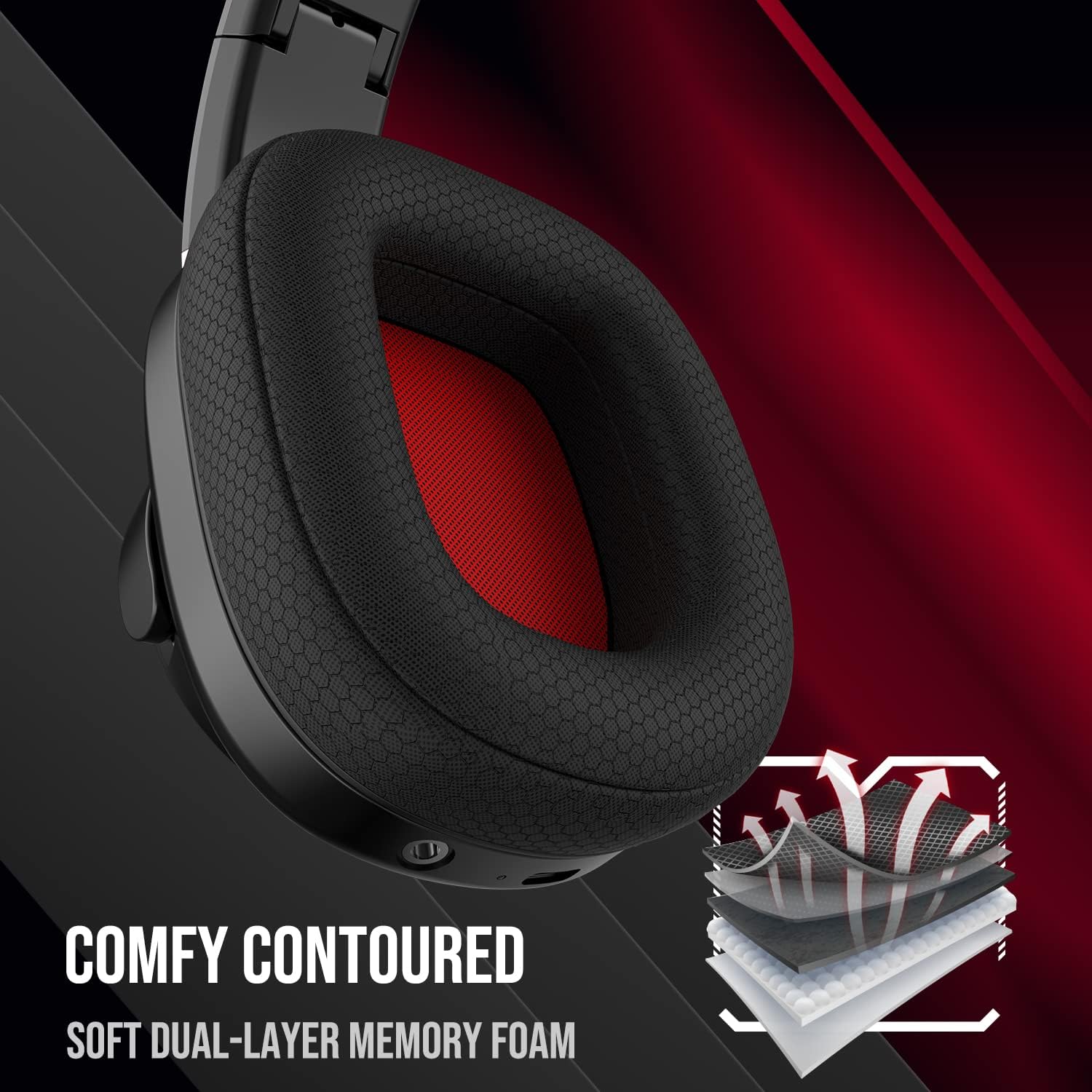
Image: A close-up view of the headset's earcup, highlighting the soft dual-layer memory foam for enhanced comfort.

Image: The headset depicted with visual effects representing 3D stereo surround sound, emphasizing its audio capabilities.
Maintenance
To ensure the longevity and optimal performance of your Picun PG-06 headset, follow these maintenance guidelines:
- Cleaning: Use a soft, dry cloth to wipe down the earcups and headband. Avoid using harsh chemicals or abrasive materials.
- Storage: When not in use, store the headset in a cool, dry place away from direct sunlight and extreme temperatures. The foldable design allows for compact storage.
- Cable Care: Handle all cables gently. Avoid sharp bends or excessive pulling to prevent damage.
Troubleshooting
If you encounter any issues with your Picun PG-06 headset, refer to the following common troubleshooting steps:
- No Sound:
- Ensure the headset is powered on and properly connected (2.4Ghz dongle, Bluetooth, or 3.5mm AUX).
- Check the volume levels on both the headset and your connected device.
- If using 2.4Ghz, ensure the dongle is securely plugged in and recognized by your device.
- If using Bluetooth, ensure the headset is paired and selected as the audio output device.
- Microphone Not Working:
- Ensure the microphone is fully extended and not muted (check the mute button on the headset).
- Verify microphone input settings on your connected device.
- For PC/console, ensure the headset is selected as the default input device.
- Pairing Issues (Bluetooth):
- Ensure the headset is in pairing mode (flashing indicator light).
- Turn off and on Bluetooth on your device, then try searching again.
- Move the headset closer to your device to ensure it's within the 10-meter range.
- Clear previous Bluetooth connections on your device if you have too many.
- Intermittent Connection:
- Reduce interference by moving away from other wireless devices (e.g., Wi-Fi routers, other Bluetooth devices).
- Ensure the headset is within the optimal connection range of your device.
- Re-pair the headset with your device.
Specifications
| Feature | Detail |
|---|---|
| Model Name | PG-06 wireless gaming headset |
| Connectivity Technology | 2.4Ghz + Bluetooth |
| Wireless Communication Technology | Bluetooth |
| Bluetooth Version | 5.2 |
| Bluetooth Range | 10 Meters |
| Audio Driver Type | Dynamic Driver |
| Frequency Range | 20 Hz - 20,000 Hz |
| Battery Life | 30 Hours |
| Charging Port | USB-C |
| Headphones Jack | 3.5 mm Jack |
| Compatible Devices | PS5, PS4, PC, Laptops, Cellphones, Tablets |
| Microphone | Retractable Noise-Cancelling |
| Ear Placement | Over Ear |
| Item Weight | 13.2 ounces |
| Package Dimensions | 6.69 x 6.14 x 3.39 inches |
Warranty and Support
For detailed warranty information and further support, please refer to the official user manual provided with your product or visit the manufacturer's website.
You can also access the User Manual (PDF) here.


