
1. Introduction
This document provides instructions for the Generic Infrared (IR) Replacement Remote Control, model Easytry14880. This remote is designed to operate various air conditioner models from brands such as Chigo, Blueway, Toyocool, and Harbor Point. It functions as a direct replacement for your original remote. Please note that the temperature display on this remote is fixed to Celsius only.
2. Setup
2.1 Battery Installation
The remote control requires two (2) AAA batteries for operation. Batteries are not included with the remote and must be purchased separately.
- Locate the battery compartment cover on the back of the remote control.
- Slide the cover downwards or press the latch (if present) to open the compartment.
- Insert two AAA batteries, ensuring the positive (+) and negative (-) terminals align correctly with the markings inside the compartment. Incorrect battery orientation can prevent the remote from functioning.
- Slide the battery compartment cover back into place until it clicks securely.
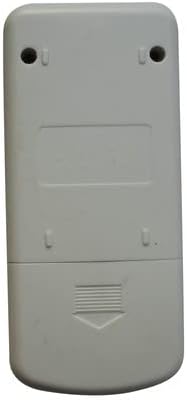
Image 1: Back of the remote control with the battery compartment.
This image displays the rear of the remote control, highlighting the battery compartment cover located at the bottom. The cover features a textured grip and an arrow indicating the direction to slide for opening. Two screw holes are visible at the top for potential wall mounting, though this remote is primarily handheld.
3. Operating Instructions
To operate your air conditioner, point the remote control directly at the air conditioner's receiver. Ensure there are no obstructions between the remote and the unit.

Image 2: Front of the remote control displaying all function buttons and the LCD screen.
This image shows the front face of the remote control. It is light grey with an LCD screen at the top. Below the screen are buttons for 'MODE', 'ON/OFF' (orange), and 'TEMP' up/down arrows. Further down, buttons are arranged for 'FAN SPEED', 'SWING', 'AIR FLOW', 'SLEEP', 'CLEAN', 'TIMER', 'TURBO', 'HOLD', and 'LAMP'.
3.1 Button Functions
- ON/OFF: Press to turn the air conditioner unit on or off.
- MODE: Cycles through available operating modes:
- AUTO: Automatically selects the operating mode based on room temperature.
- COOL: Cools the room to the set temperature.
- DRY: Dehumidifies the room.
- HEAT: Heats the room to the set temperature.
- FAN: Operates the fan only, without heating or cooling.
- TEMP ▲/▼: Adjusts the desired temperature setting. Note: Display is in Celsius only.
- FAN SPEED: Adjusts the fan speed (e.g., Low, Medium, High, Auto).
- SWING: Activates or deactivates the automatic vertical louver swing function.
- AIR FLOW: Controls the horizontal airflow direction.
- SLEEP: Activates the sleep mode, which adjusts temperature and fan speed for comfortable sleep.
- CLEAN: Initiates a self-cleaning function for the indoor unit (if supported by the AC unit).
- TIMER: Sets a timer for the unit to turn on or off automatically.
- TURBO: Activates maximum cooling or heating power for rapid temperature change.
- HOLD: May pause current settings or hold a specific function. Refer to your AC unit's manual for specific functionality.
- LAMP: Turns the display light on or off on the indoor unit (if supported by the AC unit).
4. Maintenance
4.1 Battery Replacement
Replace batteries when the remote's display becomes dim or the remote no longer controls the air conditioner effectively. Always replace both batteries at the same time with new AAA batteries. Do not mix old and new batteries, or different types of batteries.
4.2 Cleaning
Wipe the remote control with a soft, dry cloth. Do not use liquid cleaners, abrasive cleaners, or chemical solvents, as these can damage the remote's surface or internal components.
5. Troubleshooting
- Remote not responding:
- Check if the batteries are inserted correctly and are not depleted. Replace if necessary.
- Ensure there are no obstructions between the remote control and the air conditioner's receiver.
- Make sure you are within the effective operating range of the air conditioner.
- Display is dim or blank:
- Replace the batteries.
- Cannot change temperature display from Celsius to Fahrenheit:
- This remote control is designed to display temperature in Celsius only and does not support Fahrenheit.
6. Specifications
| Brand | Generic |
| Model Number | Easytry14880 |
| Connectivity Technology | Infrared (IR) |
| Compatible Devices | Air Conditioners (Chigo, Blueway, Toyocool, Harbor Point models as listed) |
| Battery Type | 2 x AAA batteries (not included) |
| Special Feature | Temperature display in Celsius only; Pre-programmed for compatibility. |
| Manufacturer | SZHKHXD |
7. Warranty and Support
7.1 Warranty Information
This product comes with a 90-Day, Hassle-Free Returns warranty. Please refer to your purchase documentation for specific terms and conditions regarding returns and replacements.
7.2 Customer Support
For compatibility inquiries or further assistance, please contact the seller or refer to the product listing where you made your purchase. It is recommended to confirm compatibility with your specific air conditioner model before purchasing.