
COOAU Q01
Contents
COOAU 5MP 360° Solar Security Camera User Manual
Model: Q01
1. Introduction
Thank you for choosing the COOAU 5MP 360° Solar Security Camera. This manual provides detailed instructions for setting up, operating, and maintaining your camera to ensure optimal performance and security for your property. Please read this manual carefully before use and keep it for future reference.

Image: The COOAU 5MP 360° Solar Security Camera, featuring a white dome camera unit with two antennas, connected to a solar panel. A smartphone screen displays a live view of a child playing, demonstrating the camera's monitoring capabilities.
2. Product Overview
The COOAU Q01 camera is a high-resolution, wireless security solution designed for outdoor use. It combines advanced imaging with solar power for continuous operation.
Key Features:
- 5MP Ultra HD Resolution: Captures clear and detailed images (2592*1944P).
- 360° Pan & Tilt: Offers 355° horizontal pan and 90° vertical tilt for comprehensive coverage.
- Color Night Vision: Equipped with 4 LEDs for clear, full-color images even in low light.
- Solar Powered: Built-in rechargeable battery continuously charged by an included solar panel.
- PIR Human Detection: Intelligent motion detection reduces false alarms.
- Two-Way Audio: Communicate with visitors or deter intruders.
- IP66 Weatherproof: Durable design for various outdoor conditions.
- H.265 Video Compression: Efficient storage and faster streaming.

Image: A detailed diagram illustrating the internal lens components of the COOAU 5MP camera, highlighting features like sharpness adjustment, corrective lighting, color correction, and improved penetration/UV protection, all contributing to 5MP Ultra HD quality.

Image: An illustration showing the COOAU camera mounted on a house, illuminating a person on the ground up to 15 meters away, demonstrating its clear night vision capabilities with four integrated lights.
3. Setup Guide
3.1 Initial Charging and Power
The camera comes with a built-in rechargeable lithium battery. For optimal performance, ensure the solar panel is installed in a location that receives ample direct sunlight throughout the day to keep the battery charged. The camera is designed for continuous operation with the solar panel.
3.2 App Download and Account Creation
- Download the recommended mobile application (e.g., CloudEdge app, as mentioned in customer reviews) from your device's app store.
- Register for a new account and log in.
3.3 Wi-Fi Connection
The camera supports a reliable 2.4GHz Wi-Fi connection only. It is not compatible with 5GHz Wi-Fi networks. Follow the in-app instructions to connect your camera to your home Wi-Fi network. Ensure your camera is within range of your Wi-Fi router for a stable connection.

Image: The COOAU solar security camera mounted on an exterior wall, with a solar panel above it. Green concentric circles emanate from the camera's antennas, indicating a strong and stable 4dBi Wi-Fi signal connection.
3.4 Mounting the Camera
The camera offers flexible mounting options for both wall and ceiling installation. Use the provided bracket and screws. A fixing template may be included to assist with accurate placement.

Image: A visual guide demonstrating the easy installation process for the COOAU camera, showing both ceiling mounting and wall mounting options with step-by-step illustrations leading to the final setup on a smartphone app.
4. Operating Instructions
4.1 Live View and Pan/Tilt Control
Access the live feed from your camera via the mobile app. You can remotely control the camera's 355° pan and 90° tilt movements to adjust the viewing angle and cover a wide area without blind spots.

Image: A smartphone displaying the live feed from the COOAU camera, with on-screen controls for 355° pan and 90° tilt, demonstrating the 360-degree remote control capability.

Image: A wide panoramic view of a large outdoor area, with the COOAU camera superimposed, illustrating its ability to cover any desired area with its 350° pan and 90° tilt capabilities for multi-angle security.
4.2 Motion Detection and Alerts
The camera features PIR (Passive Infrared) human detection to accurately identify human movement and minimize false alarms. You can customize detection zones and sensitivity levels within the app.
- Customized Motion Detection Zone: Define specific areas for detection to avoid unnecessary alerts.
- Sensitivity Adjustment: Adjust the detection sensitivity (10 levels available) to suit your environment and reduce triggers from pets or swaying branches.
- Instant Notifications: Receive immediate alerts on your mobile phone when motion is detected.

Image: A clock face surrounded by various surveillance scenes, illustrating the PIR human detection feature. It shows how the camera automatically records and notifies upon detecting visitors or suspicious persons, with options for Cloud Storage and Micro SD Card storage.

Image: A family and a dog in a grassy area, with a green overlay indicating the detection zone. Icons for Motion Detection and Human Detection are checked, illustrating the camera's ability to send alerts when human movement is detected, even when you are away from home.

Image: An outdoor scene with a house and a fence, showing a green shaded area representing a custom detection zone. A dog is walking outside the zone, illustrating how 10 levels of sensitivity and custom zones can be set to ensure effective capture of intruder information and reduce false alarms.
4.3 Two-Way Audio
The camera features a built-in microphone and speaker, allowing for real-time two-way conversation. This is useful for communicating with delivery personnel or deterring unwanted visitors.
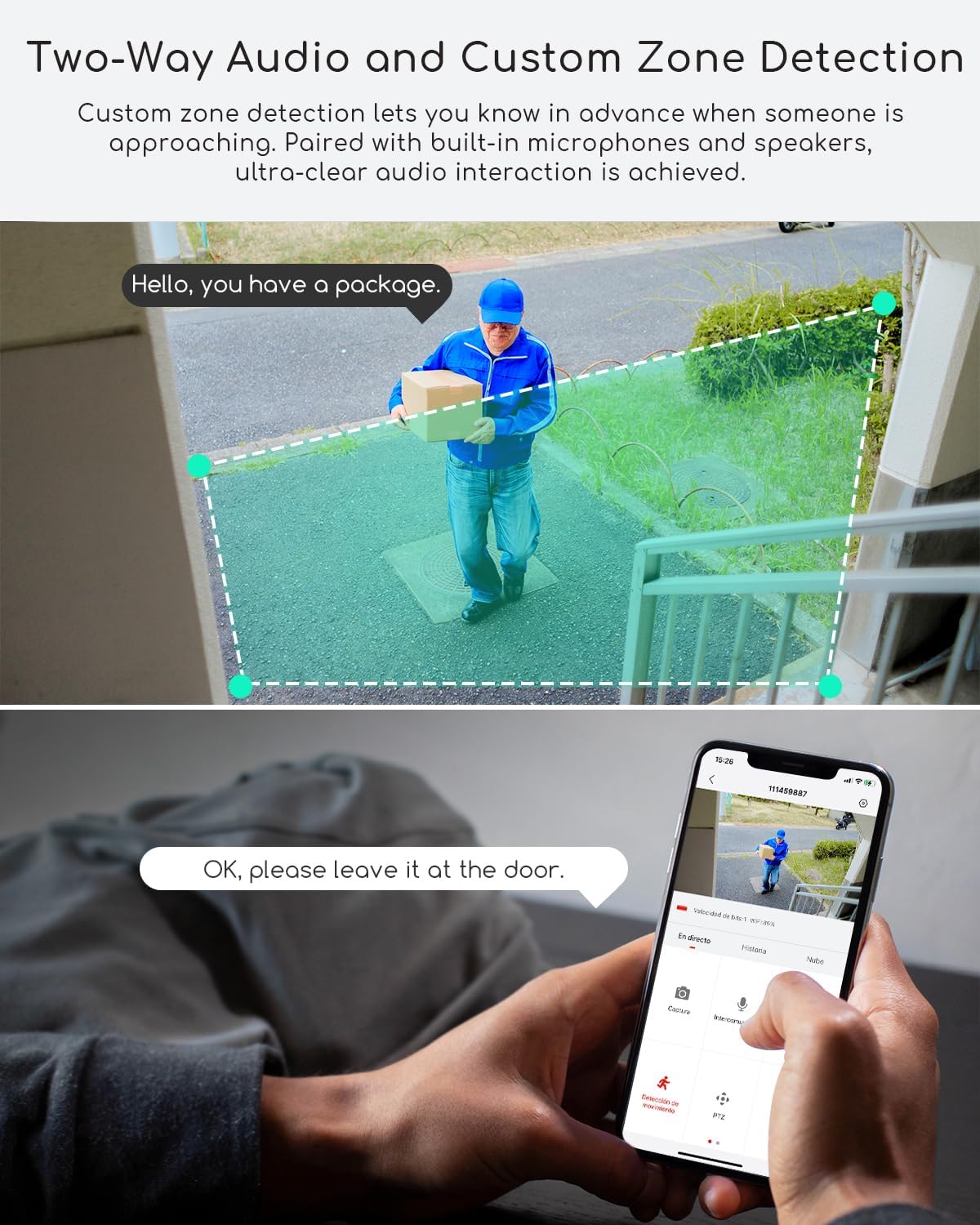
Image: A delivery person at a doorstep with a package, overlaid with a green custom detection zone. Below, a hand holds a smartphone displaying the live camera feed and a chat bubble with the text "OK, please leave it at the door," demonstrating the two-way audio feature.
4.4 Alarms (Siren & Spotlight)
If a suspicious person is detected, the camera can automatically sound an alarm and activate its spotlights to effectively intimidate and deter them. You will also receive immediate mobile notifications.

Image: Three scenarios depicting nighttime crime prevention: a white light alarm illuminating an intruder, an audible alarm with sound waves, and a siren alert with flashing lights, demonstrating the camera's deterrent features.
4.5 Video Storage Options
The camera supports both local storage via a Micro SD card (up to 128GB) and cloud storage. Recordings can be set to overwrite older footage when the memory is full.
- Micro SD Card: Insert a compatible Micro SD card (32-128GB) into the designated slot for local recording.
- Cloud Storage: A 6-second lifetime trial is available. Cloud storage provides secure, remote access to your recordings.

Image: The COOAU camera alongside a smartphone displaying the app interface for video storage. It highlights options for Micro SD Card (32-128GB) and Cloud Storage, with a bar chart showing estimated recording durations for different SD card sizes (32GB: ~90 days, 64GB: ~180 days, 128GB: ~360 days).
5. Maintenance
5.1 Cleaning
Regularly wipe the camera lens and solar panel with a soft, damp cloth to ensure clear image quality and efficient solar charging. Avoid using harsh chemicals.
5.2 Weather Resistance
The COOAU Q01 camera is IP66 weatherproof, meaning it is protected against dust and powerful water jets. It is designed to operate reliably in various outdoor conditions, including rain, cold, and heat.

Image: The COOAU camera and its solar panel being splashed with water, illustrating its IP66 weatherproof certification. Icons indicate its waterproof, cold resistant, and heat resistant properties.

Image: The COOAU camera and solar panel mounted outdoors, with a temperature gradient bar indicating its operational range from -10°C to 50°C, highlighting its heat resistance, cold resistance, and overall weatherproof capabilities.
6. Troubleshooting
- Camera not connecting to Wi-Fi: Ensure your Wi-Fi is 2.4GHz. Check Wi-Fi signal strength at the camera's location. Move the camera closer to the router if necessary.
- Battery not charging: Verify the solar panel is receiving direct sunlight for several hours daily. Clean the solar panel surface.
- Frequent false alarms: Adjust the motion detection sensitivity settings in the app. Define custom detection zones to exclude areas with frequent non-human movement (e.g., swaying trees, pets).
- Poor image quality at night: Ensure the camera lens is clean. Check for obstructions blocking the night vision LEDs.
- Delayed motion detection/notifications: Check your Wi-Fi connection stability and internet speed. Ensure the app has necessary permissions on your phone.
- Camera not responding to pan/tilt commands: Check Wi-Fi connection. Restart the camera and the app.
7. Specifications
| Feature | Specification |
|---|---|
| Model Name | Q01 |
| Video Capture Resolution | 5 MP (2592*1944P) |
| Connectivity Technology | Wireless (Wi-Fi 2.4GHz) |
| Power Source | Battery Powered (with Solar Panel) |
| Pan Range | 355° |
| Tilt Range | 90° |
| Night-Vision Range | 50 Feet |
| Weatherproof Rating | IP66 |
| Storage Options | Micro SD Card (32-128GB), Cloud Storage |
| Item Dimensions (L x W x H) | 16 x 15 x 10 cm |
| Item Weight | 8 g |
| Operating Temperature | -10°C to 50°C |
8. Warranty and Support
COOAU manufactures every product with care and provides each product with a two-year warranty and lifetime technical support.

Image: A Certificate of Conformity displayed next to the COOAU camera, signifying the product's adherence to quality standards and the manufacturer's commitment to product quality.
For further assistance, please visit the official COOAU website or contact their support team:
- Official Website: www.cooau.com
- Facebook: facebook.com/COOAU.Official
Documents and downloads
Ask a question about this manual
Ask about setup, troubleshooting, compatibility, parts, safety, or missing instructions. Manuals+ will review the question and use this page’s manual context to help answer it.