
OTL Technologies PAW981
PAW PATROL KIDS WIRELESS HEADSET User Manual
Model: PAW981 | Brand: OTL Technologies
Introduction
Thank you for purchasing the OTL Technologies PAW PATROL KIDS WIRELESS HEADSET. These headphones are designed for children aged 3 and up, featuring popular Paw Patrol characters and incorporating safety features such as controlled volume levels. This manual provides essential information for setup, operation, maintenance, and troubleshooting to ensure optimal use of your new headphones.
Safety Information
- Always supervise children when using headphones.
- Do not expose headphones to extreme temperatures, moisture, or direct sunlight.
- Keep away from water and liquids.
- Do not attempt to disassemble or modify the headphones. This will void the warranty.
- Dispose of the battery responsibly according to local regulations.
- Ensure the volume is set to a comfortable level before placing headphones on the child's ears.
What's in the Box

Image: The product packaging opened, displaying the wireless headphones, a USB-C charging cable, and a 3.5mm audio sharing cable.
Upon opening the package, please verify that all the following items are included:
- 1 x PAW PATROL KIDS WIRELESS HEADSET
- 1 x USB-C Charging Cable
- 1 x 3.5mm Audio Sharing Cable
- 1 x User Manual (this document)
Product Overview

Image: Front view of the Paw Patrol Kids Wireless Headset, highlighting its design and character graphics.
Controls and Ports

Image: Close-up of the right earcup, showing the power button, volume up/next track button, and volume down/previous track button.
- Power Button: Used to turn the headphones on/off and for Bluetooth pairing.
- Volume Up / Next Track Button: Increases volume with a short press, skips to next track with a long press.
- Volume Down / Previous Track Button: Decreases volume with a short press, goes to previous track with a long press.
- USB-C Charging Port: For connecting the charging cable.
- 3.5mm Audio Jack: For wired connection and audio sharing.
- Volume Limit Switch: Allows selection between 85dB and 95dB maximum volume levels.

Image: Detailed view of the volume limit switch (85dB/95dB) and the USB-C charging port located on the bottom of the earcup.
Adjustable Headband
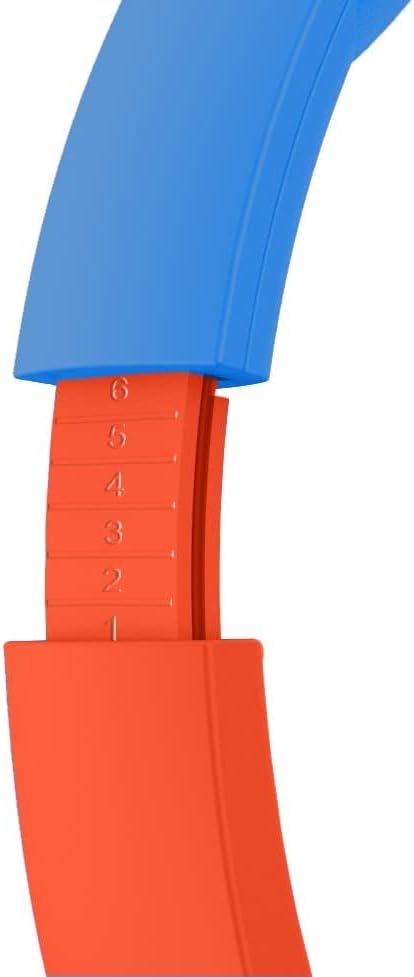
Image: Close-up showing the adjustable mechanism of the headband, allowing for a customized fit.
The headphones feature an adjustable headband to ensure a comfortable and secure fit for various head sizes. Gently slide the earcups up or down along the headband to adjust the length.
Setup
1. Charging the Headphones
Before first use, fully charge the headphones. A full charge takes approximately 2 hours.
- Connect the small end of the USB-C charging cable to the charging port on the headphones.
- Connect the large end of the USB-C charging cable to a USB power source (e.g., computer USB port, USB wall adapter).
- The LED indicator light will show charging status (refer to product for specific light behavior, typically red for charging, off/blue for full).
2. Powering On/Off
- To Power On: Press and hold the Power Button until the LED indicator lights up.
- To Power Off: Press and hold the Power Button until the LED indicator turns off.
3. Bluetooth Pairing (Wireless Mode)
The headphones can be paired with any Bluetooth-enabled device (smartphones, tablets, laptops).
- Ensure the headphones are powered off.
- Press and hold the Power Button for approximately 5-7 seconds until the LED indicator flashes blue and red, indicating pairing mode.
- On your device, go to Bluetooth settings and turn Bluetooth on.
- Search for available devices. The headphones will appear as "PAW PATROL HEADSET" or similar.
- Select the headphones from the list to connect. Once connected, the LED indicator will typically show a solid blue light or flash slowly.
- If prompted for a password, enter "0000".
Note: When the headphones are used in wired mode, all function buttons and the microphone are disabled. All functions are only available in wireless (Bluetooth) mode.
4. Wired Mode Connection
The headphones can also be used in wired mode with the included 3.5mm audio sharing cable.

Image: The 3.5mm audio sharing cable, which allows for wired connection and audio sharing.
- Connect one end of the 3.5mm audio sharing cable to the 3.5mm audio jack on the headphones.
- Connect the other end of the cable to the 3.5mm audio output jack of your device (e.g., tablet, smartphone, gaming console).
- The headphones will automatically switch to wired mode.
Operating Instructions
Volume Control
The headphones feature two safe volume levels: 85 dB and 95 dB. This allows for perfect volume control in any environment.
- Use the Volume Limit Switch on the earcup to select between 85 dB (standard safe listening) and 95 dB (for noisier environments like planes or trains).
- In wireless mode, use the Volume Up (+) and Volume Down (-) buttons on the earcup for fine-tuning the volume.
Playing Audio (Wireless Mode)
- Play/Pause: Short press the Power Button.
- Next Track: Long press the Volume Up (+) button.
- Previous Track: Long press the Volume Down (-) button.
Using the Microphone (Wireless Mode)
The built-in microphone is active only in wireless (Bluetooth) mode.
- Answer/End Call: Short press the Power Button.
- Reject Call: Long press the Power Button.
Audio Sharing
The included 3.5mm audio sharing cable allows two headphones to listen to the same audio source simultaneously.
- Connect one end of the audio sharing cable to the 3.5mm audio jack of the primary headphones (connected to the audio source).
- Connect the other end of the audio sharing cable to the 3.5mm audio jack of the second pair of headphones.
- Both headphones will now play audio from the same source.
Maintenance
Cleaning
- Wipe the headphones with a soft, dry, lint-free cloth.
- Do not use abrasive cleaners, alcohol, or chemical solvents.
- Avoid getting moisture into any openings.
Storage
- Store the headphones in a cool, dry place away from direct sunlight and extreme temperatures.
- The foldable design allows for compact storage.
Battery Care
- To preserve battery life, charge the headphones regularly, even if not in frequent use.
- Avoid fully discharging the battery frequently.
Troubleshooting
| Problem | Possible Cause | Solution |
|---|---|---|
| Headphones do not power on. | Low battery. | Charge the headphones fully. |
| Cannot pair via Bluetooth. | Headphones not in pairing mode; Bluetooth off on device; device too far. | Ensure headphones are in pairing mode (flashing blue/red). Turn on Bluetooth on your device. Move device closer to headphones (within 10 meters). Forget device and re-pair. |
| No sound in wireless mode. | Volume too low; not connected; audio source paused. | Increase volume on headphones and device. Ensure headphones are connected. Check audio playback on source device. |
| No sound in wired mode. | Cable not fully inserted; faulty cable; audio source issue. | Ensure 3.5mm cable is fully inserted into both headphones and device. Try a different 3.5mm cable if available. Check audio playback on source device. |
| Microphone not working. | Headphones in wired mode; device settings. | Microphone only works in wireless (Bluetooth) mode. Check microphone settings on your connected device. |
Specifications
| Model Name | Paw Patrol |
| Model Number | PAW981 |
| Connectivity Technology | Wireless (Bluetooth), Wired (3.5mm Jack) |
| Bluetooth Version | 5.3 |
| Bluetooth Range | Up to 10 meters (30 feet) |
| Battery Capacity | 500 mAh Lithium Polymer |
| Battery Life | Up to 24 hours playtime |
| Charging Time | Approximately 2 hours |
| Volume Levels | 85 dB and 95 dB (switchable) |
| Recommended Age | 3 years and up |
| Material | Plastic |
| Item Weight | 160 Grams (5.6 ounces) |
| Product Dimensions | 6.69 x 2.76 x 6.3 inches |
| Manufacturer | OTL Technologies |
Warranty and Support
OTL Technologies products are manufactured to the highest standards. For information regarding warranty coverage, technical support, or service, please contact OTL Technologies directly through their official website or customer service channels.
Please retain your proof of purchase for warranty claims.
Manufacturer: OTL Technologies
First Available: February 10, 2023
For the most up-to-date support information, visit the OTL Technologies website.
Ask a question about this manual
Ask about setup, troubleshooting, compatibility, parts, safety, or missing instructions. Manuals+ will review the question and use this page’s manual context to help answer it.