
Introduction
This manual provides detailed instructions for the proper use and maintenance of your Catiga CD-2701-12 Electronic Calculator. Designed for reliability and ease of use, this 12-digit calculator is suitable for various applications, from basic arithmetic in schools to more complex calculations in office environments. Please read this manual thoroughly to ensure optimal performance and longevity of your device.
Product Overview
The Catiga CD-2701-12 is a versatile electronic calculator featuring a clear 12-digit LCD display and durable plastic keys. It operates on dual power sources, utilizing both solar energy and a backup battery, ensuring continuous functionality. Its compact design makes it ideal for both desktop use and portability.
Calculator Front View
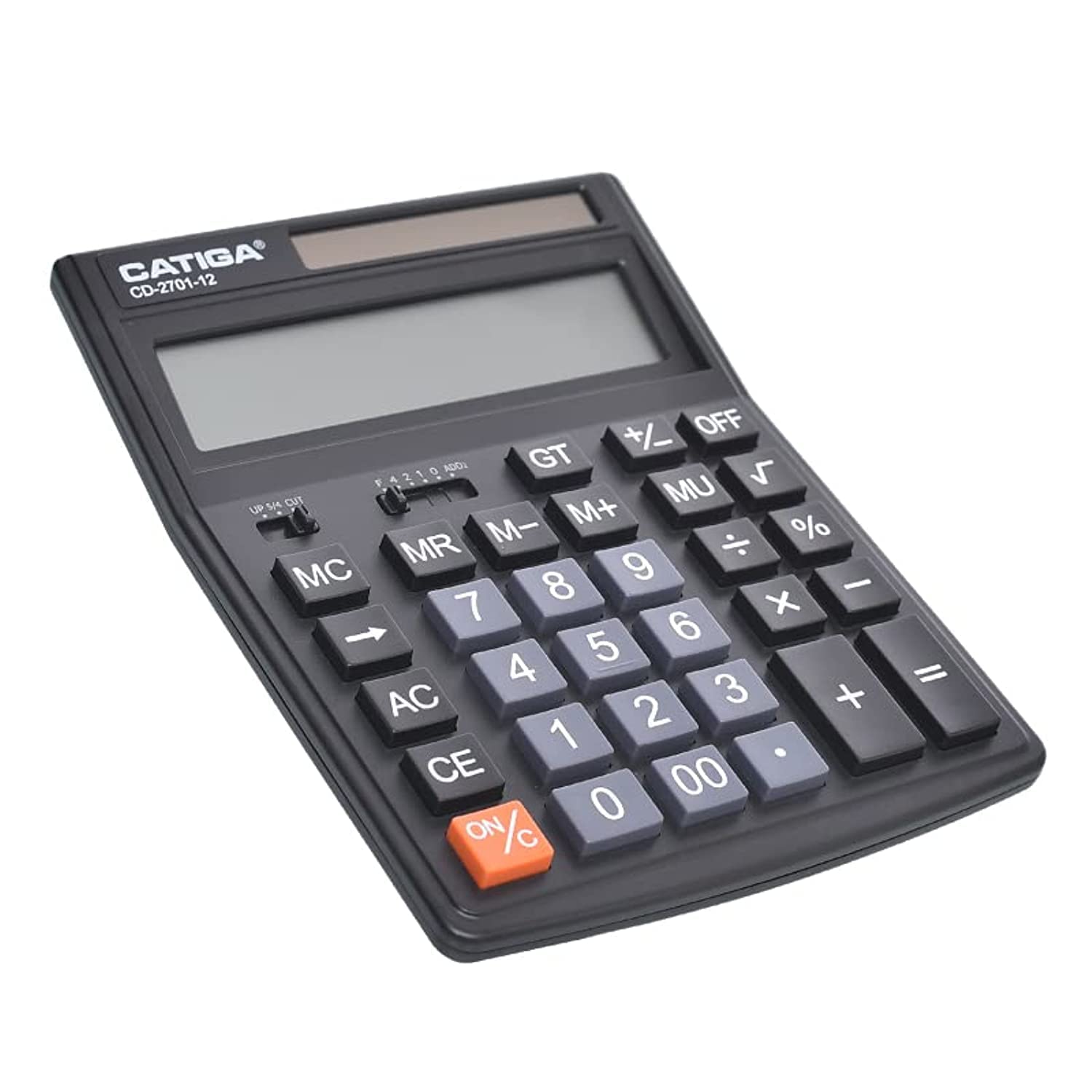
Figure 1: Front view of the Catiga CD-2701-12 calculator, showing the display, keys, and solar panel.
Key Features
- 12-Digit LCD Display: Provides clear and easy-to-read results.
- Dual Power Source: Operates on solar power with battery backup (1 AAA battery included).
- Durable Plastic Keys: Designed for long-lasting use and comfortable input.
- Basic and Scientific Functions: Supports standard arithmetic, percentage, square root, and memory functions.
- Decimal Selector and Rounding Switch: Allows for precise control over calculation output.
Setup
Battery Installation
- Locate the battery compartment cover on the back of the calculator.
- Slide the cover off in the direction indicated by the arrow.
- Insert one AAA battery, ensuring the correct polarity (+/-) as marked inside the compartment.
- Replace the battery compartment cover until it clicks securely into place.
The calculator also features a solar panel for power. In well-lit conditions, the calculator will primarily use solar power, conserving battery life. The battery provides power in low-light conditions or when solar power is insufficient.
Power On/Off
- To turn on the calculator, press the ON/C button.
- To turn off the calculator, press the OFF button. The calculator will also automatically power off after a period of inactivity to save power.
Operating Instructions
This section details the functions of the calculator's keys and switches.
Basic Arithmetic Operations
- Addition (+): Enter the first number, press +, enter the second number, then press =.
- Subtraction (-): Enter the first number, press -, enter the second number, then press =.
- Multiplication (×): Enter the first number, press ×, enter the second number, then press =.
- Division (÷): Enter the first number, press ÷, enter the second number, then press =.
Memory Functions
- M+ (Memory Plus): Adds the displayed value to the memory.
- M- (Memory Minus): Subtracts the displayed value from the memory.
- MR (Memory Recall): Recalls the value stored in memory to the display.
- MC (Memory Clear): Clears the value stored in memory.
Other Functions
- % (Percentage): Used for percentage calculations. For example, to calculate 10% of 200, enter 200 × 10 %.
- √ (Square Root): Calculates the square root of the displayed number.
- +/- (Change Sign): Changes the sign of the displayed number (positive to negative, or negative to positive).
- CE (Clear Entry): Clears the last entered number or operation without affecting previous calculations or memory.
- AC (All Clear): Clears all entries, operations, and memory, resetting the calculator to its initial state.
- GT (Grand Total): Accumulates the results of calculations. Pressing GT displays the sum of all results since the last AC or GT clear.
- MU (Mark Up): Used for profit margin calculations.
Decimal and Rounding Switches
The calculator features two slider switches located above the number pad for controlling decimal places and rounding.
- Decimal Selector (F 4 2 1 0 ADD): This switch controls the number of decimal places displayed.
- F: Floating decimal point (results display all decimal places).
- 4, 2, 1, 0: Fixed number of decimal places (4, 2, 1, or 0).
- ADD: Add mode, typically used for currency calculations, automatically adds two decimal places.
- Rounding Switch (UP 5/4 CUT): This switch determines how results are rounded.
- UP: Rounds up.
- 5/4: Standard rounding (rounds up if the next digit is 5 or greater, otherwise rounds down).
- CUT: Truncates (cuts off) decimal places without rounding.
Maintenance
Cleaning
- To clean the calculator, use a soft, dry cloth.
- For stubborn dirt, slightly dampen the cloth with water or a mild, non-abrasive cleaner.
- Do not use strong chemical cleaners, solvents, or abrasive materials, as these can damage the calculator's surface or display.
Storage
- Store the calculator in a cool, dry place away from direct sunlight and extreme temperatures.
- Avoid exposing the calculator to excessive moisture or dust.
- If the calculator will not be used for an extended period, it is recommended to remove the AAA battery to prevent leakage.
Troubleshooting
If you encounter issues with your calculator, please refer to the following common problems and solutions:
| Problem | Possible Cause | Solution |
|---|---|---|
| Display is blank or dim. | Low battery or insufficient light for solar power. | Ensure the calculator is in a well-lit area. Replace the AAA battery if necessary. |
| Incorrect calculation results. | Incorrect input, memory not cleared, or decimal/rounding settings. | Press AC to clear all previous operations. Check the decimal selector and rounding switch settings. Re-enter the calculation carefully. |
| Keys are unresponsive. | Calculator frozen or physical obstruction. | Press AC. If unresponsive, remove and reinsert the battery. Ensure no debris is lodged under the keys. |
Specifications
| Feature | Detail |
|---|---|
| Brand | Catiga |
| Model Name | CD-2701-12 |
| Display Type | LCD |
| Number of Digits | 12 |
| Power Source | Dual Power (Solar & 1x AAA Battery) |
| Material | Plastic |
| Color | Black |
| Item Weight | 1.1 pounds (approximately 0.5 kg) |
| Part Number | 6977052166043 |
Warranty and Support
Warranty Information
Based on the product information, there is no specific warranty provided for the Catiga CD-2701-12 calculator. Please refer to your retailer's return policy for any issues within the initial purchase period.
Customer Support
For further assistance or inquiries regarding your Catiga CD-2701-12 calculator, please contact the retailer from whom you purchased the product. They can provide guidance on product usage, returns, or exchanges as per their store policies.