
WHYFONE WF9440
Contents
WHYFONE WF9440 33'' Extension Long Arm Full Motion TV Wall Mount Instruction Manual
Model: WF9440
Introduction
This manual provides detailed instructions for the installation, operation, and maintenance of your WHYFONE WF9440 Full Motion TV Wall Mount. This mount is designed to provide versatile viewing angles for televisions ranging from 32 to 75 inches, with a maximum load capacity of 100 lbs (45 kg).
Key features include a 33-inch extension arm, full motion capabilities (tilt, swivel, and level adjustments), and compatibility with various VESA patterns up to 600x400mm. Its design allows for installation in corner spaces, maximizing room utility.
Important Safety Information
Please read all instructions carefully before installation and use. Failure to do so may result in personal injury or property damage.
- Do not exceed the maximum weight capacity of 100 lbs (45 kg).
- This TV mount is designed for installation on wood studs, solid concrete walls, or solid brick walls only. DO NOT install on drywall alone.
- Ensure the mounting surface can safely support the combined weight of the mount and the television.
- Use appropriate personal protective equipment during installation.
- If you are unsure about any part of the installation process, consult a qualified professional.
- Keep children and pets away during installation.
Package Contents
Verify that all components are present and undamaged before beginning installation. If any parts are missing or defective, please contact customer support.
- TV Wall Mount Assembly
- Mounting Hardware Kit (various screws, spacers, lag bolts, anchors)
- Allen Key
- Bubble Level
- Wrench
- Velcro Tie for cable management
- Instruction Manual
Specifications
| Feature | Specification |
|---|---|
| Model Number | WF9440 |
| Brand | WHYFONE |
| Mounting Type | Wall Mount |
| Movement Type | Articulating, Swivel |
| Material | Iron |
| Compatible TV Sizes | 32 - 75 Inches |
| Maximum Load Capacity | 100 lbs (45 kg) |
| VESA Compatibility (Max) | 600mm x 400mm |
| VESA Compatibility (Min) | 100mm x 100mm |
| Extension from Wall | Up to 33 inches |
| Retraction from Wall | 2.68 inches |
| Tilt Angle | +5° / -10° |
| Swivel Angle | ±90° (180° total range) |
| Level Adjustment | ±3° |
Setup and Installation
For the most detailed installation instructions, please refer to the official Installation Manual (PDF).
1. Pre-Installation Considerations
- Wall Type: This mount is suitable for wood stud, concrete, and solid brick walls. Do not install on drywall alone.
- VESA Compatibility: Ensure your TV's VESA pattern (mounting holes on the back) falls within the range of 100x100mm to 600x400mm.
- Weight Check: Confirm your TV's weight does not exceed 100 lbs (45 kg).

Image: The mount is compatible with 32-75 inch TVs, supports up to 99 lbs (45kg), and works with VESA patterns from 100x100mm to 600x400mm. It can be installed on solid concrete walls, single studs, or brick walls. Do not install on drywall alone.

Image: Diagram illustrating various VESA patterns supported by the mount, ranging from 100x100mm up to 600x400mm. It shows how the mounting arms can be adjusted to fit different VESA sizes.
2. Installation Steps Overview
The installation process typically involves the following stages:
- Mount Wall Plate: Use the provided drill hole template to mark and drill holes. Secure the wall plate to the wall using appropriate lag bolts and anchors for your wall type.
- Install TV Plate: Attach the TV plate to the back of your television using the correct screws and spacers from the hardware kit, matching your TV's VESA pattern.
- Attach to Arm: Connect the TV plate assembly to the articulating arm of the wall mount.
- Install Extension Arms (if necessary): For larger VESA patterns (e.g., >100x200mm), install the extension arms to the TV plate before attaching it to the main arm.
- Attach TV to Brackets: Carefully lift the TV with the attached TV plate and hook it onto the wall mount brackets.
- Secure TV: Engage the security locks to ensure the TV is stable and cannot accidentally dislodge from the mount.

Image: Visual guide showing two installation scenarios. On the left, for VESA 100x100mm and 100x200mm, no extension arms are needed. On the right, for larger VESA patterns, extension arms are required. Both scenarios illustrate mounting the wall plate, installing the TV plate, and attaching the TV.
Operating Your TV Mount
The WHYFONE WF9440 mount offers full motion capabilities to optimize your viewing experience.
Extension and Retraction
The mount features a 33-inch extension arm, allowing you to pull your TV far from the wall for optimal viewing in large spaces or to minimize glare. It can retract to a low profile of 2.68 inches from the wall, saving space when not in use.

Image: A side view of the TV mount showing its maximum extension of 33 inches and its retracted low profile of 2.68 inches from the wall, highlighting its space-saving and flexible design.
Tilt Adjustment
Adjust the vertical viewing angle of your TV by tilting it up to +5° or down to -10°. This is useful for reducing glare from lights or windows, or for achieving a comfortable viewing angle from different heights.
Swivel Adjustment
The mount allows for a 90° swivel to the left or right, providing a total 180° range of motion. This enables you to view your TV from various positions within a room, including adjacent rooms or corner setups.
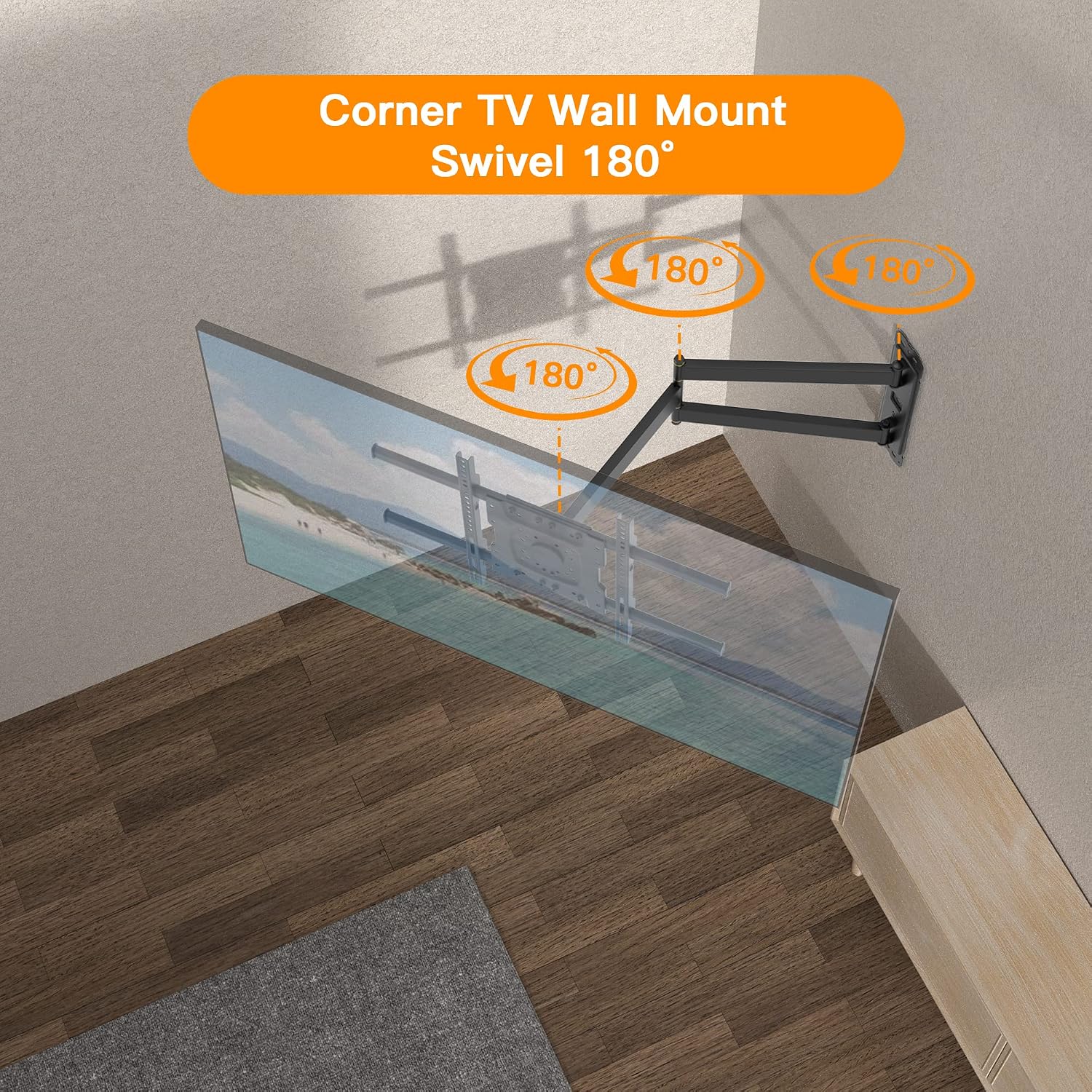
Image: An overhead view demonstrating the 180-degree swivel capability of the mount, ideal for corner installations or viewing from multiple angles within a room.
Level Adjustment
Fine-tune the horizontal alignment of your TV with a ±3° level adjustment. This ensures your screen is perfectly straight after installation, even if the wall plate was not mounted perfectly level.

Image: A visual representation of the ±3° level adjustment feature, allowing for minor horizontal corrections to ensure the TV screen is perfectly straight.

Image: This image illustrates the full range of motion, including +5°/-10° tilt, ±3° level adjustment, and the overall flexibility of the mount's arm for optimal viewing positions.
Maintenance
- Regular Inspection: Periodically check all screws, bolts, and connections to ensure they remain tight and secure. Over time, vibrations or adjustments can cause fasteners to loosen.
- Cleaning: Clean the mount with a soft, dry cloth. Avoid using abrasive cleaners or solvents that could damage the finish.
- Lubrication: If the articulating arm feels stiff or difficult to move, a small amount of silicone-based lubricant can be applied to the pivot points to ensure smooth operation.
Troubleshooting
- Problem: TV is not level after installation.
- Solution: Use the ±3° level adjustment feature. Loosen the leveling bolts slightly, adjust the TV to the desired horizontal position, and then re-tighten the bolts securely.
- Problem: Articulating arm is stiff or difficult to move.
- Solution: Apply a small amount of silicone-based lubricant to the pivot points of the arm. Work the arm back and forth to distribute the lubricant evenly.
- Problem: TV does not hold its tilt angle.
- Solution: Ensure the tilt adjustment bolts are tightened sufficiently to hold the desired angle. Avoid overtightening, which could damage the mechanism.
- Problem: TV feels unstable or slides on mounting bars.
- Solution: Verify that all security locks on the mounting bars are fully engaged and tightened. Double-check all wall plate and TV plate connections for tightness.
Warranty and Support
For detailed warranty information, product registration, or technical support, please refer to the official product documentation included with your purchase or visit the WHYFONE Store on Amazon. You may also find additional resources and contact information on the manufacturer's official website.
Documents and downloads
Ask a question about this manual
Ask about setup, troubleshooting, compatibility, parts, safety, or missing instructions. Manuals+ will review the question and use this page’s manual context to help answer it.