
1. Introduction
The Hantek 6074BC is a 4-channel USB virtual oscilloscope designed for a wide range of diagnostic and measurement applications. It offers a 70MHz bandwidth, 1GSa/s real-time sampling rate, and 64K memory depth, making it suitable for detailed waveform analysis. This device integrates multiple functions including an oscilloscope, multimeter, DMM, and waveform generator, providing a versatile tool for professionals and enthusiasts.
This manual provides essential information for the safe and effective use of your Hantek 6074BC Digital Oscilloscope. Please read it thoroughly before operation.

Figure 1.1: Hantek 6074BC Digital Oscilloscope highlighting 70MHz bandwidth, 64K storage depth, and 1GSa/s real-time sampling rate.
2. Safety Information
Always observe the following safety precautions to prevent injury and avoid damage to the instrument or any products connected to it.
- Power Source: Ensure the device is connected to a compatible USB port providing stable power.
- Probe Connections: Connect and disconnect probes only when the circuit under test is de-energized, if possible.
- Environmental Conditions: Operate the oscilloscope in a dry environment, away from moisture, dust, and extreme temperatures.
- Maintenance: Refer all servicing to qualified service personnel. Do not attempt to open or repair the device yourself.
- Accessories: Use only accessories and probes specified or supplied by Hantek.
3. Product Overview and Components
The Hantek 6074BC features four analog input channels, a USB 2.0 interface for PC connection, and a USBXI interface for modular expansion. Key components include:
- CH1-CH4 Trigger Sources: BNC connectors for connecting oscilloscope probes.
- USB Interface: For connecting to a computer.
- USBXI Interface: Standard interface for integration into USBXI cases.
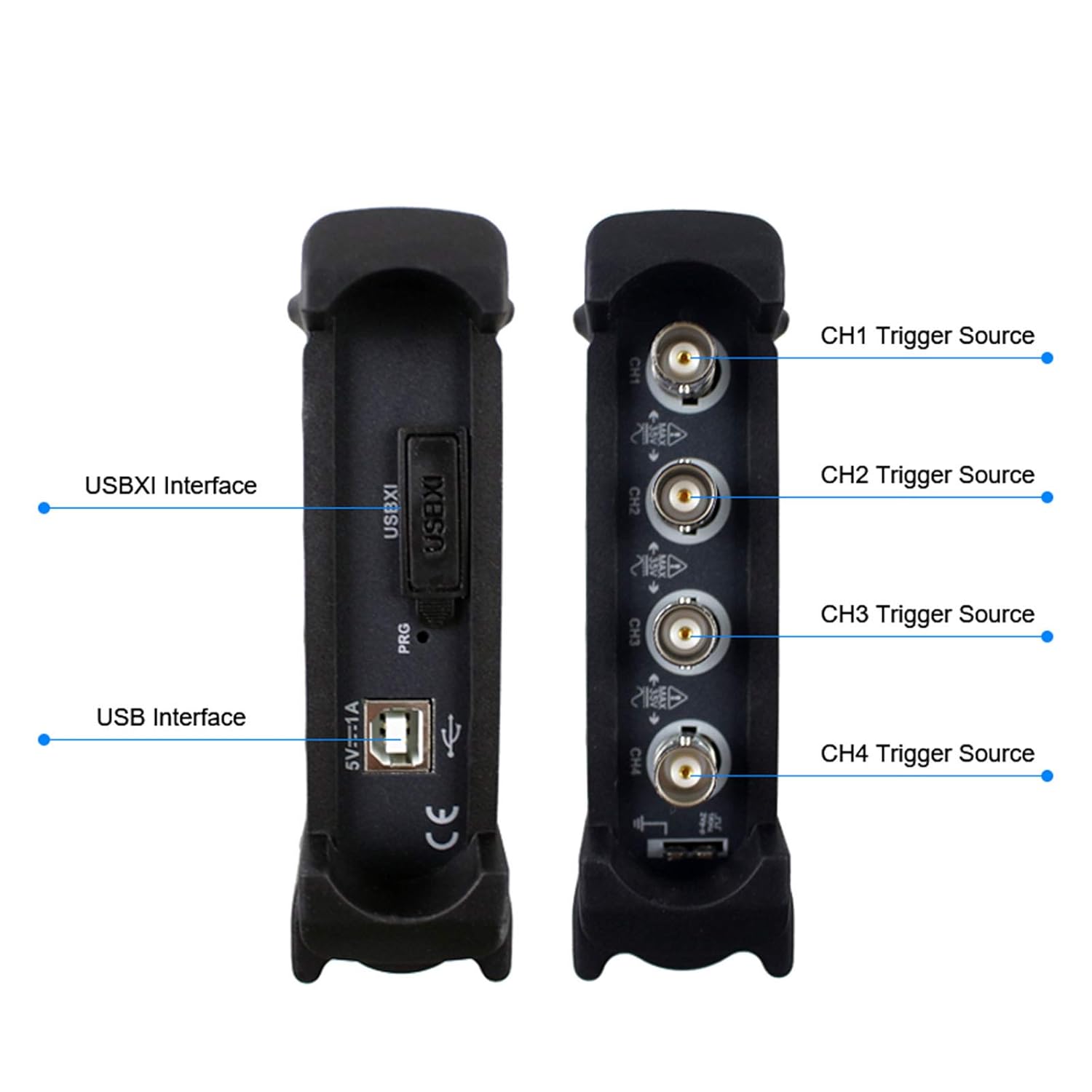
Figure 3.1: Detailed view of the Hantek 6074BC interfaces and channel inputs.

Figure 3.2: The four analog input channels for connecting probes.
4. Setup
- Unpacking: Carefully remove the oscilloscope and all accessories from the packaging. Verify that all components listed in the packing list are present.
- Software Installation: The Hantek 6074BC requires software to operate. Install the provided software on your computer. The device supports Windows 10, Windows 8, and Windows 7 operating systems.
- Connect to PC: Connect the Hantek 6074BC to your computer using the supplied USB 2.0 cable. The device is plug-and-play and does not require an external power supply.
- Connect Probes: Attach the oscilloscope probes to the desired input channels (CH1-CH4) on the device. Connect the probe ground clip to the circuit ground.

Figure 4.1: Hantek 6074BC connected to a computer for operation.

Figure 4.2: Standard accessories included with the Hantek 6074BC.
5. Operating Instructions
Once the software is installed and the device is connected, you can begin using the Hantek 6074BC. The software interface provides controls for all oscilloscope functions.
5.1 Basic Oscilloscope Functions
- Channel Selection: Enable or disable channels (CH1-CH4) as needed.
- Vertical Scale (Volts/Div): Adjust the voltage scale for each channel to properly display the waveform amplitude.
- Horizontal Scale (Time/Div): Adjust the time base to view the waveform's period and frequency.
- Trigger Settings: Configure the trigger source, type (edge, pulse, video, etc.), and level to stabilize the waveform display.
5.2 Advanced Features
- Automatic Measurement: Utilize over 20 automatic measurement functions for parameters like frequency, period, peak-to-peak voltage, RMS, etc.
- PASS/FAIL Check: Set up criteria for waveform comparison to quickly identify deviations.
- Dynamic Cursor Tracking: Use cursors to precisely measure specific points on the waveform.
- Waveform Record and Replay: Capture and store waveforms for later analysis and playback.
- FFT Spectrum Analyzer: Perform frequency domain analysis to identify signal components.

Figure 5.1: Hantek 6074BC in use, measuring signals from a circuit board and displaying them on a tablet.

Figure 5.2: Software interface showing FFT Spectrum Analyzer capabilities.
5.3 Data Output
The waveform data can be exported in various formats for reporting and further analysis, including EXCEL, BMP, and JPG. This allows for easy documentation of test results.

Figure 5.3: Examples of waveform data exported as images and a test report.
6. Maintenance
- Cleaning: Use a soft, dry cloth to clean the exterior of the device. Do not use abrasive cleaners or solvents.
- Storage: Store the oscilloscope in a clean, dry environment when not in use.
- Software Updates: Periodically check the Hantek website for software and firmware updates to ensure optimal performance and access to new features.
7. Troubleshooting
If you encounter issues with your Hantek 6074BC, consider the following common troubleshooting steps:
- No Device Detected:
- Ensure the USB cable is securely connected to both the oscilloscope and the computer.
- Try a different USB port on your computer.
- Verify that the Hantek software is correctly installed and running.
- Restart your computer.
- No Waveform Display:
- Check that probes are correctly connected to the input channels and the circuit under test.
- Ensure the input signal is within the oscilloscope's voltage range. Adjust the Volts/Div setting.
- Adjust the Time/Div setting to an appropriate range for the signal frequency.
- Verify trigger settings (source, level, type) are correctly configured to capture the signal.
- Ensure the relevant channel is enabled in the software.
- Software Issues:
- Ensure your operating system is compatible (Windows 7/8/10).
- Reinstall the Hantek software.
- Check for the latest software version on the Hantek website.
8. Specifications
Detailed technical specifications for the Hantek 6074BC Digital Oscilloscope:
| Feature | Specification |
|---|---|
| Brand | Hantek |
| Model Number | 6074BC (Manufacturer Part Number: 607400) |
| Analog Bandwidth | 70MHz |
| Real-time Sampling Rate | 1GSa/s |
| Channels | 4 Channels |
| Vertical Resolution | 8 Bit |
| Memory Depth | 64K |
| Input Sensitivity | 2mV-10V/DIV |
| Operating System Support | Windows 10, Windows 8, Windows 7 |
| Interface | USB 2.0, USBXI |
| Power Source | Corded Electric (via USB) |
| Dimensions (Approx.) | 207mm (Length) x 122mm (Width) |

Figure 8.1: Approximate dimensions of the Hantek 6074BC unit.
9. Warranty and Support
Hantek products are designed for reliability and performance. For warranty information, technical support, or to download the latest software and drivers, please visit the official Hantek website.
Official Hantek Website: www.hantek.com

Figure 9.1: Back panel of the Hantek 6074BC, displaying the Hantek website for support.