
Introduction
Thank you for choosing the Roxon RX-21VCD 21V Cordless Impact Drill. This manual provides essential information for the safe and effective operation, maintenance, and troubleshooting of your new tool. Please read these instructions carefully before use and retain them for future reference.
The Roxon RX-21VCD is a versatile cordless impact drill designed for various tasks including drilling into wood, metal, wall tiles, and cement walls, as well as driving and removing screws. It features a powerful 21V Li-ion battery, adjustable torque settings, variable speed control, and an integrated LED work light.
Safety Instructions
Always follow basic safety precautions when using power tools to reduce the risk of fire, electric shock, and personal injury.
- Work Area Safety: Keep your work area clean and well-lit. Cluttered or dark areas invite accidents. Do not operate power tools in explosive atmospheres, such as in the presence of flammable liquids, gases, or dust.
- Electrical Safety: Avoid body contact with earthed or grounded surfaces such as pipes, radiators, ranges, and refrigerators. Do not expose power tools to rain or wet conditions.
- Personal Safety: Always wear eye protection. Use hearing protection when operating the tool for extended periods. Dress properly; avoid loose clothing or jewelry. Secure long hair.
- Tool Use and Care: Do not force the power tool. Use the correct power tool for your application. Disconnect the plug from the power source and/or the battery pack from the power tool before making any adjustments, changing accessories, or storing power tools.
- Battery Pack Use and Care: Recharge only with the charger specified by the manufacturer. Do not use battery packs with any other power tools. When the battery pack is not in use, keep it away from other metal objects.
Product Overview
Familiarize yourself with the components of your Roxon RX-21VCD Cordless Impact Drill.

Image Description: This image displays the Roxon RX-21VCD Cordless Impact Drill with its key components labeled. These include the 10mm Drill Bit Chuck, 25+1 Torque Setting Ring, High/Low Speed Switch, LED Light, On/Off Switch (trigger), Forward/Reverse Switch, Battery Release Button, and the 21V Li-battery.
The drill comes with a robust carrying case, two 21V Li-ion rechargeable batteries (1500 mAh each), and a charging adaptor, ensuring you have everything needed for immediate use and portability.
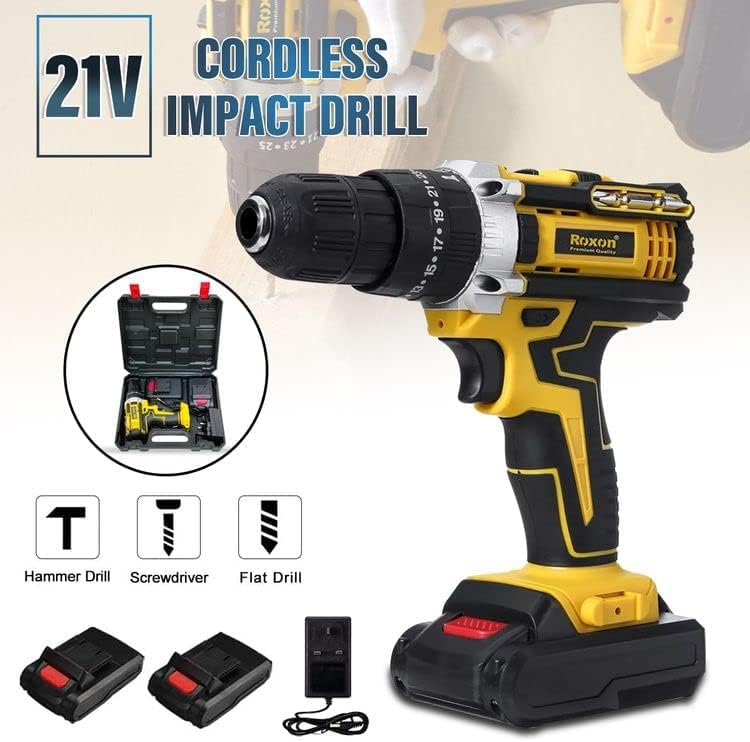
Image Description: This image shows the complete Roxon RX-21VCD kit, including the cordless impact drill, two 21V Li-ion batteries, and a charging adapter. The image also highlights the drill's capabilities as a hammer drill, screwdriver, and flat drill.
Setup
1. Battery Charging
Before first use, fully charge the battery. The charging adaptor is designed for 220-240V, 50/60Hz power outlets.
- Connect the charging adaptor to a suitable power outlet.
- Insert the battery into the charging adaptor.
- Allow the battery to charge until the indicator light on the charger signals a full charge (refer to charger instructions for specific indicator behavior).
- Disconnect the battery once fully charged.
2. Battery Installation and Removal
- Installation: Align the battery with the base of the drill handle. Slide the battery into place until it clicks securely.
- Removal: Press the battery release buttons on the sides of the battery pack and slide the battery out from the drill handle.
3. Drill Bit Installation and Removal
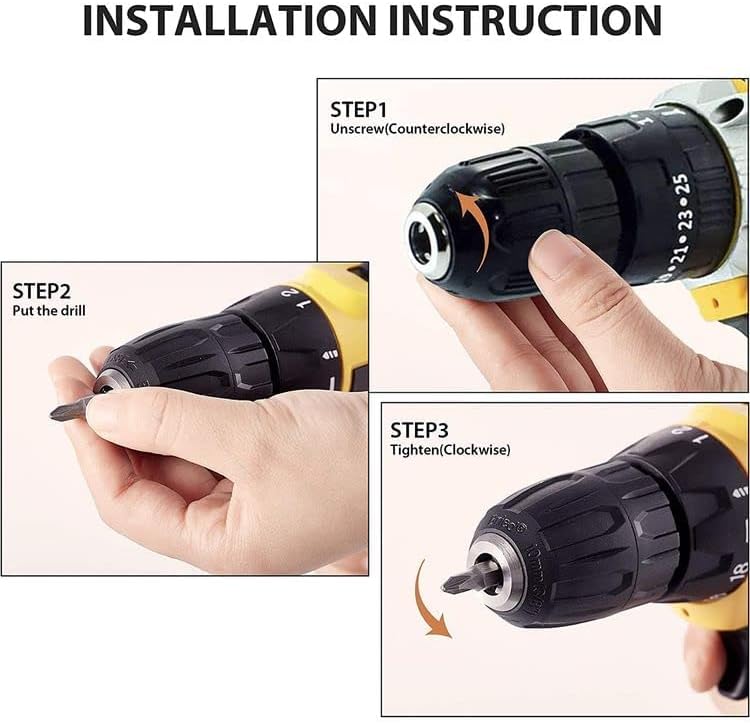
Image Description: This image illustrates the three steps for installing a drill bit. Step 1 shows unscrewing the chuck counter-clockwise. Step 2 shows inserting the drill bit. Step 3 shows tightening the chuck clockwise to secure the bit.
- Step 1 (Unscrew): Rotate the chuck counter-clockwise to open the jaws.
- Step 2 (Insert): Insert the desired drill bit or screwdriver bit into the chuck jaws. Ensure the bit is centered and inserted as far as possible.
- Step 3 (Tighten): Rotate the chuck clockwise to securely tighten the jaws around the bit. Ensure the bit is firmly held before operation.
Operating Instructions
1. Power On/Off
The drill is activated by pressing the On/Off switch (trigger) located on the handle. Release the trigger to turn the drill off.
2. Variable Speed Control
The drill features variable speed control. The speed of rotation is proportional to how far the trigger is pressed. Pressing lightly results in lower speed, while pressing fully results in maximum speed (up to 1350 RPM).
3. High/Low Speed Switch
A switch located on top of the drill allows you to select between high and low-speed ranges. Use the low-speed setting for higher torque applications (e.g., driving large screws) and the high-speed setting for faster drilling.
4. Forward/Reverse Switch
The forward/reverse switch, located above the trigger, controls the direction of rotation. Push it to the left for forward (clockwise) rotation for drilling and driving screws. Push it to the right for reverse (counter-clockwise) rotation for removing screws or freeing a jammed drill bit. Ensure the switch is in the center position to lock the trigger and prevent accidental starting.
5. Torque Settings (25+1 Position Clutch)
The torque setting ring, located behind the chuck, allows you to adjust the amount of torque applied. There are 25 settings for screw driving, which prevent over-tightening and stripping screws, and one dedicated drill setting for maximum power when drilling holes.
- Settings 1-25: For driving screws. Start with a lower setting and increase as needed until the screw is driven flush without stripping.
- Drill Symbol Setting: For drilling applications. This setting bypasses the clutch for continuous maximum torque.
6. LED Work Light
The integrated LED light illuminates the work area when the trigger is pressed, improving visibility in dark or confined spaces.
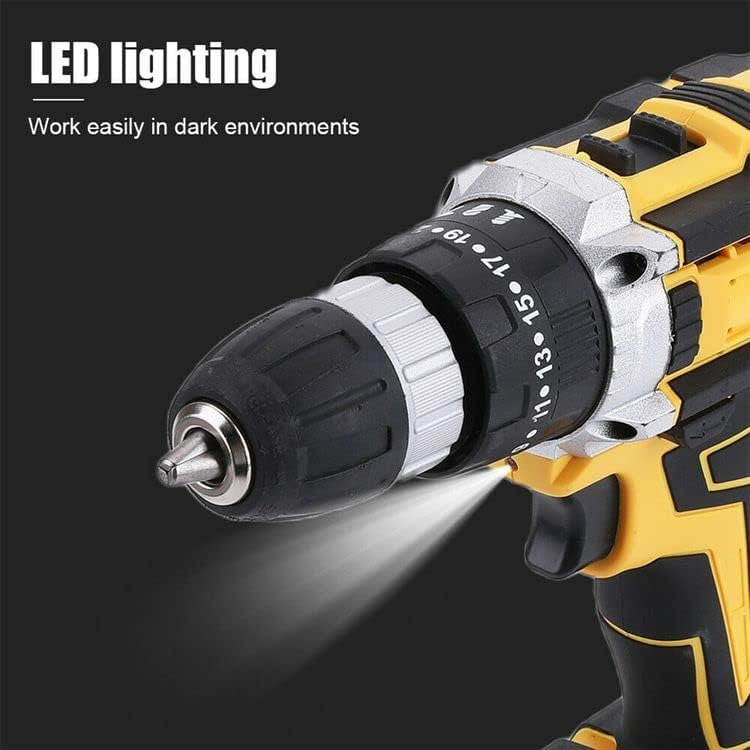
Image Description: A close-up view of the drill's chuck area, showing the integrated LED light casting illumination onto the workpiece, demonstrating its utility in low-light conditions.
7. Drilling Tips
- Always secure your workpiece to prevent movement during drilling.
- Apply steady, even pressure. Do not force the drill.
- For hard materials, use a slower speed and appropriate drill bit.
- When drilling into wood, metal, or wall tiles, select the appropriate drill bit and torque setting. For cement walls, ensure the drill is set to the hammer function (if applicable) and use a masonry bit.

Image Description: A person wearing a white glove is operating the Roxon RX-21VCD Cordless Impact Drill to create a hole in a wooden beam, demonstrating a typical drilling application.
Maintenance
- Cleaning: Keep the ventilation slots of the tool clean to prevent overheating. Use a soft, damp cloth to clean the exterior. Do not use harsh chemicals or abrasive cleaners.
- Storage: Store the drill and its accessories in a dry, secure place, out of reach of children. Use the provided carrying case for protection.
- Battery Care: Store batteries in a cool, dry place. Do not store fully discharged batteries for extended periods. Recharge them periodically if not in use.
- Inspection: Regularly inspect the drill for any signs of damage, loose screws, or worn parts. Do not operate a damaged tool.
Troubleshooting
Refer to the table below for common issues and their solutions.
| Problem | Possible Cause | Solution |
|---|---|---|
| Drill does not start | Battery not charged or improperly installed; Forward/Reverse switch in center (locked) position. | Charge battery and ensure proper installation; Move Forward/Reverse switch to forward or reverse position. |
| Loss of power during operation | Battery charge is low. | Recharge the battery. |
| Bit not tightening in chuck | Chuck jaws are dirty or damaged; Bit shank is too small or worn. | Clean chuck jaws; Use a bit with the correct shank size; Replace worn bit. |
| Excessive vibration or noise | Damaged or bent drill bit; Loose components. | Replace drill bit; Check for and tighten any loose screws. |
Specifications
| Feature | Specification |
|---|---|
| Model Number | RX-21VCD |
| Voltage | 21 Volts (DC) |
| Battery Type | Li-ion |
| Battery Capacity | 1500 mAh |
| Charger Input | 220-240V, 50/60Hz |
| Maximum Rotational Speed | 1350 RPM |
| Torque Settings | 25 + 1 (Drill Mode) |
| Maximum Torque | 25 Newton Meters |
| Chuck Size | 10mm (0.38 Inches) |
| Special Features | Variable Speed, LED Work Light |
| Item Weight | 600 g |
| Product Dimensions | 30 x 20 x 30 cm |
Warranty and Support
This product is covered by a standard manufacturer's warranty against defects in materials and workmanship. Please retain your proof of purchase for warranty claims. For technical support, spare parts, or service inquiries, please contact your retailer or the manufacturer's customer service department.