
1. Introduction
Thank you for choosing the Gosasa Men's Multi-Function Military Sports Watch Model 8049. This watch combines a robust design with multiple practical features, including both analog and digital time displays, an alarm, stopwatch, LED backlight, and calendar functions. It is designed for durability and water resistance up to 50 meters. Please read this manual carefully to understand its operation and ensure proper use and longevity of your watch.

Image: The Gosasa 8049 watch featuring its light green band and prominent face, worn on a wrist.
2. Watch Components and Buttons
Familiarize yourself with the watch's buttons and their functions:
- LIGHT Button: Activates the LED backlight.
- MODE Button: Cycles through different modes (Time, Alarm, Stopwatch).
- START/STOP Button: Used to start and stop the stopwatch, or adjust settings.
- RESET Button: Used to reset the stopwatch, or adjust settings.
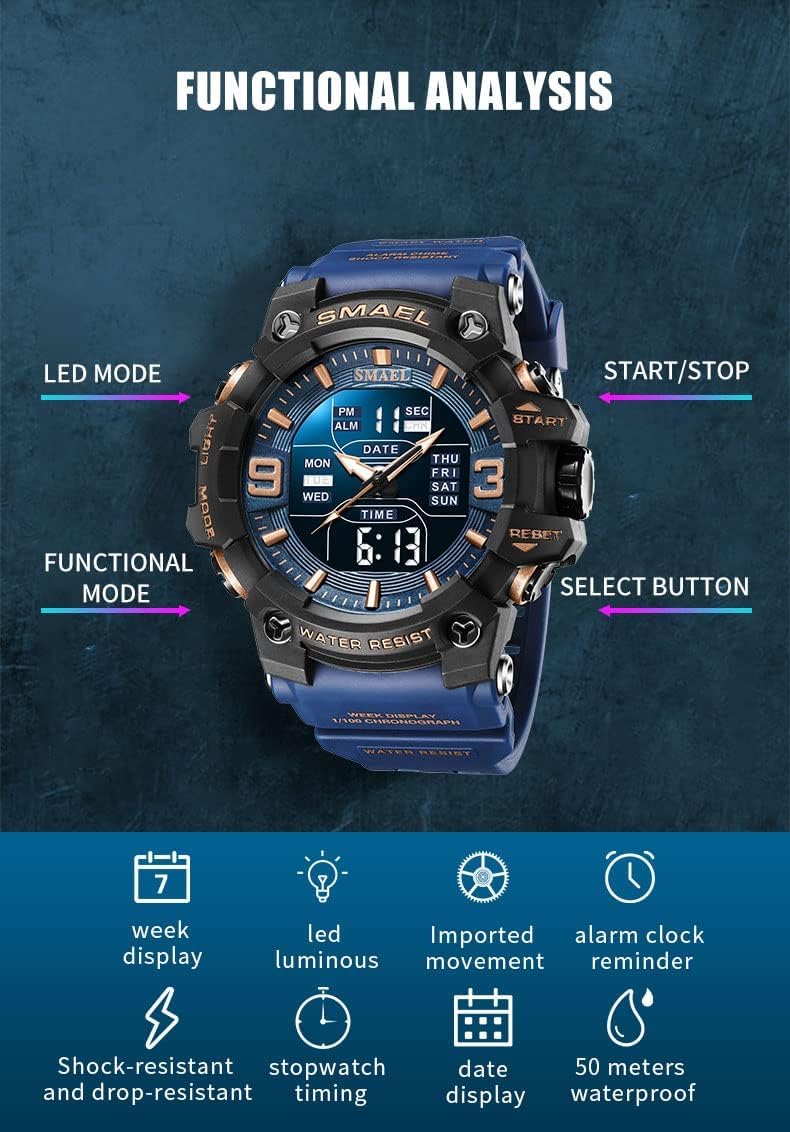
Image: A detailed diagram illustrating the location and names of the functional buttons on the Gosasa 8049 watch.
3. Setup Instructions
3.1 Setting Digital Time and Date
- Press the MODE button repeatedly until the digital time display starts flashing, indicating setting mode.
- Use the START/STOP button to adjust the flashing value (e.g., seconds, minutes, hours).
- Press the RESET button to move to the next setting item (e.g., hour, minute, month, date, day of week).
- Once all settings are correct, press the MODE button to exit setting mode.
3.2 Setting Analog Time
The analog hands are set independently. Pull out the crown (the small knob on the side of the watch) and rotate it to adjust the analog hands to the desired time. Push the crown back in to start the analog movement.
3.3 Setting the Alarm
- Press the MODE button until 'ALM' (Alarm) appears on the digital display.
- Press the START/STOP button to adjust the alarm hour.
- Press the RESET button to switch to alarm minute setting, then use START/STOP to adjust.
- Press the MODE button to exit alarm setting.
- To activate/deactivate the alarm, press the START/STOP and RESET buttons simultaneously in alarm mode. An alarm icon will appear/disappear.
3.4 12/24 Hour Format
In normal time display mode, press the START/STOP button to toggle between 12-hour (with AM/PM indicator) and 24-hour formats.
4. Operating Instructions
4.1 Using the Stopwatch
- Press the MODE button until 'CHR' (Chronograph/Stopwatch) appears.
- Press the START/STOP button to begin timing.
- Press the START/STOP button again to pause timing.
- Press the RESET button to clear the stopwatch to zero.
- To resume timing after pausing, press START/STOP.
4.2 Activating the LED Backlight
Press the LIGHT button to illuminate the digital display for a few seconds. This feature is useful in low-light conditions.

Image: The watch face illuminated by its LED backlight, making both the analog hands and digital information visible in darkness.
4.3 Water Resistance
This watch is water resistant up to 50 meters (5 ATM). This means it is suitable for everyday use, showering, and swimming in shallow water. Important: Do not press any buttons underwater. Pressing buttons underwater can compromise the water resistance and damage the watch.
Video: A demonstration of the Gosasa 8049 watch's water resistance and LED backlight feature. The watch is shown submerged in water and its display lighting up.
5. Maintenance
- Cleaning: Wipe the watch regularly with a soft, dry cloth to remove dirt and moisture. For stubborn dirt, use a slightly damp cloth and then dry thoroughly.
- Avoid Chemicals: Do not expose the watch to strong chemicals, solvents, or detergents, as these can damage the case, strap, or internal components.
- Temperature Extremes: Avoid exposing the watch to extreme temperatures (hot or cold) for prolonged periods, as this can affect battery life and accuracy.
- Battery Replacement: When the display dims or the watch stops functioning, the battery may need replacement. It is recommended to have the battery replaced by a qualified watch technician to ensure proper sealing and maintain water resistance.
- Water Resistance Check: If the watch is frequently exposed to water, it is advisable to have its water resistance seals checked periodically by a professional.
6. Troubleshooting
- Digital Display is Dim or Blank: The battery may be low or depleted. Replace the battery.
- Time is Inaccurate: Ensure the time and date are set correctly as per Section 3.1 and 3.2. If the issue persists after battery replacement, the movement may require servicing.
- Water Inside the Watch: If condensation or water appears inside the watch, stop using it immediately and have it inspected by a professional. This indicates a breach in water resistance.
- Buttons Not Responding: Check for any debris or foreign objects obstructing the buttons. If the buttons are stuck or unresponsive, do not force them; seek professional assistance.
7. Specifications

Image: A diagram detailing the physical dimensions and key specifications of the Gosasa 8049 watch.
| Feature | Detail |
|---|---|
| Model Number | 8049 |
| Movement | Quartz + Electronic (Japanese Movement) |
| Case Material | ABS + PU |
| Strap Material | Resin |
| Dial Case Back | Stainless Steel |
| Crystal | Plexiglass / Mineral Glass |
| Case Diameter | 59 mm |
| Case Thickness | 18 mm |
| Strap Width | 22 mm |
| Overall Length | 254 mm |
| Watch Weight | 77 g |
| Water Resistance | 50 Meters (5 ATM) |
| Functions | Dual Time, Alarm, Date, Week Display, LED Light, 12/24 Hour Format, Chronograph, Shock-resistant |
8. Warranty and Support
8.1 Warranty Information
This Gosasa watch comes with a 1-year manufacturer's warranty from the date of purchase. This warranty covers manufacturing defects under normal use. It does not cover damage resulting from improper use, accidents, unauthorized repairs, or normal wear and tear.
8.2 Customer Support
For any questions, concerns, or warranty claims regarding your Gosasa watch, please contact the seller directly through your purchase platform. Provide your order details and a clear description of the issue for prompt assistance.