
Eyesound Y17
Eyesound Y17 Jellyfish Lamp User Manual
Model: Y17 | Brand: Eyesound
Introduction
Welcome to the Eyesound Y17 Jellyfish Lamp user manual. This guide provides detailed instructions for setting up, operating, maintaining, and troubleshooting your new jellyfish lamp. Designed to create a soothing and mesmerizing ambiance, this lamp features 7 color-changing LED lights, two lighting modes, and adjustable flow speeds. Please read this manual carefully to ensure proper use and longevity of your product.

Image: The Eyesound Y17 Jellyfish Lamp, showcasing its design and the included stirring rod.
What's Included
Please verify that all components are present in your package:
- Jellyfish Lamp (1)
- USB-C Power Cable (1)
- Jellyfish (3)
- Stick Rod (1)
- User Manual (1)

Image: All items included in the Eyesound Y17 Jellyfish Lamp package.
Setup Instructions
Follow these steps to set up your Eyesound Y17 Jellyfish Lamp:
- Fill the Tank: Open the lid and fill the tank with bottled water up to the indicated fill line.
- Add Jellyfish: Gently place the jellyfish into the tank. Ensure they are placed upside down initially to help release trapped air.
- Add Detergent: Add 8-10 drops (6-8ml) of liquid detergent (e.g., dish soap) into the water. This helps to effectively remove air bubbles attached to the surface of the jellyfish, allowing them to swim freely.
- Remove Air Bubbles: Use the provided stick rod to gently stir the water and dislodge any remaining air bubbles from the jellyfish. Ensure all bubbles are removed for optimal swimming motion. The jellyfish should sink once all air is removed.
- Secure the Lid: Close the rotatable lock lid securely to prevent leakage.
- Connect Power: Plug the USB-C power cable into the lamp and a compatible USB power source (adapter, power bank, laptop, or PC).
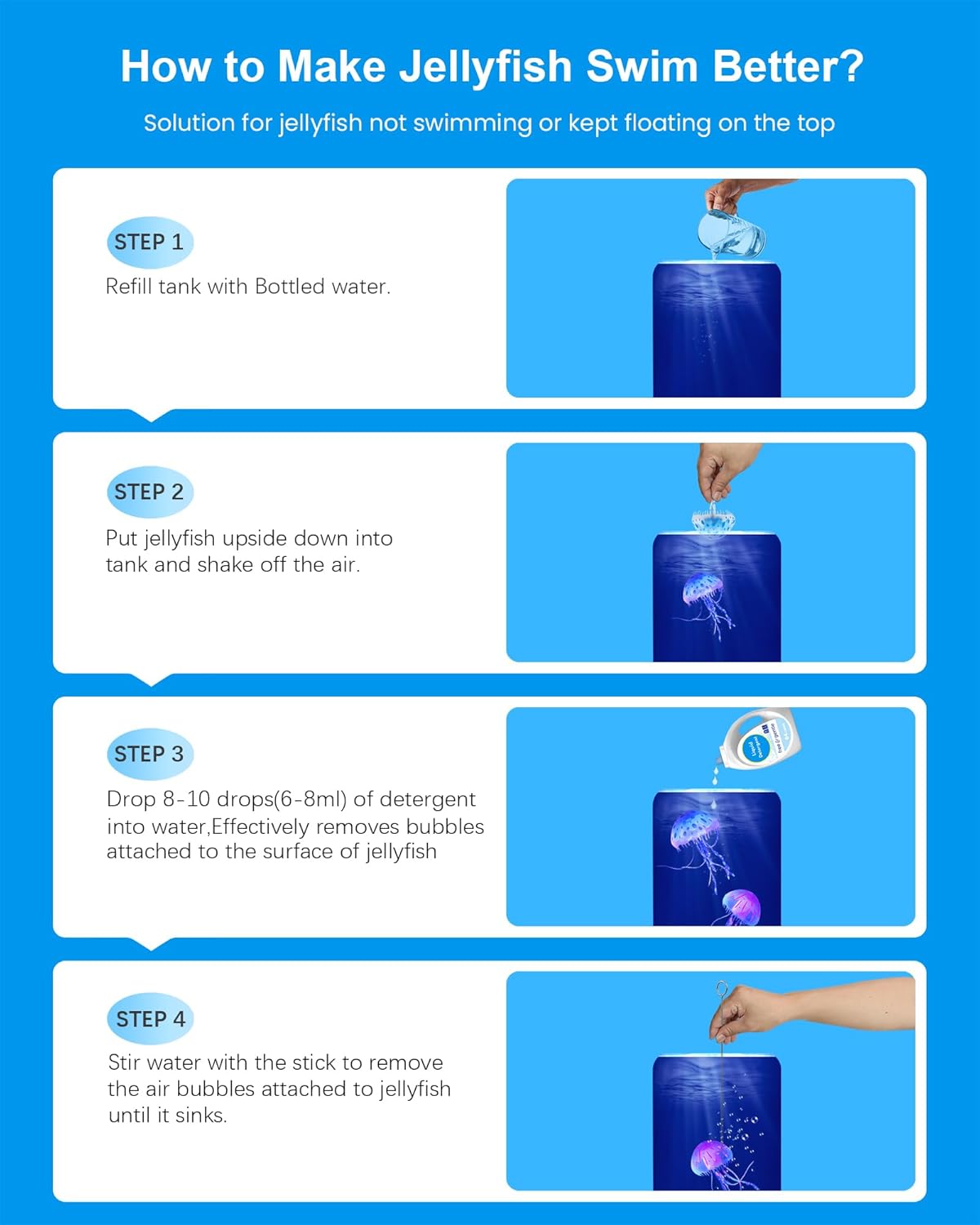
Image: Visual guide for preparing the jellyfish lamp.
Setup Video Guide
Video: Official product video demonstrating the setup process for the Eyesound Jellyfish Lamp.
Operating Instructions
Your Eyesound Y17 Jellyfish Lamp offers various settings to customize your experience:
- Power On/Off: Press the power button on the base to turn the lamp on or off.
- Color Modes: The lamp features 7 color options and 2 lighting modes. Press the light button to cycle through static colors or activate the gradient breathing mode for a dynamic color-shifting effect.
- Flow Speeds: Adjust the jellyfish swimming speed with three flow settings: normal, slow, and fast. This allows you to customize the visual effect of the jellyfish movement.
- 8-Hour Auto-Shutoff: The lamp is equipped with an 8-hour auto-shutoff timer for convenience and energy efficiency.
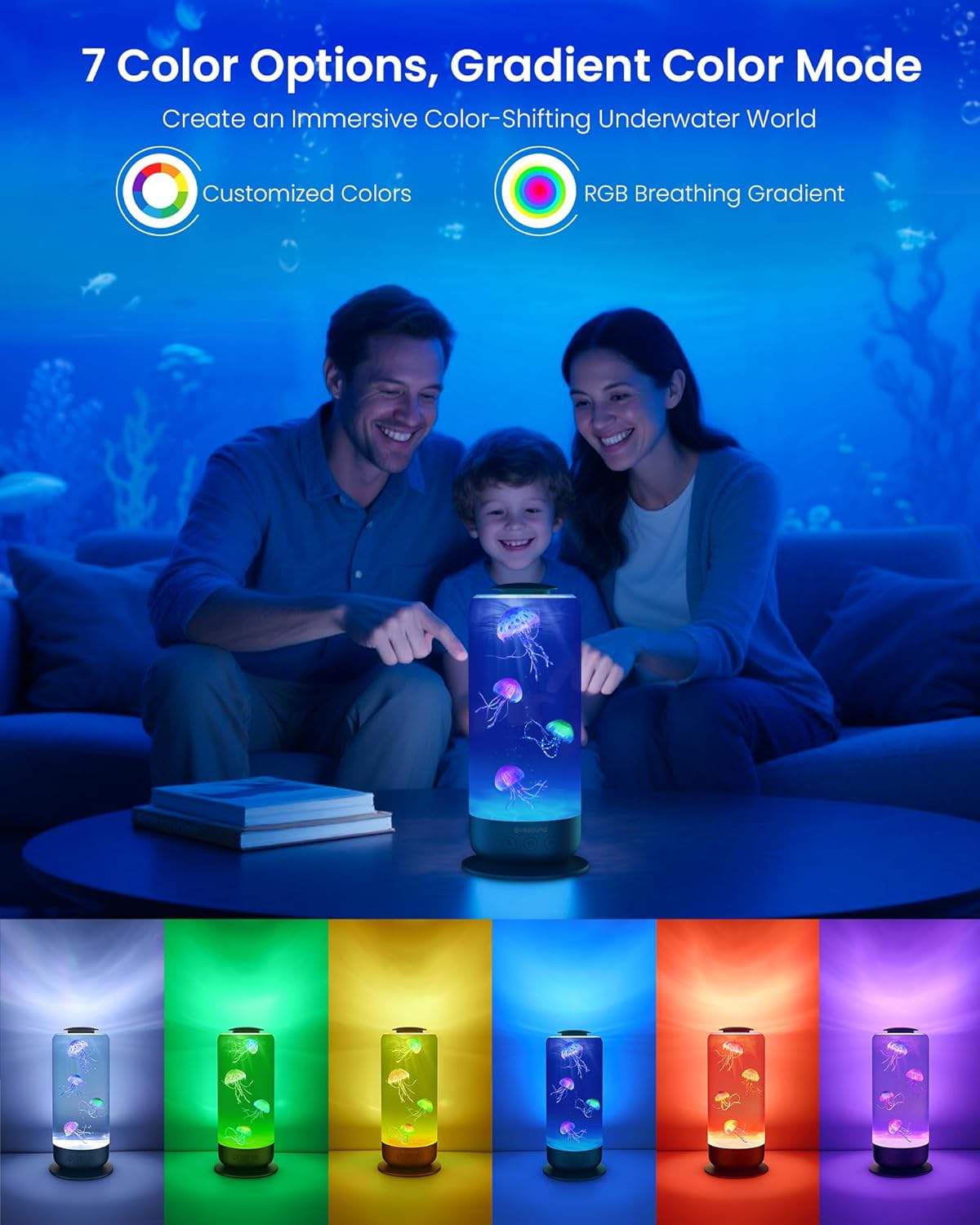
Image: Demonstration of the 7 color options and gradient mode.

Image: Illustration of the adjustable flow speeds for jellyfish movement.
Operation Video Guide
Video: Official product video demonstrating the various operating modes and features of the Eyesound Jellyfish Lamp.
Maintenance
To ensure the longevity and optimal performance of your Eyesound Y17 Jellyfish Lamp, follow these maintenance guidelines:
- Water Changes: It is recommended to change the water every 2-3 months to prevent cloudiness and maintain clarity.
- Cleaning: Gently wipe the exterior of the lamp with a soft, damp cloth. Do not use abrasive cleaners or immerse the base in water.
- Jellyfish Care: If jellyfish appear to stick together or float excessively, ensure all air bubbles are removed as described in the setup section. A small amount of liquid detergent helps maintain their buoyancy and movement.
Troubleshooting
Here are solutions to common issues you might encounter:
- Jellyfish Not Swimming/Floating at Top:
- Ensure all air bubbles are removed from the jellyfish and the tank. Use the provided stick rod to gently dislodge bubbles.
- Verify that 8-10 drops of liquid detergent have been added to the water. This reduces surface tension and helps the jellyfish sink and move naturally.
- Check if the water level is appropriate.
- Water Appears Cloudy:
- This can occur if too much detergent is used or if the water has not been changed for a long time. Perform a water change and ensure the correct amount of detergent is added.
- Motor Noise:
- The Eyesound Y17 uses an ultra-quiet brushless motor. If you notice unusual noise, ensure the lamp is on a flat, stable surface and that no foreign objects are obstructing the motor's operation.
- Lamp Not Turning On:
- Check the USB-C power cable connection to both the lamp and the power source.
- Try a different USB power source or adapter to rule out power supply issues.
Specifications
| Feature | Detail |
|---|---|
| Brand | Eyesound |
| Model Name | Y17 Jellyfish Lamp |
| Product Dimensions | 4.92"D x 4.92"W x 11.02"H |
| Item Weight | 1.2 Pounds |
| Light Source Type | LED |
| Number of Light Sources | 1 |
| Light Color Options | Blue, Green, Yellow, White, Purple, Red (7 color changing) |
| Material | Glass (Tank), Acrylonitrile Butadiene Styrene (Base) |
| Power Source | Corded Electric (USB-C) |
| Voltage | 5 Volts |
| Wattage | 3 Watt-hours |
| Control Method | Push Button |
| Special Features | 7 color changing, 8H timer auto off, Ultra-quiet motor, Leak-proof design |
| Indoor/Outdoor Usage | Indoor |
| UPC | 673658939185 |
Warranty and Support
Eyesound provides a 1-year full warranty and lifetime support for your jellyfish lamp. For any inquiries, technical assistance, or warranty claims, please contact Eyesound customer service. We are committed to designing modern gift-related products and ensuring customer satisfaction.
Ask a question about this manual
Ask about setup, troubleshooting, compatibility, parts, safety, or missing instructions. Manuals+ will review the question and use this page’s manual context to help answer it.