
ADVANCED SOUND GROUP ADV500-WHT
ADV. 500 True Wireless Earbuds User Manual
Model: ADV500-WHT
Introduction
The ADV. 500 Micro True Wireless Earbuds are designed to be the world's smallest in-ear TWS earbuds, offering loud, powerful sound and wide-range wireless connectivity. This manual provides essential information for setting up, operating, and maintaining your earbuds to ensure optimal performance and longevity.
Safety Information
- Do not expose the earbuds or charging case to extreme temperatures, humidity, or liquids.
- Avoid dropping or subjecting the device to strong impacts.
- Do not attempt to disassemble or modify the earbuds or charging case. This will void the warranty.
- Keep out of reach of children and pets.
- Use only the provided charging cable or a certified equivalent.
- Prolonged listening at high volume levels may cause hearing damage. Adjust volume to a safe level.
What's in the Box
Upon opening your ADV. 500 package, you should find the following items:
- 1 Pair of ADV. 500 Earbuds
- 1 Charging Case
- 3 Pairs of Silicone Ear Tips (Small, Medium, Large)
- 1 Wrist Strap
- 1 USB-C Charging Cable

Image: All accessories included with the ADV. 500 True Wireless Earbuds.
Setup
1. Initial Charge
Before first use, fully charge the earbuds and the charging case. Place the earbuds into the charging case and connect the USB-C cable to a power source. The charging time is approximately 1 hour.
2. Remove Protective Films
Upon unboxing, ensure you remove the small protective films covering the charging contacts on the earbuds. These films prevent charging and proper connection until removed.
Video: Instructions on how to remove the protective films from the ADV. 500 earbuds before first use.
3. Choose Your Ear Tip Size
For optimal sound quality and comfort, select the ear tip size that best fits your ears. The earbuds come with small, medium, and large silicone tips. A proper seal is crucial for bass response and noise isolation.

Image: The ergonomic design of the ADV. 500 earbuds for comfortable fit.
4. Bluetooth Pairing
- Open the charging case. The earbuds will automatically enter pairing mode.
- On your device (smartphone, tablet, etc.), enable Bluetooth.
- Search for "ADV. 500" in the list of available Bluetooth devices.
- Select "ADV. 500" to connect. You will hear an audible confirmation once paired.
The ADV. 500 earbuds utilize BT 5.2 technology for an instant and wide-range wireless connection, up to 40 feet without physical barriers.

Image: ADV. 500 earbuds demonstrating their wide-range Bluetooth connection capability.
Operating Instructions
Touch Controls
The ADV. 500 earbuds feature integrated touch controls for easy management of your audio and calls.
| Action | Function |
|---|---|
| Single Tap | Play/Pause Music, Answer/End Call |
| Double Tap (Right Earbud) | Next Track |
| Double Tap (Left Earbud) | Previous Track |
| Triple Tap | Activate Voice Assistant |
| Long Press (2 seconds) | Reject Call |
Audio Playback
The custom-tuned 6mm dynamic drivers deliver loud and powerful sound with deep, rumbling bass. Ensure earbuds are properly seated in your ears for the best audio experience.
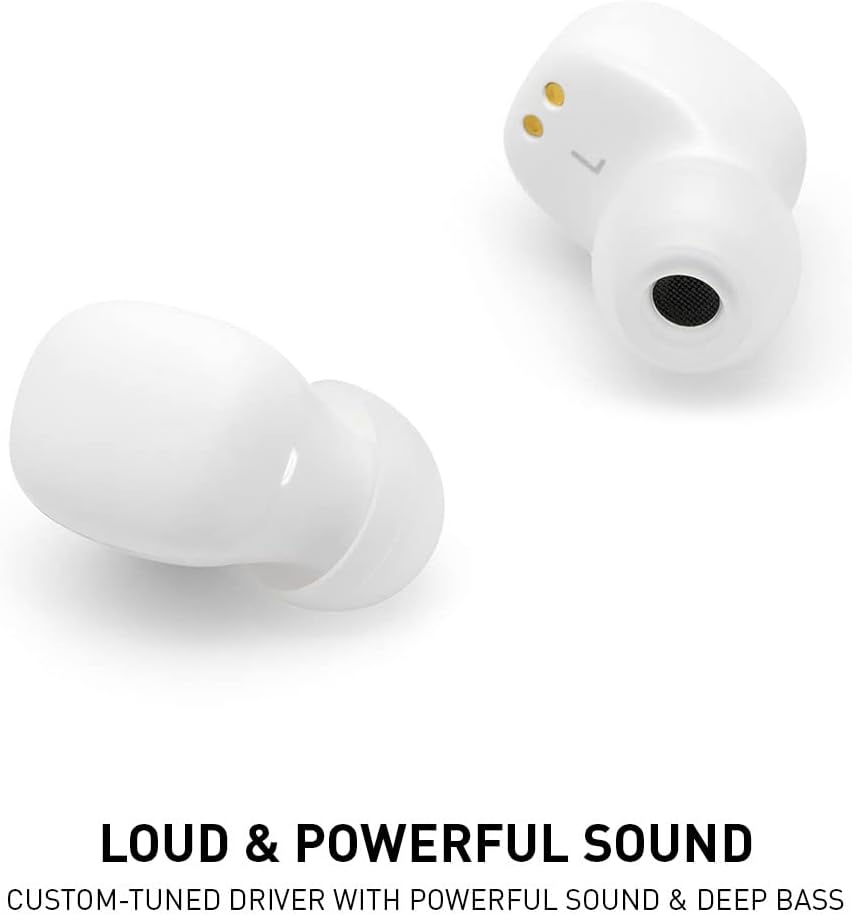
Image: A detailed view of the ADV. 500 earbud, highlighting its audio components.
Battery Life
The earbuds provide approximately 5 hours of battery life on a single charge. The charging case extends the total listening time by recharging the earbuds multiple times.
Maintenance
- Regularly clean the earbuds, especially the ear tips and charging contacts, with a soft, dry, lint-free cloth.
- Do not use abrasive cleaners or solvents.
- Store the earbuds in their charging case when not in use to protect them and keep them charged.
- Avoid exposing the device to extreme temperatures or direct sunlight for extended periods.
Troubleshooting
| Problem | Solution |
|---|---|
| Earbuds not charging | Ensure protective films are removed from charging contacts. Clean charging contacts on both earbuds and case. Ensure charging cable is securely connected. |
| Cannot pair with device | Ensure earbuds are in pairing mode (open case). Turn off and on Bluetooth on your device. Forget "ADV. 500" from your device's Bluetooth list and try pairing again. Ensure earbuds are charged. |
| No sound or low volume | Check device volume. Ensure earbuds are properly seated in your ears. Clean ear tips and speaker grilles. Re-pair the earbuds. |
| Microphone quality is poor | Ensure the microphone opening is not obstructed. Test in a quiet environment. Ensure earbuds are fully charged. |
| Touch controls not responding | Ensure your fingers are clean and dry. Try restarting the earbuds by placing them in the case and closing it, then reopening. |
Specifications
| Feature | Detail |
|---|---|
| Model | ADV500-WHT |
| Wireless Technology | Bluetooth 5.2 |
| Audio Driver Size | 6mm Dynamic Driver |
| Frequency Range | 20Hz – 20kHz |
| Battery Life (Earbuds) | Up to 5 hours |
| Charging Time | Approx. 1 hour |
| Control Type | Touch Control |
| Weight | 2.39 ounces (total package) |
| Color | White |

Image: The compact dimensions of the ADV. 500 earbuds and charging case.

Image: ADV. 500 earbuds and case compared to a dime, illustrating their small size.
Warranty and Support
For warranty information, technical support, or customer service inquiries, please refer to the contact details provided on the product packaging or visit the official ADVANCED SOUND GROUP website. Keep your proof of purchase for warranty claims.
Related documentsADV500-WHT

Ask a question about this manual
Ask about setup, troubleshooting, compatibility, parts, safety, or missing instructions. Manuals+ will review the question and use this page’s manual context to help answer it.