
1. Introduction
Thank you for choosing the TWS Bluetooth Earbuds. This manual provides detailed instructions on how to set up, operate, maintain, and troubleshoot your new earbuds. Please read this manual carefully before use to ensure optimal performance and longevity of your device.
2. Product Overview
The TWS Bluetooth Earbuds offer a wireless audio experience with immersive bass, noise cancellation, and a portable charging case. The package includes the two earbuds and the charging station.
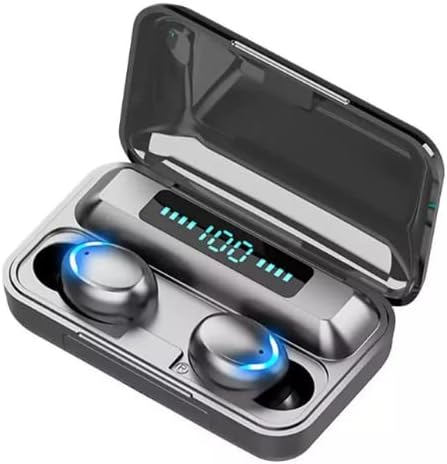
Image: TWS Bluetooth Earbuds in their charging case, displaying the battery level.
Key Features:
- Bluetooth 5.1 Connectivity
- CVC 8.0 Noise Cancellation
- IPX7 Waterproof Rating
- Smart Touch Controls
- Automatic Pairing
- 2000mAh Portable Charging Case with Power Bank Function
- Low Latency Gaming Mode
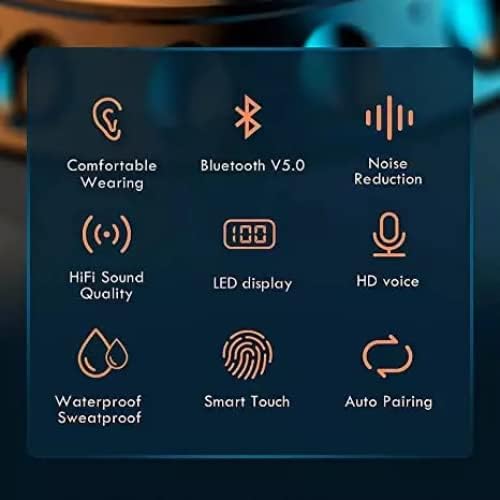
Image: Visual representation of key features including Bluetooth, noise reduction, and waterproofing.
3. Setup
3.1 Initial Charging
Before first use, fully charge the charging case and earbuds. The charging case has a 2000mAh battery capacity and can also serve as a power bank for other mobile devices.
- Connect the charging case to a USB power source using a compatible cable.
- The LED display on the charging case will show the battery percentage.
- Place the earbuds into the charging case. They will begin charging automatically.
- Earbuds typically take about 60 minutes to fully charge. The charging case can provide approximately 23 full recharges for the earbuds, offering up to 140 hours of total playback time.

Image: The 2000mAh charging case charging a mobile phone, highlighting its large capacity and extended playback time.
3.2 Pairing with Your Device
The earbuds feature automatic pairing for convenience.
- Ensure your device's Bluetooth function is turned on.
- Take both earbuds out of the charging case. They will automatically power on and enter pairing mode.
- On your device, search for Bluetooth devices and select "TWS F9" (or similar name) from the list.
- Once connected, you will hear a confirmation prompt, and the earbuds will be ready for use.
- For subsequent uses, the earbuds will automatically connect to the last paired device when removed from the case.
4. Operating Instructions
4.1 Power On/Off
- Power On: The earbuds automatically power on when removed from the charging case. To manually power on, press and hold the touch area on either earbud for approximately 5 seconds.
- Power Off: The earbuds automatically power off when placed back into the charging case. To manually power off, press and hold the touch area on either earbud for approximately 5 seconds.
4.2 Touch Controls
The earbuds feature intuitive touch controls for various functions:
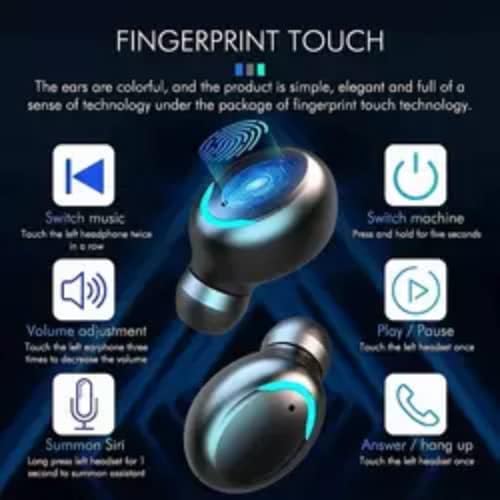
Image: Detailed diagram of touch control functions on the earbuds.
- Play/Pause: Single tap on either earbud.
- Volume Up: Triple tap the right earbud.
- Volume Down: Triple tap the left earbud.
- Next Track: Double tap the right earbud.
- Previous Track: Double tap the left earbud.
- Answer/End Call: Single tap on either earbud during an incoming call.
- Reject Call: Press and hold on either earbud for 2 seconds during an incoming call.
- Summon Voice Assistant (Siri/Google Assistant): Long press on either earbud for 1 second.
4.3 Call Functions
The earbuds are equipped with CVC 8.0 noise cancellation technology and binaural HD calling for clear communication.
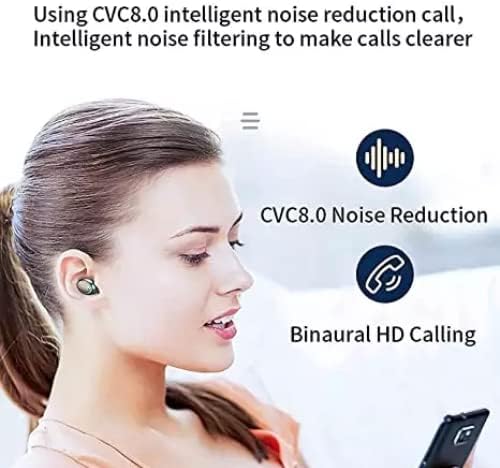
Image: Illustrates the CVC 8.0 Noise Reduction and Binaural HD Calling features for clear calls.
- Use the touch controls as described above to manage calls.
- The noise cancellation feature helps reduce ambient sound for clearer conversations.
4.4 Gaming Mode
These earbuds offer a low-latency gaming mode (40-60ms delay) for an enhanced gaming experience, allowing for real-time sound transmission. This is particularly beneficial for games requiring precise audio cues like gunshots or footsteps.
5. Maintenance
5.1 Cleaning
- Regularly clean the earbuds and charging case with a soft, dry, lint-free cloth.
- Do not use abrasive cleaners, alcohol, or chemical solvents.
- Ensure charging contacts are clean and free of debris.
5.2 Storage
- When not in use, store the earbuds in their charging case to protect them and keep them charged.
- Store in a cool, dry place away from extreme temperatures and direct sunlight.
5.3 Waterproofing (IPX7)
The earbuds are rated IPX7 waterproof, meaning they can withstand immersion in water up to 1 meter for 30 minutes. This makes them suitable for sports and outdoor activities, protecting against sweat and rain.

Image: Earbuds submerged in water, demonstrating their IPX7 waterproof rating.
Note: The charging case is not waterproof. Do not expose the charging case to water.
6. Troubleshooting
- Earbuds not pairing: Ensure both earbuds are out of the case and your device's Bluetooth is on. Try turning Bluetooth off and on again on your device. If issues persist, place earbuds back in the case, close it, then reopen and try again.
- Only one earbud working: Place both earbuds back into the charging case, close the lid, wait a few seconds, then take them out again. This often re-syncs them.
- No sound: Check the volume level on both your device and the earbuds. Ensure the earbuds are properly connected to your device.
- Charging issues: Ensure the charging cable is securely connected to both the case and the power source. Clean the charging contacts on the earbuds and inside the case.
- Poor sound quality: Ensure earbuds are clean and properly seated in your ears. Check for interference from other wireless devices.
7. Specifications
| Feature | Specification |
|---|---|
| Model Name | TWS F9 |
| Connectivity Technology | Bluetooth 5.1, Wireless |
| Noise Control | Active Noise Cancellation (CVC 8.0) |
| Water Resistance Level | IPX7 |
| Charging Case Battery Capacity | 2000mAh |
| Earbud Charging Time | Approx. 60 minutes |
| Total Playback Time (with case) | Up to 140 hours |
| Control Method | Touch |
| Compatible Devices | Cellphones |
| Included Components | Charging Station |
8. Safety Information
- Do not disassemble, repair, or modify the product.
- Keep the product away from fire, water, and high humidity environments.
- Avoid prolonged exposure to high volume levels to prevent hearing damage.
- Dispose of the product and its battery responsibly according to local regulations.
- Keep out of reach of children and pets.
9. Warranty and Support
For any product inquiries, technical support, or warranty claims, please contact the seller or manufacturer through the platform where the product was purchased. Please retain your proof of purchase for warranty purposes.


