Introduction

The RovyVon Aurora A4 EDC Keychain Flashlight is an upgraded 4th generation compact and powerful illumination tool designed for everyday carry. Crafted from durable TC4 titanium, it offers exceptional lightweight, heat-resistance, and corrosion-resistance. Featuring a 650-lumen cool white LED emitter and convenient USB-C rechargeable battery, this flashlight provides five versatile lighting modes and includes practical magnetic accessories for hands-free use.
What's in the Box
- A4 Flashlight x1
- User Manual x1
- Key Ring x1
- Magnetic Pocket Clip x1
- Magnetic Tail Base Buckle x1
Specifications
| Brand | RovyVon |
| Model | A4 |
| Material | TC4 Titanium |
| Light Source Type | LED (6500K Cool White) |
| Max Output | 650 Lumens |
| Battery | Built-in 300mAh Lithium Polymer |
| Charging Port | USB-C |
| Charge Time | Approx. 60 minutes |
| Runtime (Moonlight) | 56 hours (0.5 lumens) |
| Runtime (Low) | 6 hours (25 lumens) |
| Runtime (Medium) | 1.5 hours (200 lumens) |
| Runtime (High) | 75 minutes (650 lumens) |
| Water Resistance | IPX6 Water Resistant |
| Dimensions | 0.61"D x 0.61"W x 2.26"H |
| Item Weight | 2.4 ounces (approx. 0.15 lbs) |
Setup
Unlocking the Flashlight (First Use)
Upon receiving your RovyVon Aurora A4, the flashlight is in a locked state to prevent accidental activation during transit. To unlock it for the first time, you can either:
- Rapidly click the main button 5 times. The light will blink twice to confirm it's unlocked.
- Plug the flashlight into a USB-C charger. This will automatically unlock the device.

Image: The RovyVon Aurora A4 flashlight showing its USB-C charging capability, which also serves as an unlock method.
Attaching Magnetic Clip and Tail Base
The Aurora A4 comes with a removable magnetic pocket clip and a magnetic tail base buckle, allowing for versatile attachment options. Simply align the accessories with the designated grooves on the flashlight body, and they will securely attach magnetically.

Image: Demonstrates how the magnetic pocket clip and tail base attach to the flashlight, enabling hands-free use by adhering to metal surfaces.
Operating Instructions
Basic Operation (Momentary On, Constant On, Cycling Modes)
- Momentary On: Press and hold the main button. The light will turn on at its highest setting. Release the button to turn the light off.
- Constant On: Rapidly double-click the main button. The flashlight will turn on in Moonlight mode.
- Cycling Modes: Once the light is on (in Constant On mode), click the button once to cycle through the modes in the following order: Moonlight (0.5 lumens) → Low (25 lumens) → Medium (200 lumens) → High (650 lumens).
- Turn Off: Press and hold the button for approximately 0.5 seconds to turn the flashlight off from any constant-on mode.
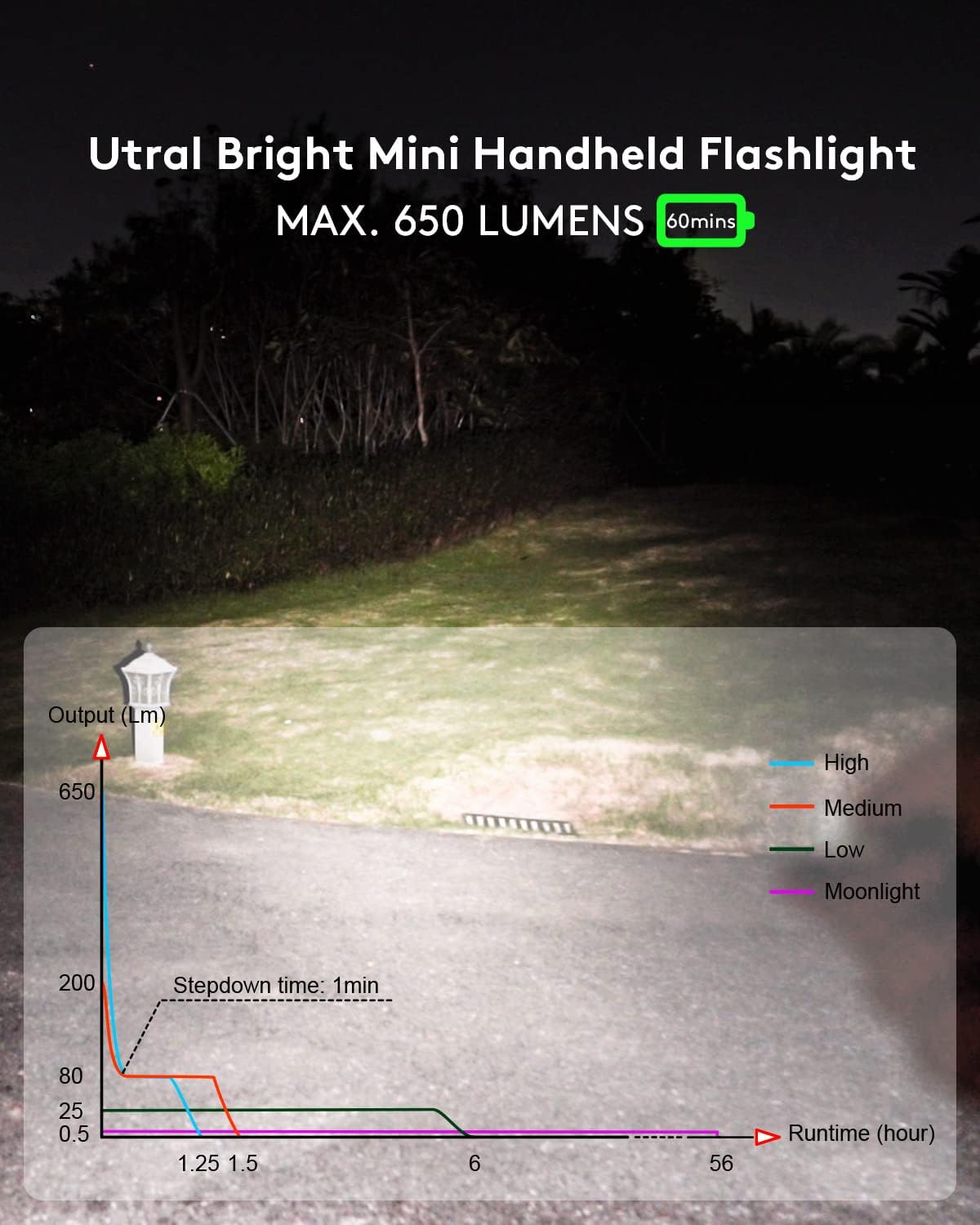
Image: Illustrates the powerful beam of the RovyVon Aurora A4 flashlight, along with a graph detailing the output and runtime for different lighting modes.
Strobe Mode
For emergency situations or signaling, the Aurora A4 features a Strobe mode. Rapidly triple-click the main button to activate the Strobe mode. Click once to turn it off.
Lock/Unlock Feature
To prevent accidental activation and conserve battery, you can lock the flashlight. This is particularly useful when carrying it in a pocket or bag.
- To Lock: Rapidly click the main button 5 times. The light will blink twice to confirm it is locked. When locked, any subsequent single press will only cause the light to blink twice, indicating it's in lock mode.
- To Unlock: Rapidly click the main button 5 times again. The light will blink three times to confirm it is unlocked, and normal operation will resume.
Official Product Video: Operation of A4 Flashlight
Video: This official video from the seller demonstrates the various operational modes of the RovyVon Aurora A4 flashlight, including momentary on, constant on, cycling through brightness levels, and activating the lock/unlock feature.
Charging
The RovyVon Aurora A4 is equipped with a built-in 300mAh battery that is conveniently rechargeable via a USB-C port. The charging port is located on the side of the flashlight, protected by a silicone cover.
- Open the silicone cover to expose the USB-C port.
- Connect a standard USB-C cable to the flashlight and a power source (e.g., power bank, computer, wall adapter).
- The battery can be fully charged in approximately 60 minutes.
- Ensure the silicone cover is properly sealed after charging to maintain water resistance.
Image: A close-up view of the RovyVon Aurora A4 flashlight, highlighting its integrated USB-C charging port for easy and fast recharging.
Maintenance
- Cleaning: Wipe the flashlight with a soft, damp cloth to remove dirt or debris. Avoid using harsh chemicals or abrasive materials that could damage the titanium finish.
- Water Resistance: While the flashlight is IPX6 water resistant, avoid prolonged submersion. Ensure the USB-C port cover is securely closed to maintain water resistance.
- Battery Care: To prolong battery life, avoid fully discharging the battery frequently. Recharge the flashlight regularly, even if not in constant use. Store in a cool, dry place.
- Button Care: Keep the button area clean to ensure smooth operation. If the button feels sticky (as noted in some user feedback), gently clean around it.
Troubleshooting
| Problem | Possible Cause | Solution |
| Flashlight does not turn on. | Battery is depleted or flashlight is locked. | Charge the battery. If charged, try unlocking by rapidly clicking the button 5 times. |
| Flashlight does not charge. | Charging cable or adapter issue, or port obstruction. | Try a different USB-C cable and power adapter. Ensure the charging port is clean and free of debris. |
| Button feels sticky or gets stuck. | Accumulation of dirt or debris around the button. | Gently clean the area around the button with a soft, dry cloth or a cotton swab. Avoid forcing the button. |
| Light output is dim or inconsistent. | Low battery, or lens/emitter obstruction. | Recharge the battery. Clean the lens surface. |
Warranty and Support
RovyVon products are manufactured with high-quality materials and undergo strict quality control. For specific warranty details, including coverage period and terms, please refer to the warranty card included with your product or visit the official RovyVon website. If you encounter any issues or require technical assistance, please contact RovyVon customer support through their official channels or the retailer from whom you purchased the product. Please have your product model and purchase date ready when contacting support.
You can also visit the RovyVon Store on Amazon for more information and product updates.