
1. Introduction
Welcome to the Tkisko TO1 Projector user manual. This guide provides essential information for setting up, operating, maintaining, and troubleshooting your projector. Please read this manual thoroughly before use to ensure optimal performance and longevity of your device.
Key Features:
- Native 1080P Full HD & 490 ANSI Brightness: Experience clear and vibrant images with true 1080p resolution and 4K support, offering 490 ANSI lumens and a 20000:1 contrast ratio.
- Digital Focus with Remote: Easily adjust image focus and keystone correction with the smart remote control for a crisp display from any angle.
- Dual-Band WiFi & Bluetooth 5.1: Enjoy fast, low-latency wireless connectivity with 5G+2.4G WiFi and versatile audio options via bidirectional Bluetooth 5.1.
- Sealed Optical Engine: Protects the projector lens from dust and scratches, extending the device's lifespan.
- Wide Compatibility: Connects to various devices via HDMI, USB, AV, and 3.5mm audio jack.

Image: The Tkisko TO1 Projector, a compact device designed for home theater and outdoor use.

Image: An overview of the Tkisko TO1 HD Video Projector's key features, including Native 1080P, Wired & Wireless Screen Mirroring, 5.0 WiFi Connection, and Bidirectional Bluetooth.
2. Setup
2.1 Unboxing and Initial Inspection
Carefully remove all components from the packaging. Verify that all items listed in the packing list are present and undamaged. The package includes the projector unit and an HDMI cable.
Video: An unboxing video of the Tkisko Native 1080P HD Video Projector, demonstrating the contents and initial handling.
2.2 Placement
Position the projector on a stable, flat surface or mount it to the ceiling. Ensure there is adequate ventilation around the unit. The recommended projection distance is between 5 feet and 23 feet, allowing for an image size from 40 inches to 300 inches.
2.3 Power Connection
Connect the power cable to the projector and then to a standard electrical outlet (110 volts AC). Press the power button on the projector or remote control to turn it on.
2.4 Focus and Keystone Correction
Adjust the image clarity using the digital focus function via the remote control. For optimal image geometry, use the 4D/4P keystone correction feature to correct vertical and horizontal distortions up to ±50 degrees.
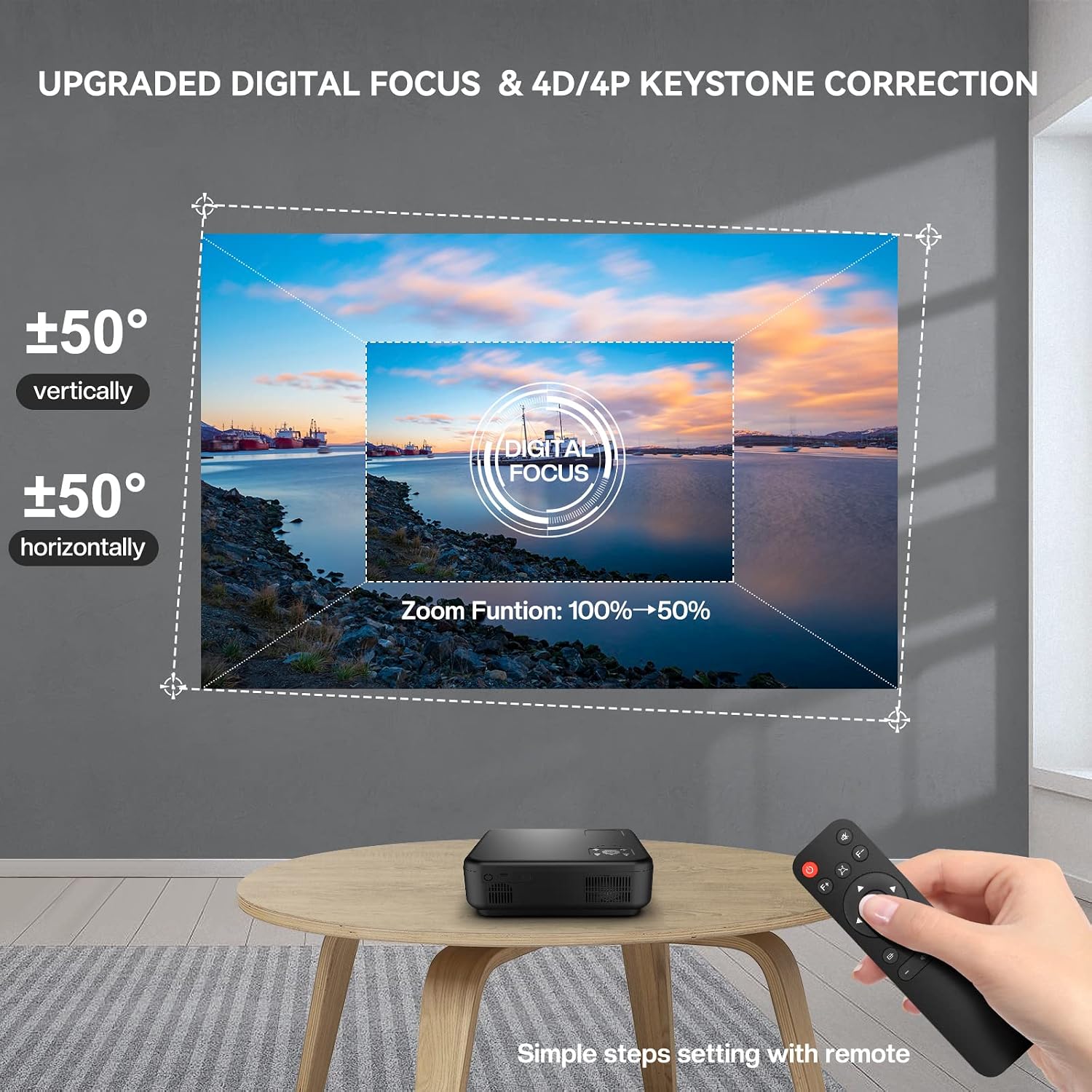
Image: Illustration of the digital focus and 4D/4P keystone correction features, showing how to adjust the image with the remote control.

Image: A comparison showing the traditional manual focus method versus the upgraded electric focus controlled by a remote.
3. Operating Instructions
3.1 Connecting Devices
The Tkisko TO1 Projector offers multiple connectivity options:
- HDMI: Connect gaming consoles (PS4, XBox), TV sticks, PCs, or laptops using the included HDMI cable.
- USB: Plug in USB drives for media playback.
- AV: Use the AV port for older devices.
- 3.5mm Audio Jack: Connect external speakers or headphones.

Image: The Tkisko TO1 Projector showcasing its wide compatibility with AV, USB, and HDMI input ports, alongside various compatible devices.
3.2 Wireless Connectivity (WiFi)
The projector supports 5G+2.4G WiFi for seamless screen mirroring from iOS and Android devices, as well as Windows PCs.
- Ensure your device and the projector are connected to the same WiFi network.
- On your smartphone/tablet, activate the screen mirroring function (e.g., "Wireless Projection" or "Screen Mirroring").
- Select the projector's name (e.g., "TO1-XXXX") from the available devices to initiate mirroring.

Image: A visual representation highlighting the speed advantage of 5G+2.4G WiFi wireless connection compared to 2.4G alone.

Image: Diagram illustrating both wireless (2.4G/5G WiFi) and wired (USB cable) screen mirroring options for connecting mobile devices to the projector.
Video: A demonstration of the projector's WiFi and Bluetooth capabilities, showing how to enjoy a large screen experience easily.
3.3 Bluetooth Audio
The bidirectional Bluetooth 5.1 allows for flexible audio connections:
- Connect to External Speakers: Pair the projector with your Bluetooth speakers or headphones for enhanced audio.
- Use as a Bluetooth Speaker: The projector can also function as a standalone Bluetooth speaker, playing audio from your phone or other devices.

Image: The projector demonstrating its bidirectional Bluetooth 5.1 capability, connecting to external speakers or acting as a Bluetooth speaker for mobile devices.

Image: A detailed guide on how to establish bidirectional Bluetooth connections, either connecting the projector to external speakers or using the projector as a Bluetooth speaker.
Video: A buyer show video demonstrating the Tkisko TO1 1080P Video Projector in various usage scenarios.
4. Maintenance
4.1 Cleaning the Lens
Use a soft, lint-free cloth specifically designed for optical lenses to gently wipe the projector lens. Avoid using abrasive cleaners or excessive force, which can scratch the lens.
4.2 Dust Protection
The Tkisko TO1 features a fully sealed optical engine designed to protect the lens from dust and prolong its operational life. While this reduces the need for frequent internal cleaning, ensure the projector is used in a clean environment and stored properly when not in use.
4.3 Lamp Life
The projector utilizes an energy-efficient LED light source with an expected operating life of up to 100,000 hours. No lamp replacement is typically required during the product's lifespan under normal usage conditions.

Image: An internal view highlighting the sealed optical engine, green power LED light source, and intelligent processing unit of the Tkisko TO1 Projector.
5. Troubleshooting
If you encounter issues with your Tkisko TO1 Projector, refer to the following common problems and solutions:
| Problem | Possible Cause | Solution |
|---|---|---|
| No image on screen | Power cable disconnected, incorrect input source, device not powered on. | Check power connections. Select the correct input source (HDMI, USB, AV). Ensure connected device is powered on. |
| Blurry image | Out of focus, incorrect projection distance, keystone not adjusted. | Use the remote control to adjust digital focus. Ensure projector is within recommended throw distance. Adjust keystone correction. |
| No sound | Volume too low, external speakers not connected/paired, audio format not supported. | Increase projector volume. Check external speaker connection or Bluetooth pairing. Ensure audio format is compatible. |
| WiFi/Bluetooth connection issues | Incorrect password, device out of range, interference. | Verify WiFi password. Ensure devices are within range. Restart projector and device. Try connecting to 2.4G WiFi if 5G has issues. |
| Remote control not working | Dead batteries, obstruction, remote sensor blocked. | Replace batteries. Remove any obstructions between remote and projector. Ensure remote sensor on projector is clear. |
If the problem persists, please contact Tkisko customer support for assistance.
6. Specifications
| Feature | Detail |
|---|---|
| Brand | Tkisko |
| Model Name | TO1 |
| Native Resolution | 1920 x 1080 (Full HD) |
| Display Resolution Maximum | 1920 x 1080 pixels (4K Supported) |
| Brightness | 490 ANSI Lumens (13000 lm) |
| Contrast Ratio | 20000:1 |
| Connectivity Technology | Bluetooth, HDMI, USB, Wi-Fi (5G+2.4G) |
| Light Source Operating Life | 100,000 hours |
| Maximum Image Size | 300 inches |
| Minimum Image Size | 40 inches |
| Maximum Throw Distance | 23 feet |
| Minimum Throw Distance | 5 feet |
| Special Feature | Built-In Speaker, Digital Focus, 4D/4P Keystone Correction |
| Power Consumption | 65 watts |
| Color | Grey |
| UPC | 700433029912 |
7. Warranty and Support
The Tkisko TO1 Projector comes with a 3-year warranty. For any inquiries or assistance, Tkisko provides professional customer support. You can contact them anytime, even during holidays, and expect a response within 24 hours.
For support, please refer to the contact information provided with your product packaging or visit the official Tkisko website.