
Septpenta Septpentawb04tyfopm
RC4875 TV Remote Control User Manual
Brand: Septpenta | Model: Septpentawb04tyfopm
Introduction
This manual provides detailed instructions for the Septpenta RC4875 TV Remote Control. Designed for ease of use and broad compatibility, this remote offers a seamless replacement experience for various LED television models. Please read this manual carefully to ensure correct usage and optimal performance.
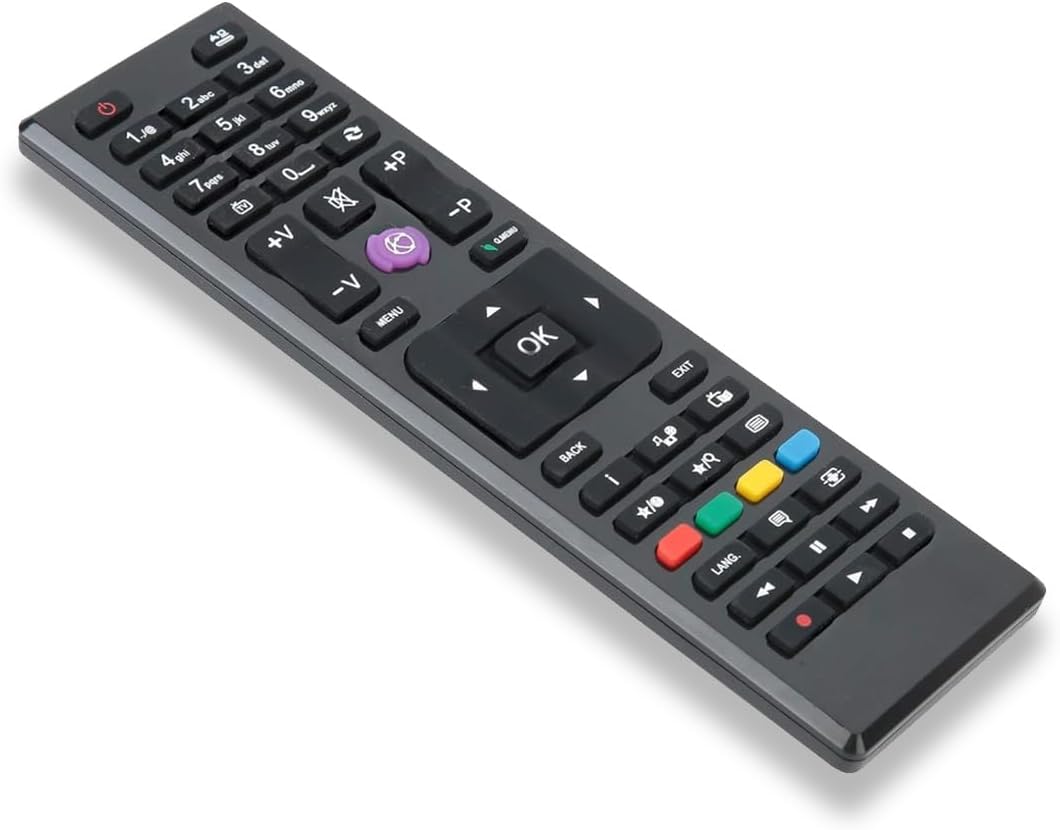
Image: The Septpenta RC4875 TV Remote Control, showcasing its ergonomic design and button layout.
Setup
Battery Installation
The RC4875 remote control requires two (2) AAA batteries (not included) for operation. Follow these steps to install the batteries:
- Locate the battery compartment cover on the back of the remote control.
- Slide the cover downwards or press the latch to open the compartment.
- Insert two AAA batteries, ensuring the positive (+) and negative (-) terminals align correctly with the markings inside the compartment.
- Close the battery compartment cover by sliding it back into place until it clicks securely.
No programming or setting is required after battery installation; the remote is ready for use.

Image: View of the open battery compartment on the back of the remote, showing where to insert AAA batteries.
Operating Instructions
The RC4875 remote control is designed for intuitive operation with compatible TV models. Once batteries are installed, it functions immediately without additional setup.
Key Features and Functions:
- Quick Response: Experience high sensitivity and quick response times for seamless control of your television.
- Long Control Distance: Operates effectively up to approximately 10 meters (32.8 feet) from the television.
- Ergonomic Design: Small in size and light in weight, providing a comfortable grip and hand touch.
- Direct Replacement: Functions identically to the original remote control for a perfect replacement experience.
- Durable Material: Constructed from premium ABS material, ensuring wear-resistance and long service life.

Image: A clear view of all buttons on the RC4875 remote control, including number pad, navigation, volume, channel, and media controls.

Image: A hand holding the RC4875 remote control, illustrating its compact and comfortable design.
Compatible Models
The RC4875 remote control is compatible with a wide range of television models. Below is a list of known compatible models:
- For FINLUX: 24FLZ274S, 32FLZ274S, FIN19DVDBK, FIN22DVDBK
- For CR-TV: CR-TV20-100, CR-TV32-100, CR-TV28-100, CR-TV22-100
- For TE Series: TELORC4875, TE49280S20F2T10D, TE32182B311T10D, TE24180B31T10E, TE19180B31T10E, TE50275N26F1T10D, TE40240S20F2T10ES4, TE20265S20T10E, TE65240G26F4T10, TE28275B31T10E, TE40275N2, TE32275B311T10D, TE24275B31T10E, DGQ32169HDRD, TE32280B311T10D, TE39275N26F1T10D, TE24275B30S10E, TE32275B301S10D, TE32265B301C10D, TE22275B30FC10E, TE22272B30FC10E
- For SL Series: SL48990, ASL399202T, SL42960, ASL329202T, ASL24960
- For Technika: SM32-240-AW15, 24FHA4160, ASL28920-2T, DGQ40169FHDD
- For XD Series: XD28HDV, XD39FHV, XD22FHV, XD32HDV
- For FLE/FLN Series: FLE40382SMART, FLN32T339

Image: The RC4875 remote control displayed alongside a graphic listing many of its compatible television models.
Maintenance
To ensure the longevity and proper functioning of your RC4875 remote control, follow these maintenance guidelines:
- Cleaning: Wipe the remote control regularly with a soft, dry cloth. For stubborn dirt, slightly dampen the cloth with water or a mild, non-abrasive cleaner. Avoid using harsh chemicals or abrasive materials.
- Battery Replacement: Replace batteries when the remote's response becomes sluggish or it stops functioning. Always replace both batteries at the same time with new ones of the same type (AAA).
- Storage: If the remote will not be used for an extended period, remove the batteries to prevent leakage and potential damage to the remote. Store in a cool, dry place away from direct sunlight.
- Avoid Drops: While durable, avoid dropping the remote control, as this can damage internal components.
Troubleshooting
If you encounter issues with your RC4875 remote control, try the following troubleshooting steps:
- Remote Not Responding:
- Check if the batteries are inserted correctly with the correct polarity (+/-).
- Replace old batteries with new AAA batteries.
- Ensure there are no obstructions between the remote control and the TV's infrared receiver.
- Confirm you are within the effective operating range (approx. 10 meters).
- Buttons Not Working:
- Clean the remote control, especially around the buttons, to remove any dirt or debris that might be preventing proper contact.
- If only specific buttons are not working, the remote might be damaged.
- Intermittent Operation:
- This often indicates low battery power. Replace the batteries.
- Ensure consistent line-of-sight to the TV.
If problems persist after trying these steps, please refer to the support information.
Specifications
| Feature | Detail |
|---|---|
| Item Type | TV Remote Control |
| Material | ABS |
| Model | RC4875 |
| Product Size (Approx.) | 16 x 4.5 x 2 cm / 6.3 x 1.8 x 0.8 inches |
| Battery Type | 2 x AAA batteries (not included) |
| Remote Distance (Approx.) | 10 meters / 32.8 feet |
| Item Weight | 2.11 ounces |
| Manufacturer | Septpenta |
| Compatible Devices | Television |
Important Safety Information
Please read the product instructions carefully before use to ensure correct use.
Image: A warning graphic emphasizing the importance of reading instructions for correct usage.
Warranty and Support
For any questions, technical support, or warranty inquiries regarding your Septpenta RC4875 TV Remote Control, please contact your retailer or the manufacturer directly. Keep your purchase receipt for warranty purposes.
Manufacturer: Septpenta
For more information, you may visit the Septpenta Store on Amazon.
Ask a question about this manual
Ask about setup, troubleshooting, compatibility, parts, safety, or missing instructions. Manuals+ will review the question and use this page’s manual context to help answer it.