
Introduction
This manual provides comprehensive instructions for the assembly, operation, and maintenance of your SANODESK Electric Standing Desk. Designed for ergonomic comfort and productivity, this desk allows seamless transitions between sitting and standing positions. Please read this manual thoroughly before assembly and use to ensure safe and optimal performance.

Image: A user standing comfortably at the SANODESK Electric Standing Desk, demonstrating its use in a standing position with multiple devices.
Safety Information
Adherence to the following safety guidelines is crucial for preventing injury and damage to the product.
- Weight Limit: Do not exceed the maximum recommended weight limit of 176 pounds (80 kg) on the desktop. Exceeding this limit may cause stability issues or damage to the desk's lifting mechanism and structure.
- Clearance: Ensure there are no obstructions above or below the desk when adjusting its height. Keep hands and fingers clear of moving parts during operation.
- Power Source: Connect the desk only to a grounded power outlet. Do not use extension cords or adapters that are not rated for the desk's power requirements.
- Children and Pets: Keep children and pets away from the desk during height adjustments. The desk is not a toy.
- Stability: Ensure all screws and bolts are securely tightened after assembly and periodically check for looseness. Do not sit or stand on the desk.
- Liquid Spills: In case of liquid spills, immediately unplug the desk and wipe thoroughly. Avoid direct contact of liquids with electrical components.
Product Overview
The SANODESK Electric Standing Desk is engineered for durability and user convenience, featuring a robust design and intelligent controls.
Key Features:
- Whole-Piece Desktop: A spacious 60" x 24" desktop provides ample room for multiple monitors, laptops, and other office essentials, promoting a clutter-free workspace.
- Electric Lifting System: Smooth and quiet height adjustment from 28.1 inches to 45.7 inches, accommodating various user heights and preferences. The system is supported by a thickened steel pipe frame, ensuring stability and a 176 lbs (80 kg) weight capacity.
- LED Memory Control Panel: Features a 6-button controller with 4 memory preset buttons, allowing quick and precise adjustment to your preferred sitting or standing heights.
- Durable Construction: The desk frame is constructed from industrial-grade steel, preventing wobbling. The desktop is made from high-quality engineered wood, designed to be thick, waterproof, and eco-friendly.
- Sleek Design: The black frame and black tabletop offer a modern and timeless aesthetic that integrates well into various office and home environments. The frame surface is coated with fine, smooth paint that is waterproof and rustproof, facilitating easy cleaning.

Image: An overhead view highlighting the spacious and neat one-piece desktop surface of the SANODESK.

Image: A close-up illustrating the high-quality, thick, waterproof, and eco-friendly wood desktop material.
Setup and Assembly
While specific step-by-step assembly instructions are provided in the packaging, this section outlines general considerations for setting up your SANODESK Electric Standing Desk.
- Unpack Components: Carefully unpack all components and verify against the parts list provided in your assembly guide. Ensure no parts are missing or damaged.
- Prepare Workspace: Choose a clear, flat, and spacious area for assembly. Lay down a soft cloth or cardboard to protect the desktop surface from scratches.
- Assemble Frame: Follow the detailed instructions to assemble the desk frame, including the legs, crossbar, and motor components. Ensure all connections are secure before proceeding.
- Attach Desktop: Carefully place the desktop onto the assembled frame and secure it using the provided screws. Ensure proper alignment.
- Connect Electronics: Connect the motor cables to the control box and the control panel cable to the control box. Plug the power cord into the control box.
- Cable Management: Utilize the included cable ties or management accessories to organize and secure cables, preventing entanglement and ensuring a tidy workspace.
- Initial Power-Up: Plug the desk into a grounded power outlet. Perform an initial calibration or reset as per the specific instructions in your assembly guide to synchronize the motors.

Image: A visual representation of the product's dimensions, indicating a 60-inch width and 24-inch depth.
Operating Instructions
Your SANODESK Electric Standing Desk features an intuitive LED memory control panel for effortless height adjustments.
Control Panel Functions:
- Up/Down Buttons (^ / v): Press and hold the up arrow (^) to raise the desk and the down arrow (v) to lower it. Release the button to stop at the desired height.
- Memory Presets (1, 2, 3, 4): The control panel features four programmable memory buttons.
- To Set a Memory Height: Adjust the desk to your desired height using the up/down buttons. Press the "M" button (or similar memory set button, if present) followed by the desired number button (1, 2, 3, or 4). The display may flash or beep to confirm the setting.
- To Recall a Memory Height: Simply press the corresponding number button (1, 2, 3, or 4). The desk will automatically move to the saved height.
- Display: The LED display shows the current height of the desk in inches.
Height Adjustment Range:
The desk can be adjusted from a minimum height of approximately 28.1 inches (71.4 cm) to a maximum height of approximately 45.7 inches (116.1 cm).

Image: A visual demonstration of the desk's adjustable height range, from its lowest point of 28.9 inches to its highest point of 46.5 inches.
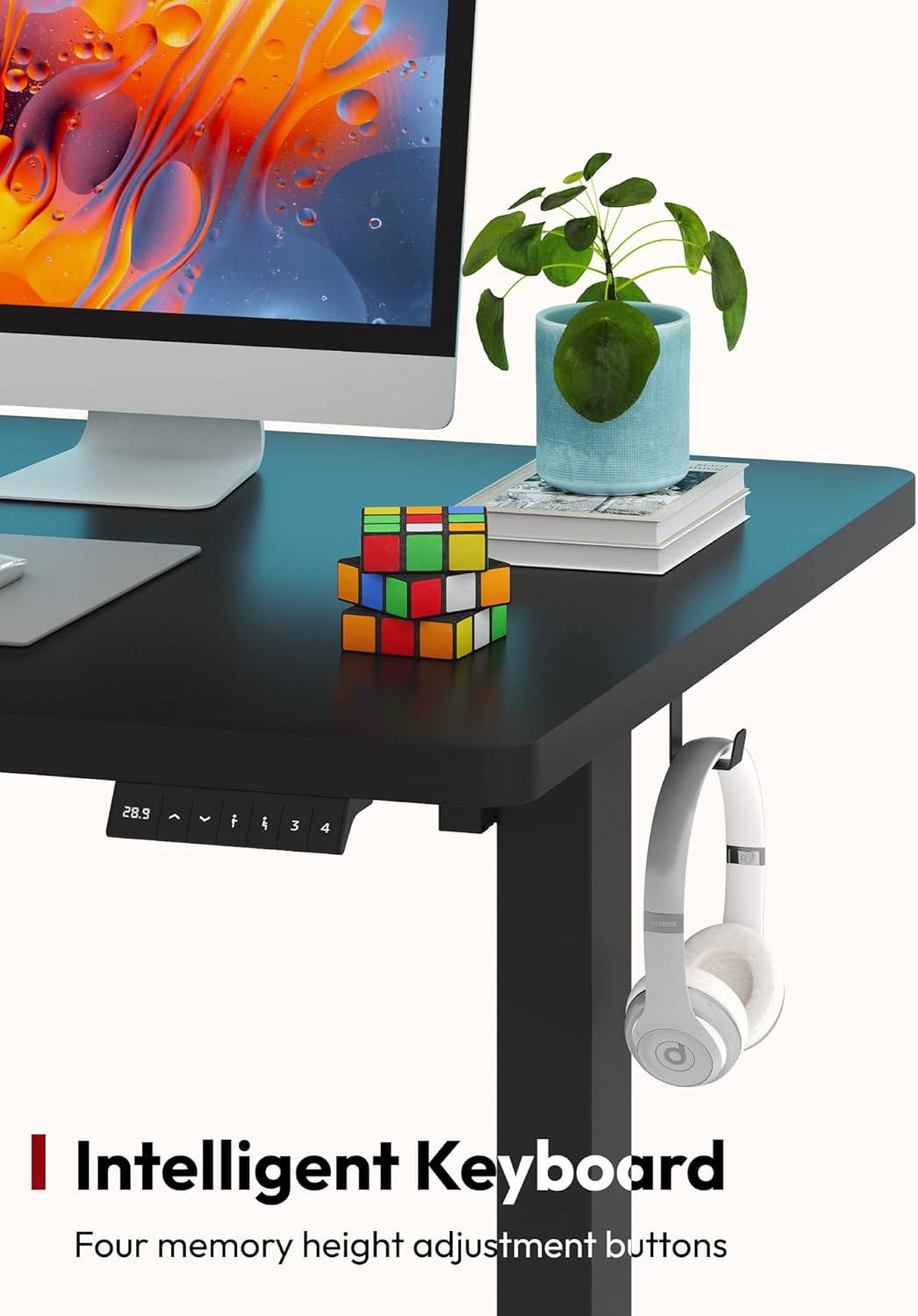
Image: A detailed view of the intelligent keyboard control panel, highlighting the four memory height adjustment buttons for quick and precise settings.
Maintenance
Regular maintenance ensures the longevity and optimal performance of your SANODESK Electric Standing Desk.
- Cleaning: Wipe the desktop and frame with a soft, damp cloth. For stubborn marks, use a mild, non-abrasive cleaner. Avoid harsh chemicals that may damage the finish.
- Cable Management: Periodically check all cables for wear or damage. Ensure they are neatly organized and not pinched or tangled, especially during height adjustments.
- Fastener Check: Every few months, check all screws and bolts to ensure they remain tight. Re-tighten if necessary to maintain desk stability.
- Motor Care: The electric motor system is designed for maintenance-free operation. Avoid disassembling the motor or control box. If you notice unusual noises or operation, refer to the troubleshooting section or contact support.
Troubleshooting
If you encounter issues with your SANODESK Electric Standing Desk, refer to the following common troubleshooting steps:
| Problem | Possible Cause | Solution |
|---|---|---|
| Desk does not move or respond to buttons. | Power cable disconnected; circuit breaker tripped; motor overload; control box error. |
|
| Desk moves unevenly or makes unusual noises. | Loose fasteners; uneven weight distribution; obstruction; damaged component. |
|
| Height presets are not working correctly. | Incorrectly set presets; temporary control panel glitch. |
|
If these steps do not resolve the issue, please contact SANODESK customer support for further assistance.
Specifications
| Attribute | Detail |
|---|---|
| Brand | SANODESK |
| Model Number | SN-01BB6024 |
| Desktop Dimensions (L x W) | 60 x 24 inches (152.4 x 60.96 cm) |
| Adjustable Height Range | 28.1 to 45.7 inches (71.4 to 116.1 cm) |
| Weight Capacity | 176 lbs (80 kg) |
| Item Weight | 36.3 kg (approximately 80 lbs) |
| Desktop Material | Engineered Wood |
| Frame Material | Metal (Thickened Steel Pipe) |
| Color | Black Frame + Black Top |
| Special Features | Adjustable Height, LED Memory Control Panel, Whole-Piece Desktop |
Warranty and Support
SANODESK is committed to providing high-quality products and customer satisfaction. For information regarding warranty coverage, technical support, or replacement parts, please contact SANODESK customer service directly.
Please refer to the contact information provided with your product packaging or visit the official SANODESK website for the most up-to-date support details.
Note: Keep your purchase receipt and model number (SN-01BB6024) handy when contacting support.
