
Aheaplus B0BDL4NTNV
Aheaplus L Shaped Desk User Manual
Model: B0BDL4NTNV | Brand: Aheaplus
1. Introduction
Thank you for choosing the Aheaplus L Shaped Desk. This manual provides essential information for the assembly, operation, and maintenance of your new desk. Designed for versatility, this desk can be configured as an L-shaped corner desk or a long two-person table, offering ample space for work, study, or gaming. It features integrated power outlets, USB ports, and LED lighting to enhance your experience.

Figure 1: Aheaplus L Shaped Desk with LED lights and power outlets in a modern office setup.
2. Important Safety Information
WARNING: Failure to follow these instructions may result in injury or damage to the product.
- This product has a maximum weight recommendation of 150 pounds. Do not exceed this limit.
- Assembly is required. Use only tools included in the package or recommended by the manufacturer.
- Be cautious of sharp edges from the metal frame during assembly and use.
- Properly anchor the desk to the wall if using it as a computer desk, especially with multiple monitors or heavy equipment, to ensure stability and prevent tipping.
- Ensure all electrical connections are secure and follow local electrical codes. Do not overload the power outlets.
3. Package Contents
Verify that all components listed below are present before beginning assembly:
- Desk Panels (MDF board)
- Metal Frame Components
- 3 AC Outlets & 2 USB Ports (integrated power strip)
- Moveable Monitor Stand
- LED Light Strip with Remote Control
- Extra Storage Bag (fabric)
- Headphone Hooks
- Assembly Hardware (screws, bolts, etc.)
- Assembly Tools (Allen key, screwdriver)

Figure 2: Detailed dimensions and key components of the Aheaplus L Shaped Desk.
4. Setup and Assembly
The Aheaplus L Shaped Desk is designed for easy assembly. All necessary hardware and tools are included, and parts are clearly labeled. It is recommended to assemble the desk with two people for optimal ease and safety, though it can be done by one person.
4.1 Assembly Steps
- Unpack all components and verify against the package contents list.
- Follow the step-by-step instructions provided in the included assembly manual. Pay close attention to diagrams for correct orientation of parts.
- Securely fasten all screws and bolts. Do not overtighten.
- Attach the fabric storage bag and headphone hooks to the designated points on the metal frame.
- Place the movable monitor stand in your desired position on the desktop.
- Connect the power cord from the integrated power strip to a wall outlet.
4.2 Reversible Configuration
This desk offers four different configurations, allowing you to set it up as an L-shaped desk (left or right orientation) or a long two-person table. The top hutch can also be placed on either the left or right side as needed.

Figure 3: Various configurations of the Aheaplus L Shaped Desk.
4.3 Assembly Video
Video 1: An overview of the Aheaplus L Shaped Gaming Desk, showcasing its features and assembly process. This video provides visual guidance for setting up the desk and highlights its various functionalities.
5. Operating Instructions
5.1 Power Outlets & USB Ports
The desk is equipped with a built-in power strip featuring 3 AC outlets and 2 USB ports. This allows for convenient charging of your phone, computer, headset, power bank, gaming gear, and other office devices directly from your desktop, reducing cable clutter.

Figure 4: Integrated power outlets and USB ports for convenient device charging.
5.2 LED RGB Light Strips
Enhance your gaming or work ambiance with the cool LED RGB light strips. The lights offer 20 static colors, 21 dynamic modes, and 5 light flashing modes. Use the included remote control to select your preferred settings. The memory function ensures the LED lights return to the last mode when turned on.

Figure 5: The L Shaped Desk illuminated by its LED RGB light strips, creating an immersive gaming environment.
5.3 Movable Monitor Stand
The included movable monitor stand helps elevate your line of sight, promoting proper sitting posture and protecting your cervical and spinal health. You can position it anywhere on the desktop for optimal comfort and viewing angle.
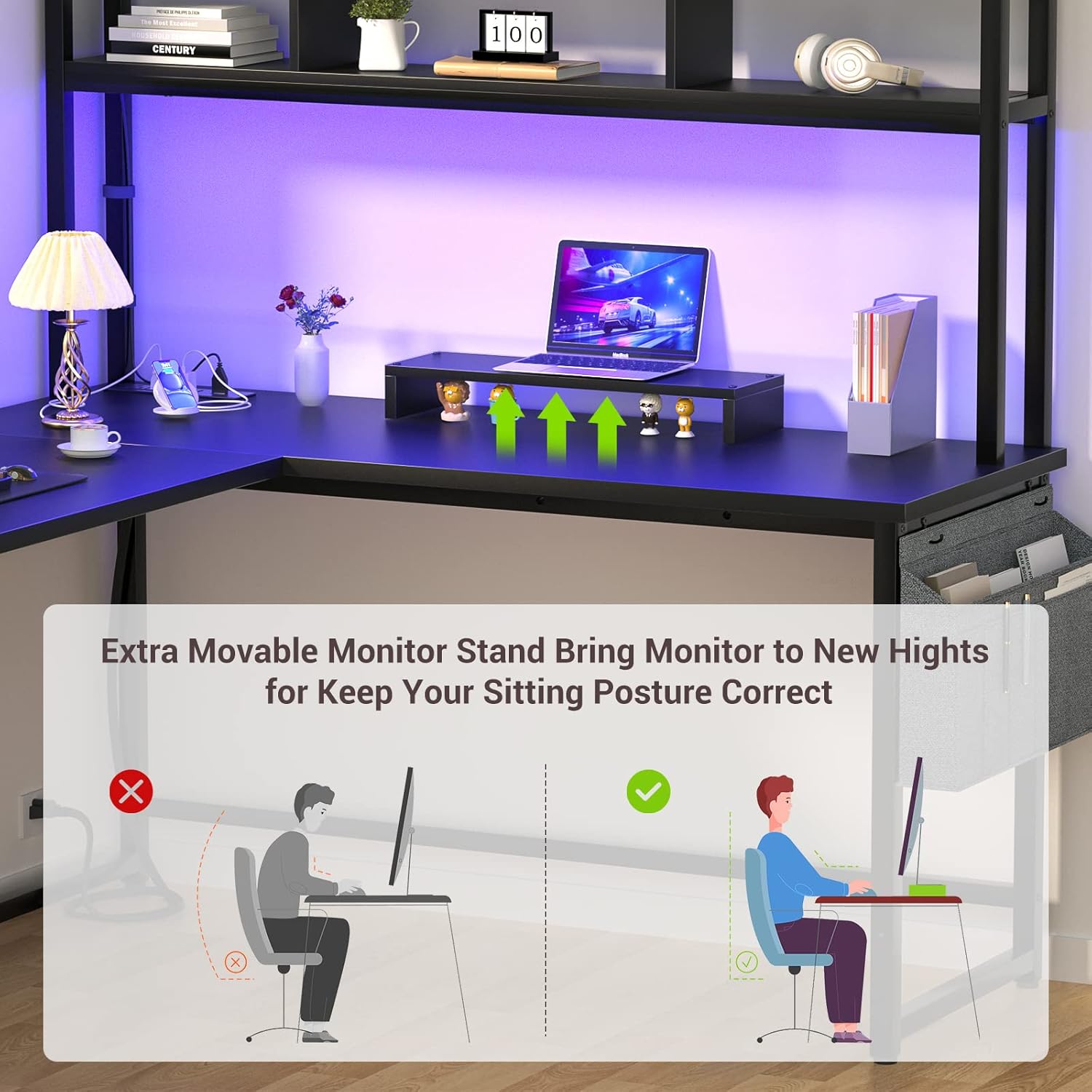
Figure 6: The movable monitor stand helps maintain correct sitting posture.
5.4 Storage Features
The desk offers spacious working and storage areas. It includes a two-tier top hutch for books, magazines, plants, and office essentials, as well as an extra storage bag and headphone hooks to keep your desktop organized and clutter-free.

Figure 7: Overview of the desk's storage capabilities, including the two-tier hutch and side storage bag.
6. Maintenance
To ensure the longevity and appearance of your Aheaplus L Shaped Desk, follow these maintenance guidelines:
- Cleaning: Wipe surfaces regularly with a soft, damp cloth. Avoid harsh chemicals or abrasive cleaners that may damage the finish.
- Spills: Clean up spills immediately to prevent moisture damage to the MDF board.
- Weight Distribution: Distribute weight evenly across the desktop and shelves. Do not place excessively heavy items on any single point. The maximum weight recommendation is 150 pounds.
- Stability: Periodically check all screws and bolts to ensure they remain tight. Retighten if necessary to maintain desk stability.
- LED Lights: If the LED lights malfunction, first check the power connection and the remote control battery. If issues persist, contact customer support.
7. Troubleshooting
Here are some common issues and their solutions:
| Problem | Possible Cause | Solution |
|---|---|---|
| Desk wobbles/unstable | Loose screws; uneven floor; improper assembly | Ensure all screws are tightened. Adjust adjustable leg pads if present. Recheck assembly steps. Consider anchoring to wall if needed. |
| LED lights not working | Power disconnected; remote battery dead; faulty strip | Check power connection to the desk. Replace remote control battery. If still not working, contact customer support. |
| Power outlets/USB not working | Desk power cord unplugged; overloaded circuit; faulty unit | Ensure the desk's main power cord is securely plugged into a working wall outlet. Avoid plugging too many high-power devices simultaneously. Contact support if issue persists. |
| Missing parts during assembly | Packaging error | Contact Aheaplus customer service immediately with your purchase details. |
8. Specifications
| Feature | Detail |
|---|---|
| Brand | Aheaplus |
| Model | B0BDL4NTNV |
| Product Dimensions | 19.7"D x 59"W x 59.8"H |
| Color | Black |
| Style | Industrial |
| Base Material | Metal |
| Top Material Type | Engineered Wood |
| Special Features | Led Light, Built-In USB Outlet |
| Included Components | 3 Outlets, 2 USB ports, moveable monitor stand, Extra Storage Bag, headphone hooks |
| Maximum Weight Recommendation | 150 Pounds |
| Assembly Required | Yes |
9. Warranty and Customer Support
Aheaplus provides lifetime customer support for your L Shaped Desk. If you encounter any problems before or after sales, please do not hesitate to contact our experienced customer service team. We are committed to responding within 24 hours to assist you.
For support, please refer to the contact information provided with your purchase or visit the official Aheaplus store online.
Related documentsB0BDL4NTNV

Ask a question about this manual
Ask about setup, troubleshooting, compatibility, parts, safety, or missing instructions. Manuals+ will review the question and use this page’s manual context to help answer it.