1. Introduction
The MESTEK CGD02A is a portable combustible gas detector designed to identify the presence of various flammable gases. This device features a high-precision semiconductor sensor, a flexible probe for reaching confined spaces, and a clear 2.6-inch color LCD display. It provides real-time gas concentration readings in both Parts Per Million (PPM) and Lower Explosive Limit (LEL) percentages, along with temperature measurements. This manual provides essential information for the safe and effective use of your gas detector.
2. Safety Information
Please read and understand all safety warnings and operating instructions before using this device. Failure to follow these instructions may result in electric shock, fire, or serious injury.
- Do not operate the device in environments with extremely high humidity or corrosive gases.
- Ensure the device is calibrated in a fresh air environment before use to ensure accurate readings.
- Do not attempt to disassemble or modify the device. Refer all servicing to qualified personnel.
- Keep the device away from strong electromagnetic fields.
- This device is a detection tool and should not be used as a substitute for proper safety procedures or equipment.
3. Product Overview and Components
The MESTEK CGD02A Combustible Gas Detector consists of the main unit, a flexible probe, and an intuitive control panel.

Figure 1: MESTEK CGD02A Gas Detector Components
- Gooseneck/Flexible Probe: Approximately 280mm (12 inches) in length, allowing access to hard-to-reach areas.
- Probe: Contains the high-precision semiconductor sensor with a six-port airway design and anti-jamming protective cover.
- Monitor: 2.6-inch color LCD display for real-time readings and status.
- Power On/Off Button: Activates and deactivates the device.
- ZERO Button: Resets the current gas reading to zero for baseline calibration.
- PPM/%LEL Button: Switches between Parts Per Million (PPM) and Lower Explosive Limit (%LEL) display units.
- APO Button: Toggles the Auto Power Off function.
- °C/°F Button: Switches between Celsius and Fahrenheit for temperature display.
4. Specifications
| Feature | Specification |
|---|---|
| Model Number | CGD02A |
| Detection Range | 50-50000 PPM (100% LEL) |
| Sensor Type | High-precision Semiconductor Sensor |
| Response Time | < 2 seconds |
| Display | 2.6-inch Color LCD |
| Units | PPM, %LEL, °C, °F |
| Alarm | Audible, Visual (Screen Alarm) |
| Auto Power Off (APO) | Yes (adjustable/deactivatable) |
| Power Source | 3 x AAA batteries (included) |
| Item Weight | 9.5 ounces (270 grams) |
| Product Dimensions | 5.12 x 2.87 x 1.3 inches |
| Operating Humidity | 100% (non-condensing) |
5. Setup
5.1 Battery Installation
The MESTEK CGD02A requires 3 AAA batteries for operation. These are typically included with the device.
- Locate the battery compartment on the back of the device.
- Use a small screwdriver (often included) to loosen the screw securing the battery compartment cover.
- Remove the cover and insert 3 AAA batteries, ensuring correct polarity (+/-).
- Replace the battery compartment cover and tighten the screw.
Video 1: Demonstrates battery installation for the MESTEK CGD02A Gas Detector.
6. Operating Instructions
6.1 Power On/Off
Press and hold the power button (red circle with power symbol) to turn the device on or off. Upon powering on, the device will undergo a 30-second warm-up and self-calibration process. Ensure this is done in a fresh air environment for accurate baseline readings.
6.2 Gas Detection
Once calibrated, the device is ready to detect combustible gases. The flexible probe allows you to direct the sensor to specific areas of concern.
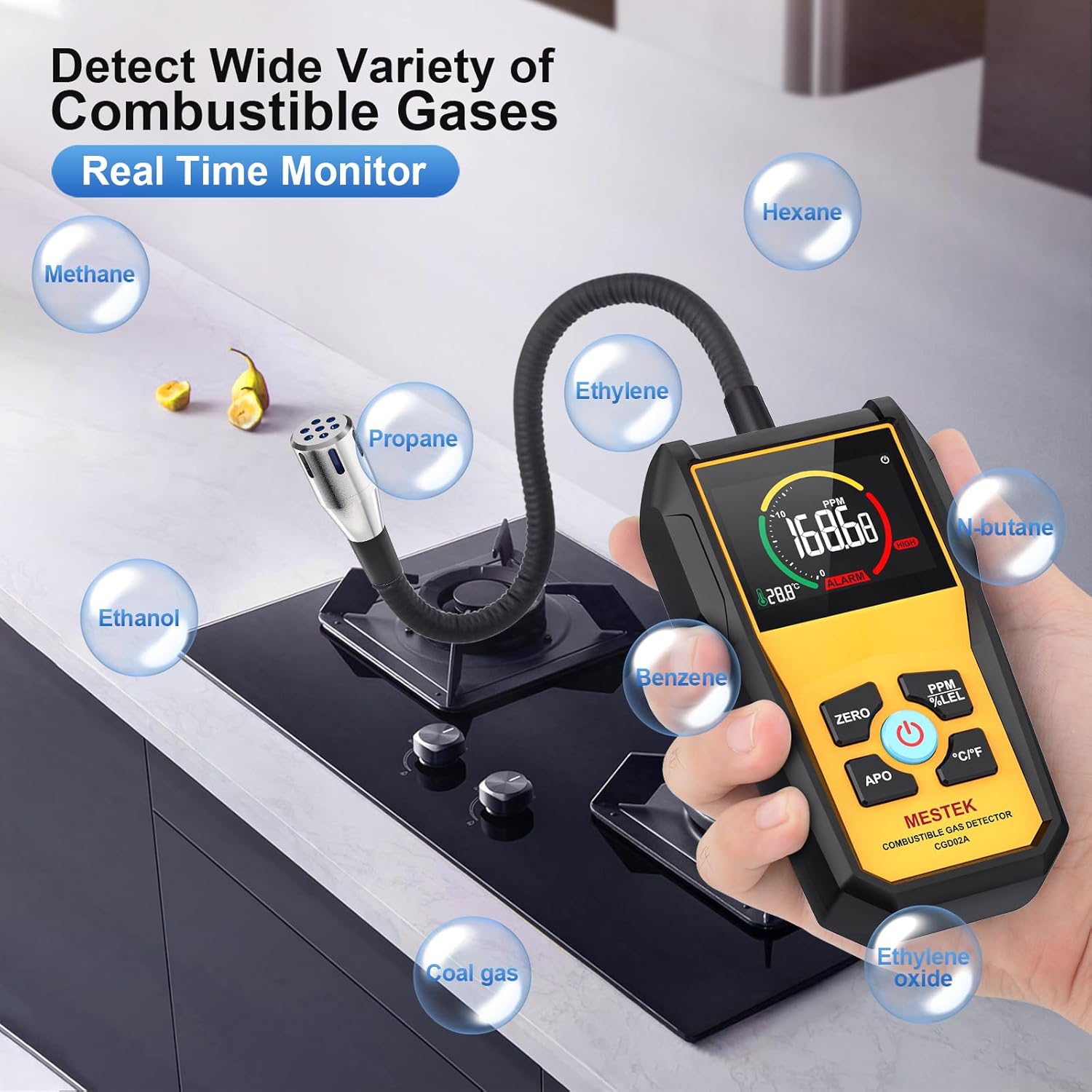
Figure 2: MESTEK CGD02A detecting a wide variety of combustible gases.
- Move the probe slowly around the area where a gas leak is suspected.
- The LCD display will show the real-time gas concentration.
- An audible alarm and visual screen alarm will activate when gas concentration exceeds a preset threshold.
6.3 Unit Switching (PPM/%LEL)
Press the PPM/%LEL button to toggle between Parts Per Million (PPM) and Lower Explosive Limit (%LEL) display modes for gas concentration.
Video 2: Demonstration of gas detection and unit switching on the MESTEK CGD02A.
6.4 Temperature Measurement
The device also displays ambient temperature. Press the °C/°F button to switch between Celsius and Fahrenheit units.
6.5 Auto Power Off (APO)
The device features an automatic power-off function to conserve battery life. To cancel this function, short press the APO button.
6.6 Zero Calibration
If you need to re-establish a baseline reading, move the device to a clean air environment and press the ZERO button. This will reset the gas concentration reading to zero.
7. Maintenance
Proper maintenance ensures the longevity and accuracy of your MESTEK CGD02A Gas Detector.
- Cleaning: Wipe the device with a soft, dry cloth. Do not use abrasive cleaners or solvents.
- Sensor Care: Keep the sensor probe clean and free from dust or debris. Avoid exposing the sensor to liquids.
- Storage: When not in use for extended periods, remove the batteries and store the device in a cool, dry place, away from direct sunlight and extreme temperatures.
- Battery Replacement: Replace batteries promptly when the low battery indicator appears on the display.
8. Troubleshooting
If you encounter issues with your MESTEK CGD02A, refer to the following common problems and solutions:
| Problem | Possible Cause | Solution |
|---|---|---|
| Device does not power on. | Low or dead batteries; incorrect battery installation. | Replace batteries with new AAA batteries, ensuring correct polarity. |
| Inaccurate or inconsistent readings. | Improper calibration; sensor contamination; device not warmed up. | Perform zero calibration in fresh air. Clean the sensor probe. Allow full 30-second warm-up. |
| Alarm sounds continuously without gas presence. | Sensor malfunction; high background gas level. | Move to a known clean air environment and perform zero calibration. If problem persists, contact support. |
| Display is dim or unreadable. | Low batteries. | Replace batteries. |
If the problem persists after attempting these solutions, please contact customer support.
9. Warranty Information
MESTEK products are manufactured to high-quality standards. This product is covered by a limited warranty against defects in materials and workmanship. Please refer to the warranty card included with your purchase or visit the official MESTEK website for detailed warranty terms and conditions.
10. Support
For technical assistance, product inquiries, or service requests, please contact MESTEK customer support. Contact information can typically be found on the product packaging, the official MESTEK website, or through your retailer.


