
1. Introduction
Thank you for choosing the Nokia TWS-222 Go Earbuds Pro Wireless Headphones. This manual provides detailed instructions to help you set up, operate, and maintain your earbuds, ensuring you get the best audio experience. Please read this manual thoroughly before using the product.
2. Package Contents
- Nokia TWS-222 Go Earbuds Pro (Left and Right)
- Charging Case
- Protective Case
- USB Charging Cable (Type-C)
- User Manual
3. Product Overview
Familiarize yourself with the components of your Nokia TWS-222 Go Earbuds Pro.
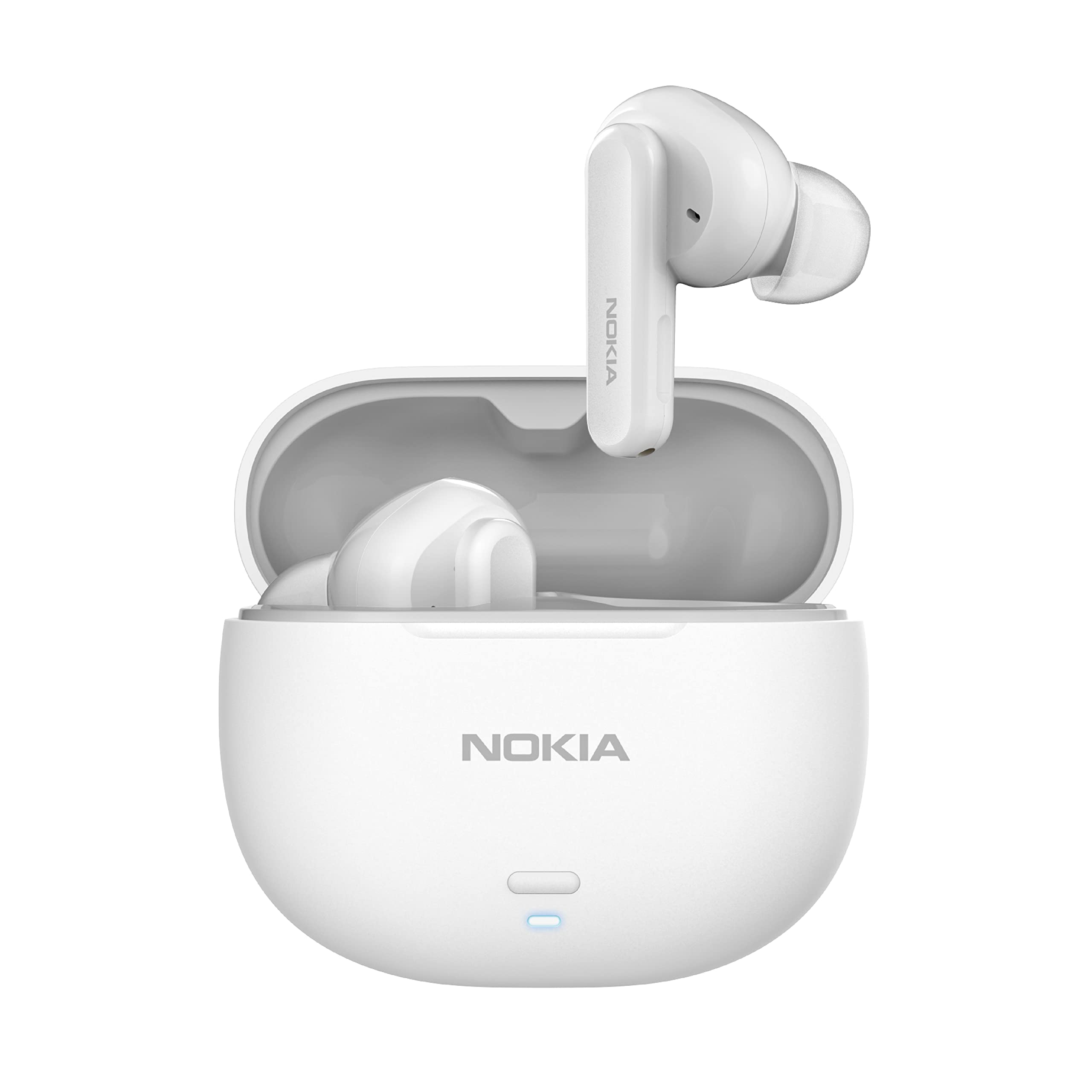
Image 3.1: Nokia TWS-222 Go Earbuds Pro and Charging Case. This image displays both earbuds and their compact charging case, highlighting the sleek white design.

Image 3.2: Nokia TWS-222 Go Earbuds Pro removed from charging case. The image shows the earbuds positioned above the open charging case, ready for use or storage.
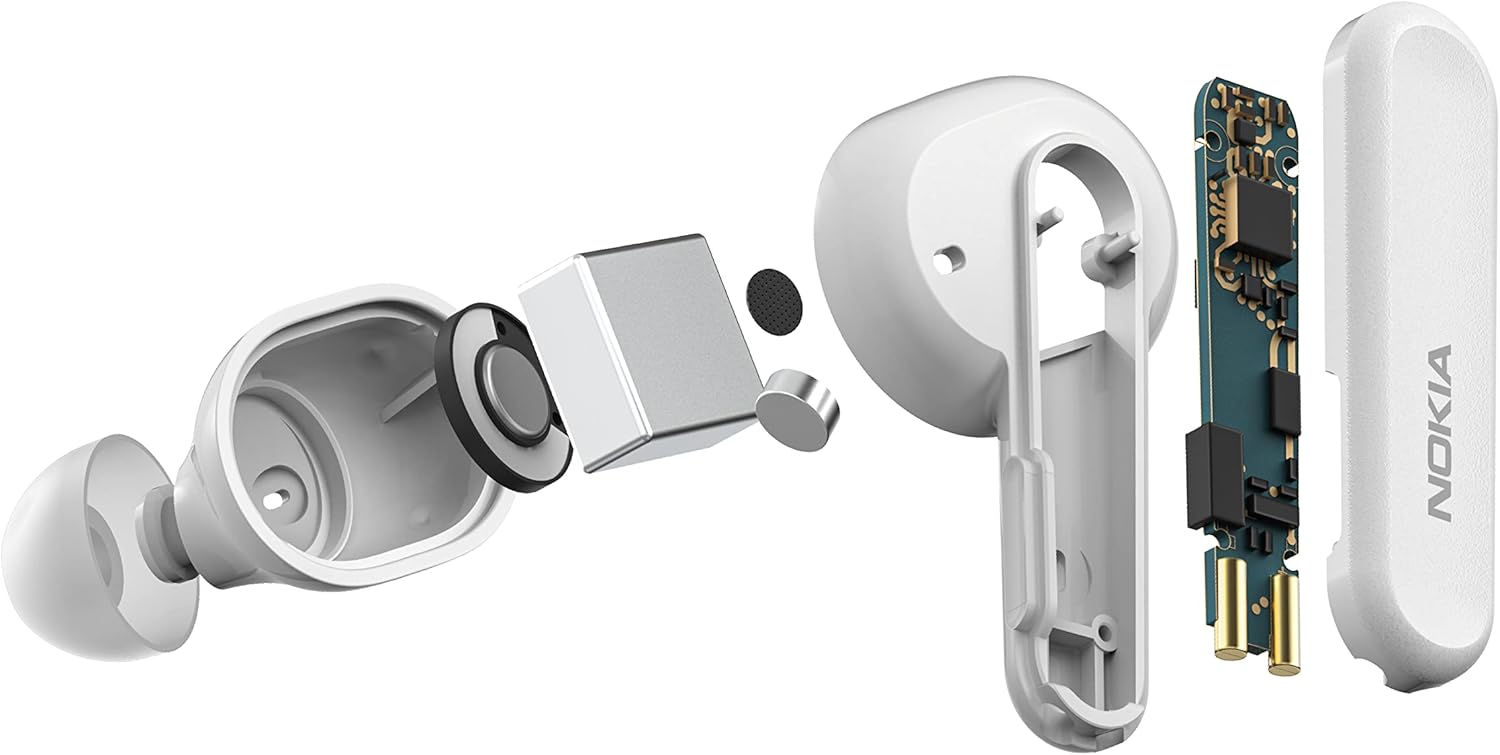
Image 3.3: Exploded view of Nokia TWS-222 Go Earbuds Pro. This illustration breaks down the internal components of an earbud, showcasing its intricate design and technology.
4. Setup
4.1. Charging the Earbuds and Case
Before first use, fully charge the earbuds and the charging case.
- Place the earbuds into the charging case, ensuring they are correctly seated.
- Connect the USB charging cable to the charging port on the case and to a power source.
- The charging indicator on the case will show the charging status. A full charge takes approximately 1.5 hours.
4.2. Pairing with a Bluetooth Device
The earbuds will automatically enter pairing mode when removed from the charging case for the first time.
- Open the charging case and remove both earbuds. They will automatically power on and enter pairing mode.
- On your device (smartphone, tablet, etc.), enable Bluetooth.
- Search for available Bluetooth devices and select "Nokia TWS-222 Go Earbuds Pro" from the list.
- Once connected, you will hear a confirmation tone, and the earbuds will be ready for use.
- For subsequent uses, the earbuds will automatically connect to the last paired device when removed from the case.
5. Operating Instructions
The Nokia TWS-222 Go Earbuds Pro feature intuitive touch controls.
5.1. Touch Controls
| Function | Action |
|---|---|
| Play/Pause Music | Single tap on either earbud |
| Next Track | Double tap on the right earbud |
| Previous Track | Double tap on the left earbud |
| Answer/End Call | Single tap on either earbud |
| Reject Call | Press and hold either earbud for 2 seconds |
| Activate Voice Assistant (Google Assistant) | Triple tap on either earbud |
| Toggle Low Latency Mode | Press and hold the right earbud for 2 seconds (during music/video playback) |
5.2. Environmental Noise Cancelling (ENC)
The built-in Environmental Noise Cancelling technology reduces background sound during calls, ensuring clear communication even in noisy environments. This feature is automatically active during phone calls.
5.3. Low Latency Mode
For an optimized experience during gaming or video playback, activate the low latency mode to minimize audio lag. Refer to the touch controls section for activation.
6. Maintenance
6.1. Cleaning
Regular cleaning helps maintain sound quality and hygiene.
- Use a soft, dry, lint-free cloth to wipe the earbuds and charging case.
- Gently remove any earwax or debris from the earbud tips and speaker mesh using a small, soft brush or cotton swab.
- Do not use abrasive cleaners, alcohol, or chemical solvents.
6.2. Water Resistance

Image 6.1: Nokia TWS-222 Go Earbuds Pro demonstrating water resistance. The image shows the earbuds amidst splashing water, illustrating their IPX4 water-resistant rating.
The Nokia TWS-222 Go Earbuds Pro are rated IPX4 water resistant, meaning they are protected against splashing water from any direction. This makes them suitable for workouts and light rain. However, they are not designed for swimming or submersion in water. Ensure the earbuds are dry before placing them back into the charging case to prevent damage.
6.3. Storage
When not in use, store the earbuds in their charging case to protect them and keep them charged. Store the case in a cool, dry place away from direct sunlight and extreme temperatures.
7. Troubleshooting
If you encounter issues with your earbuds, try the following solutions:
- Earbuds not pairing: Ensure both earbuds are charged and removed from the case. Turn off and on your device's Bluetooth, then try pairing again.
- Only one earbud working: Place both earbuds back into the charging case, close the lid, wait a few seconds, then remove them again. This often re-syncs them.
- No sound: Check the volume level on your connected device. Ensure the earbuds are properly paired and selected as the audio output.
- Charging issues: Verify the charging cable and power adapter are working. Ensure the charging contacts on the earbuds and case are clean and free of debris.
- Poor sound quality: Ensure the earbuds are securely fitted in your ears. Try cleaning the speaker mesh.
If problems persist, consult the Nokia support website or contact customer service.
8. Specifications
| Feature | Detail |
|---|---|
| Model Name | TWS-222 |
| Connectivity Technology | Wireless (Bluetooth) |
| Ear Placement | In Ear |
| Form Factor | In Ear |
| Audio Drivers | 10 mm |
| Noise Control | Environmental Noise Cancelling (ENC) |
| Control Method | Touch |
| Voice Assistant | Google Assistant |
| Water Resistance Level | IPX4 (Water Resistant) |
| Charging Time | Approx. 1.5 Hours |
| Playtime (with case) | Up to 24 hours |
| Item Weight | 4.3 Grams (per earbud) |
| Material | Plastic |
| Product Dimensions | 3.55 x 2.2 x 1.85 cm |
| Included Components | Protective Case |
9. Safety Information
- Do not expose the earbuds or charging case to extreme temperatures or direct sunlight.
- Avoid dropping or applying excessive force to the product.
- Keep out of reach of children and pets.
- Do not attempt to disassemble or modify the product.
- Use only the provided or certified charging cables and adapters.
- Prolonged listening at high volume levels can cause hearing damage. Adjust volume to a safe level.
10. Warranty and Support
Your Nokia TWS-222 Go Earbuds Pro are covered by a limited warranty. For detailed warranty information, product support, or to register your product, please visit the official Nokia website or contact your local customer service representative. Keep your purchase receipt as proof of purchase.


