
Introduction
Thank you for choosing the HART 20-Volt 2.0 Amp Fast Charger Accessory. This manual provides essential information for the safe and efficient operation, maintenance, and troubleshooting of your charger. Please read this manual thoroughly before use and retain it for future reference.
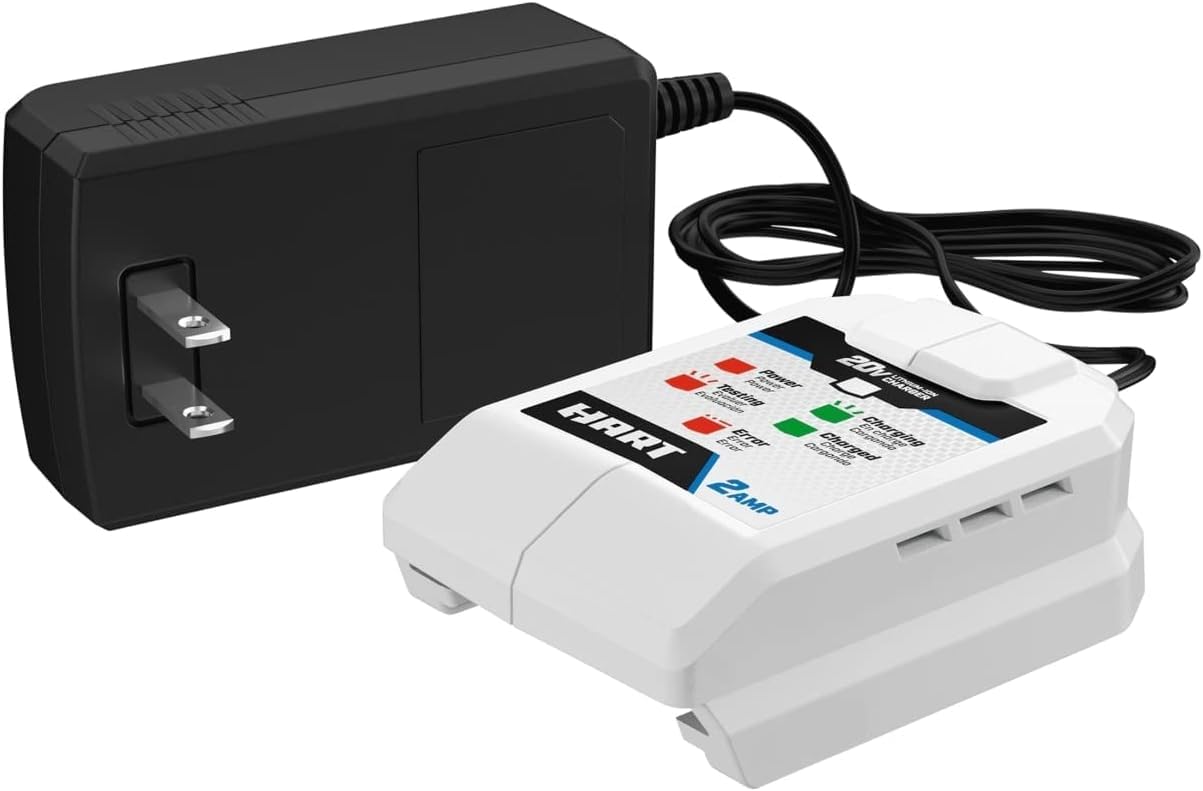
Image: The HART 20-Volt 2.0 Amp Fast Charger connected to a HART 20V Lithium-Ion battery. The charger is black and white with blue accents, and the battery is black with blue and white branding.
Important Safety Instructions
Always follow basic safety precautions when using electrical appliances to reduce the risk of fire, electric shock, and personal injury. This charger is designed for use with HART 20V Lithium-Ion batteries only. Do not attempt to charge other battery types.
- Read all instructions before using the charger.
- Do not expose the charger to rain or wet conditions.
- Use only HART 20V Lithium-Ion batteries with this charger.
- Do not operate the charger if it has received a sharp blow, been dropped, or otherwise damaged.
- Unplug the charger from the power outlet when not in use or before cleaning.
Setup
- Unpacking: Carefully remove the charger from its packaging. Inspect for any damage that may have occurred during shipping.
- Placement: Place the charger on a dry, stable, and non-flammable surface. Ensure adequate ventilation around the charger.
- Power Connection: Plug the charger's power cord into a standard 120V AC electrical outlet. The 'Power' indicator light (red) on the charger should illuminate, indicating it is ready for use.
Operating Instructions
This section details how to properly charge your HART 20V Lithium-Ion batteries using the 2.0 Amp Fast Charger.

Image: A close-up view of the HART 20-Volt 2.0 Amp Fast Charger's indicator panel, showing labels for Power, Testing, Error (red lights) and Charging, Charged (green lights).
Charging a Battery
- Insert Battery: Slide the HART 20V Lithium-Ion battery onto the charger, ensuring it clicks securely into place.
- Indicator Lights: Observe the indicator lights on the charger:
- Power (Red): Solid red indicates the charger is plugged in and receiving power.
- Testing (Red): Flashing red indicates the charger is testing the battery. This is a brief phase before charging begins.
- Charging (Green): Flashing green indicates the battery is actively charging.
- Charged (Green): Solid green indicates the battery is fully charged and ready for use.
- Error (Red): Solid red indicates a fault with the battery or charger. Refer to the Troubleshooting section.
- Remove Battery: Once the 'Charged' indicator light turns solid green, the battery is fully charged. Press the battery release button and slide the battery off the charger.
The 2.0 Amp Fast Charger charges HART 20V Lithium-Ion batteries approximately three times faster than standard 0.5 Amp chargers.
Maintenance
Proper maintenance ensures the longevity and optimal performance of your charger.
- Cleaning: Disconnect the charger from the power outlet before cleaning. Use a clean, dry cloth to wipe the exterior of the charger. Do not use harsh chemicals or abrasive cleaners.
- Storage: Store the charger in a cool, dry place, away from direct sunlight and moisture.
- Inspection: Periodically inspect the power cord and charger housing for any signs of damage. If damage is found, discontinue use and contact customer support.
Troubleshooting
If you encounter issues with your HART 20-Volt 2.0 Amp Fast Charger, refer to the following table for common problems and solutions.
| Problem | Possible Cause | Solution |
|---|---|---|
| Charger not powering on (no 'Power' light) | Not plugged in; no power from outlet; faulty charger. | Ensure charger is securely plugged into a working outlet. Test the outlet with another device. If still no power, the charger may be faulty. |
| 'Error' light (red) is solid | Battery fault (too hot/cold, damaged); charger fault. | Remove the battery and allow it to cool down or warm up to room temperature. Reinsert the battery. If the error persists with multiple batteries, the charger may be faulty. If it persists with only one battery, that battery may be damaged. |
| Battery not charging (no 'Charging' light) | Battery not properly seated; battery fully charged; battery fault. | Ensure the battery is fully seated on the charger. Check if the 'Charged' light is already solid green. If not, and the 'Error' light is not on, try another battery. |
| Slow charging | Environmental factors (extreme temperatures). | Ensure the charger and battery are in a room temperature environment (typically 40°F - 100°F / 4°C - 38°C) for optimal charging speed. |
Specifications
| Feature | Detail |
|---|---|
| Brand | Hart |
| Model Number | 140421001 |
| Input Voltage | 20 Volts |
| Output Voltage | 20 Volts |
| Current Rating | 2 Amps |
| Compatible Devices | HART 20V Lithium-Ion Battery Tools |
| Connector Type | Hart proprietary connector |
| Number of Ports | 1 |
| Item Weight | 0.06 Kilograms |
| Certification | UL |
| UPC | 842080189240 |
Warranty Information
For detailed warranty information regarding your HART 20-Volt 2.0 Amp Fast Charger Accessory, please refer to the official HART Tools website or the warranty card included with your purchase. Warranty terms and conditions may vary.
Customer Support
If you have further questions, require technical assistance, or need to report a problem not covered in this manual, please contact HART customer support. Visit the official HART Tools website for contact information, FAQs, and additional resources.
