
Protmex HT609
Protmex HT609 Gas Leak Detector User Manual
Model: HT609
Introduction
The Protmex HT609 is a versatile 3-in-1 portable gas leak detector designed to identify combustible gas leaks, measure ambient temperature, and relative humidity. This device provides audible, visual, and screen-based alarms to ensure safety and assist in pinpointing potential leak sources in various environments. Its compact design and multiple sensitivity modes make it a valuable tool for both household and professional use.
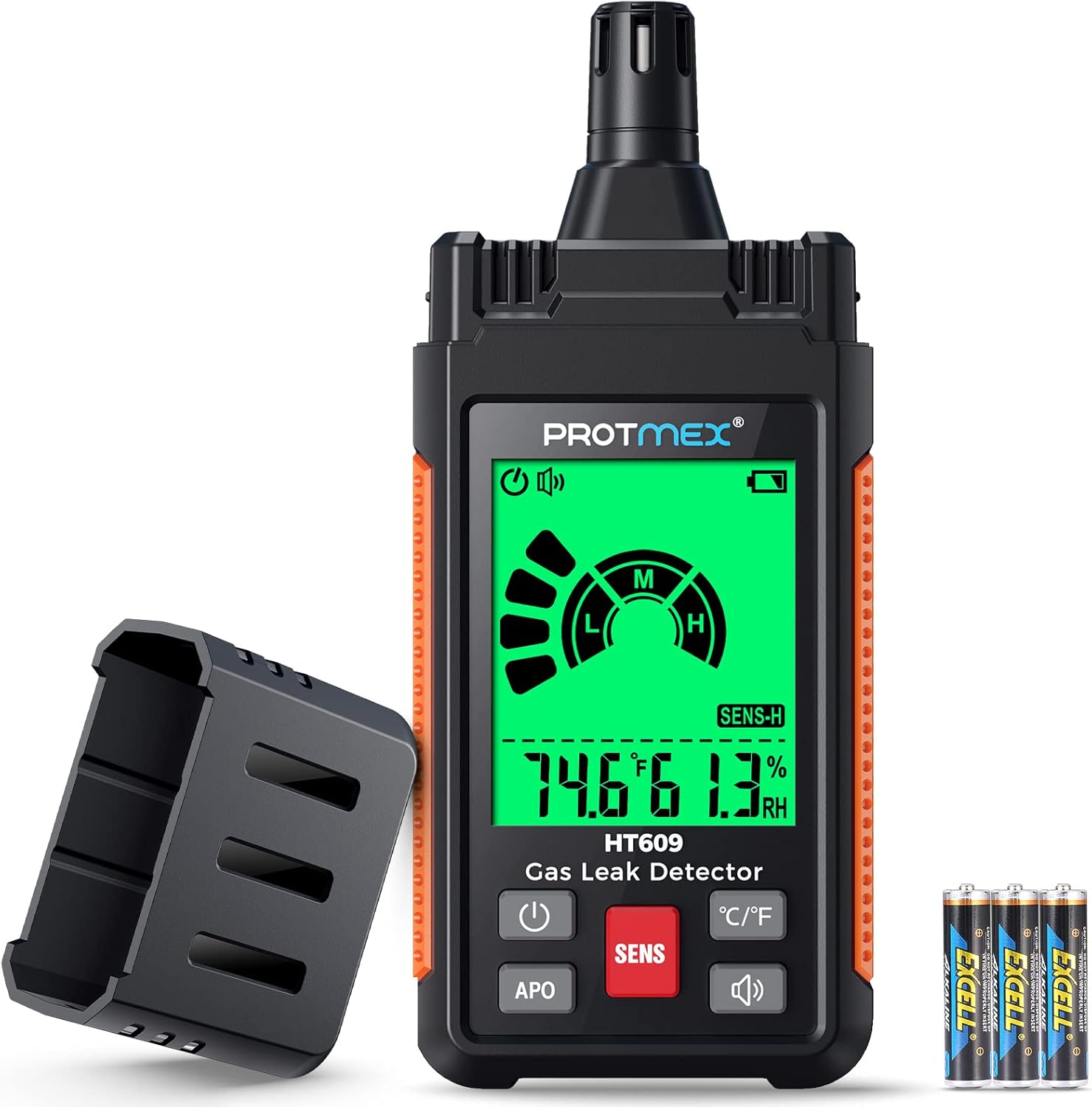
Figure 1: Protmex HT609 Gas Leak Detector and accessories.
Safety Information
WARNING: Always prioritize safety when dealing with gas leaks. This device is a detection tool and should not replace professional inspection or emergency procedures. Evacuate the area immediately if a strong gas odor is detected and contact emergency services.
- Ensure proper ventilation when testing for gas leaks.
- Do not use the device in environments with extremely high concentrations of gas, which could pose an explosion risk.
- Keep the device away from water and extreme temperatures.
- Do not attempt to disassemble or modify the device.
- Always allow the device to warm up fully before use to ensure accurate readings.
Product Overview
Key Features:
- 3-in-1 Functionality: Combines gas leak detection with temperature and humidity measurement. Temperature units are switchable between Fahrenheit (℉) and Celsius (℃).
- Adjustable Sensitivity: Features High, Medium, and Low sensitivity settings to adapt to different leak sizes and environments.
- Triple Alarm System: Provides visual (green, orange, red display), audible (buzzer), and screen-based alarms. Alarm frequency and bar graph increase with gas concentration.
- Compact and Portable: Ergonomic design with a 2.24-inch LCD display for easy one-handed operation and clear visibility in various lighting conditions.
- Wide Application: Detects various combustible gases including LPG, methane, ethane, propane, butane, natural gas, coal gas, fuel gas, sewer gas, and liquefied natural gas.
- Automatic Power Off (APO): Includes an APO function for battery saving, which can be disabled.
Components:

Figure 2: Key components and dimensions of the HT609.
- Sensor: Located at the top, protected by a cap.
- Display Screen: 2.24-inch LCD for readings and indicators.
- Power Button: To turn the device on/off.
- SENS Button: To adjust sensitivity (Low, Medium, High).
- ℃/℉ Button: To switch temperature units.
- APO Button: To cancel or enable Automatic Power Off.
- Buzzer On/Off Button: To control the audible alarm.
- Battery Compartment: Located at the rear, for 3 AAA batteries.
Setup
- Battery Installation:
Locate the battery compartment on the back of the device. Use the provided screwdriver to open the compartment. Insert 3 AAA batteries, ensuring correct polarity. Close the compartment and secure it with the screws.
- Initial Power On:
Press and hold the power button (⏻) to turn on the device. The device will display "WAIT" and undergo a warm-up period of approximately 30 seconds. During this time, ensure the device is in a clean air environment, free from any gas sources, to allow for proper calibration. The device will emit two "Beeps" when warm-up is complete and it is ready for use.

Figure 3: Sensor warm-up and response time.
Operation
Gas Leak Detection:
- Warm-up: After powering on, wait for the 30-second warm-up period to complete.
- Sensitivity Selection:
Press the SENS button to cycle through the sensitivity modes: High (H), Medium (M), and Low (L). The selected mode will be indicated on the display.
- High Sensitivity (H): Ideal for detecting small gas leaks or pinpointing the exact source. The buzzer activates when the signal reaches the second grid.
- Medium Sensitivity (M): A balanced setting for general detection. The buzzer activates when the signal reaches the fifth grid.
- Low Sensitivity (L): Suitable for detecting larger gas leaks. The buzzer activates when the signal reaches the eighth grid.
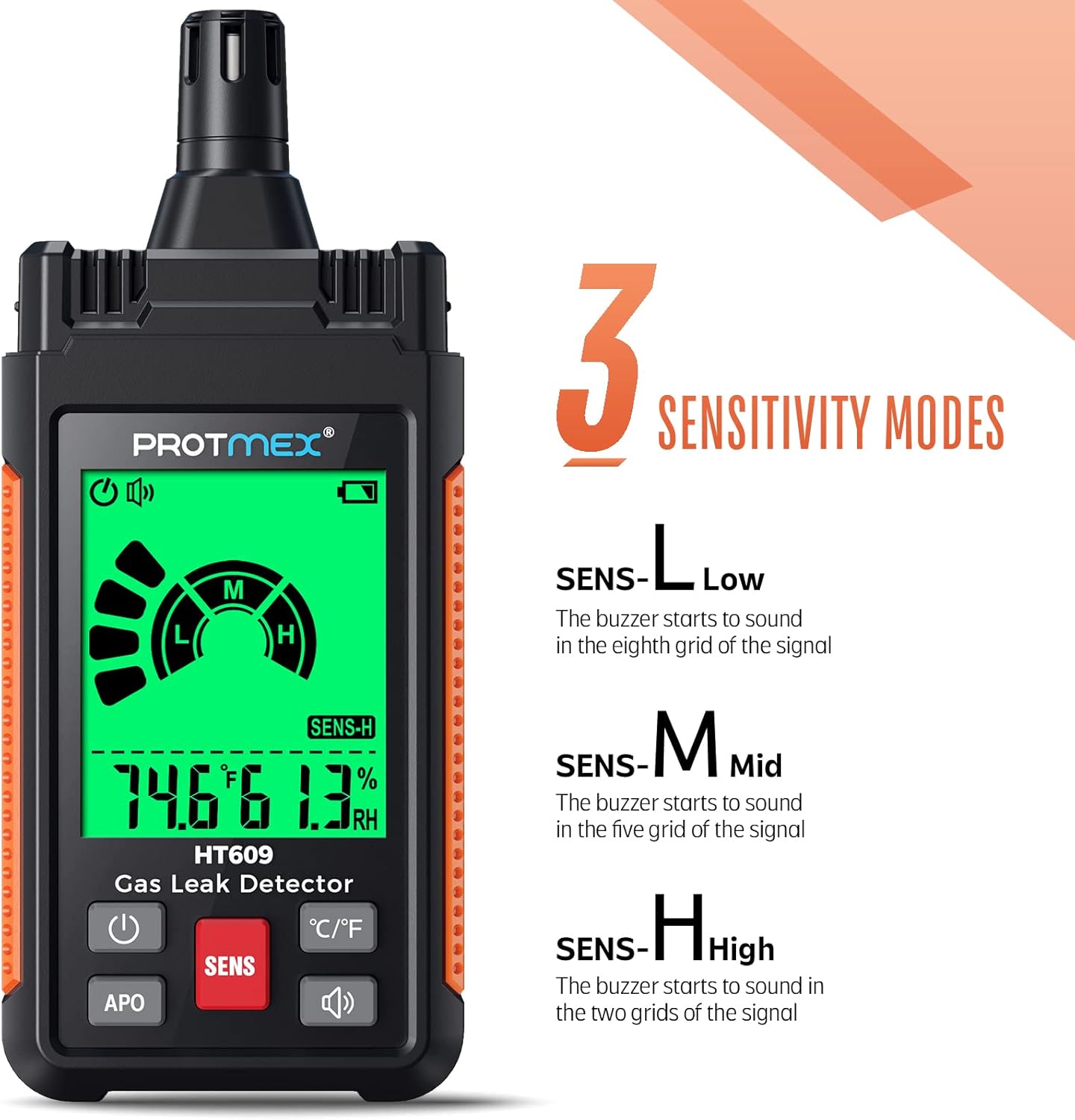
Figure 4: Sensitivity modes and alarm thresholds.
- Scanning for Leaks:
Slowly move the sensor tip close to potential leak sources (e.g., gas pipes, appliance connections, valves). Maintain a consistent distance for accurate readings. The device will respond to the presence of combustible gases.
Video 1: Demonstration of the HT609 Gas Leak Detector in use, showing how to scan for leaks near a gas stove and a water heater. The device's display changes from green to red and the alarm sounds when gas is detected.
- Interpreting Alarms:
The HT609 provides a triple alarm system:
- Visual Alarm: The screen backlight changes color (Green: Safe, Orange: Low concentration, Red: High concentration).
- Audible Alarm: A buzzer will sound, increasing in frequency as gas concentration rises.
- Screen Display: The bar graph on the screen will increase, and the numerical reading will change, indicating higher gas levels.
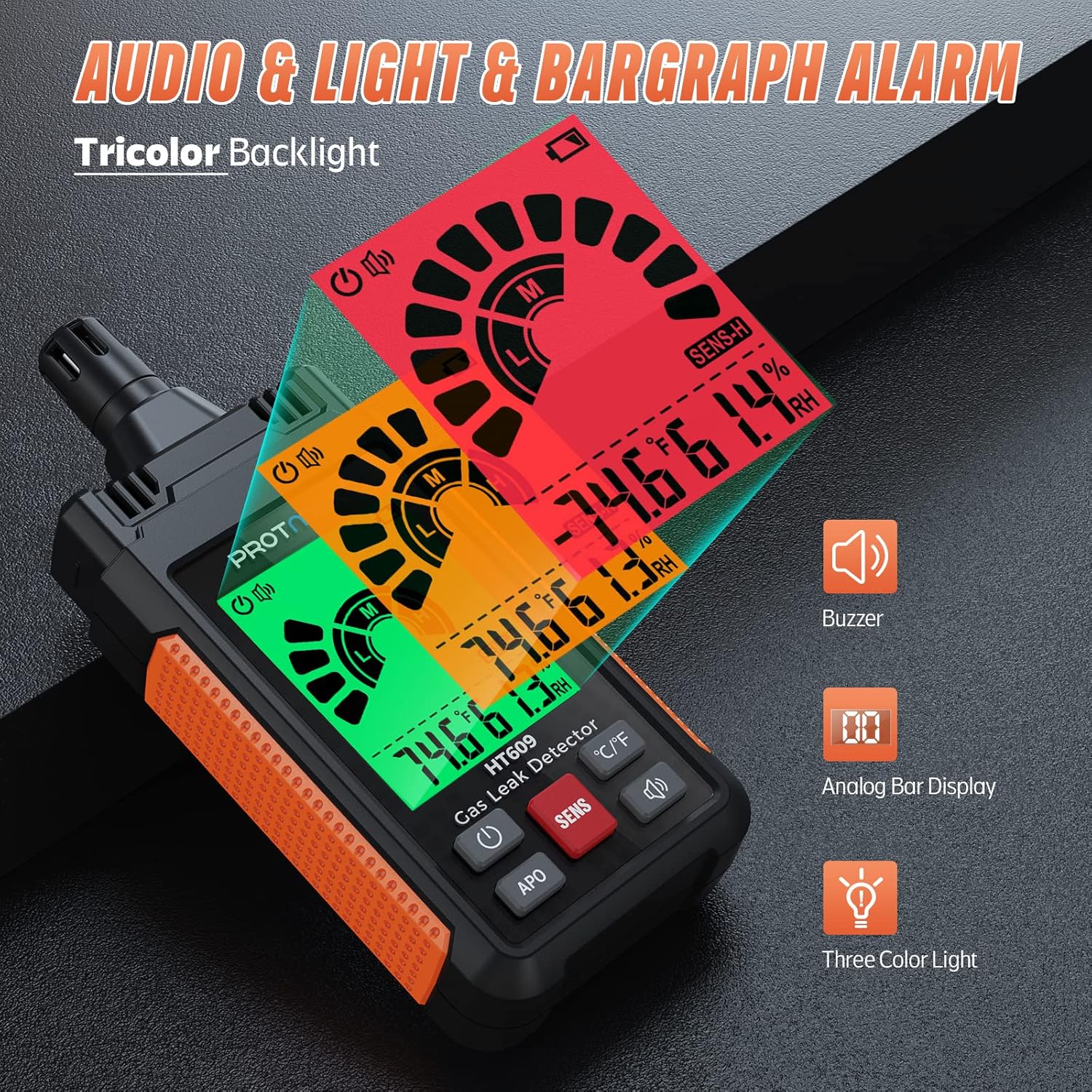
Figure 5: Audio, light, and bar graph alarm indicators.
Temperature and Humidity Measurement:
The device continuously displays ambient temperature and relative humidity on the screen. Press the ℃/℉ button to switch between Celsius and Fahrenheit temperature units.
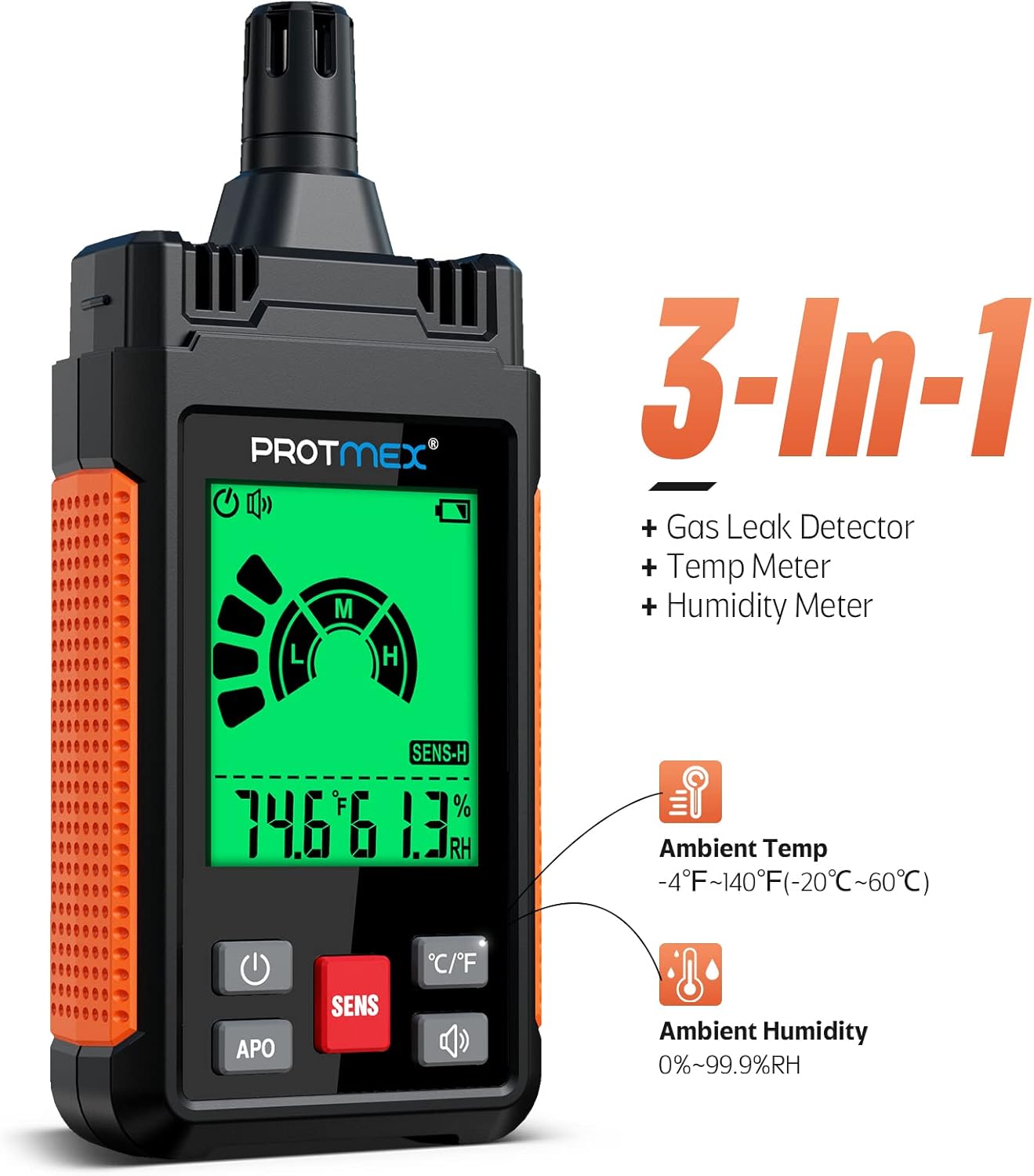
Figure 6: 3-in-1 functionality for gas, temperature, and humidity.
Automatic Power Off (APO) Function:
The HT609 features an automatic power-off function to conserve battery life. To disable or enable this function, press the APO button. When APO is active, the device will automatically shut down after a period of inactivity.
Applications
The Protmex HT609 is suitable for a wide range of applications where combustible gas detection is necessary:
- Residential homes: Checking gas stoves, water heaters, furnaces, and gas lines.
- RV and camping: Inspecting gas connections in recreational vehicles and portable gas appliances.
- Industrial settings: Locating leaks in gas pipelines, storage tanks, and industrial equipment.
- Commercial kitchens: Ensuring safety around commercial cooking equipment.
- Anywhere combustible gases like methane, propane, natural gas, LPG, LNG, or fuel gas might be present.

Figure 7: Wide range of applications for the HT609.
Maintenance
- Cleaning: Wipe the device with a soft, dry cloth. Do not use abrasive cleaners or solvents.
- Sensor Care: Keep the sensor tip clean and free from dust or debris. Avoid touching the sensor directly.
- Storage: Store the device in a cool, dry place away from direct sunlight and extreme temperatures. If storing for extended periods, remove the batteries to prevent leakage.
- Battery Replacement: Replace batteries when the low battery indicator appears on the display to ensure optimal performance.
Troubleshooting
| Problem | Possible Cause | Solution |
|---|---|---|
| Device does not power on. | Dead or incorrectly installed batteries. | Check battery polarity. Replace with new AAA batteries. |
| Inaccurate or inconsistent gas readings. | Insufficient warm-up time; sensor contamination; device not calibrated properly. | Ensure device completes 30-second warm-up in clean air. Clean sensor tip. If issues persist, contact support. |
| No audible alarm. | Buzzer function is turned off. | Press the buzzer on/off button to activate the audible alarm. |
| Temperature/Humidity readings seem off. | Environmental factors; sensor issue. | Ensure the device has stabilized in the environment. If readings are consistently inaccurate, contact support. |
Specifications
| Parameter | Value |
|---|---|
| Model Number | HT609 |
| Detection Gases | Combustible gases (Methane, LPG, LNG, Fuel Gas, etc.) |
| Response Range | 50-1000 ppm |
| Warm-up Time | Approx. 30 seconds |
| Response Time | 2-5 seconds (varies with gas concentration) |
| Temperature Measurement Range | -4°F ~ 140°F (-20°C ~ 60°C) |
| Humidity Measurement Range | 0% ~ 99.9% RH |
| Alarm Type | Audible, Visual (3-color backlight), Bar Graph |
| Power Source | 3 x 1.5V AAA Batteries |
| Item Weight | 7.8 ounces |
| Product Dimensions | 7.09 x 3.82 x 2.13 inches |
Warranty and Support
Protmex is committed to providing quality products and customer satisfaction. For any inquiries, technical support, or warranty claims, please contact Protmex customer service. They offer 24/7 online friendly support.
Refer to the official Protmex website or your purchase documentation for specific warranty terms and contact information.
Official User Manual (PDF): Download PDF
Related documentsHT609

Ask a question about this manual
Ask about setup, troubleshooting, compatibility, parts, safety, or missing instructions. Manuals+ will review the question and use this page’s manual context to help answer it.