Important Safety Instructions
Before operating the ANCHEER T900 Treadmill, please read and understand all safety instructions. Failure to follow these instructions may result in injury or damage to the product.
- Always consult with a physician before starting any exercise program.
- Keep children and pets away from the treadmill during operation.
- Place the treadmill on a flat, stable surface with adequate clearance around it.
- Wear appropriate athletic footwear and clothing.
- Use the safety key at all times. Attach the clip to your clothing before starting.
- Do not operate the treadmill if it is damaged or malfunctioning.
- Do not exceed the maximum user weight of 350 pounds (158 kg).
- Unplug the treadmill from the power outlet when not in use or before cleaning/maintenance.

Image: Illustration of the safety key being attached to a user's clothing, emphasizing its importance during operation.
Assembly and Setup
The ANCHEER T900 Treadmill comes partially pre-assembled. Follow these steps to complete the setup.
- Unpacking: Carefully remove all components from the packaging. Retain packaging materials for future storage or transport.
- Base Stabilization: Place the treadmill on a firm, level surface. Ensure all feet are stable and the unit does not wobble.
- Upright Assembly: Lift the console uprights into position and secure them according to the included hardware instructions.
- Console Connection: Connect all necessary cables from the uprights to the console. Ensure connections are secure.
- Power Connection: Plug the power cord into a grounded electrical outlet.

Image: A diagram illustrating the dimensions of the ANCHEER T900 Treadmill and its automatic incline range from 0% to 15%.

Image: A diagram showing the compact dimensions of the ANCHEER T900 Treadmill when folded for storage.
Operating Instructions
Console Overview
The ANCHEER T900 features a spacious LCD console for easy control and monitoring of your workout.

Image: Close-up view of the ANCHEER T900 treadmill console, showing the LCD display, control buttons, and integrated Bluetooth speakers.
- Start/Stop: Press to begin or end your workout.
- Speed Control: Adjust speed from 0.5 MPH to 9 MPH (0-14.5 KM/H) using the +/- buttons or quick-select keys.
- Incline Control: Adjust incline from 0% to 15% using the +/- buttons or quick-select keys.
- Program Selection: Choose from 12 preset programs (P1-P12) designed for various fitness goals.
- Heart Rate Sensors: Grip the handrail sensors to monitor your heart rate during exercise.
- Bluetooth Audio: Connect your device via Bluetooth to play music through the integrated speakers.
Using the GFIT APP
Enhance your workout experience by connecting your treadmill to the GFIT APP via Bluetooth.

Image: A user interacting with the GFIT App on a tablet and smartphone, showcasing features like virtual travel, workout tracking, and music playback.
- Download: Search for "GFIT" in the App Store (iOS) or Google Play Store (Android).
- Connect: Enable Bluetooth on your device and open the GFIT app. Follow the in-app instructions to pair with your ANCHEER T900 treadmill.
- Features: The app allows you to travel virtual routes, track your workout data, map your progress, and enjoy music.
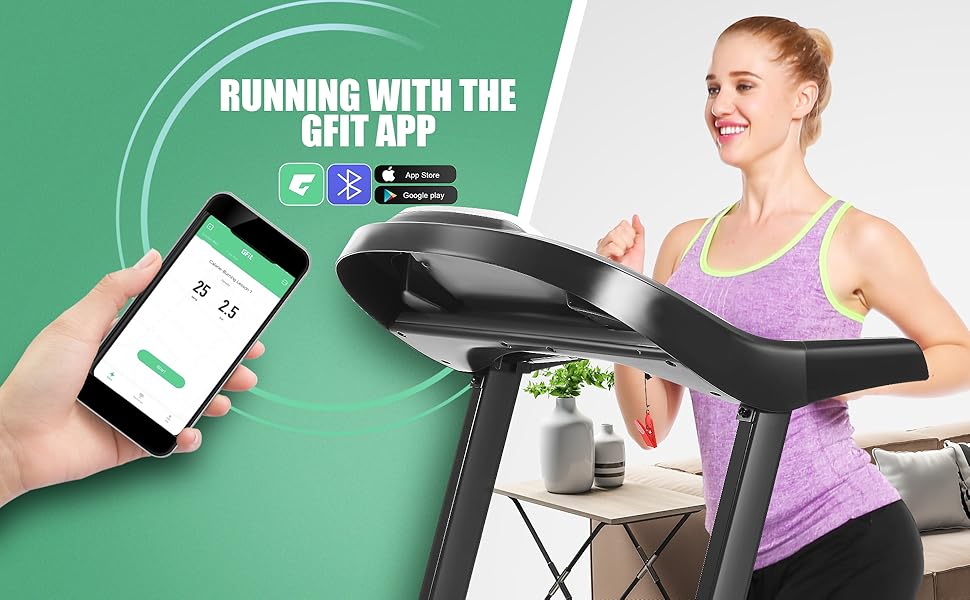
Image: A person using the GFIT App on a smartphone while running on the treadmill, demonstrating the app's workout tracking capabilities.
Maintenance
Regular maintenance ensures the longevity and optimal performance of your ANCHEER T900 Treadmill.
- Cleaning: Wipe down the console and exterior surfaces with a damp cloth after each use. Avoid abrasive cleaners.
- Belt Lubrication: The treadmill features an auto-lubrication system. Refer to the specific instructions in your quick-start guide for how to add lubricant when indicated. Proper lubrication is crucial for belt life and smooth operation.
- Belt Tension and Alignment: Periodically check the running belt for proper tension and alignment. Adjust as needed following the instructions in the full user manual.
- Storage: When not in use, the treadmill can be folded using its hydraulic folding system for compact storage.

Image: A diagram illustrating the internal auto-lubrication system of the treadmill, showing how lubricant is distributed under the running belt.

Image: A visual representation of the treadmill's hydraulic folding system, demonstrating how the deck can be easily lifted and lowered for storage.
Troubleshooting
If you encounter issues with your ANCHEER T900 Treadmill, refer to the following common solutions. For more complex problems, contact customer support.
| Problem | Possible Cause | Solution |
|---|---|---|
| Treadmill does not power on. | Power cord not plugged in, circuit breaker tripped, safety key not inserted. | Ensure power cord is securely plugged in. Check household circuit breaker. Insert safety key fully into the console. |
| Running belt slips or hesitates. | Belt too loose, insufficient lubrication. | Adjust belt tension (refer to full manual). Apply lubricant if due (check auto-lubrication system). |
| Unusual noise during operation. | Loose parts, motor issue, belt friction. | Inspect for loose bolts and tighten. Ensure proper lubrication. If noise persists, contact customer support. |
| Heart rate monitor inaccurate. | Improper hand placement, dry hands. | Ensure firm, consistent grip on both sensors. Lightly moisten hands if dry. |
Specifications
Key technical specifications for the ANCHEER T900 Treadmill:
- Brand: ANCHEER
- Model: T900
- Motor Horsepower: 3.25 HP
- Speed Range: 0.5 - 9 MPH (0-14.5 KM/H)
- Incline Range: 0 - 15% Automatic Incline
- Running Surface (Deck Length x Width): 40" x 17" (101.6 cm x 43.18 cm)
- Maximum User Weight: 350 lbs (158 kg)
- Product Dimensions (L x W x H): 60.4" x 27.6" x 48.8" (153.4 cm x 70.1 cm x 123.9 cm)
- Frame Material: Alloy Steel
- Special Feature: Portable, Hydraulic Folding System, Bluetooth Audio, APP Control
Customer Support
For further assistance, parts, or warranty inquiries, please contact ANCHEER customer support. Refer to your product packaging or the official ANCHEER website for the most current contact information.


