Introduction
Thank you for choosing the Hifonics ZS65C Zeus Series 6.5-inch 2-Way Car Audio Component Speaker System. This manual provides essential information for the proper installation, operation, and maintenance of your new car audio speakers. To ensure optimal performance and longevity, please read these instructions thoroughly before installation and retain this manual for future reference.
Safety Information
Always observe the following safety precautions during installation and operation:
- Disconnect the vehicle's negative battery terminal before beginning any electrical work to prevent short circuits.
- Ensure all wiring is properly insulated to prevent damage and potential electrical hazards.
- Mount speakers securely to prevent them from becoming loose during vehicle operation.
- Avoid installing speakers in locations that obstruct airbags or other safety features.
- Do not operate the audio system at excessively high volumes for prolonged periods, as this can cause hearing damage.
- If you are unsure about any part of the installation process, consult a professional car audio installer.
Package Contents
Verify that all items are present in your package:
- 6.5-inch Midwoofers (2)
- 1-inch Neo-Mylar Soft Dome Tweeters (2)
- External Crossovers (2)
- Speaker Grilles (2)
- Mounting Hardware (screws, clips, gaskets)
- Speaker Wire and Connectors
- Quick Start Installation Guide

Image: Contents of the Hifonics ZS65C component speaker system, including midwoofers, tweeters, crossovers, grilles, and various mounting hardware and wiring accessories.
Setup and Installation
Proper installation is crucial for optimal sound quality. It is recommended to have this system installed by a qualified professional.
1. Midwoofer Installation
- Identify suitable mounting locations in your vehicle, typically factory speaker openings in doors or kick panels.
- Ensure the mounting depth (2.12 inches) and cutout dimensions (5.59 inches) are compatible with your chosen location.
- Secure the midwoofers using the provided screws and mounting hardware. Ensure a tight, vibration-free fit.

Image: Close-up view of the Hifonics ZS65C 6.5-inch midwoofer, showcasing its alpha-cellulose cone and Hifonics branding.
2. Tweeter Installation
- Tweeters should be mounted in a location that provides optimal sound staging, such as on the dashboard, A-pillars, or flush-mounted in door panels.
- Use the included mounting cups or flush-mount hardware as appropriate for your chosen location.
- Angle the tweeters towards the listening position for best results.
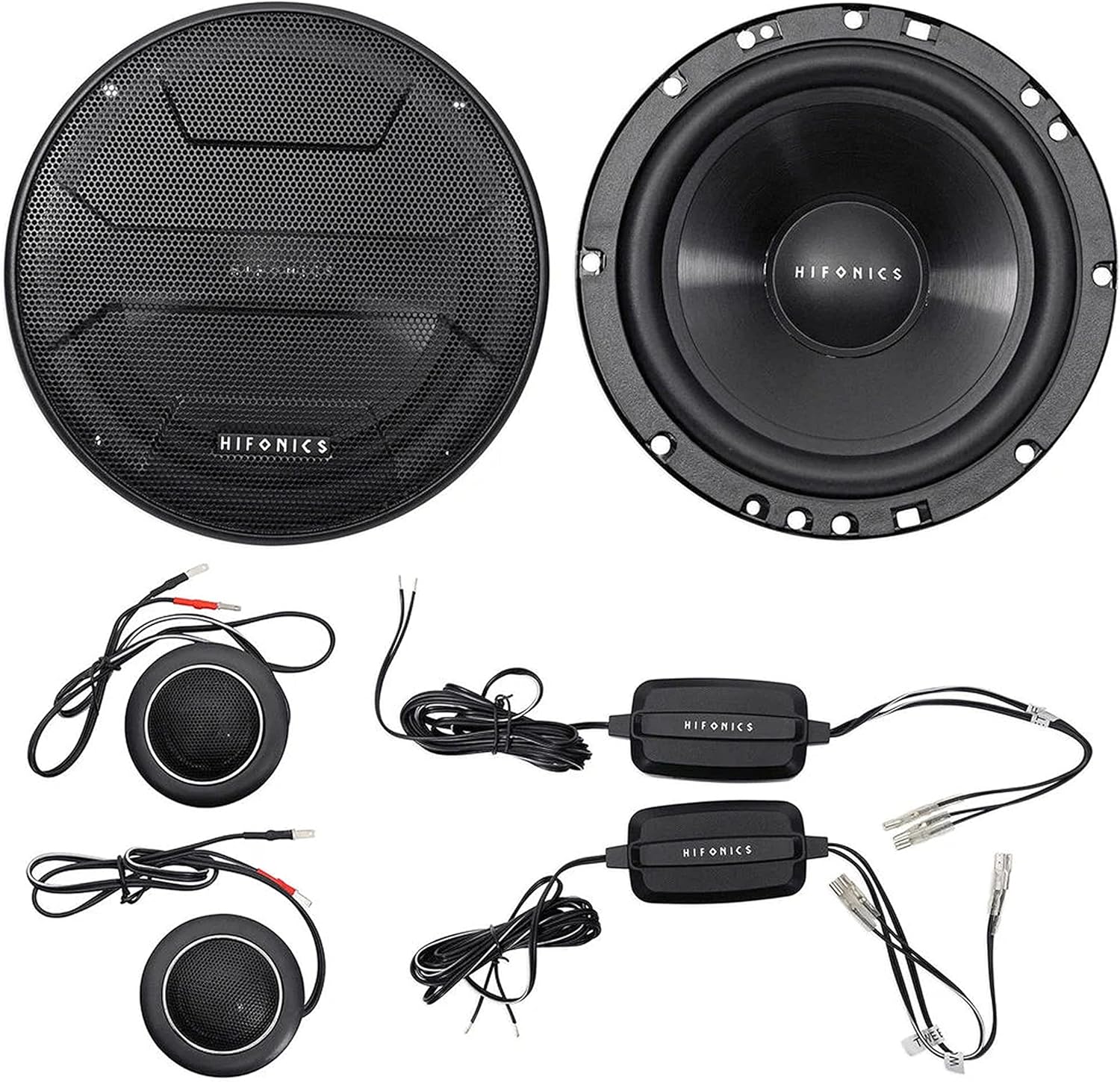
Image: The complete Hifonics ZS65C component speaker system, showing the midwoofers, separate tweeters, and external crossovers, ready for installation.
3. Crossover Connection
- The external crossovers are essential for directing the correct frequency ranges to the midwoofers and tweeters.
- Connect the amplifier output to the 'INPUT' terminals on the crossover.
- Connect the midwoofer to the 'WOOFER' or 'MID' terminals on the crossover.
- Connect the tweeter to the 'TWEETER' or 'TWEET' terminals on the crossover.
- Ensure correct polarity (+ to + and - to -) for all connections.

Image: Rear view of the Hifonics ZS65C midwoofer, showing the speaker terminals and magnet structure, indicating wiring points.
4. Wiring
- Use appropriate gauge speaker wire for all connections.
- Route all wiring carefully, avoiding sharp edges, moving parts, and heat sources.
- Secure wiring with zip ties or clips to prevent rattles and damage.
- After all connections are made, reconnect the vehicle's negative battery terminal.
Operating Instructions
Once installed, your Hifonics ZS65C speakers are ready for use. Follow these guidelines for optimal performance:
- Initial Power-Up: Start with the volume low and gradually increase it to a comfortable listening level.
- Break-In Period: Allow a break-in period of approximately 10-20 hours of normal listening before operating the speakers at high volumes. This allows the speaker components to loosen and perform optimally.
- Amplifier Matching: Ensure your amplifier's power output is appropriately matched to the speakers' RMS power handling (60 watts RMS per speaker) to prevent damage.
- Audio Settings: Adjust your head unit's equalizer and crossover settings to fine-tune the sound to your preference. Avoid excessive bass or treble boost that can distort the sound.
Maintenance
The Hifonics ZS65C speakers require minimal maintenance:
- Keep speaker grilles clean by gently wiping them with a soft, dry cloth.
- Avoid exposing speakers to excessive moisture or direct sunlight for prolonged periods.
- Periodically check wiring connections for tightness and corrosion.
Troubleshooting
If you experience issues with your speaker system, refer to the following common problems and solutions:
- No Sound from Speakers:
- Check all wiring connections from the head unit to the amplifier, and from the amplifier to the crossovers and speakers.
- Verify that the amplifier is powered on and functioning correctly.
- Ensure the head unit's volume is up and not muted.
- Distorted Sound:
- Reduce the volume level.
- Check amplifier gain settings; they may be set too high.
- Inspect speaker cones for any physical damage.
- Ensure crossovers are correctly wired and functioning.
- Weak or Uneven Sound:
- Check speaker polarity; incorrect wiring can cause phase issues.
- Verify that all speakers are receiving power.
- Adjust balance and fader settings on your head unit.
- Rattling or Vibrations:
- Ensure speakers are securely mounted and not loose.
- Check for loose panels or objects in the vehicle that may be vibrating.
Specifications
| Feature | Specification |
|---|---|
| Model Number | ZS65C-PK1 |
| Speaker Type | 2-Way Component System |
| Midwoofer Size | 6.5 Inches |
| Tweeter Size | 1 Inch |
| Peak Power Handling (Pair) | 800 Watts |
| RMS Power Handling (Each) | 60 Watts |
| Midwoofer Cone Material | Alpha-cellulose Polypropylene |
| Tweeter Material | Neo-Mylar Soft Dome |
| Voice Coil | 1" Pure Copper |
| Top-mount Depth | 2.12 Inches |
| Cutout Dimensions | 5.59 Inches |
| Impedance | 4 Ohm |
| Connectivity Technology | Auxiliary, RCA (via amplifier) |
| Product Dimensions | 2.12"D x 5.59"W x 5.59"H |
| Item Weight | 4.97 pounds |
Warranty Information
This Hifonics ZS65C Zeus Series Component Speaker System comes with a limited warranty. Please refer to the warranty card included with your product or visit the official Hifonics website for detailed terms and conditions regarding coverage, duration, and claim procedures. Keep your proof of purchase for warranty service.
Customer Support
For technical assistance, troubleshooting, or warranty inquiries, please contact Hifonics customer support through their official website or the contact information provided in your product packaging. When contacting support, please have your product model number (ZS65C) and proof of purchase readily available.


