
1. Introduction
This manual provides essential information for the safe and effective use of your PKPOWER AC Adapter. This replacement power supply is designed for GIGABYTE G27F and G27Q Gaming Monitors, providing a stable 65W power output.
Please read this manual thoroughly before using the product and retain it for future reference.
2. Safety Information and Precautions
To ensure safe operation and prevent damage, observe the following precautions:
- Input Voltage: Ensure the input voltage of the power outlet matches the adapter's specifications (100-240V 50-60Hz).
- Protection Features: This adapter is equipped with OVP (Over Voltage Output Protection), OCP (Over Current Output Protection), and SCP (Short Circuit Output Protection) to safeguard your devices.
- Environment: Use the adapter in a dry, well-ventilated area. Avoid exposure to moisture, extreme temperatures, or direct sunlight.
- Handling: Do not drop, disassemble, or attempt to repair the adapter. Refer all servicing to qualified personnel.
- Cable Care: Do not place heavy objects on the power cord or allow it to be pinched. Always grasp the plug, not the cord, when disconnecting.
- Compatibility: Only use this adapter with compatible devices as specified (GIGABYTE G27F, G27Q Gaming Monitors). Using it with incompatible devices may cause damage.
Proposition 65 Warning: This product may contain chemicals known to the State of California to cause cancer and birth defects or other reproductive harm.
3. Package Contents
Verify that all items are present in your package:
- 1 x PKPOWER AC Adapter
- 1 x Power Cable

Image: The PKPOWER AC Adapter shown with its detachable power cable. The adapter is black, rectangular, and features input/output specifications on its label.
4. Setup Instructions
Follow these steps to connect your AC adapter:
- Connect Power Cable to Adapter: Insert the figure-8 connector of the power cable firmly into the corresponding port on the AC adapter.
- Connect Adapter to Monitor: Plug the barrel connector of the AC adapter's output cord into the power input port of your GIGABYTE G27F or G27Q Gaming Monitor. Ensure a secure connection.
- Connect Power Cable to Outlet: Insert the two-prong plug of the power cable into a standard wall outlet (100-240V AC).
- Verify Power: Once connected, your monitor should receive power. If not, check all connections and the power outlet.

Image: A top-down view of the PKPOWER AC Adapter with both the input power cable and the output barrel connector cable attached, ready for connection.
5. Operating the AC Adapter
The PKPOWER AC Adapter operates automatically once connected to a power source and a compatible device. It converts the AC wall voltage to the DC voltage required by your GIGABYTE monitor.
- No user interaction is required for its operation beyond proper connection.
- The adapter is designed for continuous use, but it is recommended to disconnect it from the power outlet when not in use for extended periods.
6. Maintenance and Care
Proper care will extend the life of your AC adapter:
- Cleaning: Disconnect the adapter from power before cleaning. Use a soft, dry cloth to wipe the surface. Do not use liquid cleaners or aerosols.
- Storage: Store the adapter in a cool, dry place when not in use. Avoid wrapping the cables too tightly around the adapter.
- Inspection: Periodically inspect the adapter and cables for any signs of damage, such as frayed wires or cracked casing. If damage is found, discontinue use immediately.
7. Troubleshooting
If you encounter issues with your AC adapter, try the following solutions:
| Problem | Possible Cause | Solution |
|---|---|---|
| Monitor not powering on. | Loose connection, faulty outlet, or incompatible device. |
|
| Adapter feels unusually hot. | Overload, poor ventilation, or internal fault. |
|
| Flickering monitor display. | Unstable power supply or loose connection. |
|
If the problem persists after trying these solutions, please contact PKPOWER customer support.
8. Specifications
| Feature | Detail |
|---|---|
| Input | 100-240V ~ 50-60Hz |
| Output Wattage | 65W |
| Product Dimensions | 4 x 2 x 0.5 inches (Adapter block) |
| Item Weight | 9 ounces |
| Connectivity Technology | Barrel Connector |
| Compatible Devices | GIGABYTE G27F, G27Q Gaming Monitors |
| Special Features | OVP, OCP, SCP Protection (Short Circuit Protection) |
| Certifications | CE / FCC / RoHS certified |
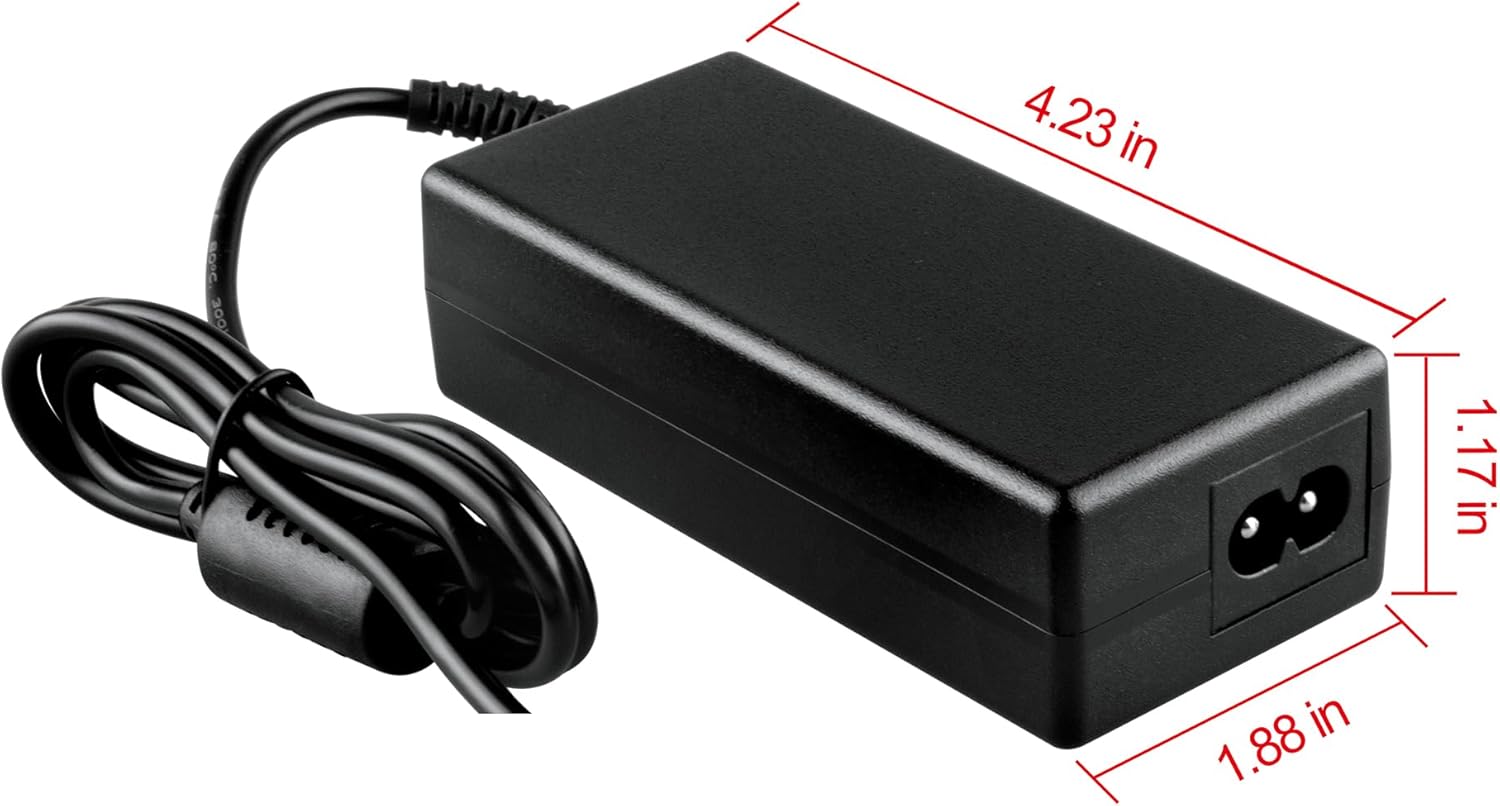
Image: A view of the PKPOWER AC Adapter with its dimensions labeled: 4.23 inches length, 1.88 inches width, and 1.17 inches height.
9. Warranty and Support
PKPOWER products are tested by the manufacturer to match and/or exceed OEM specifications.
For any questions, concerns, or technical support, please contact PKPOWER customer service. Our friendly and reliable customer service will respond to you within 24 hours.
You can typically find contact information on the product packaging or through the seller's page on the platform where you purchased the item.
This manual is subject to change without notice.