
1. Product Overview
The ALPOWL Portable Karaoke Machine is a versatile PA speaker system designed for various indoor and outdoor events. Featuring a unique record player shape, Bluetooth connectivity, and two wireless microphones, it offers a complete entertainment solution. This manual provides essential information for safe and effective use.

Image 1.1: ALPOWL Portable Karaoke Machine with two wireless microphones.
2. Package Contents
Ensure all items are present upon unboxing:
- 1 x ALPOWL Karaoke Machine
- 2 x Wireless Microphones
- 1 x Charging Cable (USB)
- 1 x AUX Cable
- 1 x User Manual

Image 2.1: Contents of the ALPOWL Karaoke Machine package.
3. Setup
3.1 Charging the Unit
- Connect the provided USB charging cable to the DC 5V port on the karaoke machine.
- Plug the other end of the USB cable into a compatible USB power adapter (not included) or a computer USB port.
- The charging indicator light will illuminate (usually red) to show the unit is charging. It will turn off or change color when fully charged.
3.2 Inserting Batteries into Microphones
- Unscrew the bottom cap of each wireless microphone.
- Insert 2 AA batteries into each microphone, ensuring correct polarity (+/-).
- Screw the bottom cap back on securely.
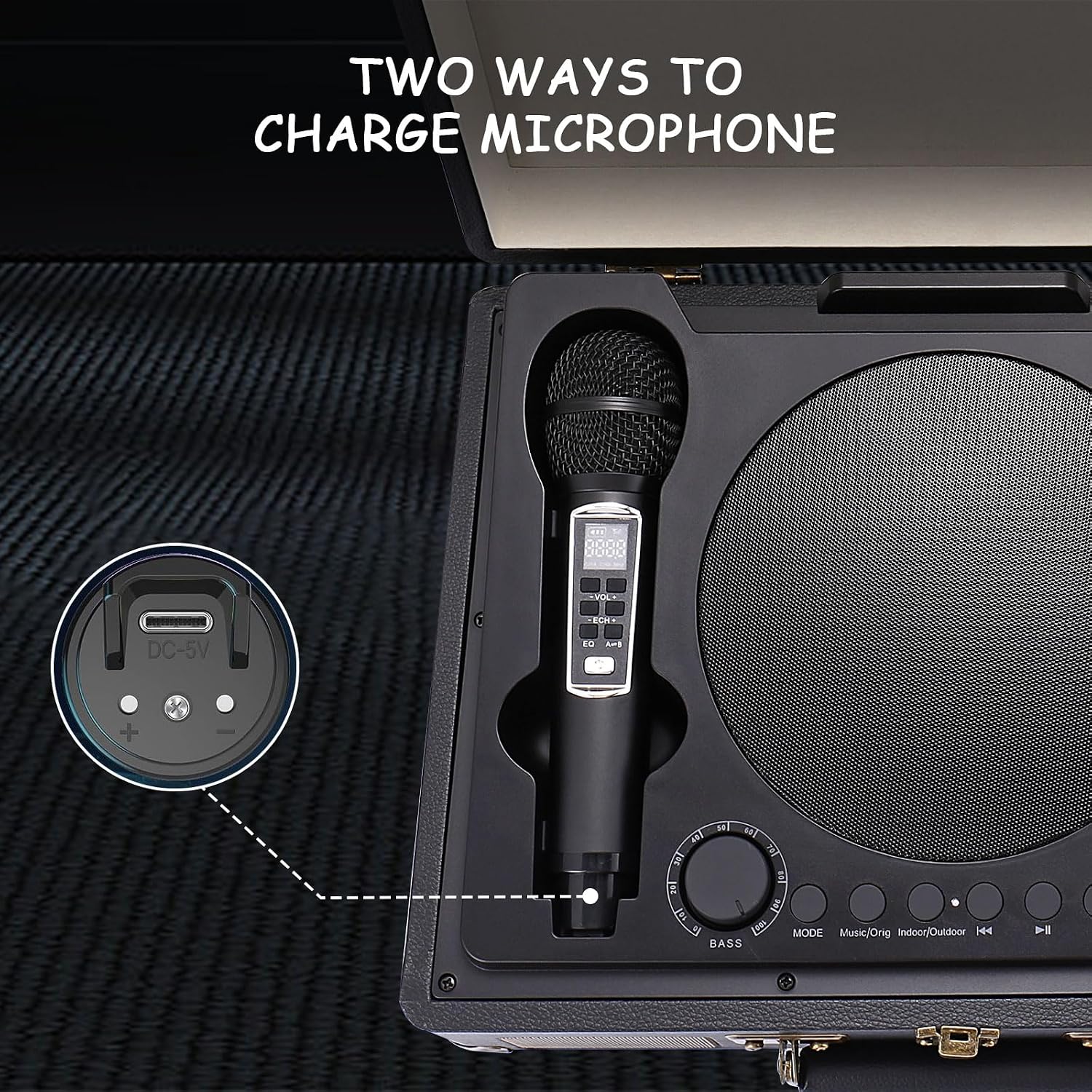
Image 3.1: Wireless microphone with charging port and battery compartment details.
4. Operating Instructions
4.1 Power On/Off
- To power on the karaoke machine, rotate the 'ON/OFF' knob clockwise until you hear a click and the display illuminates.
- To power off, rotate the 'ON/OFF' knob counter-clockwise until it clicks off.
- To power on the wireless microphones, press and hold the power button on each microphone until the display lights up.
4.2 Bluetooth Connection
- Turn on the karaoke machine. It will automatically enter Bluetooth mode (indicated by 'BLUE' on the display).
- Enable Bluetooth on your smartphone, tablet, or smart TV.
- Search for available devices and select 'AL-2109' (or similar name) to pair.
- Once connected, you will hear an audible confirmation.

Image 4.1: Bluetooth connection setup with TV and smartphone.
4.3 USB/TF Card Mode
- Insert a USB flash drive or TF (MicroSD) card with MP3 music files into the respective port.
- The machine will automatically switch to USB or TF Card mode and begin playing music.
- Use the 'Previous', 'Next', and 'Play/Pause' buttons on the control panel to manage playback.

Image 4.2: USB and TF card input ports for direct music playback.
4.4 AUX Input
- Connect an external audio device (e.g., MP3 player, computer) to the AUX IN port using the provided AUX cable.
- The machine will automatically switch to AUX mode.
- Control music playback from your connected device.
4.5 Microphone Usage
- Once powered on, the wireless microphones will automatically connect to the karaoke machine.
- Adjust the microphone volume using the 'MIC VOL' knob on the control panel.
- Adjust the echo effect using the 'MIC ECHO' knob.
- The microphones feature a display showing battery level and frequency.

Image 4.3: Detailed view of the wireless microphone's display and controls.
4.6 Sound Adjustment
- Master Volume: Use the 'VOLUME' knob to adjust the overall sound output of the karaoke machine.
- Treble/Bass: Use the 'TREBLE' and 'BASS' knobs to fine-tune the audio frequencies.
4.7 LED Light Effects
- Press the 'LED' button on the control panel to cycle through different light modes and colors.
- Long press the 'LED' button to turn the lights off or on.

Image 4.4: Karaoke machine displaying dynamic LED light effects.
5. Maintenance
- Clean the exterior of the machine with a soft, dry cloth. Do not use abrasive cleaners or solvents.
- Keep the device away from water, moisture, and direct sunlight.
- Store in a cool, dry place when not in use.
- Remove batteries from microphones if storing for extended periods to prevent leakage.
6. Troubleshooting
| Problem | Possible Cause | Solution |
|---|---|---|
| No power | Battery drained | Charge the karaoke machine. |
| No sound from speaker | Volume too low; Incorrect mode; Device not connected | Increase master volume; Select correct input mode (Bluetooth, USB, AUX); Ensure device is properly paired/connected. |
| No sound from microphone | Microphone off; Batteries low/dead; Mic volume too low | Turn on microphone; Replace batteries; Increase 'MIC VOL' knob. |
| Echo effect too strong/weak | MIC ECHO knob setting | Adjust the 'MIC ECHO' knob to desired level. |
| Bluetooth connection issues | Device too far; Interference; Not in pairing mode | Ensure devices are within 10 meters; Avoid obstacles; Restart Bluetooth on both devices. |
7. Specifications
- Brand: ALPOWL
- Model: B0BD88NBBY
- Connectivity: Bluetooth, 3.5mm Audio Jack, USB, TF Card
- Power Source: Battery Powered (Rechargeable)
- Voltage: 5 Volts (DC)
- Included Components: Karaoke Machine, Charging Cable, AUX Cable, 2 Microphones, User Manual
- Special Feature: Rechargeable, LED Lights
8. Warranty and Support
For warranty information, technical support, or any product-related inquiries, please refer to the contact details provided on the product packaging or visit the official ALPOWL website.