
1. Introduction
The BSIDE X1A is a compact and intelligent digital multimeter pen designed for efficient and safe electronic parameter detection. This device offers multiple measurement functions including DC/AC voltage, resistance, and frequency, making it an essential tool for electricians, hobbyists, and DIY enthusiasts. Its pen-type design ensures portability and ease of use in various working environments.
2. Safety Information
Please read and understand all safety warnings and operating instructions before using this instrument. Failure to follow these instructions could result in electric shock, fire, or serious injury.
- Always select the correct function and measurement range for your task.
- Do not exceed the maximum input value specified for each measurement range.
- When the meter is connected to a circuit, avoid touching the metallic parts of the test leads.
- When measuring voltages above 60V DC or 30V AC (RMS), always keep your fingers behind the finger guards on the test probes.
- Do not attempt to measure voltage if the terminal voltage exceeds 500V DC or 500V AC.
- Before changing measurement functions, ensure the test leads are disconnected from the circuit under test.
- Never measure resistance or continuity on live circuits. Ensure the circuit is de-energized to prevent damage to the meter or injury.
- Do not operate the instrument near explosive gases, vapors, or dust.
- Discontinue use immediately if any abnormality or malfunction is observed.
- Ensure the bottom case and battery cover are securely fastened before operating the meter.
- Avoid storing or using the meter in direct sunlight, high temperatures, or high humidity.
3. Package Contents
Verify that all items listed below are included in your package. If any items are missing or damaged, please contact your retailer.
- 1 x BSIDE X1A Digital Multimeter Pen
- 1 x Test Lead Set (Red and Black)
- 1 x User Manual
- 1 x Screwdriver (for battery compartment)
- 1 x Storage Bag
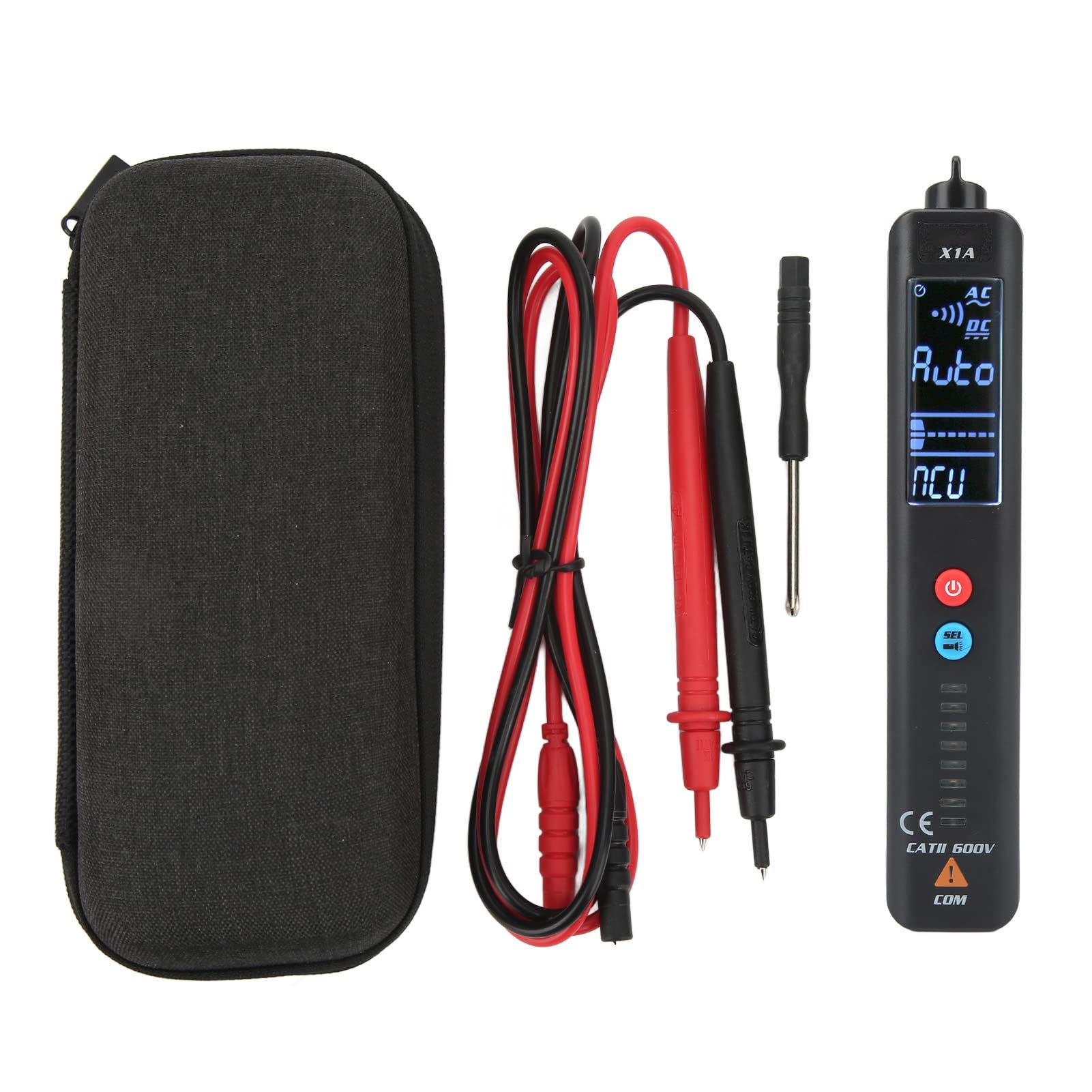
Image 3.1: Complete package contents of the BSIDE X1A Digital Multimeter Pen, including the pen meter, test leads, screwdriver, and storage bag.
4. Product Overview
The BSIDE X1A features a clear digital display and intuitive controls for various electrical measurements.
- Emergency Flashlight: Equipped with a built-in flashlight for improved visibility in low-light conditions, enhancing safety during night work.
- Multi-function Measurement: Supports various measurements including voltage, resistance, and frequency to meet diverse testing needs.
- Portable and Compact: Its pen-type design makes it easy to carry and suitable for most work environments.
- Durable Construction: Made from high-quality ABS material, providing impact resistance, scratch resistance, and environmental friendliness.

Image 4.1: Front view of the BSIDE X1A Digital Multimeter Pen, highlighting the display, power button, and mode selection button.
5. Setup
5.1 Battery Installation
The BSIDE X1A requires two 1.5V AAA batteries for operation.
- Locate the battery compartment cover on the back of the multimeter pen.
- Use the provided screwdriver to loosen the screw securing the battery cover.
- Remove the battery cover.
- Insert two 1.5V AAA batteries, ensuring correct polarity (+ and -).
- Replace the battery cover and tighten the screw securely.
6. Operating Instructions
6.1 Power On/Off
Press and hold the red power button (U) to turn the device on or off.
6.2 Mode Selection
The BSIDE X1A operates in two main modes. Press the blue 'SET' button to cycle through available measurement functions (e.g., Voltage, Resistance, Frequency, NCV).
6.3 Measuring DC/AC Voltage
- Turn on the multimeter.
- Select the appropriate voltage measurement mode (DC V or AC V) using the 'SET' button. The display will indicate the selected mode.
- Connect the red test lead to the positive (+) terminal of the circuit and the black test lead to the negative (-) terminal or ground.
- Read the voltage value displayed on the screen.
6.4 Measuring Resistance
- Ensure the circuit is de-energized before measuring resistance.
- Turn on the multimeter and select the resistance measurement mode (Ω).
- Connect the test leads across the component or circuit section where resistance is to be measured.
- Read the resistance value displayed on the screen.
6.5 Measuring Frequency
- Turn on the multimeter and select the frequency measurement mode (Hz).
- Connect the test leads to the circuit where frequency is to be measured.
- Read the frequency value displayed on the screen.
6.6 Non-Contact Voltage (NCV) Detection
The NCV function allows for detection of AC voltage without direct contact. Select NCV mode and bring the tip of the multimeter close to the conductor. The device will indicate the presence of AC voltage through visual and/or audible alerts.
7. Maintenance
- Cleaning: Use a soft, damp cloth to clean the meter's casing. Do not use abrasive cleaners or solvents.
- Battery Replacement: Replace batteries when the low battery indicator appears on the display to ensure accurate readings. Refer to Section 5.1 for battery installation instructions.
- Storage: When not in use for extended periods, remove the batteries to prevent leakage. Store the meter in a cool, dry place, away from direct sunlight and extreme temperatures.
8. Troubleshooting
If you encounter issues with your BSIDE X1A, refer to the following common troubleshooting steps:
- No Display/Power: Check if the batteries are correctly installed and have sufficient charge. Replace batteries if necessary.
- Inaccurate Readings: Ensure the correct measurement function and range are selected. Check test lead connections for proper contact. Verify that the circuit is de-energized for resistance/continuity tests.
- No NCV Detection: Ensure the NCV mode is active and the tip of the meter is brought sufficiently close to the AC voltage source.
- Meter Not Responding: Try turning the meter off and on again. If the issue persists, replace the batteries.
For persistent issues not resolved by these steps, please contact customer support.
9. Specifications
| Parameter | Value |
|---|---|
| Model | X1A |
| Material | ABS |
| DC Voltage Range | Up to 500V |
| AC Voltage Range | Up to 500V |
| Resistance Range | 0Ω to 20MΩ |
| Frequency Range | Up to 1000Hz |
| Power Supply | 2 x 1.5V AAA Batteries (not included) |
10. Warranty
This product is covered by a standard manufacturer's warranty against defects in materials and workmanship. The warranty period typically begins from the date of purchase. Please retain your proof of purchase for warranty claims. For specific warranty terms and conditions, refer to the documentation provided with your purchase or contact the retailer.
11. Support
For technical assistance, product inquiries, or service requests, please contact the retailer or manufacturer's customer support. Contact information can usually be found on the product packaging or the retailer's website. When contacting support, please have your product model (X1A) and purchase details ready.


