
ECONTROLLY RC-681M
User Manual
ECONTROLLY RC-681M Replacement Remote Control
1. Product Overview
The ECONTROLLY RC-681M is a replacement remote control designed for various Onkyo AV Receiver models. This remote provides full functionality without the need for complex programming, offering a straightforward solution for controlling your audio-visual system.
Compatible Onkyo AV Receiver Models:
- HT-R550, HT-R508, HT-SR800, HT-R557, HT-SR750
- TX-SR575, TX-SR8550, TX-SR505, TX-SR505E, TX-SR505B, TX-SR575B
- HT-SP904, HT-SP904B
- SKB-550, SKC-550C, SKF-550F, SKM-550S, SKW-550
2. Setup and Battery Installation
The RC-681M remote control requires two (2) 1.5V AA alkaline batteries for operation. No programming or pairing is necessary; simply install the batteries, and the remote will be ready for immediate use with compatible Onkyo AV Receivers.
Battery Installation Steps:
- Locate the battery compartment on the back of the remote control.
- Slide the battery compartment cover downwards or in the direction indicated by an arrow to open it.
- Insert two (2) 1.5V AA alkaline batteries, ensuring the positive (+) and negative (-) terminals align correctly with the markings inside the compartment.
- Replace the battery compartment cover by sliding it back into place until it clicks securely.

Image: Front view of the ECONTROLLY RC-681M remote control, showing all buttons and layout. This image helps users identify the remote and its various functions.
3. Operating Instructions
The RC-681M remote control is designed to replicate the functions of your original Onkyo AV Receiver remote. Familiarize yourself with the button layout to effectively control your device.
Key Functions:
- STANDBY/ON: Powers the AV Receiver on or off.
- INPUT SELECTOR (VCR/DVR, CBL/SAT, AUX, MULTI CH, DVD, CD, MD/CDR, DOCK, TV, VCR, CABLE, SAT): Selects the desired input source for your receiver.
- VOLUME (+/-): Adjusts the master volume level.
- Muting: Mutes or unmutes the audio output.
- Navigation Buttons (Up, Down, Left, Right, ENTER): Used for menu navigation and selection.
- SETUP: Accesses the receiver's setup menu.
- RETURN: Goes back to the previous menu or screen.
- Playback Controls (Play, Pause, Stop, Fast Forward, Rewind, Skip): Controls media playback for connected devices.
- LISTENING MODE (STEREO, SURROUND): Switches between different audio listening modes.
- DISPLAY: Toggles on-screen display information.
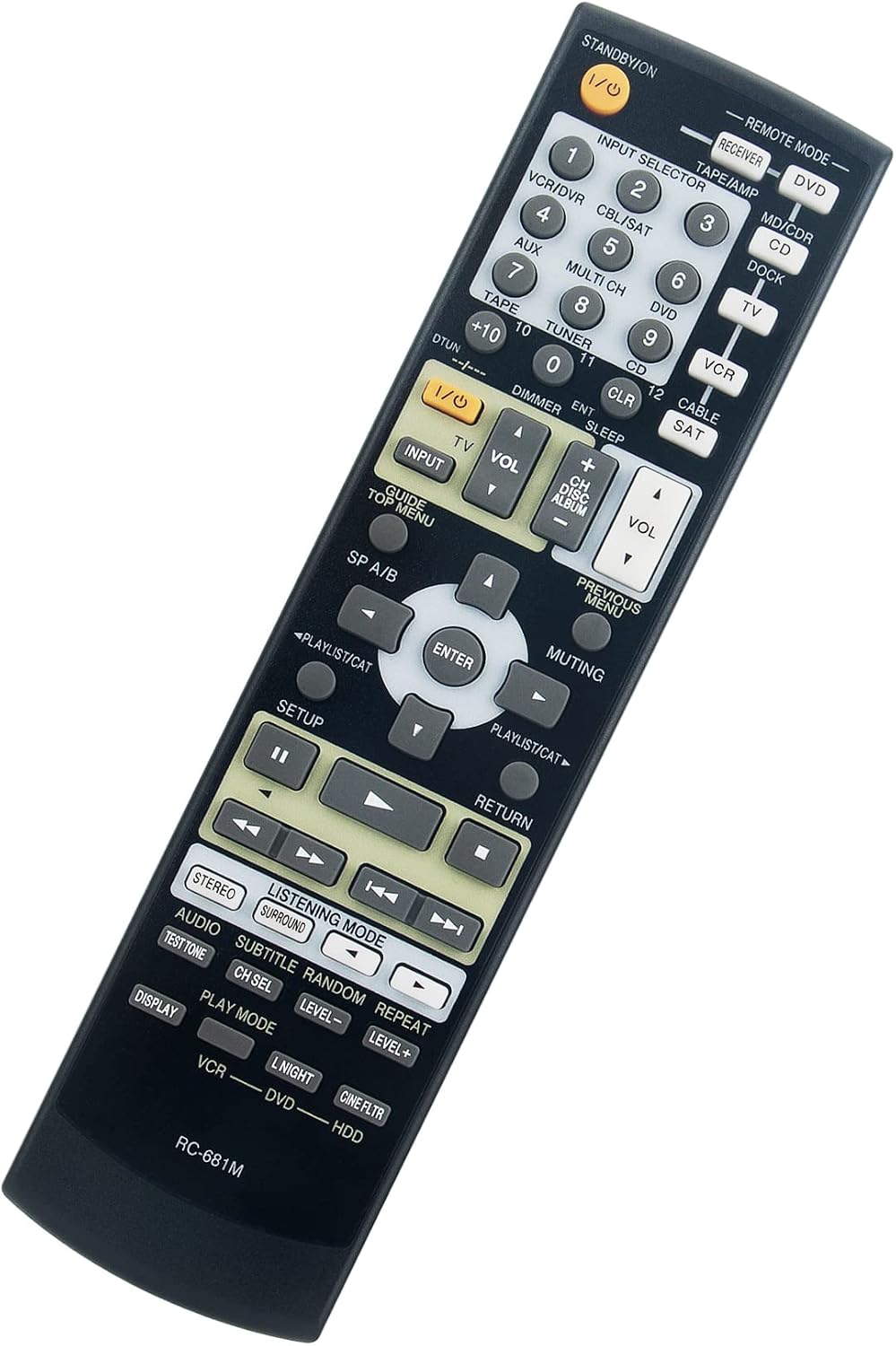
Image: An angled view of the ECONTROLLY RC-681M remote control, highlighting its ergonomic design and button placement for easy access.
4. Maintenance
Proper maintenance ensures the longevity and optimal performance of your remote control.
Cleaning:
- Wipe the remote control with a soft, dry cloth.
- For stubborn dirt, slightly dampen the cloth with water or a mild, non-abrasive cleaner. Ensure no liquid enters the remote.
- Do not use harsh chemicals, solvents, or abrasive cleaning pads.
Battery Care:
- Replace batteries when the remote's response becomes sluggish or stops working.
- Remove batteries if the remote will not be used for an extended period to prevent leakage and damage.
- Dispose of used batteries responsibly according to local regulations.
5. Troubleshooting
If you encounter issues with your RC-681M remote control, refer to the following common troubleshooting steps:
| Problem | Possible Cause | Solution |
|---|---|---|
| Remote not responding | Dead or incorrectly inserted batteries. | Replace batteries with new 1.5V AA alkaline batteries, ensuring correct polarity (+/-). |
| Remote works intermittently | Low battery power; obstruction between remote and receiver. | Replace batteries. Ensure a clear line of sight to the AV Receiver's infrared sensor. |
| Specific buttons not working | Dirt or debris under the button; remote damage. | Clean the remote surface. If the issue persists, the remote may be damaged and require replacement. |
6. Specifications
- Model: RC-681M
- Brand: ECONTROLLY
- Power Supply: 2 x 1.5V AA Alkaline Batteries (not included)
- Dimensions: Approximately 5 x 1.5 x 0.5 inches (12.7 x 3.8 x 1.3 cm)
- Item Weight: Approximately 2 ounces (56.7 grams)
- Compatibility: Designed for specific Onkyo AV Receiver models (refer to Product Overview section for list).
7. Support
For any queries or further assistance regarding your ECONTROLLY RC-681M remote control, please feel free to contact our customer support. While no specific warranty information is provided, we are committed to ensuring your satisfaction with our products.
Please note: Batteries and a detailed manual are not included in the product package. This document serves as a comprehensive guide for setup and operation.
Ask a question about this manual
Ask about setup, troubleshooting, compatibility, parts, safety, or missing instructions. Manuals+ will review the question and use this page’s manual context to help answer it.