
1. Introduction
This manual provides detailed instructions for the safe and efficient operation of your BETOPPER LPC015 54x3W RGB LED Stage Light. Please read this manual thoroughly before use and retain it for future reference.
The BETOPPER LPC015 is a versatile RGB 3-IN-1 LED par light designed for various lighting applications. It features 54x3W high-tech SMD LEDs, offering bright illumination with a beam angle of 26 degrees and an effective range of up to 5 meters. It can function as stage lighting, DJ light, strobe light, and wash light.
2. Product Overview
2.1 Key Features
- High Brightness: Equipped with 54x3W RGB 3-IN-1 LEDs for powerful and vibrant lighting.
- Wide Illumination: Covers an area of up to 5 meters with a 26-degree beam angle.
- Multiple Control Modes: Supports Auto, Sound-activated, DMX512 (3/7 channels), and Master-slave modes.
- Versatile Effects: Offers static color modes (Red/Green/Blue), color combinations, color changes, jump, strobe, hopping, and dimming.
- Durable Design: Features a built-in cooling fan for excellent heat dissipation and a long lifespan of 50,000 hours.
- Easy Setup: Plug-and-play operation with included brackets and screws for adjustable lighting angles.
2.2 Components
The BETOPPER LPC015 package includes:
- LPC015 LED Stage Light Unit
- Power Cable
- Mounting Brackets (2)
- Mounting Screws (2)
- User Manual (this document)

Figure 1: BETOPPER LPC015 LED Stage Light and its accessories, including mounting brackets and screws.

Figure 2: Rear panel connections and controls. Features DMX IN/OUT, Power IN/OUT, a cooling fan, and a digital display with MENU, UP, DOWN, and ENTER buttons.
3. Setup
3.1 Mounting the Light
- Attach the provided mounting brackets to the sides of the light unit using the included screws.
- Secure the light to a stable surface or truss system. The brackets allow for angle adjustment. Ensure the light is securely fastened to prevent accidental falls.
Figure 3: The stage light with its adjustable mounting brackets, ready for installation.
3.2 Power Connection
Connect the power cable to the "POWER IN" port on the rear panel of the light. Plug the other end into a suitable power outlet (100-240VAC, 50-60HZ). The unit is plug-and-play and will power on automatically.
3.3 DMX Connection (Optional)
For DMX control, connect a DMX cable from your DMX controller to the "DMX IN" port on the light. If linking multiple lights, connect from the "DMX OUT" of the first light to the "DMX IN" of the next, and so on.
4. Operating Modes
The LPC015 offers several operating modes, selectable via the digital display and buttons on the rear panel (MENU, UP, DOWN, ENTER).
4.1 Auto Mode
In Auto mode, the light cycles through pre-programmed patterns and colors automatically. This mode is ideal for quick setup without external control.
Video 1: Demonstration of the BETOPPER LPC015 in various automatic color changing modes. The lights transition smoothly between different colors and patterns, showcasing the dynamic capabilities of the fixture.
4.2 Sound-Activated Mode
In Sound-Activated mode, the light reacts to ambient sound or music, changing patterns and colors in sync with the audio. This mode is perfect for parties and events where dynamic lighting is desired without manual control.
Video 2: The BETOPPER LPC015 responding to sound, demonstrating its sound-activated control. The lights change colors and patterns in rhythm with the music, creating an engaging visual experience.
4.3 DMX Mode
For professional control, the LPC015 supports DMX512 protocol with 3 or 7 channel options. This allows for precise control over color, dimming, strobe, and other effects using a DMX controller.
DMX Channel Functions:
- Channel 1: Master Dimmer (0-100%)
- Channel 2: Red Dimmer (0-100%)
- Channel 3: Green Dimmer (0-100%)
- Channel 4: Blue Dimmer (0-100%)
- Channel 5: Strobe (Speed adjustable)
- Channel 6: Color Output / Jump Change / Shade / Pulse Transform (Use with CH7)
- Channel 7: Sound-activated (Use with CH6)
Video 3: A demonstration of DMX control for the BETOPPER LPC015. The video shows manual adjustment of red, green, and blue dimming, strobe effects, and various color output modes including jump change, shade, and pulse transform, all controlled via a DMX console.
4.4 Master-Slave Mode
Connect multiple LPC015 units using DMX cables. Set one unit as the "Master" and others as "Slave" units. The slave units will then mirror the master unit's settings and effects, allowing for synchronized lighting across multiple fixtures.
5. Maintenance
Regular maintenance ensures optimal performance and extends the lifespan of your BETOPPER LPC015 stage light.
- Cleaning: Periodically clean the lens and exterior casing with a soft, dry cloth. Do not use harsh chemicals or abrasive materials.
- Cooling Fan: Ensure the cooling fan and vents are free from dust and debris to maintain proper heat dissipation.
- Cable Inspection: Regularly check power and DMX cables for any signs of damage. Replace damaged cables immediately.
- Storage: When not in use, store the light in a dry, dust-free environment.
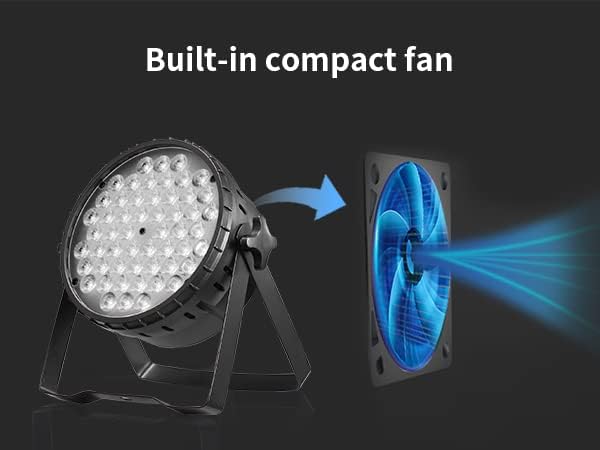
Figure 4: Illustration of the built-in compact fan, highlighting its role in maintaining optimal operating temperature and ensuring product longevity.
6. Troubleshooting
If you encounter issues with your LPC015, refer to the following common problems and solutions:
| Problem | Possible Cause | Solution |
|---|---|---|
| Light does not power on. | No power supply; faulty cable. | Check power connection and outlet. Replace power cable if damaged. |
| No light output. | Dimmer set to 0%; incorrect mode. | Increase dimmer level. Select appropriate operating mode (Auto, Sound, DMX). |
| DMX control not working. | Incorrect DMX address; faulty DMX cable; incorrect DMX mode. | Verify DMX address and channel settings. Check DMX cable connections. Ensure light is in DMX mode. |
| Sound-activated mode not responding. | No sound input; microphone sensitivity too low. | Ensure music or sound is playing near the light. Adjust microphone sensitivity if available. |
7. Specifications
| Feature | Detail |
|---|---|
| Model | LPC015 |
| Light Source | 54 x 3W RGB 3-IN-1 LEDs |
| Power Consumption | 150W |
| Beam Angle | 26 degrees |
| Control Modes | Auto, Sound-activated, DMX512, Master-slave |
| DMX Channels | 3/7 CH |
| Lifespan | 50,000 hours |
| Operating Temperature | -20℃ to 40℃ |
| Dimensions (L x W x H) | 21 cm x 8 cm x 21 cm |
| Weight | 1.85 kg |

Figure 5: Diagram illustrating the 26-degree beam angle and effective illumination distance of the LPC015 LED Stage Light.
8. Warranty and Support
BETOPPER products are designed for durability and performance. For warranty information and technical support, please refer to the contact details provided with your purchase or visit the official BETOPPER website.
For any issues not covered in this manual, please contact BETOPPER customer service for assistance.


